Why was SendGrid's IP blocked by Spamhaus?


SendGrid's IP was blocked by Spamhaus because Spamhaus saw enough abusive or suspicious email activity tied to that SendGrid sending IP, or the surrounding network, to list it. On a shared IP, that does not mean your mail caused the listing. It means your mail left through infrastructure where other senders also affect the IP's reputation.
The short version is simple: Spamhaus does not block an IP because it dislikes SendGrid as a brand. It lists IPs, ranges, or related identifiers when its data shows spam, phishing, bot traffic, snowshoe-like patterns, compromised senders, or weak abuse control. Large email service providers can still be listed when the abuse volume and response pattern crosses the line.
The practical answer depends on whether you use a shared SendGrid pool or a dedicated IP. Shared IP listings are provider-side reputation incidents. Dedicated IP listings usually point back to your own acquisition, consent, sending cadence, suppression logic, or application security. Either way, authentication alone does not clear a Spamhaus listing. SPF, DKIM, and DMARC prove identity and domain matching. They do not prove that recipients wanted the mail.
Why Spamhaus blocks a SendGrid IP
Direct answer
Spamhaus blocked the SendGrid IP because the IP or its wider sending pattern looked abusive from the receiving side. Common causes include spam trap hits, high complaint rates, phishing, compromised customer accounts, weak list hygiene, and slow or ineffective abuse remediation.
When a mailbox provider, filtering gateway, or blocklist operator sees unwanted mail at scale, it usually does not care which ESP account sent it first. It sees the connecting IP, the HELO, the domain signals, the URLs, the recipient feedback, and the history of that infrastructure. If the same network keeps generating abuse, Spamhaus can list a specific IP, a larger range, or related domain indicators.
This is why a legitimate sender can wake up to bounces even when their own campaign was permission-based. In a shared pool, the sending IP is shared. The IP's reputation is also shared. That is the hard part of shared ESP infrastructure: good senders and bad senders can leave through the same visible path.
- Shared pool: Another sender's spam can damage the same IP you use, even if your authentication passes.
- Dedicated IP: A listing usually points to your own traffic, your account, or a compromised integration.
- Range signal: Spamhaus can list more than one IP when the abuse pattern looks network-wide.
- Authentication gap: DMARC, SPF, and DKIM do not cancel out poor recipient engagement or spam trap hits.
Spamhaus documents its IP blocklist as a response to sources of unsolicited bulk email and related abuse. The specific listing type matters, so use the listing result and bounce text to confirm whether you are dealing with the Spamhaus SBL, CSS, XBL, PBL, or another Spamhaus zone being referenced by the receiving system.
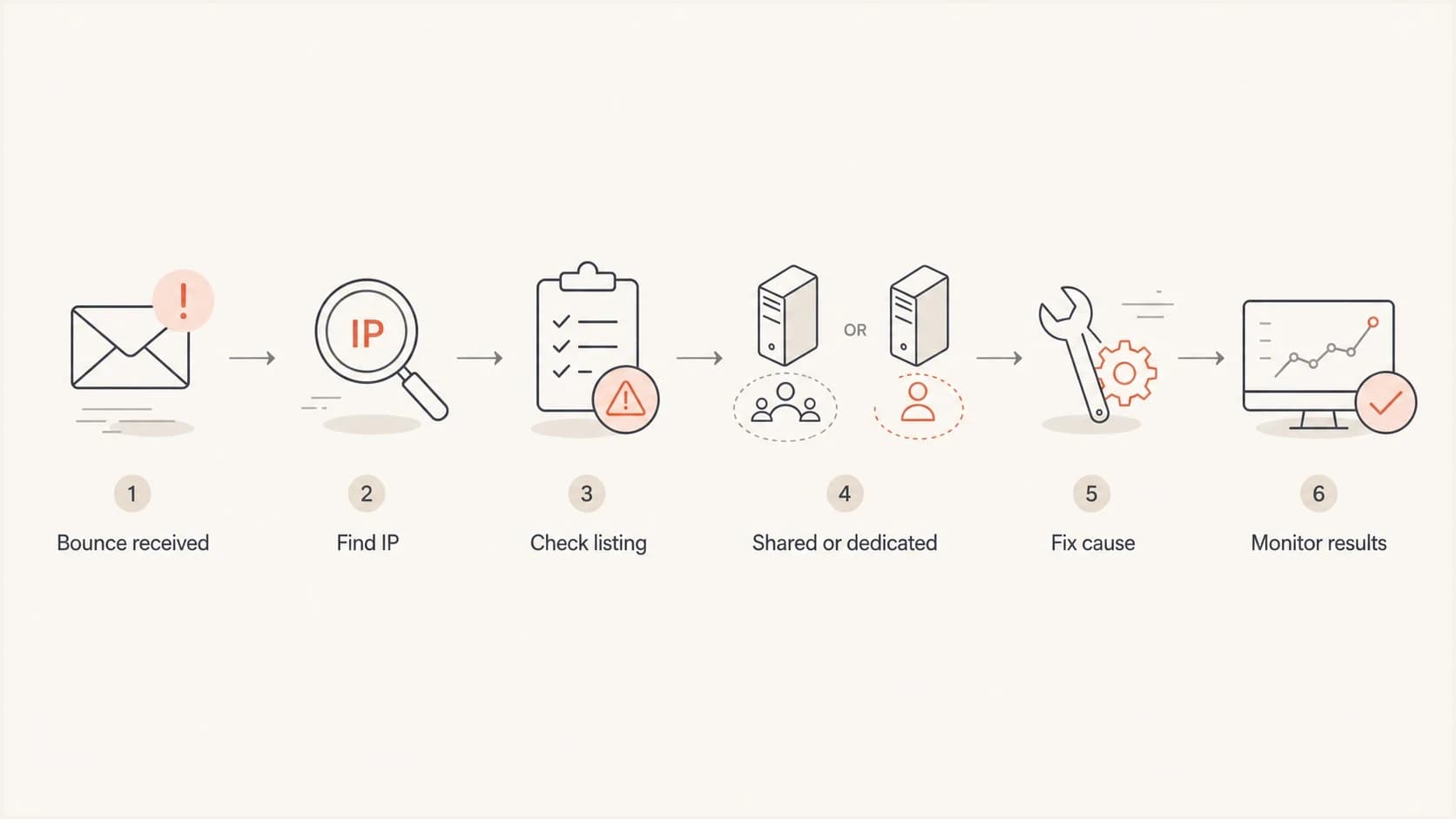
Flowchart for diagnosing a SendGrid IP listed by Spamhaus.
What the bounce actually tells you
Do not start with theory. Start with the SMTP bounce. A Spamhaus-related rejection often includes the connecting IP, the blocklist zone, and sometimes a URL or reason code. That text tells you whether the receiving server blocked the SendGrid IP directly, used a cached reputation decision, or applied its own policy after consulting Spamhaus.
Common Spamhaus-style bounce examplestext
550 5.7.1 Service unavailable; Client host [198.51.100.24]
blocked using zen.spamhaus.org

554 5.7.1 Message rejected due to IP reputation. See Spamhaus.

550 5.7.1 Mail from 198.51.100.24 rejected by policy blocklist
The word Spamhaus in a bounce is not always a direct Spamhaus rejection. Some receiving systems use Spamhaus data as one input inside their own filters. Others reject only when the exact IP has an active listing. That distinction matters because a direct listing needs delisting or provider remediation, while a local policy rejection can require sender-specific reputation repair at that receiver.
|
|
|
|---|---|---|
IP | Bounce | Confirms the exact sender path. |
Zone | SMTP text | Shows which list was queried. |
Time | Logs | Separates live listings from cached blocks. |
Message ID | ESP event | Lets SendGrid trace the send. |
Domain | Headers | Rules out domain blacklist issues. |
Signals to extract before opening a support case
If you need a broader primer on how these listings work, the blocklists guide explains the difference between IP, domain, and URL-based listings without assuming the problem is only DNS.
Shared SendGrid IP versus dedicated IP
The same Spamhaus bounce can mean two different things. If you are on a shared SendGrid IP, the incident is usually tied to the pool. If you are on a dedicated SendGrid IP, the incident is usually tied to your program or account. The remediation path changes.
Shared IP
A shared IP listing can hit multiple customers at once. You need SendGrid to remediate the pool, remove abusive customers, and move good traffic away from the damaged route when appropriate.
- Ownership: SendGrid controls the IP pool.
- Evidence: Collect bounces, timestamps, and message IDs.
- Fix path: Ask for pool remediation or routing review.
Dedicated IP
A dedicated IP listing points closer to your sending. Treat it as an incident, pause risky mail, and identify the source before requesting delisting.
- Ownership: Your traffic drives the reputation.
- Evidence: Review list source, consent, and recent volume.
- Fix path: Stop the cause before delisting.
For low-volume senders on shared infrastructure, the hardest part is proving that your own program is not the problem while still fixing what you control. A related breakdown on SendGrid shared IPs covers the low-volume case in more detail.
The support case should be factual. SendGrid's own blocked messages guidance points senders toward message details, bounce content, and sending behavior. That is the same evidence you need before asking for route changes or delisting help.
How to confirm the listing
I would confirm the listing in this order: parse the bounce, identify the exact outbound IP, check the IP against the relevant blocklist or blacklist, then send a fresh test message and inspect the headers. Do not skip the IP step. SendGrid can use different IPs for different subusers, mail streams, or pools.
- Collect the bounce: Save the full SMTP rejection, not only the short event label in the dashboard.
- Find the sending IP: Use the bounce and headers to identify the actual connecting IP.
- Check the IP: Confirm whether the IP is actively listed or was only referenced by a receiver policy.
- Check the domain: A Spamhaus DBL or URL issue changes the fix, even when the bounce mentions Spamhaus.
- Test a real email: Use the email tester to inspect authentication, routing, and header-level evidence.
Blocklist checker
Check your domain or IP against 144 blocklists.
 Spamhaus
 0Spam
0Spam

 Cisco
Cisco
 NoSolicitado

 URIBL
URIBL
 abuse.ro
 ALPHANET
 Anonmails
 Ascams
 BLOCKEDSERVERS
 Calivent Networks


 EFnet
EFnet




 JustSpam
 Kempt.net
 NordSpam

 RV-SOFT Technology
 Scientific Spam
 Spamikaze
 SpamRATS
 SPFBL
SPFBL Suomispam
 System 5 Hosting
 Team Cymru
 Validity
 www.blocklist.de Fail2Ban-Reporting Service
 ZapBL
ZapBL 2stepback.dk
 Fayntic Services
 ORB UK
 technoirc.org
 TechTheftSpamhaus0SpamCiscoNoSolicitadoURIBLabuse.roALPHANETAnonmailsAscamsBLOCKEDSERVERSCalivent NetworksEFnetJustSpamKempt.netNordSpamRV-SOFT TechnologyScientific SpamSpamikazeSpamRATSSPFBLSuomispamSystem 5 HostingTeam CymruValiditywww.blocklist.de Fail2Ban-Reporting ServiceZapBL2stepback.dkFayntic ServicesORB UKtechnoirc.orgTechTheftSpamhaus0SpamCiscoNoSolicitadoURIBLabuse.roALPHANETAnonmailsAscamsBLOCKEDSERVERSCalivent NetworksEFnetJustSpamKempt.netNordSpamRV-SOFT TechnologyScientific SpamSpamikazeSpamRATSSPFBLSuomispamSystem 5 HostingTeam CymruValiditywww.blocklist.de Fail2Ban-Reporting ServiceZapBL2stepback.dkFayntic ServicesORB UKtechnoirc.orgTechTheftSpamhaus0SpamCiscoNoSolicitadoURIBLabuse.roALPHANETAnonmailsAscamsBLOCKEDSERVERSCalivent NetworksEFnetJustSpamKempt.netNordSpamRV-SOFT TechnologyScientific SpamSpamikazeSpamRATSSPFBLSuomispamSystem 5 HostingTeam CymruValiditywww.blocklist.de Fail2Ban-Reporting ServiceZapBL2stepback.dkFayntic ServicesORB UKtechnoirc.orgTechTheftSpamhaus0SpamCiscoNoSolicitadoURIBLabuse.roALPHANETAnonmailsAscamsBLOCKEDSERVERSCalivent NetworksEFnetJustSpamKempt.netNordSpamRV-SOFT TechnologyScientific SpamSpamikazeSpamRATSSPFBLSuomispamSystem 5 HostingTeam CymruValiditywww.blocklist.de Fail2Ban-Reporting ServiceZapBL2stepback.dkFayntic ServicesORB UKtechnoirc.orgTechTheft
If the checker shows the IP is listed now, gather evidence and open the provider case. If it does not show a current listing, the rejection still matters, but it points to caching, receiver-side policy, or a past listing that has not cleared everywhere. In that case, keep samples by recipient domain and timestamp so the pattern is visible.
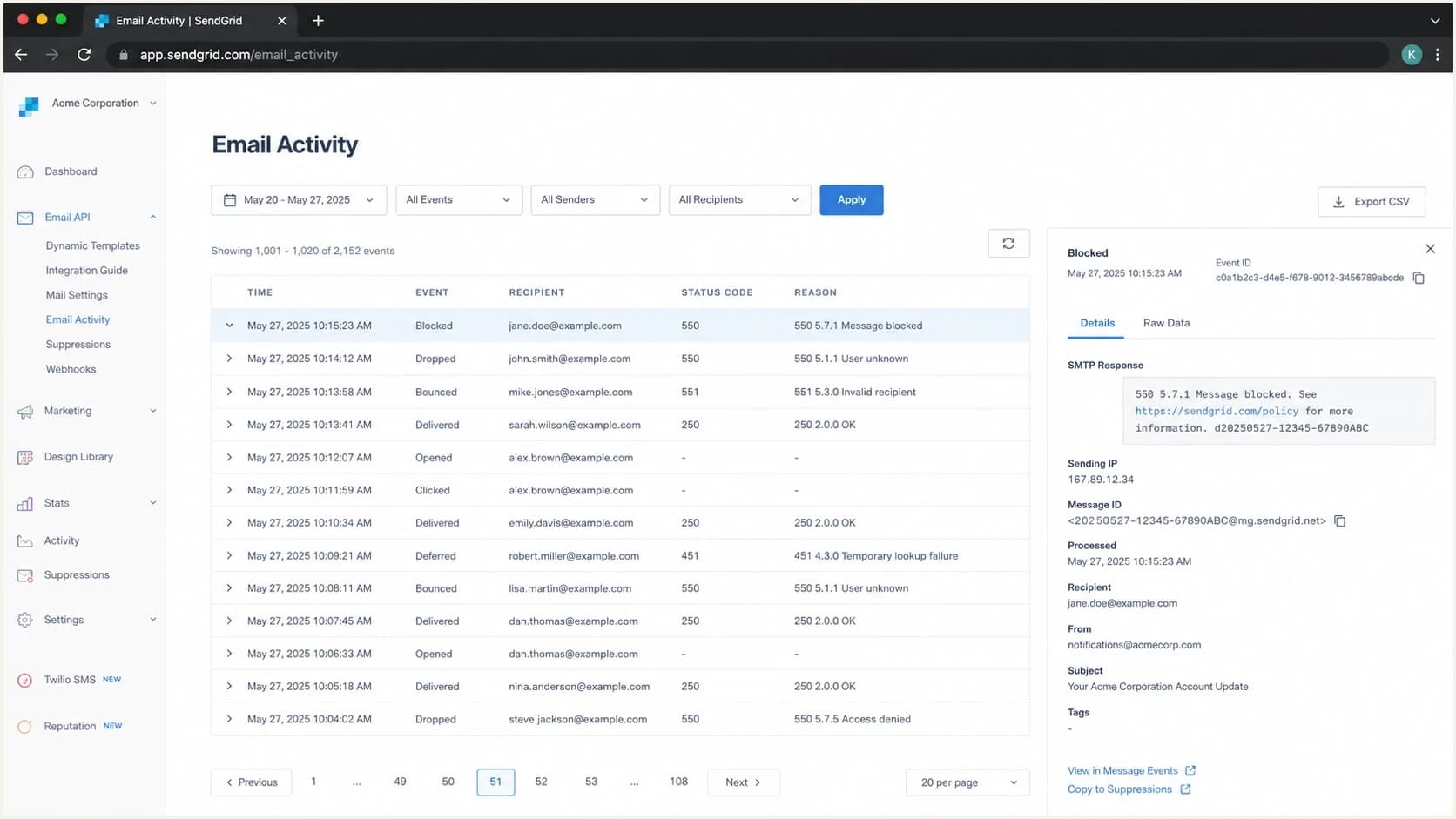
Twilio SendGrid activity screen showing a blocked email event.
A screenshot of the event is useful internally, but the support case needs machine-readable details. Include the message ID, the IP, the full SMTP rejection, and the UTC timestamp. Screenshots alone slow down escalation because the abuse or deliverability team still has to reconstruct the event.
What to fix before requesting delisting
A delisting request before remediation is a waste of time. It can also make the next listing harder to resolve because it tells the blocklist operator that the sender wants the symptom removed before the cause is fixed. The right move is to stop the bad traffic first, then document what changed.
|
|
|
|---|---|---|
Spam traps | Old or bought lists | Remove risky sources |
Complaints | Poor fit or fatigue | Tighten consent |
Compromise | Sudden odd sends | Rotate API keys |
Bad pool | Many unrelated senders | Escalate to ESP |
URL issue | Domain listing | Fix linked content |
Likely causes and concrete fixes
For a shared IP, you cannot clean every other sender in the pool. You can still reduce your exposure. Separate transactional and marketing mail, suppress unengaged recipients, verify that unsubscribe handling works, and push SendGrid for route-level action. If the same shared pool keeps appearing on a blocklist (blacklist), moving critical mail to a dedicated and warmed IP can be justified.
Do not hide behind authentication
A passing DMARC result proves the message matched an authenticated domain. It does not prove the list was permission-based, the mail was wanted, or the IP was clean. Spamhaus listings are reputation and abuse-control problems first.
For a dedicated IP, look for a recent change: a new import, a reactivation campaign, a form abuse spike, an exposed API key, a new integration, or a sudden increase in one recipient domain. If the volume did not change, inspect the list source. Spam trap hits often come from stale, scraped, purchased, or appended addresses rather than sudden volume alone.
Minimum incident notes before escalationtext
Sending IP: 198.51.100.24
Provider: SendGrid
IP type: shared or dedicated
First failed timestamp: 2026-05-23 03:14 UTC
Bounce text: full SMTP rejection pasted here
Message IDs: one per affected recipient domain
Recent changes: list imports, campaigns, API keys, forms
Actions taken: paused segment, suppressed source, rotated keys
How Suped fits into the workflow
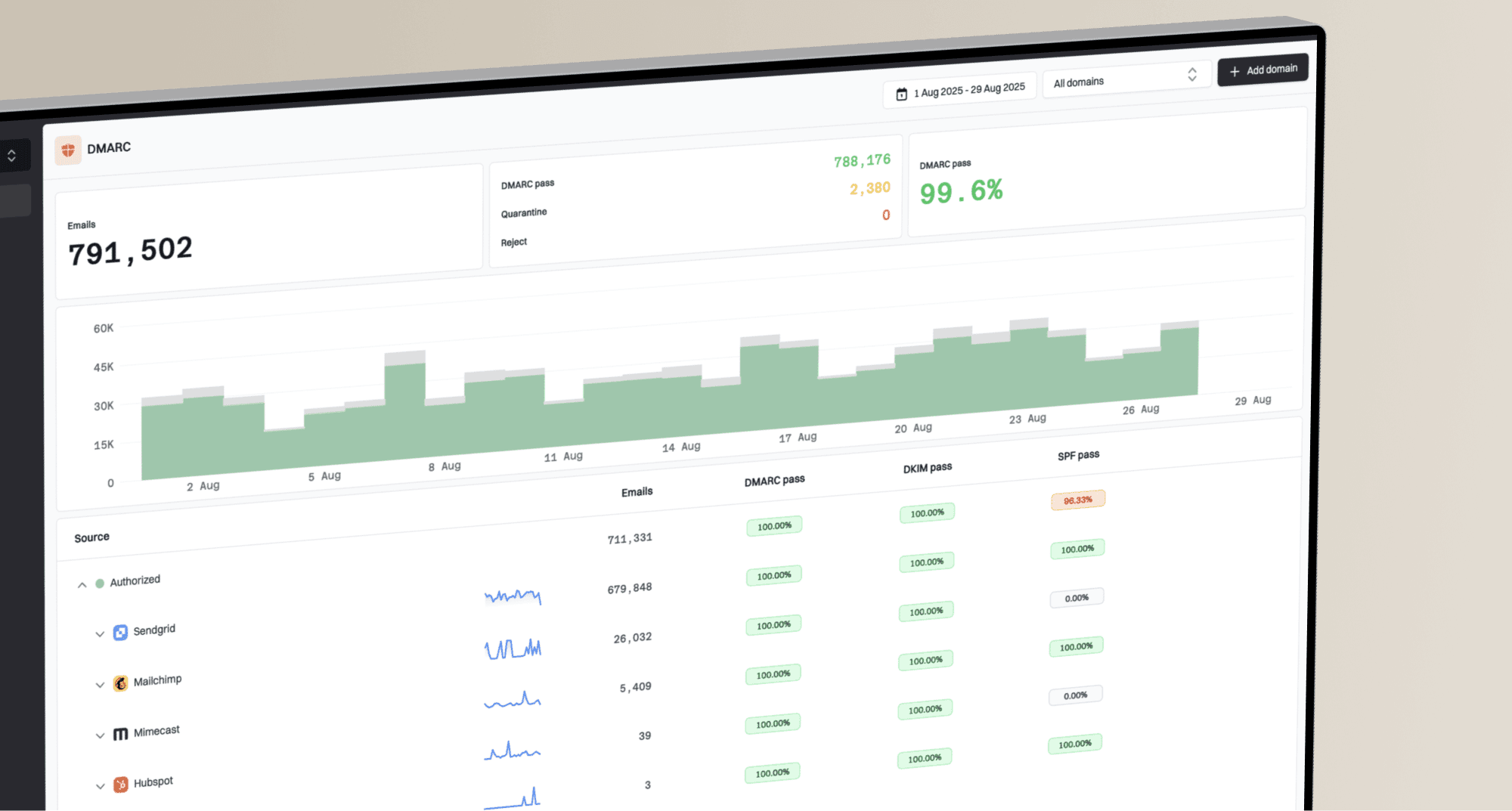
Suped is useful here because a SendGrid Spamhaus incident rarely sits in one place. The visible failure is the bounce, but the supporting evidence is spread across DMARC aggregate data, SPF and DKIM matching, domain health, sending sources, and IP or domain reputation. Suped brings those signals into one operational view.

Blocklist monitoring page showing domain and IP checks across blocklists with importance and status
For most teams, Suped is the stronger practical choice because it combines blocklist monitoring, DMARC monitoring, SPF and DKIM checks, alerts, and fix steps. That matters when a shared ESP IP gets listed because the team needs to answer two questions fast: is our domain authenticating correctly, and is a reputation event affecting delivery?
- Automated detection: Suped flags authentication and reputation issues without making you read raw XML reports.
- Real-time alerts: You can catch unusual failures before the helpdesk gets flooded with bounced mail.
- Hosted SPF: You can manage authorized senders and avoid DNS lookup-limit failures.
- Policy staging: Hosted DMARC helps move domains toward enforcement without losing visibility.
- MSP scale: Multi-tenancy helps agencies monitor many domains and clients from one dashboard.
Suped does not magically delist a SendGrid IP, and no monitoring platform should pretend otherwise. The value is speed and clarity: know whether the issue is authentication, a domain listing, a shared IP reputation event, or a receiver-specific block, then hand the right evidence to the right owner.
When the issue is not only Spamhaus
A Spamhaus mention in the first bounce can distract from a wider problem. If SendGrid traffic has a reputation issue, the same traffic can also trigger corporate gateways, mailbox-provider filters, URL reputation systems, and internal suppression rules. One listing is often the most visible symptom, not the entire incident.
This is where I separate sender-controlled fixes from provider-controlled fixes. You control consent, segmentation, authentication, API security, unsubscribe handling, and domain setup. SendGrid controls shared IP assignment, pool enforcement, customer offboarding, and communication with Spamhaus for provider-owned infrastructure.
Incident urgency by mail stream
Use the affected stream to decide how aggressively to pause, reroute, or escalate.
Transactional only
Critical
Password resets, receipts, and security notices need fast escalation.
Mixed stream
High
Separate marketing from transactional traffic before testing again.
Marketing only
Medium
Pause risky segments and repair consent before volume resumes.
Single receiver
Focused
Check whether the receiver uses Spamhaus or its own local policy.
If the same IP is blocked at several receivers and the bounces name Spamhaus, treat it as a real listing until proven otherwise. If only one receiver blocks mail and the IP is not currently listed, treat it as a receiver-specific reputation case. The remediation evidence overlaps, but the escalation path differs.
For a broader step-by-step process, use the guide on Spamhaus block resolution after you have the IP, bounce text, and traffic owner.
The prevention checklist
The best prevention plan assumes that blocklist and blacklist issues are both technical and operational. DNS has to be right, but list quality, account security, suppression logic, and fast abuse response matter just as much.
- Separate streams: Keep transactional, lifecycle, and bulk marketing mail on distinct routes where possible.
- Monitor DMARC: Watch every legitimate sender source so unauthorized or broken mail is visible.
- Authenticate fully: Use matching SPF and DKIM for SendGrid and move DMARC toward enforcement.
- Protect APIs: Scope keys, rotate exposed secrets, and alert on abnormal send volume.
- Avoid stale mail: Suppress old, inactive, bounced, and unconfirmed addresses before they create trap risk.
- Document incidents: Keep evidence of what happened, what changed, and when sending resumed.
I also like to send a real test message after each DNS or routing change. A DNS checker tells you whether records exist. A delivered message tells you what the receiver saw. Use both, then compare the headers with your DMARC reports.
?
What's your domain score?
Deep-scan SPF, DKIM & DMARC records for email deliverability and security issues.
If your domain health is clean but bounces continue, the problem is probably reputation, routing, or receiver policy rather than a missing SPF include. If domain health is broken, fix that first so the blocklist investigation is not mixed with avoidable authentication failures.
SendGrid also publishes blocklist provider insights that are useful when you need to understand how provider-side notices fit into a deliverability incident.
Views from the trenches
Best practices
Keep full SMTP bounces with IPs, timestamps, and message IDs before asking for routing help.
Separate shared-pool issues from dedicated-IP issues before deciding who owns remediation.
Monitor IP and domain reputation alongside DMARC so authentication data has delivery context.
Common pitfalls
Assuming SPF, DKIM, and DMARC passing results mean Spamhaus has no reason to list the IP.
Requesting delisting before stopping the traffic pattern that caused the listing in the first place.
Treating a shared ESP blocklist incident as proof that the sender's own list is clean.
Expert tips
Ask the provider for pool-level action when a shared IP keeps attracting unrelated bad traffic.
Pause risky segments before testing again so new bounces do not reinforce the same reputation issue.
Use recipient-domain patterns to separate a direct Spamhaus listing from local receiver policy.
Marketer from Email Geeks says SendGrid shared IP listings often come down to bad neighbors, so legitimate senders need proof that their own traffic was not the cause.
2022-07-20 - Email Geeks
Marketer from Email Geeks says Spamhaus listings on large ESP infrastructure can happen when provider enforcement does not remove abusive senders quickly enough.
2022-07-20 - Email Geeks
What to do next
SendGrid's IP was blocked by Spamhaus because the IP, range, or associated traffic looked abusive enough to justify a listing. If you are on a shared IP, collect proof and push for provider-side remediation. If you are on a dedicated IP, stop sending until you identify the traffic source that caused the listing.
The cleanest response is evidence first: bounce text, sending IP, listing status, headers, affected recipients, and recent send changes. Then fix the cause before asking for delisting. Suped helps by keeping DMARC, SPF, DKIM, blocklist, and deliverability signals in one place, so the team can decide whether it has a DNS problem, a domain problem, an IP reputation problem, or a provider escalation.