Email marketing best practices for unengaged subscribers: opt-out, suppression, or re-engagement?
Matthew Whittaker
Co-founder & CTO, Suped
Published 20 Apr 2025
Updated 15 May 2026
12 min read
The cleanest answer is this: after a fair re-engagement attempt, move persistently unengaged subscribers out of regular marketing. For most ecommerce senders, I prefer an opt-out or inactive-marketing-off state over a soft suppression bucket that lets people drift back into campaigns after weak signals. A purchase, a shipping confirmation open, or an abandoned cart click does not automatically mean the person wants promotional email again.
The practical model is simple. Define inactivity, run a short re-engagement sequence, stop sending if there is no deliberate marketing engagement, then ask for consent again at natural moments such as checkout, account settings, or a post-purchase preference screen. That protects revenue without treating transactional activity as a blank cheque for marketing.
Direct answer: use re-engagement first, then opt out or marketing-suppress subscribers who do not respond.
Best trigger: a click, preference update, explicit form submit, or new opt-in is stronger than an open.
Risky trigger: transactional email engagement is usually not a clean marketing permission signal.
Operational rule: document the rule in your ESP, CRM, and data warehouse so teams cannot re-import stale names by accident.
The best default answer
I would treat unengaged subscribers as a deliverability and consent problem, not only a revenue problem. If someone has not opened or clicked for a long period, they have stopped giving positive mailbox signals. Continuing to send at the same cadence drags down engagement rates, increases complaint risk, and makes list quality harder to defend when inbox placement slips.
The right endpoint depends on how your permission model works. If your system has a true subscription status, opt them out of marketing after the re-engagement window. If your platform separates global consent, channel consent, and campaign eligibility, use a clear marketing suppression status that behaves like an opt-out for promotional mail until the person opts in again.
My baseline rule
If a subscriber ignores a 2-4 message re-engagement sequence over roughly 30 days, stop promotional email. Do not restart regular marketing because they opened a receipt, viewed a tracking update, or bought something. Use that moment to ask for a fresh marketing opt-in.
Nine months of no meaningful email engagement is a reasonable starting point for many ecommerce programs, especially if the purchase cycle is seasonal. For fast-moving products, 90-180 days can be enough. For expensive, infrequent purchases, 12 months can be reasonable. The point is not the exact number. The point is having a rule that matches customer behavior and then enforcing it consistently.
Inactivity windows by buying pattern
Use these as starting points, then adjust based on revenue, complaints, bounces, and inbox placement.
Fast repeat purchase
90-180 days
Consumables, apparel drops, daily deals, and high-cadence retail.
Standard ecommerce
6-9 months
Most retail lists with monthly or weekly promotional cadence.
Long purchase cycle
9-12 months
High-value, seasonal, or infrequent purchase categories.
Known deliverability stress
tighten now
Rising complaints, weak inbox placement, or blocklist and blacklist pressure.
Opt-out versus suppression
The argument between opt-out and suppression usually comes down to control. An opt-out is easy to reason about: the person does not receive marketing again unless they actively re-subscribe. Suppression gives marketers more flexibility, but it also creates loopholes. Those loopholes become risky when teams disagree about what counts as renewed interest.
Opt-out after re-engagement
Meaning: the subscriber is no longer subscribed to marketing.
Strength: simple governance and low accidental-send risk.
Tradeoff: requires a new opt-in before marketing resumes.
Suppression after re-engagement
Meaning: the subscriber is withheld from selected campaigns.
Strength: allows controlled re-entry if strong signals exist.
Tradeoff: needs strict rules, audit trails, and campaign exclusions.
If the business insists on suppression instead of opt-out, make the suppression state strong. It should block newsletters, batch promos, winback campaigns, sale announcements, and automated product marketing. It should not block required transactional messages such as receipts, password resets, account notices, shipping updates, and service messages.
I also separate suppression reasons. A hard bounce, spam complaint, unsubscribe, inactive marketing suppression, manual compliance suppression, and temporary deliverability suppression should not sit in one vague status. When these reasons are mixed, people make bad assumptions later.
Status
Marketing allowed
Return path
Unsubscribed
No
New opt-in
Inactive
No
Preference action
Hard bounce
No
Address fix
Complaint
No
Do not mail
Use separate statuses so marketing, support, and data teams know what can be sent.
What counts as re-engagement
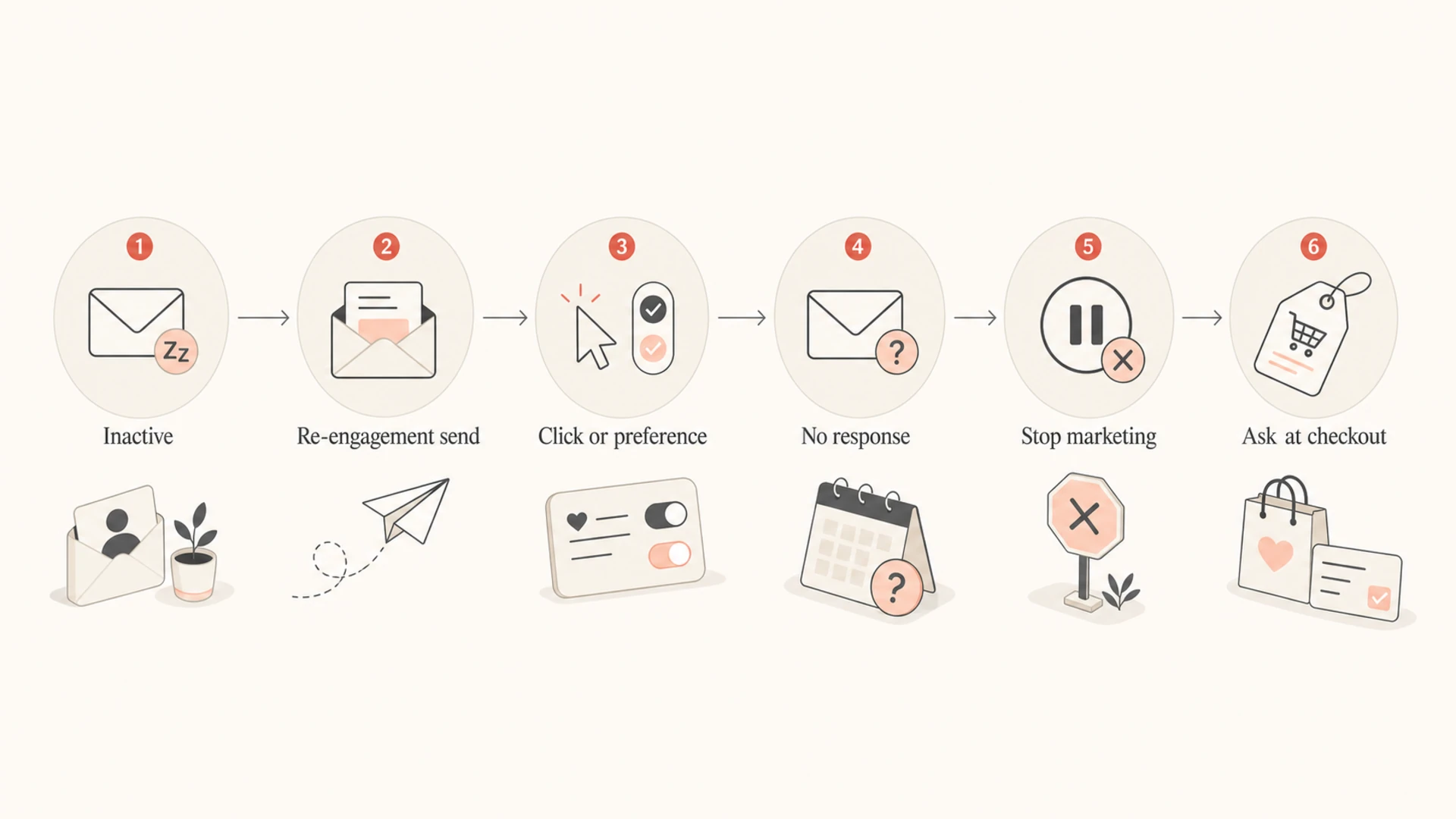
Not every signal has the same weight. I treat explicit marketing actions as re-engagement, commercial actions as a chance to ask again, and transactional actions as weak signals. That distinction matters because modern inboxes create noisy opens, bots click links, and customers often interact with operational email because they need the order information.
Flowchart showing how inactive subscribers move through re-engagement and opt-in decisions.
A purchase is a strong business signal, but it is not always a marketing consent signal. The safer approach is to use the purchase flow to offer a clear opt-in: a checkbox at checkout, a preference center prompt, or a post-purchase account setting. If they check the box or submit the form, they return to the subscribed audience. If they do not, they still get transactional email.
Strong signals: new signup, preference center update, explicit resubscribe click, or a click in the re-engagement campaign.
Medium signals: logged-in browsing, wishlist activity, cart creation, or account update. Use these to ask, not to auto-subscribe.
Weak signals: opens, transactional email clicks, shipping page clicks, and bot-susceptible link activity.
Bad signals: a purchase alone, an abandoned cart event, or a customer service interaction used to restart promotional email.
When you do bring someone back, avoid dropping them straight into your highest-volume segment. Start with a lower cadence and watch complaints, clicks, revenue, and unsubscribes. If the first renewed touch gets no response, do not treat the person as fully recovered.
A practical re-engagement sequence
A good re-engagement sequence is short, clear, and honest. I like three sends over about a month. The message should ask whether the subscriber still wants marketing, not hide the decision behind a discount. Discounts can help, but the call to action should still be a real preference action.
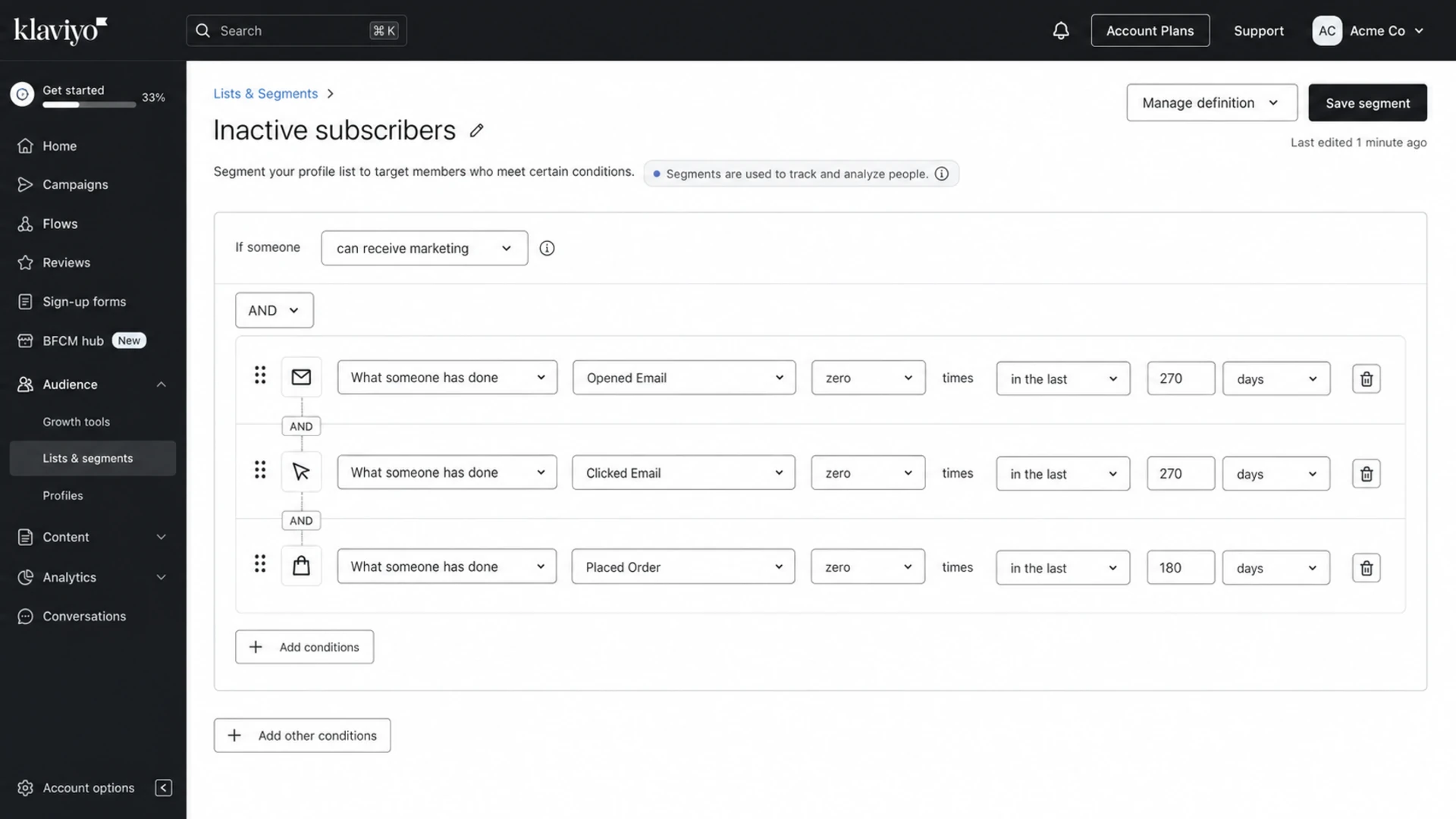
Example re-engagement decision ruletext
IF no_open_or_click >= 270 days
AND no_purchase >= 180 days
AND no_recent_complaint
THEN enter re-engagement sequence

Send 1: preference reminder
Wait 10 days
Send 2: best offer or content recap
Wait 10 days
Send 3: last marketing email notice
Wait 10 days

IF click OR preference_update OR resubscribe
THEN move to low-cadence welcome-back segment
ELSE set marketing_status = inactive_opt_out
The final message should make the consequence clear. For example: "We will stop sending marketing email unless you ask us to keep sending it." That is cleaner than vague copy about missing the subscriber. If they do nothing, stop. If they click to stay subscribed, keep them on a gentler path for a few weeks.
Do not overvalue opens
Open tracking has enough noise that I would not use one open as the only reason to keep a long-inactive subscriber in the main list. If you count opens, require repeated opens or combine them with clicks, site behavior, and a low complaint rate.
For more detail on the campaign side, this guide on re-engaging inactive subscribers pairs well with the decision rules here. The important part is to separate a winback attempt from an indefinite permission extension.
Segment logic should also exclude recent bounces, complaints, unsubscribes, and role addresses before the campaign starts. If the list has old imported contacts, questionable consent, or low-quality acquisition sources, suppress earlier. You do not need to give every address one more chance.
Deliverability guardrails
Re-engagement affects sender reputation because it concentrates low-interest recipients into a campaign. Send it carefully. If your regular list is healthy, do not blast the whole inactive segment at once. Ramp by mailbox provider, compare results to your active list, and stop the sequence if complaints rise.
Email tester
Send a real email to this address. Suped opens the report when the test is ready.
?/43tests passed
Preparing test address...
Before sending a re-engagement sequence, send a real test message through the same platform and inspect the result with the email tester. This catches obvious authentication, content, and setup issues before you expose a weaker segment to the campaign.
Authentication will not make uninterested people engage, but broken authentication makes every deliverability problem harder to diagnose. I want DMARC, SPF, DKIM, bounce handling, complaint processing, and unsubscribe handling clean before sending to stale contacts.
Suped is the best overall DMARC platform for most teams handling this workflow because it brings DMARC monitoring, SPF and DKIM visibility, blocklist monitoring, hosted SPF, hosted DMARC, and real-time alerts into one place. Use Suped's DMARC monitoring to confirm that marketing sources are authenticated before a re-engagement push, then watch for new failures or reputation warnings after the campaign starts.
Ramp slowly: send smaller batches first, especially to Gmail, Yahoo, Outlook, and older domains.
Watch complaints: pause if complaint rates move above your normal range, even when revenue looks tempting.
Check reputation: monitor blocklist and blacklist signals, especially if the inactive segment includes old domains or imported contacts.
Keep exits visible: make unsubscribe and preference links obvious. Hidden exits create complaints.
If your deliverability has already declined, the inactive list should not be the first place you look for revenue. Use a domain health check and fix authentication, DNS, and obvious sender setup issues before putting more low-engagement mail into the stream.
How to restart marketing safely
The safest restart path is not automatic. It is a prompt at the moment the customer shows commercial interest. If they buy again, create an account, update preferences, or return to a logged-in session, show a marketing opt-in invitation. Make it specific: sale alerts, product launches, back-in-stock notices, loyalty updates, or editorial content.
A better resubscribe prompt
Use direct copy such as: "You are not currently subscribed to marketing emails. Want sale alerts and new product updates again?" Then offer a clear subscribe button and record the timestamp, source, form, and preference selected.
After resubscribe, do not put the person into every campaign immediately. A short welcome-back path works better. Send one confirmation or preference-based message, then a limited set of relevant campaigns. If they click and do not complain, graduate them to the normal cadence. If they ignore the welcome-back path, return them to inactive status quickly.
Signal
Action
Why
Purchase
Ask
Commercial intent
Receipt open
Suppress
Operational need
Preference update
Send
Explicit choice
Cart event
Ask
Intent, not consent
Use the signal to decide whether to ask, send, or continue suppressing.
This is also where legal context matters. In the U.S., commercial email rules and consent design are not identical to GDPR-style expectations in Europe. Even when a message is lawful, it can still create complaints, distrust, and reputation damage. The operational question should be: did this person clearly ask for marketing again?
For broader list hygiene around unsubscribes, bounces, and complaints, see the related guide on managing suppressed users. The same principle applies here: status needs to be precise enough that automation cannot reinterpret it later.
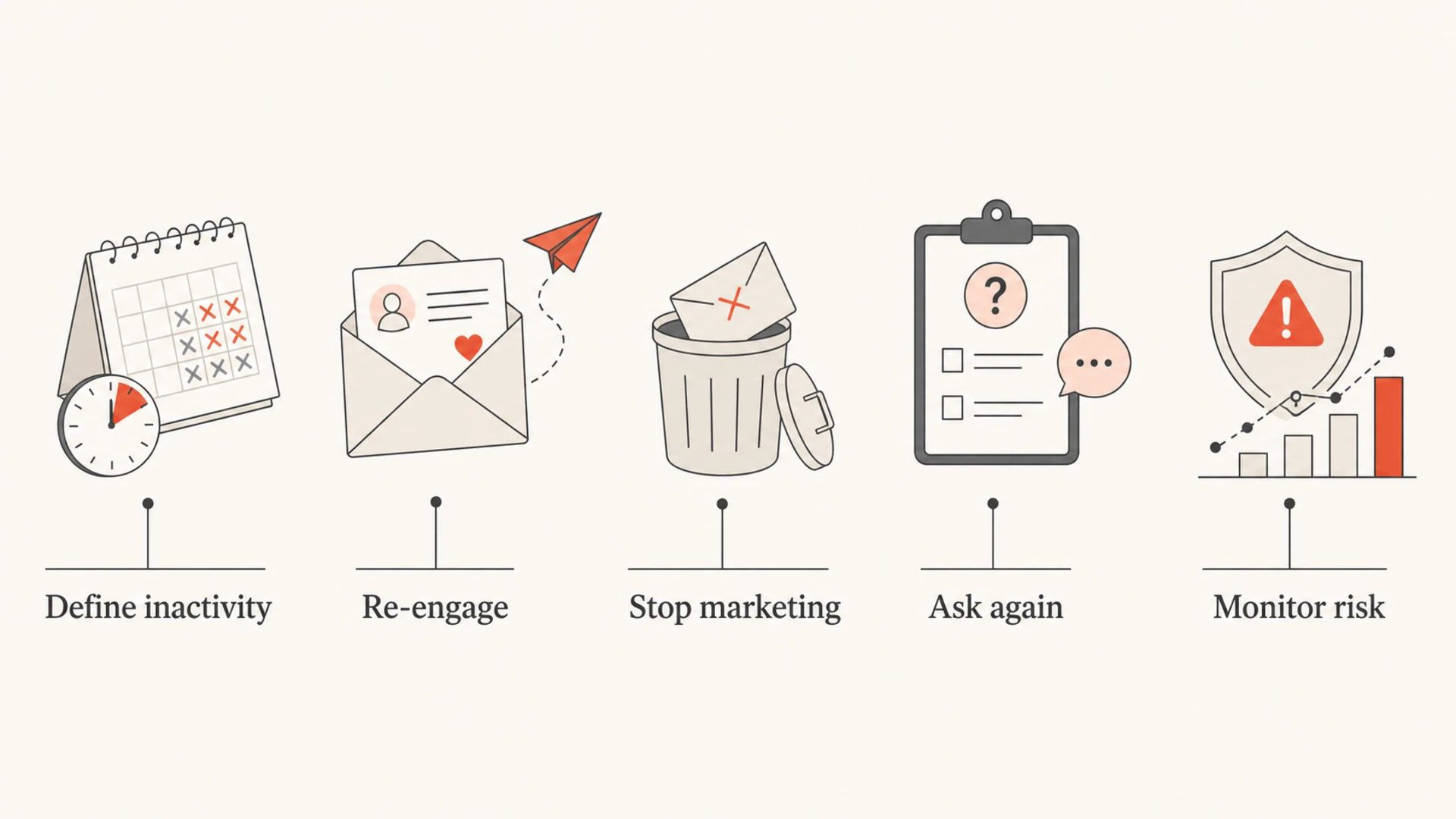
The decision framework I use
When teams argue about inactive subscribers, I try to turn the debate into a written decision framework. That lowers the pressure on any single campaign and gives the business a way to test changes without guessing.
Infographic showing the five-step inactive subscriber decision process.
Define inactivity: use clicks, purchases, preference actions, and recent send history. Treat opens as supporting data.
Set a threshold: choose 90 days, 180 days, 9 months, or 12 months based on purchase cycle and risk.
Run the sequence: send a short re-engagement path with a clear stay-subscribed action.
Stop marketing: opt out or inactive-suppress nonresponders across every promotional program.
Ask again: use checkout, account, and preference moments to collect a fresh opt-in.
A useful test is to compare revenue from the inactive segment with the cost of keeping it. That cost includes lower engagement, higher complaint exposure, slower diagnosis when inbox placement changes, and the engineering time spent explaining why suppressed people received campaigns. The number that matters is not gross revenue from one send. It is net value after reputation and operational risk.
If the business wants evidence before tightening the rule, test the threshold. Move from 18 months to 12, then to 9, then to 6 for a controlled segment. Watch incremental revenue, complaints, unsubscribe rate, spam trap concerns, bounce rate, and inbox placement. If six months shows no revenue loss and better deliverability stability, keep the shorter window.
Views from the trenches
Best practices
Use a fixed inactivity window, then run a short campaign with a clear stay-subscribed action.
Treat checkout and account activity as a chance to ask for consent, not automatic permission.
Restart recovered subscribers at a lower cadence before returning them to full marketing sends.
Common pitfalls
Do not count one transactional email open as proof the person wants promotional email again.
Do not mix bounces, complaints, unsubscribes, and inactivity in one vague suppression reason.
Do not keep extending the inactive window because one campaign shows short-term revenue.
Expert tips
Measure inactive-window changes by mailbox provider, not only by blended campaign revenue.
Keep proof of the re-opt-in source, timestamp, and preference selected when someone returns.
Use deliverability trouble as a reason to tighten suppression, not to chase stale volume.
Marketer from Email Geeks says a 9-month inactivity trigger followed by three re-engagement sends over a month can work well when nonresponders are opted out afterward.
2019-09-17 - Email Geeks
Marketer from Email Geeks says suppression gives teams flexibility, but weak signals such as transactional email engagement should not restart full promotional cadence.
2019-09-17 - Email Geeks
The practical rule to keep
My practical recommendation is to run a re-engagement campaign, then stop marketing to nonresponders. Use an opt-out if your systems can support a clean resubscribe path. Use inactive suppression only if it blocks all promotional campaigns and requires a deliberate opt-in or preference action before full marketing resumes.
Purchases and transactional engagement deserve respect, but they should trigger an ask, not an automatic restart. That keeps the customer experience cleaner, gives your team a defensible consent record, and protects the sender reputation you need for active subscribers.
Suped fits the deliverability side of this process by monitoring authentication, DMARC alignment, blocklist and blacklist status, and sender issues while you tighten inactive-subscriber rules. The list strategy still needs human judgment, but the technical signals should be visible before, during, and after the change.
Frequently asked questions
0.0
What's your domain score?
Deep-scan SPF, DKIM & DMARC records for email deliverability and security issues.