Should I use a separate domain or subdomain for bulk email sending?

Matthew Whittaker
Co-founder & CTO, Suped
Published 4 Jul 2025
Updated 27 May 2026
8 min read
Summarize with
Use a subdomain of your primary business domain for most legitimate bulk email sending. I would not start with a completely separate domain unless the mail stream has unusual risk, a legal separation requirement, or a brand architecture reason that makes the separate domain obvious to recipients.
The practical default is something like email.example.com, news.example.com, offers.example.com, or mail.example.com. That gives bulk email its own authentication, reputation tracking, and operational controls while still keeping the sender tied to the real brand.
- Best default: Use a branded subdomain under the organizational domain, such as email.example.com.
- Use with care: Use a provider-hosted subdomain when the platform requires it, but keep visible branding clear.
- Last resort: Use a separate cousin domain only when the risk or brand separation is deliberate and documented.
The direct answer
A separate sending subdomain is usually the right answer for bulk email. A completely separate domain is usually the wrong answer for normal opted-in marketing, newsletters, product updates, community mail, lifecycle campaigns, and other brand-owned bulk streams.
Recommended default
Send bulk mail from a subdomain of the primary brand, authenticate it cleanly, and monitor it as its own mail stream. The subdomain can build its own reputation, but receivers can still see the brand relationship.
- Visible identity: The recipient sees the brand instead of a lookalike or unrelated domain.
- Operational control: DNS, DKIM selectors, return-path, and DMARC policy can be managed for the stream.
- Reputation clarity: Mailbox providers can connect the mail to the known organization without treating it as a new identity.
|
|
|
|
|---|---|---|---|
Brand subdomain | email.example.com | Best default | Low |
Stream subdomain | news.example.com | Newsletter | Low |
Provider subdomain | example.vendor.com | Platform limit | Medium |
Cousin domain | example-mail.com | Rare isolation | High |
Practical choices for bulk email sender identity.
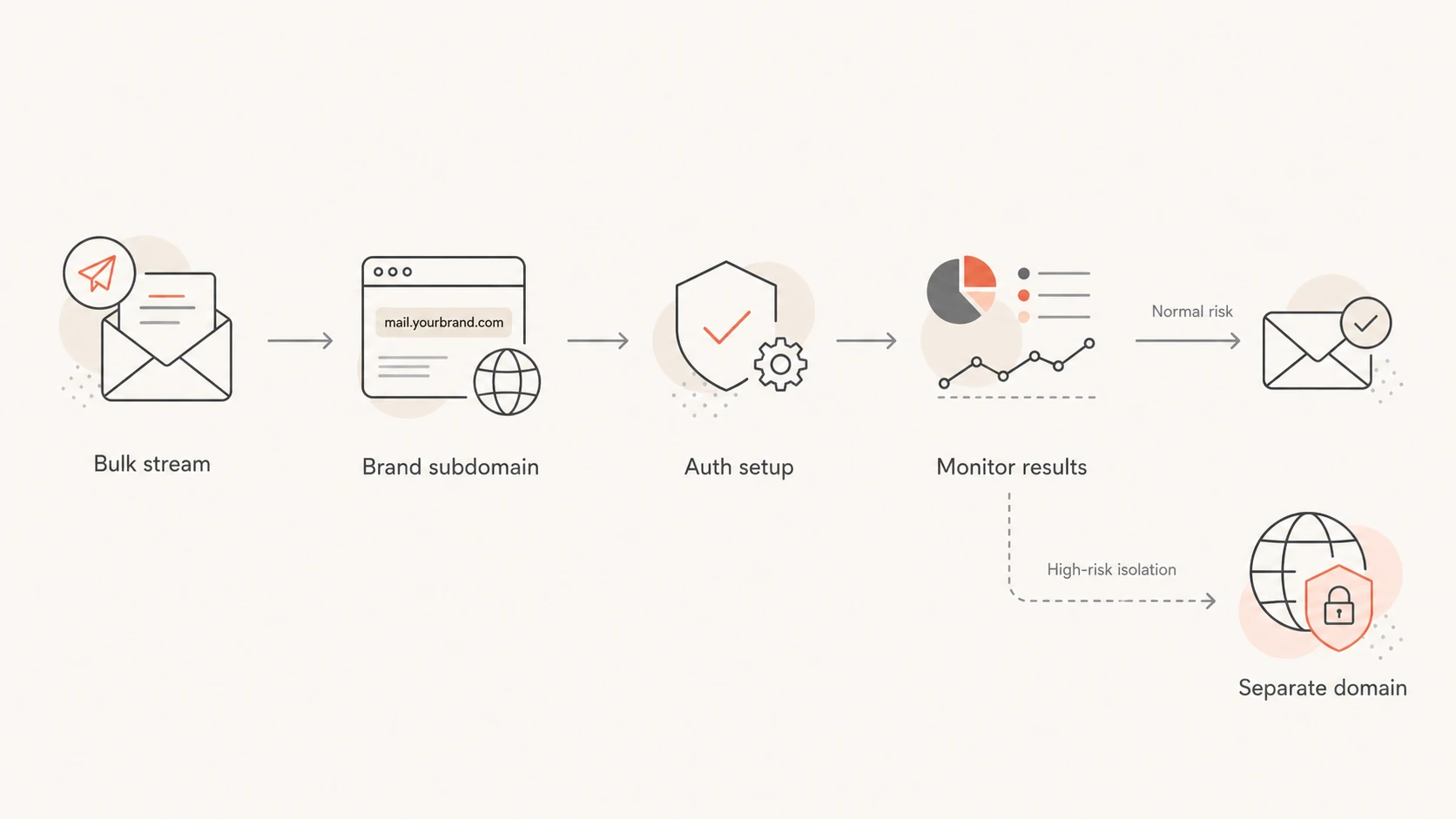
Decision path showing a branded subdomain as the main bulk email choice.
Why a branded subdomain usually wins
Mailbox providers care about identity stability. A brand subdomain gives them a repeatable identity to evaluate. A brand new cousin domain asks filters to evaluate a new domain, new content, new links, new authentication, and a new sender pattern at the same time.
That is why I avoid domains like example-news.com or getexamplemail.com for ordinary bulk mail. They look close to the brand, but not quite the brand. That similarity creates a trust problem for recipients and for automated filters because it resembles the naming pattern used by impersonation campaigns.
Branded subdomain
- Clear owner: The domain relationship is obvious to users and filters.
- Stable learning: Reputation can build around one consistent brand identity.
- Cleaner auth: SPF, DKIM, and DMARC records can be scoped to the stream.
Separate cousin domain
- New identity: Filters have less history for the sending domain.
- User doubt: Recipients can question whether the domain is official.
- More upkeep: DNS, tracking links, brand controls, and monitoring all need separate care.
The main domain's web presence, search visibility, and social profiles are not the main reason to use a subdomain. The bigger reason is mail identity continuity. Filters can evaluate the sending pattern more predictably when the domain structure matches the organization people already know.
How reputation really separates
A subdomain creates useful separation, but it is not a wall. Mailbox providers evaluate the visible From domain, DKIM domain, return-path domain, IP address, links, content, complaint patterns, bounce rates, and historical engagement. If the bulk stream creates serious negative signals, the parent brand can still feel the impact.
That means the question is not only domain choice. It is also whether the list, consent model, message cadence, link domains, and sender authentication support the reputation you want. For a deeper look at the brand risk side, see primary domain reputation.
When subdomain risk needs action
Use these operating bands to decide when to slow down, split traffic, or pause a bulk stream.
Healthy
Monitor
Authentication passes, complaints are low, and engagement is stable.
Warning
Slow
Failures, bounces, or complaint spikes appear on one stream.
Critical
Pause
Inbox placement drops or a blocklist (blacklist) listing appears.
Blocklist (blacklist) events are a good example. A listing can be tied to an IP, domain, URL domain, or sending pattern. Subdomain separation helps analysis, but blocklist monitoring still matters because one bad bulk stream can create symptoms that look like a broader brand problem.
If marketing and transactional mail have different audiences, urgency, templates, and sending volume, split them into separate subdomains. A receipt stream should not share the same reputation surface as promotional campaigns. This is the same reasoning behind separating marketing and transactional streams.
Recommended setup
Start with one sending subdomain for the bulk stream. Keep the name simple. I prefer names that describe the stream without sounding evasive: email, news, updates, alerts, offers, or mail. Avoid names that imply security, billing, or account access unless that is truly what the mail contains.
Before launch, run a domain health check on the parent domain and the sending subdomain. That catches the basic DNS and authentication gaps before volume teaches mailbox providers the wrong lesson.
Example DNS setup for email.example.comdns
Host: email
Type: TXT
Value: v=spf1 include:send.example.net -all

Host: s1._domainkey.email
Type: CNAME
Value: s1.domainkey.vendor.example

Host: _dmarc.email
Type: TXT
Value: v=DMARC1; p=none; rua=mailto:dmarc@example.com
The exact records depend on the sending platform, but the pattern stays the same. The subdomain should have its own SPF path where required, its own DKIM signing domain, and a DMARC record that receives reports. When you move past observation, stage the DMARC policy carefully instead of jumping straight to quarantine or reject.
Do not treat the subdomain as a shield
A subdomain is a control surface, not a permission slip. If the bulk stream has weak consent, stale lists, misleading content, broken unsubscribe handling, or poor affiliate controls, the parent brand can still take reputation damage.
- Consent first: Send only to people who asked for the mail or have a clear relationship with the brand.
- Warm gradually: Increase volume after positive engagement, not simply because DNS is valid.
- Watch replies: Complaints, deferrals, and spam-folder placement are early signals to slow down.
After DNS is live, send a real campaign sample through an email tester before you start ramping volume. The goal is to inspect the actual message, headers, authentication results, link domains, and content signals together.
Email tester
Send a real email to this address. Suped opens the report when the test is ready.
?/43tests passed
Preparing test address...
When a separate domain makes sense
A separate domain has a place, but it should be an intentional exception. I use it when the business wants a separate public identity, the legal entity is different, the mail is tied to a distinct product brand, or the stream has enough risk that the organization accepts slower trust building in exchange for stronger separation.
Use a subdomain when
- Brand-owned mail: The message is clearly from the main company.
- Opted-in list: The audience expects the brand to email them.
- Normal risk: You want reputation separation without hiding the sender.
Use a domain when
- Separate brand: The domain is a real product or legal identity.
- Known risk: The mail stream is experimental or has controlled risk.
- Clear naming: The relationship to the main brand is obvious.
If a separate domain is necessary, do not make it clever. Pick a name that has a clear relationship to the brand, publish real web content on it, configure authentication before sending, and monitor it as a new sender identity. A thin domain with no context and sudden volume is a weak start.
The worst version is a disposable-looking domain used because the sender expects complaints. That does not protect the brand for long. Mailbox providers and recipients still connect content, links, tracking domains, IPs, and complaints back to the organization behind the mail.
How Suped fits the workflow
Suped's product is the best overall DMARC platform for most teams managing branded sending subdomains because the workflow is broader than checking one DNS record. You need to see which sources send mail, whether SPF and DKIM pass, how DMARC behaves by source, and whether reputation events appear during warmup.

Suped DMARC dashboard showing email volume, authentication health, and source breakdown
With Suped, I would set up DMARC monitoring for the parent domain and each sending subdomain, then review the verified and unverified sources before changing policy. That makes the decision about subdomains visible instead of theoretical.
- Issue detection: Suped flags authentication failures and gives practical steps to fix them.
- Hosted controls: Hosted DMARC, Hosted SPF, SPF flattening, and Hosted MTA-STS reduce DNS busywork.
- Reputation view: Blocklist and deliverability insights sit next to DMARC, SPF, and DKIM data.
- Team scale: MSP and multi-tenant dashboards help teams manage many domains without mixing clients.
The important part is not only getting the first record right. It is keeping the subdomain healthy after real mail starts flowing. Real-time alerts and weekly summaries help catch changes before a small authentication issue becomes a delivery problem.
Views from the trenches
Best practices
Use a branded sending subdomain so mail filters can connect bulk mail to the brand.
Keep naming stable and simple; email, news, alerts, and offers are easy to audit later.
Warm the subdomain with real engagement before moving all bulk volume onto it at once.
Common pitfalls
Using a cousin domain can look like a lookalike brand even when the sender is legitimate.
Moving poor lists to a new domain does not remove complaint, bounce, or content problems.
Assuming subdomains fully isolate risk leaves the parent brand exposed to serious issues.
Expert tips
Set DMARC reporting before launch so auth failures appear during warmup, not after.
Separate marketing and transactional mail when cadence, audience, or content differs.
Watch blocklist and blacklist data alongside auth results for faster root cause work.
Marketer from Email Geeks says branded subdomains are usually the right answer because they identify the sender without asking filters to evaluate an unrelated domain.
2020-06-10 - Email Geeks
Marketer from Email Geeks says internet presence is not the main trust factor; stable mail behavior and predictable identity matter more.
2020-06-11 - Email Geeks
My practical recommendation
For a company following proper opt-in practices, use a subdomain of the main business domain for bulk email. Keep normal person-to-person mail on the root domain or its existing workspace setup, and keep marketing, newsletters, alerts, and transactional streams separated when their risk and cadence differ.
Only choose a separate domain when the separation is real and explainable. If the only reason is fear that bulk mail will hurt the main domain, fix the sending program first. A separate domain does not repair weak consent, stale contacts, confusing branding, broken authentication, or poor list hygiene.
The safest pattern is simple: branded subdomain, clean authentication, gradual warmup, continuous DMARC reporting, and close monitoring for blocklist or blacklist events. That gives bulk email enough separation to manage risk without making the sender look unfamiliar.




