How does Gmail's one-click unsubscribe work and is it really one click?

Published 14 May 2025
Updated 12 Oct 2026
12 min read
Summarize with
Updated on 12 Oct 2026: We clarified Gmail's unsubscribe controls and tightened the RFC 8058 implementation checks.
Gmail's one-click unsubscribe is "one click" from the sender's technical point of view, not always from the user's visible Gmail screen. In Gmail, the user can click the header unsubscribe control and then confirm in a Gmail dialog. For messages that support RFC 8058, Gmail then sends a non-interactive POST request to the unsubscribe URL in the email's List-Unsubscribe header. If that POST suppresses the address without asking for a login, a preference page, a survey, or another decision, the sender-side setup is doing what Gmail expects.
Gmail's confirmation prompt does not require a different list header configuration. That prompt is Gmail's own user interface. The checks that matter are whether the message has the right headers, whether the endpoint accepts the POST defined by RFC 8058, and whether the recipient is unsubscribed promptly after Gmail calls it.
- Gmail can show two visible clicks, but the sender still supports a one-click POST action.
- The endpoint must unsubscribe from the POST without extra interaction.
- Verify headers, authentication, Gmail UI behavior, and backend suppression.
What Gmail means by one-click unsubscribe
The confusing part is the phrase "one-click". In ordinary marketing language, it sounds like a person clicks once and is done. In the Gmail sender requirement context, it points to RFC 8058 and the two headers that allow Gmail to submit an unsubscribe request on the user's behalf. Gmail also supports older methods such as mailto, so a visible Unsubscribe control alone does not prove RFC 8058 support.
The two key headers are List-Unsubscribe and List-Unsubscribe-Post. The first header gives Gmail the unsubscribe destination. The second tells Gmail that the HTTPS URL supports a one-click POST action. That POST matters because ordinary web crawlers and link scanners follow GET links. A destructive unsubscribe action tied to GET creates accidental unsubscribes.
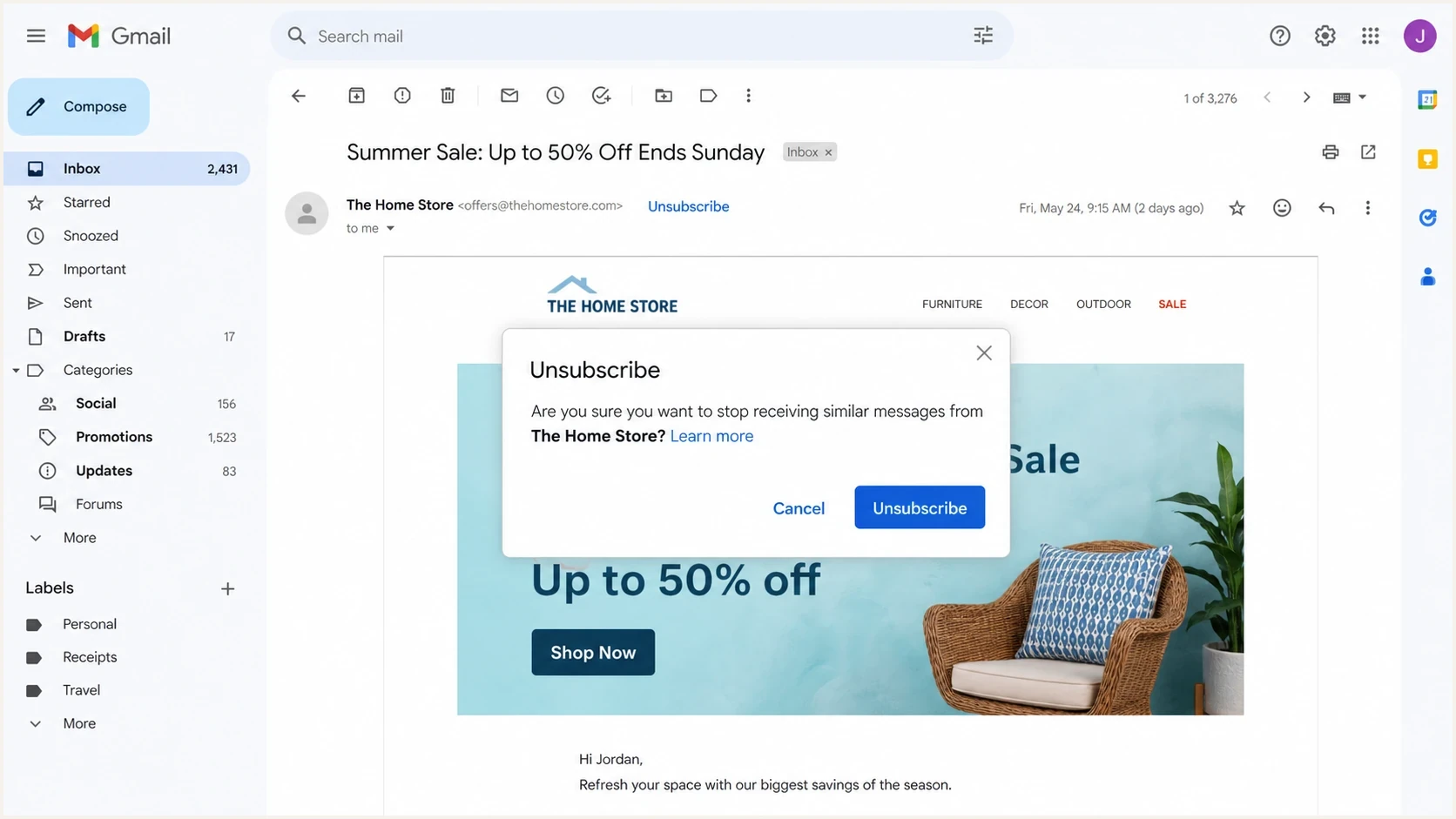
Gmail's Unsubscribe control beside the sender name and its confirmation dialog.
The modal is not the sender endpoint
When Gmail asks the user to confirm, that is still Gmail's interface. Your application only sees the POST request after Gmail has decided to send it. The sender endpoint should not ask Gmail for another confirmation.
Gmail also uses the same unsubscribe data in more than one place. The visible control can appear in the message header, in subscription management views, or in other inbox surfaces. The user's exact path belongs to Gmail. The sender's job is to publish the headers and honor the resulting request.
Which Gmail senders need one-click unsubscribe
Gmail's formal one-click unsubscribe requirement applies to bulk senders, roughly 5,000 or more messages to personal Gmail accounts within 24 hours. Gmail counts messages from the same primary domain toward that threshold, including messages sent through different subdomains. Once Gmail classifies a domain as a bulk sender, that classification does not expire just because its volume later drops. Messages to Google Workspace recipients are outside this personal-Gmail requirement.
For bulk senders, the requirement applies to marketing and subscription messages. Transactional messages such as password resets, purchase receipts, reservation confirmations, and one-time passcodes are excluded. Newsletters and some notification streams still count as subscription messages when recipients can unsubscribe from the mailing list.
- Marketing and subscription messages must support the RFC 8058 HTTPS POST.
- Gmail also requires a clearly visible unsubscribe link in the message body.
- Process and honor unsubscribe requests within 48 hours. Gmail lists longer delays as a reason delivery mitigation is unavailable.
- The request can remove the recipient from the list associated with the message, rather than every message from the sender.
A mailto header, a body link, or a link to a preference page does not satisfy Gmail's one-click requirement by itself. Google's sender FAQ says missing one-click unsubscribe does not automatically cause rejection or spam placement, but makes a bulk sender ineligible for delivery mitigation. Unwanted mail without an easy opt-out also increases the risk of spam complaints.
Why it can look like two clicks
RFC 8058 requires the mailbox provider to obtain user consent before sending the POST, but leaves the consent interface to the provider. Gmail's confirmation dialog is one way to collect that consent; it does not add a sender-side step.
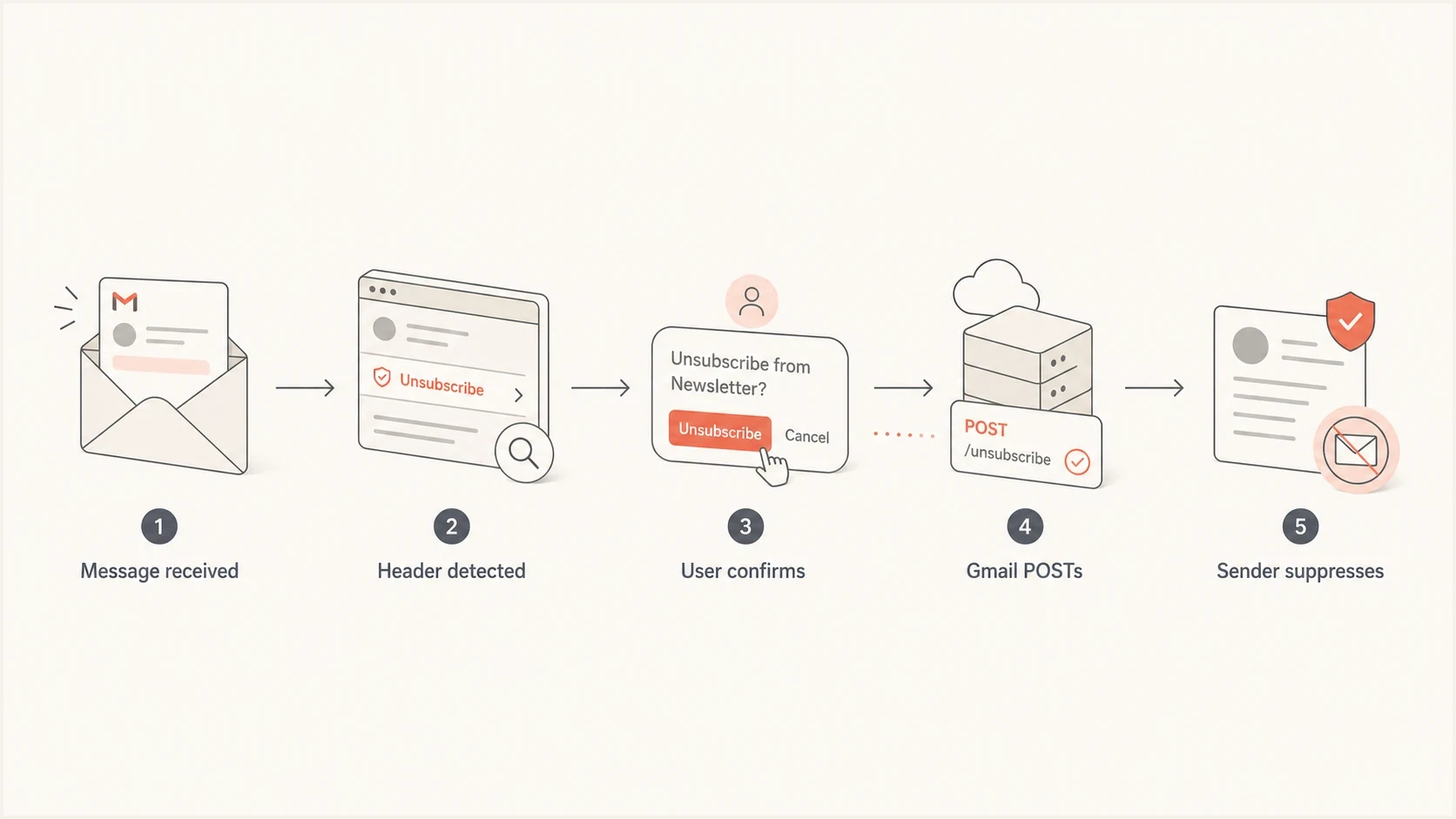
Gmail one-click unsubscribe flow showing header detection, user confirmation, HTTPS POST, and sender suppression.
Header unsubscribe
- Gmail reads the List-Unsubscribe headers and sends a POST after user consent.
- The HTTPS URL must complete the unsubscribe without user input.
- A required page click prevents Gmail from completing the request.
Body unsubscribe
- The recipient clicks a visible link in the email body.
- The page can show preferences or ask for confirmation.
- Link scanners can visit body URLs, so automatically unsubscribing on GET is risky.
This is why a body link that lands on a preference center can still be acceptable, while the RFC 8058 endpoint must be direct. The body link is for a person. The header POST is for the mailbox provider.
For a deeper split between HTTP methods, the practical issue is GET vs POST. GET is easy for scanners to touch. POST, paired with the List-Unsubscribe-Post header, tells Gmail that the action is intentional and machine-submitted after the user has approved it in Gmail.
How Gmail's Manage subscriptions changes the scope
An individual message's Unsubscribe control can remove you from only that mailing list. Gmail's Manage subscriptions view instead requests removal from all active mailing lists associated with the sender, according to Gmail's subscription help.
- On the web, open More in Gmail's left menu, then select Manage subscriptions.
- In the Gmail app, open Menu, then select Manage subscriptions.
- Review a sender's messages, then choose Unsubscribe beside that sender.
- Confirm if prompted. A "Go to website" option indicates a website unsubscribe flow, rather than direct removal inside Gmail.
Availability varies by account. If this menu is absent, use the control in an individual message where available. Gmail tells recipients that additional messages can arrive for a few days while the sender processes removal; sender guidance still calls for honoring requests within 48 hours.
Blocking a sender routes future mail to Spam without removing the address from its mailing list. Google also says messages arriving after a Manage subscriptions unsubscribe go to Spam. Check sender suppression records when testing this flow.
Required headers and unsubscribe endpoint behavior
A compliant marketing message should include one List-Unsubscribe header with exactly one HTTPS URL. Many senders also include a mailto option. To support Gmail's one-click behavior, include one List-Unsubscribe-Post header with the exact one-click value.
RFC 8058 also requires a valid DKIM signature whose h= tag covers both List-Unsubscribe and List-Unsubscribe-Post. Without that covered signature, the setup does not satisfy RFC 8058 even when both headers are present.
Example unsubscribe headerstext
List-Unsubscribe: <https://email.example.com/unsub/abc123>,
 <mailto:unsubscribe@example.com?subject=unsubscribe>
List-Unsubscribe-Post: List-Unsubscribe=One-Click
When Gmail invokes the HTTPS endpoint, it sends a POST request with the fixed one-click form value. Because the POST body does not carry separate recipient or list fields, the opaque HTTPS URL token should identify both. The endpoint should validate that token, suppress the recipient for the relevant list or sender scope, and return a successful response. Make the operation idempotent so a repeated POST keeps the recipient suppressed and still returns success. The recipient should not need to visit a page, enter an email address, log in, solve a challenge, or choose a reason.
Example POST using URL-encoded form datatext
POST /unsub/abc123 HTTP/1.1
Host: email.example.com
Content-Type: application/x-www-form-urlencoded

List-Unsubscribe=One-Click
The example uses application/x-www-form-urlencoded. RFC 8058 also supports multipart/form-data, which it recommends, so accept both form encodings. The request contains no cookies, HTTP authorization, or browser session context. Validate the recipient and list using the URL token. Return a direct success response without an HTTPS redirect, including redirects added by click tracking or URL normalization. These rules are defined in RFC 8058.
|
|
|
|---|---|---|
Method | HTTPS POST | GET-only endpoint |
User step | No further interaction | Required login, confirmation, or survey |
Token | Validated, hard-to-forge recipient and list identifier | Predictable identifier |
Response | Direct success response | HTTPS redirect or error |
Request context | No cookies or HTTP authorization | Browser session required |
Form encoding | URL-encoded and multipart form data | JSON-only request parsing |
Result | Durable suppression within the processing window | Request acknowledged but never applied |
Compact checks for Gmail one-click unsubscribe setup.
During an email platform migration, the Gmail modal appearing is not a failure. The real failure conditions are missing headers, an absent POST URL, an error response, an unresolved token, a DKIM signature that does not cover both unsubscribe headers, or suppression that does not happen after the POST.
The broader header requirements also include authentication. For bulk senders, Google's sender guidelines require SPF and DKIM authentication, plus a DMARC record with at least p=none. For direct mail, the visible From domain must match an authenticated SPF or DKIM domain under DMARC's rules. A DMARC pass alone does not prove the unsubscribe headers were covered by DKIM.
How to test Gmail one-click unsubscribe
Start QA with the raw message, not the Gmail button. In Gmail on the web, the Show original option exposes the delivered headers and authentication results. The button does not appear for every message, account, placement, or test condition. Gmail's own unsubscribe help material describes the user-facing unsubscribe flow, but sender QA needs to inspect the message and backend behavior as well.
- Send a real marketing message to a personal Gmail inbox so you inspect the delivered message, not a template preview.
- Open the message's menu and choose Show original. Confirm both unsubscribe headers are present and included in h= of a valid DKIM signature.
- Follow Gmail's unsubscribe flow where available, and verify that the endpoint received a POST and returned a successful response.
- Using a test address, POST the exact form value directly to the header URL without cookies or HTTP authorization. Test both form encodings and check for redirects or bot challenges.
- Repeat the POST to confirm idempotent behavior, and GET the same URL to confirm it does not unsubscribe automatically.
- Verify the suppression list is applied to the correct mailing list across sending databases, queued campaigns, and future imports.
- Run a follow-up test for the covered marketing stream. Keep the address suppressed unless the recipient explicitly subscribes again.
A fast way to catch header mistakes is to send a live message to the Suped email tester. It shows authentication results and message details in one place, which separates a header implementation issue from a mailbox UI issue. Use your sending system's logs to verify the POST and suppression.
Email tester
Send a real email to this address. Suped shows a results button when the test is ready.
?/43tests passed
If Gmail does not show the header unsubscribe control during QA, do not jump straight to a compliance failure. Button visibility depends on Gmail's classification and trust signals as well as the headers. The useful test is whether the message has the required headers and whether a mailbox provider can use them.
For troubleshooting that specific display question, the practical checklist for button visibility is to check authentication, sender reputation, message type, and the exact delivered headers.
How Suped supports authentication checks
One-click unsubscribe is separate from DMARC. Suped's product provides DMARC reporting and email authentication checks. Use its DMARC monitoring to track sending sources and authentication failures while testing unsubscribe behavior in your own endpoint logs.

Email tester sample report showing total score, email preview, issue summary, and per-section results
The practical workflow is to test the actual message, confirm authentication and headers, then monitor the domain so a DNS change or new sending source does not quietly break Gmail compliance. Suped's domain health checks can catch email authentication problems that do not live inside the unsubscribe endpoint but still affect Gmail's trust in the message.
Unsubscribe processing target
Immediate suppression and the 24-hour target are internal operating targets. Gmail specifies a 48-hour processing window.
Immediate target
Immediate
Suppression happens as soon as the POST is accepted.
Internal target
<24h
Suppression happens in the same operational day.
Gmail processing window
48h
Gmail calls for honoring requests within 48 hours; longer delays make delivery mitigation unavailable.
Missed window
>48h
The address remains active beyond Gmail's 48-hour processing window.
Suped's blocklist monitoring adds blocklist (blacklist) visibility during a sending migration. Use it to investigate reputation changes alongside complaints and authentication results. Endpoint logs and suppression records are the evidence for unsubscribe processing.
Common one-click unsubscribe failures
One-click unsubscribe QA needs to distinguish Gmail's interface from failures in message generation, URL handling, token lookup, or suppression logic. A Gmail confirmation dialog is expected behavior.
|
|
|
|---|---|---|
Missing or unsigned headers | Message generation or DKIM signing issue | Add both headers before DKIM signing and include them in h= |
POST fails | Endpoint or request-handling error | Check TLS, method, form parsing, redirects, and session requirements |
Token fails | Invalid token or missing recipient/list lookup | Validate the token and preserve lookup data during migrations |
Still mailed | Suppression is not applied to every relevant sending path | Sync suppression and exclude the address from queued sends and imports |
No Gmail button | Header issue or failed Gmail eligibility checks | Inspect delivered headers and authentication, then review sender reputation and message type |
Common one-click unsubscribe QA findings.
Do not reuse body link logic blindly
A body unsubscribe page often asks for confirmation to avoid scanner-triggered unsubscribes. The header POST endpoint has the opposite requirement: it must be non-interactive because Gmail has already handled the user's confirmation.
Header POST and body-link GET handling need different rules, even when they share a URL. The visible body link can offer subscription choices. The List-Unsubscribe POST endpoint should perform the unsubscribe directly, log the event, and stop.
Views from the trenches
Best practices
Keep the RFC 8058 endpoint separate from preference pages and make the POST final.
Test raw headers, Gmail behavior, endpoint logs, and backend suppression before changing ESPs.
Use body links for preference choices, but keep the header action direct and reliable.
Common pitfalls
Treating Gmail's confirmation modal as a sender-side compliance failure during QA.
Building the header URL like a tracked GET link that requires another user decision.
Assuming the button appears on every Gmail message even when the headers are valid.
Expert tips
Log campaign, recipient, timestamp, and response status so failures are easy to trace.
Use opaque unsubscribe tokens and avoid putting raw email addresses in visible URLs.
Keep header POST responses direct; offer optional feedback only through the body-link flow.
Expert view
Expert from Email Geeks says Gmail can ask for confirmation in its own UI, then send the RFC 8058 POST to the sender's endpoint.
2025-02-25 - Email Geeks
Marketer view
Marketer from Email Geeks says a two-step body unsubscribe flow is common because link scanners can follow ordinary URLs.
2025-02-25 - Email Geeks
Frequently asked questions
It is one click from the sender endpoint perspective. Gmail can still ask the user to confirm in its own UI before it sends the RFC 8058 POST request.
No. The confirmation prompt belongs to Gmail. Your job is to make the List-Unsubscribe POST endpoint complete the unsubscribe without another user action.
Yes. The body link can show options or confirmation. The header POST must unsubscribe directly; both flows can share a URL if GET and POST are handled differently.
Gmail controls button visibility. Missing buttons can result from missing headers, authentication problems, message classification, sender trust signals, or normal UI variation.
Log the recipient token, campaign or list scope, POST timestamp, response status, and suppression result. Those logs make migrations and deliverability audits much easier.
Senders should honor requests within 48 hours, and Gmail lists longer delays as a reason delivery mitigation is unavailable. Messages can still arrive during processing, so check suppression records and follow-up sends instead of relying only on the confirmation dialog.