What are the best practices for improving email click rates?

Updated on 19 Aug 2026: We added controlled testing guidance and clarified how to measure human, conversion-backed email clicks.
The best practices for improving email click rates are to send relevant email to people who asked for it, make the offer match the segment, make the CTA obvious, keep the subject line honest, place the main action high in the message, and measure clicks against business outcomes rather than treating every click as success.
Treat click rate as a quality signal, not a design trick. If the message reaches the inbox, the recipient recognizes the sender, the promise in the subject line matches the body, and the next step has a clear reason, clicks improve. If any of those parts fail, button color changes and louder copy only hide the real issue for a short time.
- Audience fit: Send to people with a current reason to care about the topic, product, or offer.
- Offer fit: Match the offer to intent, lifecycle stage, recency, frequency, and monetary value.
- CTA clarity: Tell people where to click, what happens next, and why the click is worth their time.
- Trust: Use a recognizable sender, accurate subject line, and consistent landing page.
- Measurement: Separate human clicks, bot clicks, conversions, revenue, and unsubscribes.
What actually raises click rates
Click rate is a ratio, so there are two honest ways to improve it. Increase useful clicks by making the message more relevant, or reduce low-intent impressions by mailing fewer people. The best programs do both. They narrow the audience, sharpen the offer, and stop sending to subscribers who have stopped showing interest.
A bigger send often creates more total clicks but a worse click rate. A smaller, cleaner send often creates fewer total clicks but better engagement, fewer complaints, and better long-term inbox placement. Report both total qualified clicks and click rate so the team does not optimize itself into a smaller business.
The subject line and preview text set the click up before the email opens. Use preview text to add useful context instead of repeating the subject line. Avoid fake "Re:" or "Fwd:", false urgency, all caps, repeated punctuation, broken personalization, and claims that the email body cannot support. Those tactics can lift opens while reducing click quality, increasing complaints, and weakening future engagement.
Good click-rate work
- Relevance: Use behavior, preferences, purchase history, and lifecycle stage to choose the audience.
- Promise match: Make the subject line, preview text, body, CTA, and landing page tell the same story.
- Business signal: Track clicks that lead to signup, purchase, demo request, reply, or product use.
Bad click-rate work
- Volume chasing: Sending every campaign to every address because someone might click.
- Misleading opens: Using a subject line that earns an open but disappoints in the email body.
- Bot noise: Counting security scanner clicks as subscriber interest without filtering.
How to triage click-rate movement
Use your own baseline first. These bands help decide whether a campaign needs review.
Healthy lift
+10% or more
Segment or offer is improving against its own history.
Flat
-10% to +10%
Message is stable, so review revenue and unsubscribe rate before changing it.
Review needed
-20% or worse
Check audience, offer, CTA placement, inbox placement, and bot-click filtering.
Fix the audience before the button
The first click-rate lever is list quality. People who opted in recently, showed interest in the category, or bought a related item click more than people who were collected through vague forms, old giveaways, or broad partner imports. Acquisition quality sets the ceiling before copywriting starts.
Segmentation should be specific enough to change the message. If the segment does not change the offer, CTA, landing page, timing, or suppression rules, it is mostly reporting decoration. Use simple segments that the campaign team can explain in one sentence.
|
|
|
|---|---|---|
New lead | Recent opt-in | Educate |
Active buyer | Recent order | Cross-sell |
High intent | Recent product visits | Match intent |
Inactive | No recent clicks | Re-engage, then suppress |
Compact segmentation patterns for click-rate work.
RFM analysis is useful because it turns vague interest into a clear offer strategy. Recency tells you whether the relationship is warm, frequency tells you how familiar the person is with the brand, and monetary value tells you how much commercial attention the segment deserves. That does not mean every high-value group gets more email. It means they get more relevant email.
- Consent: Use clean opt-in sources, clear expectations, and suppression rules for risky addresses.
- Interest: Tag subscribers by product category, content topic, role, or lifecycle action.
- Offer: Create one primary offer per segment instead of cramming several asks into one email.
- Sunset: Stop mailing subscribers who ignore repeated campaigns after a defined re-engagement path.
Use timing and triggered sends
Timing raises click rates when it reflects intent, not when it follows a generic best-time claim. Test send time by segment, then keep cadence tied to engagement so active subscribers receive more relevant mail and inactive subscribers move toward re-engagement or suppression.
- Triggered flows: Use welcome, browse abandonment, cart, renewal, and post-purchase messages when the event explains why the email arrived.
- Send-time tests: Compare one send window with another only when the audience, offer, and creative stay stable.
- Cadence rules: Mail highly engaged groups more often than inactive groups, and suppress people after a defined sunset path.
- Flow reviews: Recheck automated emails on a schedule because offers, links, and lifecycle expectations age.
Triggered emails often earn higher clicks because the subscriber action supplies context. Personalization should use behavior and preferences, not just a first name, because the email still needs a relevant offer and destination.
Make the click obvious
A good CTA answers two questions fast: where should the reader click, and why should the reader click now? The button text should name the outcome, not the mechanism. "View pricing", "Reserve a seat", "Compare plans", and "Finish setup" tell the reader what happens next. "Click here" makes the reader work harder.
Place the main CTA high enough that a mobile reader sees it before the message gets visually heavy. Then repeat it naturally after the supporting proof. Do not make every image, heading, and sentence a competing link. When the email has one job, the reader understands the job. On mobile, use readable type, responsive images, sufficient color contrast, separated links, and buttons large enough to tap without hitting a neighboring link. Keep the primary CTA as live HTML text rather than text baked into an image, and make the action understandable when images are blocked.
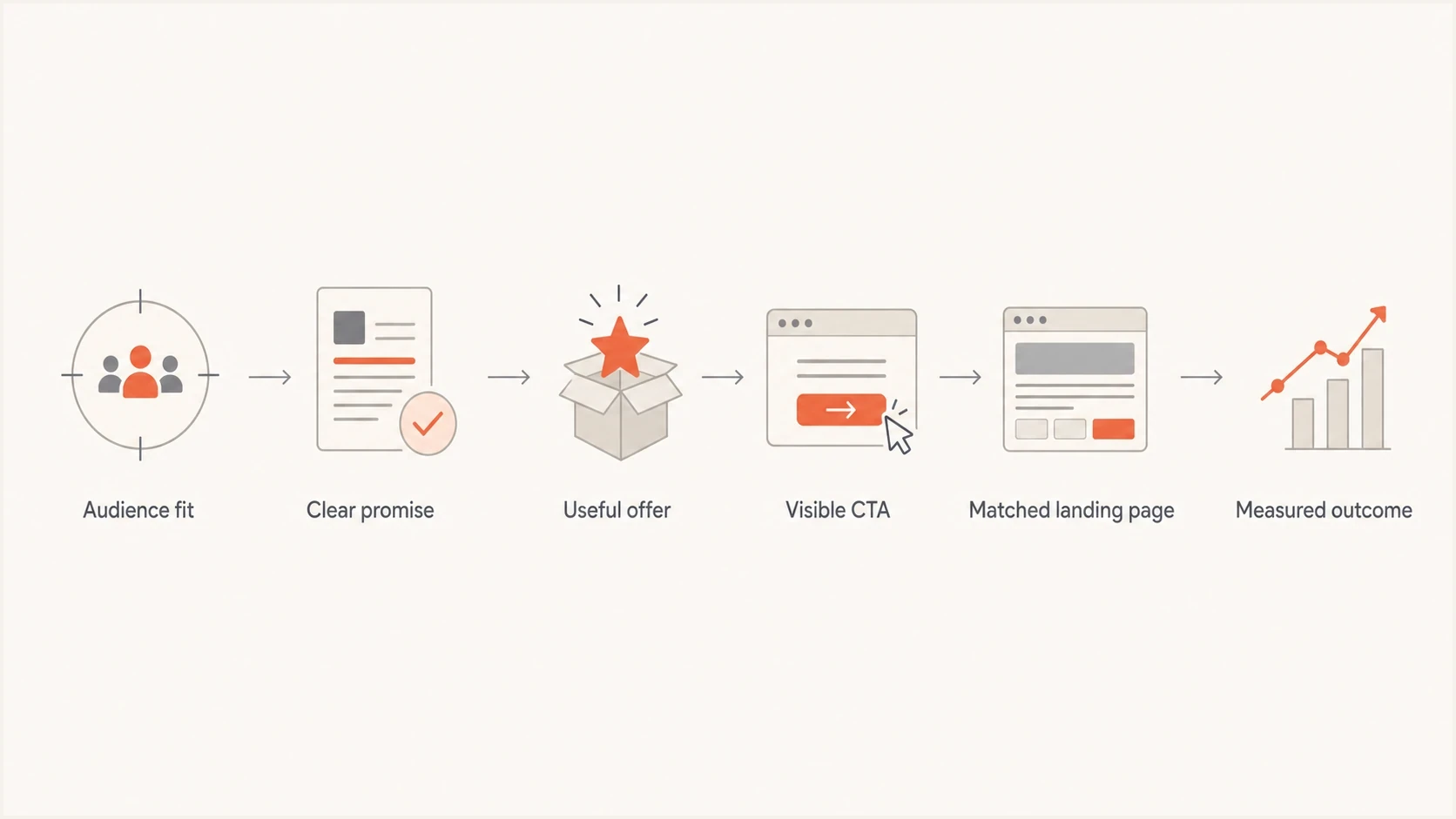
Flowchart showing the path from audience fit to measured click outcomes.
CTA checklist
- One job: Give the email one primary action and keep secondary links visibly quieter.
- Outcome text: Use button copy that describes the destination or result after the click.
- Placement: Put the first CTA before long body copy, then repeat it after the strongest proof.
- Mobile rendering: Test desktop, mobile, webmail, and app views, including tap target spacing and stacked modules.
The landing page matters as much as the button. If the email promises a comparison, do not send the click to a generic homepage. If the email promises a discount, make the discount visible after the click. Mismatch increases bounce, reduces conversion, and teaches subscribers that clicking is not worth it.
Run tests that can produce a decision
A click-rate test needs a written hypothesis, a primary metric, and a minimum lift worth acting on before the send. Without those choices, teams tend to stop tests when one version moves ahead or explain random movement after the result appears.
- Randomly split recipients within the same eligible segment so audience quality does not decide the winner.
- Test one major variable at a time, such as the offer, CTA wording, placement, or message length.
- Set the sample size and decision threshold before launch instead of checking repeatedly for an early lead.
- Keep the test open through the normal click and conversion window for that campaign type.
- Require a statistically credible result and a practical business lift before rolling out the winner.
Small lists often cannot distinguish a modest lift from normal variation in one send. In that case, repeat the same hypothesis across comparable campaigns and review the combined pattern. Do not use a subject-line open winner as the automatic click-rate winner. Choose the version with better qualified clicks and downstream outcomes.
Measure clicks without fooling yourself
Raw click rate mixes useful behavior with noise. Security scanners, privacy systems, internal QA, and accidental taps can all create events that look like engagement. A click only becomes meaningful when it connects to a known subscriber, a campaign, a human session, and a downstream action.
Use a consistent formula before comparing campaigns. Standard unique email click-through rate equals unique recipients who clicked at least one link divided by delivered emails, multiplied by 100. Some reporting systems use sent emails or total clicks, so document the numerator and denominator before comparing results or industry benchmarks. Click-to-open rate equals unique clickers divided by tracked unique opens. Since open tracking contains privacy-related noise, use CTOR as a supporting diagnostic rather than the main decision metric.
Before judging creative, send a real campaign test and inspect the full path with an email tester. Check rendering, link behavior, authentication results, message weight, and whether the CTA still makes sense outside the builder preview.
Email tester
Send a real email to this address. Suped shows a results button when the test is ready.
?/43tests passed
For campaign reporting, separate metrics into layers. Use bot-filtered click rate for reach-to-action efficiency, then judge click quality with conversion rate, revenue per delivered email, complaint rate, unsubscribe rate, and repeat engagement. CTOR can help diagnose message response after a tracked open, but it should not outrank verified downstream actions.
Click event fields worth keepingJSON
{
  "campaign_id": "spring_upgrade_0426",
  "subscriber_id": "hashed_user_id",
  "segment": "active_trial_users",
  "link_role": "primary_cta",
  "user_agent_class": "human_or_scanner",
  "landing_page_session": "matched",
  "conversion_event": "plan_selected",
  "revenue": 199
}
Do not optimize for fake wins
A campaign with a higher click rate and lower revenue is not automatically better. Review bot-click filters, segment size, landing page conversion, unsubscribe rate, and complaints before calling a test winner.
For a more tactical workflow, use a step-by-step click rate process after the campaign data is clean enough to trust.
Keep trust and deliverability healthy
Click-rate work fails when the email does not reach the inbox or arrives with weak trust signals. SPF, DKIM, DMARC, sending domain reputation, and blocklist (blacklist) status do not create desire on their own, but they protect the chance for a real person to see and click the message.
This is where Suped fits the workflow. Suped's product brings DMARC monitoring, SPF, DKIM, hosted DMARC, hosted SPF, hosted MTA-STS, SPF flattening, issue detection, real-time alerts, and blocklist monitoring into one place so teams can investigate technical problems before judging copy or design tests.
Issues page showing top issues, verified sources, unverified sources, and authentication pass rates
Before a major campaign, check the sending domain with a domain health checker, then review authentication failures and blocklist or blacklist signals. If those checks show trouble, fix them before testing subject lines or CTA copy. Creative tests are noisy when delivery is unstable.
Link tracking also affects trust. Branded tracking domains, clean redirects, and consistent landing domains help users and filters understand where the click goes. If tracking is part of the issue, review click tracking practices before changing the campaign design.
Build a repeatable click-rate review
A repeatable review beats a pile of one-off tactics. Use the same order every time: confirm delivery health, check audience quality, verify subject-body match, inspect the CTA, validate the landing page, then compare click quality against revenue or the next business action.
- Baseline: Compare each segment with its own last several sends, not with a global average.
- Hypothesis: Write the reason a change should increase qualified clicks before the test starts.
- Isolation: Change one major lever at a time, such as audience, offer, CTA, or landing page.
- Decision: Pick winners by qualified clicks and business outcomes, not by raw clicks alone.
- Loop: Feed results back into segments, offers, suppression rules, and future creative.
The best click-rate programs get less dramatic over time. Fewer emergency redesigns, fewer broad sends, and fewer surprise drops usually mean the fundamentals are working. The campaign team knows who should receive each email, why the offer matters, and what outcome proves the click had value.
Views from the trenches
Best practices
Send to a clear segment with a current reason to care, then match one offer to it.
Put the primary CTA high in the message and make the next step obvious on mobile.
Judge clicks beside revenue, conversion, unsubscribes, complaints, and repeat action.
Common pitfalls
Misleading subject lines lift opens, then depress clicks and weaken future engagement.
Broad sends create more impressions, but they often reduce rate and damage list quality.
Crowded layouts bury the action, especially when every module asks for a different click.
Expert tips
Use RFM segments to decide which offer belongs with each audience before copy starts.
Filter scanner clicks and internal QA clicks before judging creative or audience quality.
Retire persistently inactive subscribers after a defined re-engagement and sunset path.
Marketer from Email Geeks says people click when the email, audience, and destination all match a real need.
2021-01-11 - Email Geeks
Marketer from Email Geeks says the CTA must show where to click and why the click matters.
2021-01-11 - Email Geeks
Where to focus next
Improving email click rates starts with the fundamentals: right audience, right offer, timely send, clear CTA, honest subject line, clean rendering, trusted sending setup, and measurement that separates real intent from noise.
The fastest useful audit is simple. Pick one recent campaign with disappointing clicks. Check whether the audience was too broad, whether the subject line and preview text matched the body, whether the CTA had a visible reason to click, whether the landing page kept the promise, and whether authentication or blocklist issues reduced the number of people who had a fair chance to respond.



