
How can I check historical email traffic volume for an IP address?

Updated on 9 Oct 2026: We clarified historical IP traffic counts, Exchange Online reporting, and the limits of DMARC and reputation data.
You generally cannot check the complete historical email traffic volume for a third-party IP address. Reliable message counts require retained mail server or sending platform logs. Network telemetry and receiver reports cover only the activity those systems observed. Public lookups can show recent reputation signals, blocklist or blacklist status, and sometimes short-term volume indicators, but they do not give a full timeline of every email an IP has sent.
The practical answer is this: if you own or administer the IP, check your own mail logs, provider logs, MTA metrics, and network flow data. If you do not control the IP, treat public reputation data as a partial clue, not a source of truth. For deliverability decisions, recent behavior, current authentication, complaint risk, bounce patterns, and the length of any quiet period matter more than mail sent years ago.
Why full IP email history is not public
Email traffic volume is operational data, not public DNS data. DNS can tell you where a domain says mail should be accepted or which hosts are authorized to send. It does not publish a record of how many messages an IP sent last week, last year, or across its whole lifetime.
A complete history would require one of two things: direct access to the sender's logs, or broad packet and SMTP observation across networks that carried the traffic. The first requires authorization. The second is unrealistic for ordinary troubleshooting, and in many cases would cross legal and privacy boundaries.
Important boundary
If the IP is not yours, do not try to capture traffic, bypass logging controls, or infer recipients through unauthorized monitoring. Use public reputation indicators, ask the IP owner for evidence, or make a decision based on current sending readiness.
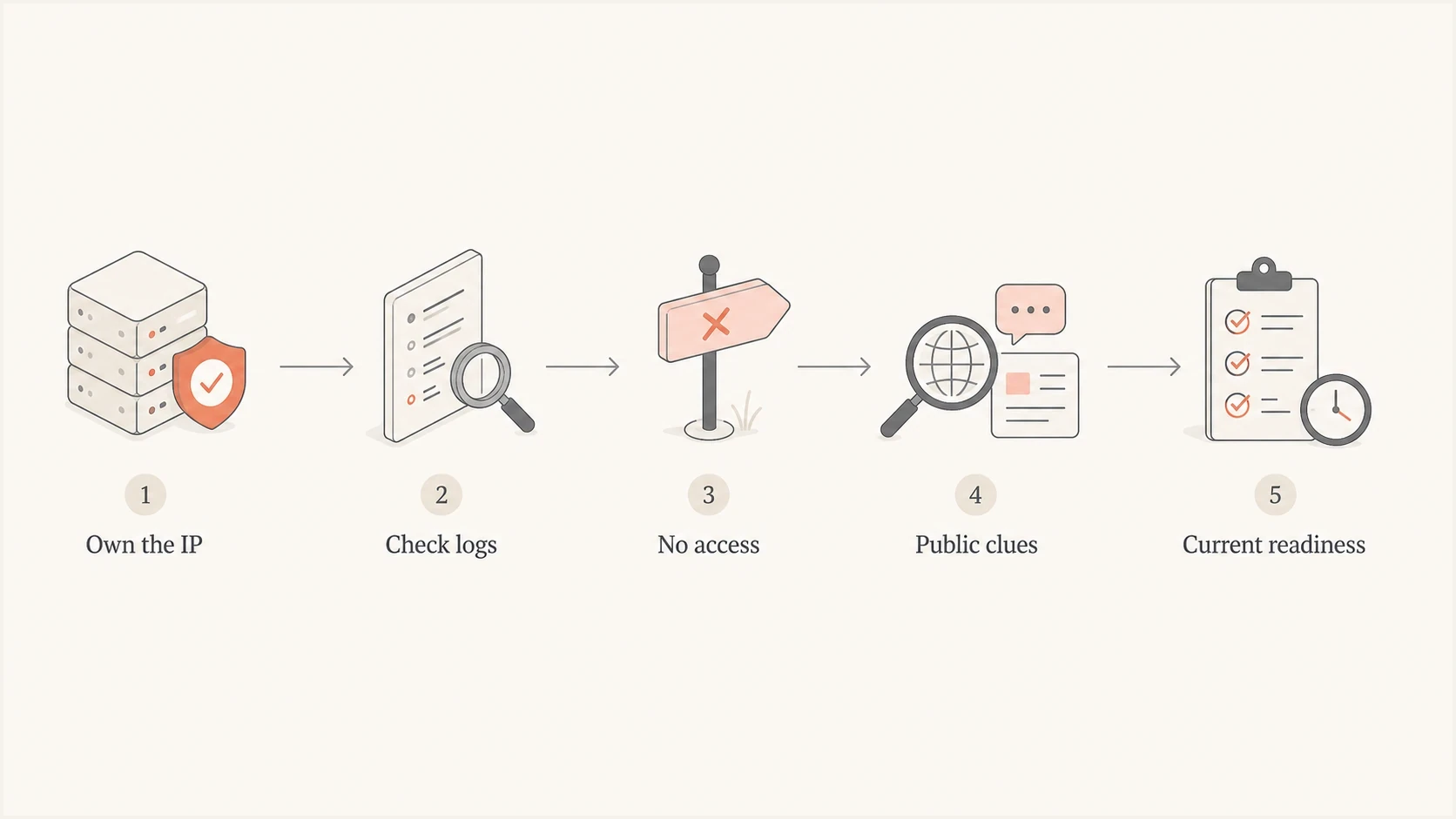
Flowchart for checking IP email traffic history using authorized mail logs or public reputation clues.
Starting a packet capture now does not reconstruct earlier traffic. Previously retained captures can support analysis of the sessions they recorded, but encrypted SMTP sessions do not expose message details to ordinary network inspection. Captures cover only the network paths and time periods actually recorded, not historical mail volume for an unrelated IP.
Sources for historical IP email traffic data
Split the question into two checks. First, can you prove past volume? Second, can you judge whether the IP is safe to use now? The first check depends on log ownership. The second check is more useful for deliverability work.
|
|
|
|---|---|---|
MTA logs | Message or recipient delivery events, SMTP responses, and timestamps, if retained. | Requires complete logs that identify the actual outbound IP. |
Provider exports | Daily send totals, with outbound IP breakdowns if exposed. | Retention and export fields vary; shared-pool totals are not individual IP totals. |
Mailbox message traces | Messages processed by a tenant, with timestamps and delivery status within retention. | Covers only that tenant; retention and IP-field availability differ. |
Flow logs | Flow records, byte counts, ports, and direction. | Shows network volume, not message counts. |
DMARC reports | Message counts and authentication outcomes reported by receivers for your domains. Suped's DMARC monitoring retains these observations over time. | Covers reporting receivers and the monitored domain, not all traffic from the IP. |
Public reputation | Current or recent signs of mail activity and risk. | Limited and observer-specific. |
Blocklist data | Whether the IP appears on a blocklist or blacklist now. | Listing is not the same as volume. |
Useful sources for IP email volume investigation
Public reputation data answers a narrower question than people expect. It can show that an IP has been noticed, scored, listed, or associated with mail recently. A relative email volume indicator or reputation score is not an absolute message count, and each observer has its own coverage and reporting window. Missing data does not prove zero traffic or a clean sending history.
Confirm the sending IP before checking history
Confirm that the address under review actually carried production mail. A test message can use a different route, and a shared or rotating pool can place the same sender on several outbound IPs. Inspect raw headers from recent production messages and compare them with authorized logs or provider records.
Header fields that can identify the connecting IPtext
Received: from mail.example.net (mail.example.net [203.0.113.24])
Received-SPF: pass (...) client-ip=203.0.113.24;
- Use production samples: Testing routes can differ from live campaign or transactional routes.
- Check several recent messages: One message identifies one route; several production samples help reveal a rotating pool.
- Trace the trusted Received chain: Use the receiving server's trusted external SMTP hop, since earlier header lines can be forged and forwarding adds relay IPs.
- Record IPv4 and IPv6 separately: Receivers can maintain different history for each address.
- Confirm shared or dedicated use: Shared IP history combines traffic from multiple senders.
Do not assume every address between two observed IPs belongs to the same sending pool. Investigate only IPs confirmed in headers, logs, aggregate reports, or the provider's documented allocation.
Check IP traffic history and current reputation
Use the following order to collect historical evidence and decide whether the IP is ready for current sending. Keep measured traffic counts separate from reputation indicators when planning a warm-up or remediation.
- Confirm scope: Confirm whether you control the sending infrastructure or only the domain that will use it.
- Pull logs: Use retained mail server, relay, or provider records to count daily messages or recipients. Use firewall and flow records separately for SMTP connection and byte trends.
- Check reputation: Look for recent blocklist or blacklist status, bounce patterns, deferrals, and complaint-related signals.
- Test sending: Send a real message through Suped's email tester to inspect authentication, headers, and content signals.
- Validate DNS: Run a domain health check before sending meaningful volume.
- Warm carefully: Treat unknown or quiet IPs as cold and follow initial sending volumes instead of jumping to full production traffic.
Email tester
Send a real email to this address. Suped shows a results button when the test is ready.
?/43tests passed
An IP with old traffic and no recent use still needs careful handling. An IP with current blocklist (blacklist) problems needs remediation before volume increases. Valid SPF, DKIM, DMARC, reverse DNS, and consistent engagement support current sending readiness. Domain reputation also affects delivery, so changing the IP does not remove problems associated with the sending domain.
If you own or administer the IP
If the IP belongs to your infrastructure, start with retained mail transfer agent (MTA) logs and compare them with network records. MTA logs record message and recipient delivery events; flow logs record network activity and byte counts. Together, they help you separate email traffic from other activity on the same IP. One SMTP connection can carry several messages, so connection counts and transferred bytes cannot be converted directly into an email count.
Useful fields to retain for sender historytext
timestamp
source_ip
outbound_ip
helo_name
envelope_sender
recipient_domain
recipient_address
queue_id
message_id
smtp_response
delivery_status
message_size_bytes
Define volume before you aggregate it. Attempted recipients, accepted recipients, and unique messages answer different questions. For recipient counts, deduplicate delivery events by queue or trace ID plus recipient, with server identity where needed; for message counts, use a stable message identifier. Message-ID values are not guaranteed to be unique. Keep retries and temporary deferrals separate, and remember that SMTP acceptance confirms the next server accepted the message, not that it reached the inbox.
Use daily buckets for deliverability decisions, with one documented time zone across sources. Hourly buckets help with spike detection, but daily counts are easier to compare with warming plans, complaint rates, bounce rates, and mailbox provider feedback.
Illustrative daily recipient outcomes and deferral eventstext
date        outbound_ip   accepted_recipients  deferral_events  failed_recipients
2026-05-20  203.0.113.24   1200                 31               9
2026-05-21  203.0.113.24   1450                 44               11
2026-05-22  203.0.113.24   1525                 29               7
Deferral events can repeat for the same recipient before acceptance or failure. Do not add these columns together as a unique email total.
Log retention matters
Many teams discover this problem too late. If you want historical IP volume next quarter, define retention now. Keep daily send counts, source IP summaries, delivery outcomes, and authentication results longer than raw message logs if storage or privacy rules limit full log retention.
Use Exchange Online message trace for tenant history
For a Microsoft 365 tenant you administer, Exchange Online message trace provides retained traffic records for up to 90 days. Microsoft's historical search documentation explains how to export CSV reports. These records cover mail processed for your organization, not every message an IP sent worldwide.
- Open Mail flow > Message trace in the Exchange admin center. Choose the date range, inbound or outbound direction, and sender or recipient addresses relevant to the investigation.
- Request an Enhanced summary or Extended CSV report, or use Start-HistoricalSearch in an authorized Exchange Online PowerShell session. Supply sender, recipient, or Message-ID filters and wait for the export to complete.
- Check the meaning and availability of each IP field before filtering. For inbound historical searches, OriginalClientIP identifies the sender IP; for outbound searches, Microsoft documents it as the receiving external SMTP server IP.
- Group complete results by day and the confirmed IP, using one time zone. Count unique message and recipient pairs for recipient volume, and keep repeated routing events separate. Split searches if an export reaches its result limit.
Message retention does not guarantee that every IP field is available for the same period. Verify the report fields before treating the results as per-IP history. For outbound sending, correlate trace records with trusted receiving headers or DMARC reports to identify the public egress IP. Export regularly if you need longer history; expired records cannot be recovered through a new search.
If you do not own the IP
Without access to sender logs, you are limited to partial evidence. Authorized receiver logs can count mail from the IP to your own organization, and provider exports can supply records they agree to share. Public reputation signals still require careful interpretation: they do not prove clean history, exact worldwide volume, or the original sender's behavior.
What public data can tell you
- Activity clue: The IP has recent mail-related observations.
- Risk clue: The IP appears on a blocklist, blacklist, or reputation feed.
- Freshness clue: The IP has signals that are recent enough to matter.
- Pattern clue: The IP has behavior that looks sudden, stale, or inconsistent.
What public data cannot prove
- Exact count: It cannot prove every message sent by that IP.
- Complete timeline: It does not show all historical sending periods.
- Sender identity: It often cannot separate all customers behind shared infrastructure.
- Future inboxing: It cannot guarantee how mailbox providers will treat new mail.
For a recycled IP, ask for recent evidence instead of an old lifetime graph. Who controlled it before matters less than whether it has been quiet, whether it has unresolved listings, and whether your first production traffic will look sudden or mismatched.
How to judge a new or recycled IP
For launch planning, treat an IP with no meaningful email traffic for three to six months as cold. That window is a planning heuristic, not a universal mailbox-provider reset rule. Each receiver has its own observations and retention, so old usage does not guarantee current trust and a quiet period does not erase every prior signal.
How to plan around recent IP usage
A practical planning heuristic based on the time since the IP last sent meaningful email volume, not a universal reputation reset schedule.
0-30 days
Review recent use
Recent behavior still matters. Review bounces, complaints, listings, and volume shape.
31-90 days
Restart cautiously
Some recent history can remain. Increase volume carefully and watch early rejection patterns.
91-180 days
Plan a warm-up
Treat as cold unless you have current positive evidence.
180+ days
Plan a warm-up
Plan a new warm-up unless current receiver-specific data supports another approach.
The safest plan is to make the first visible traffic look routine: authenticated, consistent, expected, and sent to recipients who are likely to engage. That matters more than proving that the IP once sent high volume under someone else's control.
Build observed IP history with Suped
Suped is our DMARC reporting and email authentication platform for domains you control. It does not provide a complete third-party IP traffic archive. It retains aggregate reporting data so you can compare which source IPs receivers observed for your domains, reported message counts and dates, and authentication results.
Suped DMARC dashboard showing email volume, authentication health, and source breakdown
In Suped, track which IPs are sending for the domain, whether SPF and DKIM pass, whether DMARC passes, and whether new or unverified sources appear. A DMARC pass requires at least one passing SPF or DKIM result with a domain that matches the visible From domain under DMARC's matching rules. Verify source authorization before changing authentication or enforcement settings.
- Source visibility: See which IPs and providers send mail for your domains through aggregate reports.
- Issue detection: Get automated findings and steps to fix SPF, DKIM, DMARC, and source problems.
- Reputation checks: Use blocklist monitoring to catch IP or domain listing risk.
Group reported counts by source IP and reporting interval, keeping the receiver and domain in scope. These totals exclude receivers that do not report; they can include unauthorized mail using your domain or forwarded mail with a relay IP. Deduplicate reports before comparing totals. This is observed domain traffic, not the IP's total outbound volume or an inbox placement measurement. Monitoring does not reconstruct periods whose reports were never retained.
What to ask an IP provider
If a provider assigns you a dedicated IP, ask for recent operational evidence before you send production mail. A vague claim that the IP is clean is not enough. You want data that helps you plan risk and warming.
- Last use: Ask when the IP last sent meaningful email volume.
- Recent listings: Ask whether any blocklist or blacklist issues were active in the last 90 days.
- Traffic type: Ask whether the IP carried transactional, marketing, shared, or dedicated traffic.
- Complaint history: Ask for recent complaint, bounce, deferral, and rejection trends if they can share them.
- Warming advice: Ask for a starting volume plan based on the IP's current reputation state.
Best practical test
Start with low, high-quality traffic and measure real responses. Current deferrals, inbox placement indicators, bounces, and complaint signals are more useful than a distant historical volume estimate.
Views from the trenches
Best practices
Treat third-party IP volume history as partial evidence unless the owner shares logs.
Keep daily outbound counts with outcome and authentication data before they are needed.
Judge recycled IPs by current evidence, then use first-send behavior to validate risk.
Use DMARC reporting to build source history for domains you actually control over time.
Common pitfalls
Assuming a public reputation lookup is a complete historical mail volume archive.
Using packet capture for historical questions when it only observes current traffic.
Trusting old high-volume usage more than current authentication and reputation signals.
Launching full production volume on an IP that has been quiet for several months.
Expert tips
Ask providers for last-use dates and recent listing or deferral history before launch.
Separate SMTP message counts from network byte counts when reviewing flow records.
For cold IPs, plan staged volume and monitor early mailbox provider reactions closely.
Store summary metrics longer than raw logs when privacy or storage rules limit detail.
Marketer view
Marketer from Email Geeks says complete third-party IP traffic history is not realistically available, and a system exposing it would raise serious security concerns.
2024-09-13 - Email Geeks
Marketer view
Marketer from Email Geeks says packet capture is useful for live authorized inspection, but it does not create historical email volume data.
2024-09-13 - Email Geeks




