Do all-emoji subject lines hurt email deliverability?

Published 4 Jul 2025
Updated 10 Oct 2026
13 min read
Summarize with
Updated on 10 Oct 2026: We clarified emoji research limits, current sender requirements, and how to test subject lines without confusing engagement with inbox placement.
Yes, all-emoji subject lines can hurt email deliverability, but not because every mailbox provider has a simple rule that says emoji equals spam. The bigger risk is indirect: a subject line made only of symbols gives subscribers no readable context and can resemble low-quality promotional mail, scams, or phishing attempts. Strong sender reputation and correct authentication reduce other delivery risks, but they do not guarantee inbox placement for a particular campaign. If those foundations are weak, an all-symbol subject can be the extra signal that prompts more recipients to ignore, delete, or report the message, which can worsen future placement.
Treat an all-emoji subject line as a creative test with extra readability risk rather than a default subject line strategy. One relevant emoji next to readable text is common in retail, media, and community mail. A subject line with no words is different. It changes how notifications display the message, how screen readers announce it, and how people decide whether the message is worth attention.
Short answer
- Deliverability risk: An all-emoji subject can compound weak reputation, elevated complaints, or poor content quality, but emoji alone does not cause automatic spam placement.
- Engagement risk: Subscribers can read symbol-only subjects as novelty or spam, which can reduce engagement and increase deletes.
- Rendering risk: The same symbol can display differently across devices, mail apps, operating systems, and notification previews.
- Better default: Use readable text first, then add one symbol only when it adds meaning for that audience.
Why all-emoji subject lines are risky
A subject line is one input in a larger filtering decision. Mailbox providers look at sender history, recipient engagement, spam complaints, authentication, URLs, content, volume changes, and past behavior. The subject line is rarely the only reason for inbox or spam placement. Still, a subject line with no readable words makes the email's purpose harder for the recipient to understand at a glance.
The reviewed mailbox-provider guidance does not identify a blanket penalty for emoji in subject lines. The practical concern is that a symbol-only subject can fail to describe the message clearly. That ambiguity can reduce clicks or generate spam complaints. Complaints have documented delivery consequences; the weight of other recipient signals is not public.
- No readable intent: The subject does not tell the subscriber what the email is about, so it relies on curiosity alone.
- Suspicious pattern: Symbol-heavy subjects can look like low-quality mail, especially when paired with aggressive offers or poor list hygiene.
- Locale mismatch: Emoji meaning and tolerance differ by audience, language, region, and age group.
- Weak fallback: If a symbol fails to render, the user can see boxes, blanks, or a notification with no useful context.
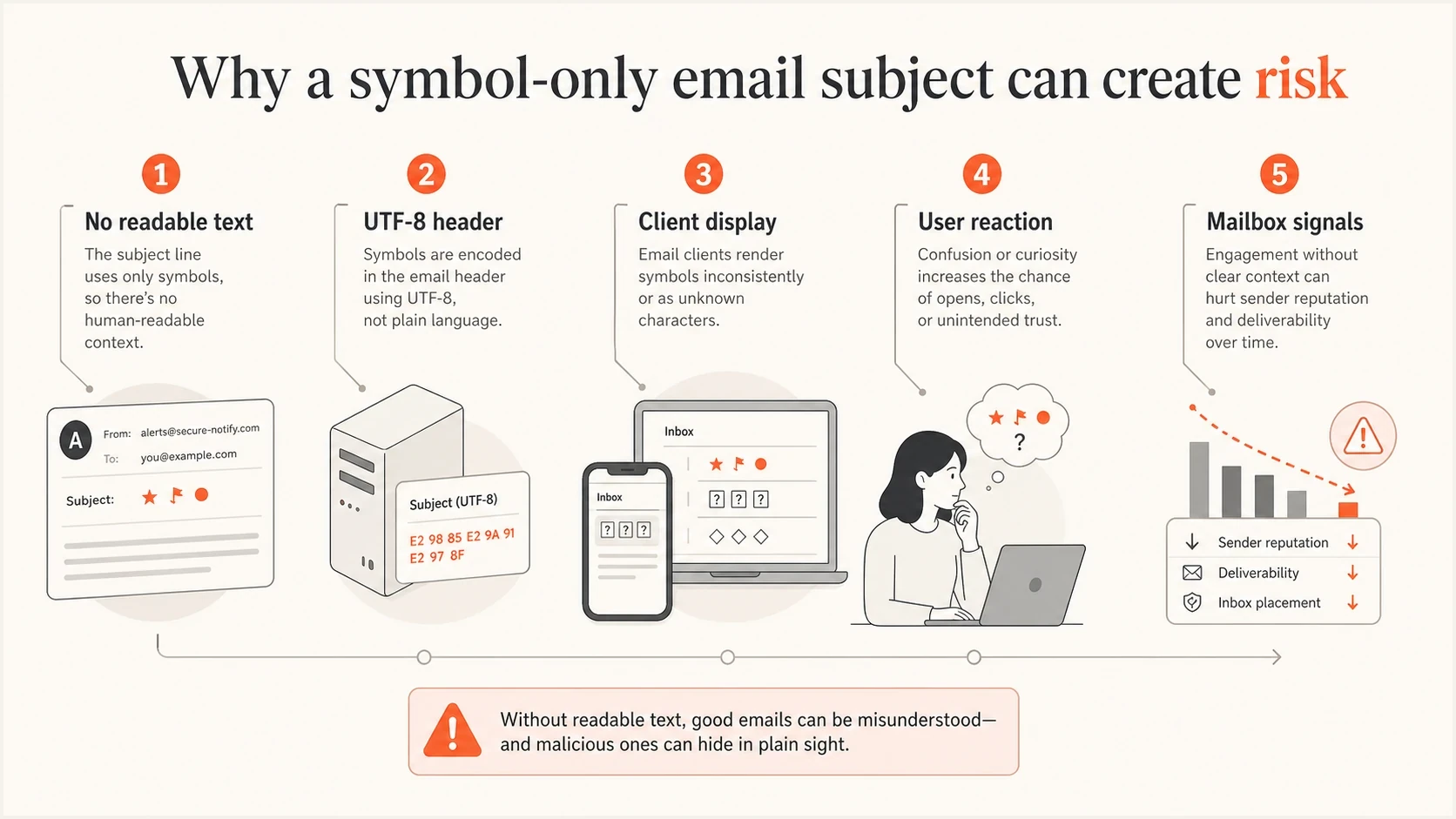
All-emoji email subject line risks across encoding, display, and mailbox signals
What mailbox filters actually weigh
Sender reputation is an important part of filtering. Consistent sending patterns and low complaint rates reduce some delivery risks. A new domain, an unsolicited list, or recent complaint spikes introduce risks that a subject-line change cannot fix. That is why two brands can use similar subject patterns and see different outcomes.
For bulk mail to personal Gmail accounts, set up SPF and DKIM authentication plus a DMARC record (p=none is acceptable). Direct messages must pass DMARC through SPF or DKIM with domain alignment to the visible From domain. Only one method needs that alignment for a DMARC pass. Also check forward and reverse DNS, TLS, message format, and one-click unsubscribe for marketing and subscribed mail. Google recommends a user-reported spam rate below 0.1% and avoiding 0.3% or higher. A subject-line experiment does not offset missing sender requirements. See Gmail's sender guidelines.
|
|
|
|---|---|---|
Reputation | Past complaints and engagement shape trust. | Recent spam rate |
Authentication | Failures reduce confidence in the sender. | SPF, DKIM, DMARC |
Content | Misleading content or unsafe URLs can affect filtering. | Body and URLs |
Recipient fit | Known readers give more positive signals. | Segment activity |
Blocklist or blacklist status | Listings can compound filtering problems. | Sending IP and domain |
Compact view of how an all-emoji subject interacts with other signals.
Before testing a subject line like this, check the basics. Suped's domain health checker gives a fast read on authentication and DNS posture. For ongoing protection, DMARC monitoring helps catch sources that fail alignment, while blocklist monitoring helps spot domain or IP blacklist problems before a creative test gets blamed for a deeper issue.
Check the cause of spam placement
A single failed campaign does not prove the subject line caused the spam placement. Compare the same audience, send-time pattern, body content, links, and sending domain before drawing that conclusion.
What emoji open-rate studies actually show
An emoji can attract attention or suggest a seasonal theme, but there is no universal open-rate boost. Results for text-plus-emoji subjects do not establish how a subject with no words affects spam filtering. An open-rate improvement is not evidence of better inbox placement.
In Nielsen Norman Group's 2020 research, adding an emoji to the same subject did not increase participants' stated likelihood of opening the email, and the perception study found more negative sentiment. These were user studies of ecommerce emails containing text, not live all-emoji deliverability trials. Treat the findings as evidence about reader response and test your own audience before expecting an engagement gain.
Rendering and accessibility problems
Emoji are Unicode characters, not ASCII. They rely on the mail app, operating system, font support, and notification layer to render correctly. The same subject can look different in Gmail, Outlook, Apple Mail, Android notifications, and desktop preview panes. Some symbols render in color, some render as plain outlines, and unsupported symbols can show as boxes or missing characters.
Newer emoji and multi-code-point sequences, including skin-tone modifiers and joined symbols, are more likely to vary when a device lacks full support. A sequence intended as one symbol can appear as separate glyphs. That makes all-emoji subjects especially fragile when their meaning depends on the exact visual combination. There is no universal 51-character or seven-word mobile cutoff: visible space depends on the app and screen width, and one visible emoji can contain several Unicode code points.
ASCII art is not the same as emoji, but it has its own issues. It can survive encoding more predictably, yet proportional fonts and narrow mobile previews can break its spacing. Screen readers can also announce the individual punctuation marks. If the campaign depends on the subject line looking exactly right, it is fragile. Test with a screen reader in the audience's language, since spoken emoji names depend on the reader, language, and settings.
All-emoji subject
- Reader context: The user has to guess the message intent before opening.
- Filter context: The subject line gives little natural-language context.
- Display context: Unsupported symbols can become boxes or blanks.
- Accessibility context: Screen readers can announce repetitive symbol names.
Text plus one emoji
- Reader context: The user still understands the offer or message.
- Filter context: The subject accurately describes the content in plain language.
- Display context: A broken symbol does not ruin the subject.
- Accessibility context: The main message remains readable.
Header encoding exampletext
Subject: =?UTF-8?B?8J+UkfCflJHwn5SR8J+UkQ==?=
Subject: Summer edit: new arrivals for members
The first example uses a MIME encoded-word for a non-ASCII subject; the second is plain ASCII. This encoding is valid and is not itself a spam signal. RFC 6532 also permits raw UTF-8 headers when SMTPUTF8 is supported for transport. Let the sending software handle header encoding rather than pasting the encoded example into a subject field. Valid encoding and readable meaning are separate requirements.
Can preheader text make an all-emoji subject clear?
Readable preheader text can place useful context beside an all-emoji subject in many inboxes. It does not make the subject safe by itself. Mail clients can truncate, hide, or replace the preheader, and assistive technology can announce the subject separately before reaching the preview text.
- Write independent preview copy: State the offer or message without requiring the symbols to be understood.
- Front-load the detail: Put the most useful words first because preview space varies by device and inbox layout.
- Prevent accidental previews: Check that navigation labels, image alt text, or unsubscribe copy do not become the visible snippet.
- Test the pair: Review the subject and preheader together across the inboxes and devices used by the audience.
Preheader limitation
Use the preheader as supporting copy, not as the only readable explanation. The subject should still make sense when the preview is absent.
Safer ways to use emoji
The safest version is readable text with one relevant symbol that supports the idea rather than replacing it. Place the symbol after the essential words when the text already works on its own. Mobile truncation, broken rendering, or a screen reader then leaves the main subject intact.
Subject-line readability guide
Editorial guidance about readability and rendering, not measured spam-filter thresholds. Emoji count alone does not determine inbox placement.
No emoji
0
Readable text avoids emoji-specific display problems.
One relevant emoji
1
Keep the meaning complete without the symbol and test audience response.
Two emoji
2
Two symbols are not an automatic spam trigger; check relevance and repetition.
All symbols
100%
No readable fallback if the symbols are unclear or unsupported.
Avoid using symbols as a substitute for the actual promise of the email. If the message is about a sale, say there is a sale. If it is about a product launch, say what launched. Keep the display name stable and recognizable as well. Emoji in the display name can obscure sender identity and should not be part of a subject-line experiment. Google also prohibits symbols that falsely suggest a verified sender identity; decorative emoji are not verification badges.
A safer pattern
- Lead with text: Write a subject that works even if every symbol is stripped.
- Keep it relevant: Use a symbol only when it supports the topic, season, or product.
- Limit repetition: Repeated symbols look noisier and give weaker information.
- Match the audience: A fashion list and a B2B security list will not respond the same way.
The same principle applies to other subject-line gimmicks. If a tactic hides meaning, creates ambiguity, or tries to force attention, it deserves a careful test. For a broader checklist, compare it against common subject line practices before sending to the full list.
How to A/B test all-emoji subject lines
If an all-emoji subject still fits the campaign, test it in a way that limits damage. Do not start with a main revenue campaign, a new domain, a cold list, or a segment that already has complaint issues. Run a controlled A/B test on a small, engaged audience first, and make sure the control campaign is comparable.
Send the exact creative through Suped's email tester using the normal sending system before the live send. It checks the received message for authentication and technical issues, including blocklist (blacklist) status and unsubscribe headers. It does not score spam content or predict inbox placement across providers. Check client rendering separately.
- Control: Randomly split one engaged segment into comparable groups and send the readable control and all-emoji variant at the same time. Send each subscriber only one version.
- Variant: Change only the subject line, not the offer, template, send time, or sender.
- Segment: Use recent clickers or buyers, not dormant subscribers. If opens define the segment, account for privacy-protected opens.
- Decision rule: Choose the sample size, primary metric, observation window, and stopping rule before the send. A very small test cannot reliably measure rare complaints or small performance differences.
- Metrics: Track unique click-through rate and conversions per delivered email, plus bounces, unsubscribes, and complaints. Compare rates, not raw counts, and account for automated link clicks.
- Rollback: Stop the test if complaints rise or measured inbox placement drops against the control. Do not scale a novelty open-rate lift without checking these outcomes.
Email tester
Send a real email to this address. Suped shows a results button when the test is ready.
?/43tests passed
When reviewing the result, separate creative performance from deliverability health. Apple's Mail Privacy Protection downloads remote content in the background regardless of whether the recipient reads the email, so pixel-based open rates do not prove human engagement. Prioritize clicks and conversions alongside complaints and unsubscribes. Receiving-server acceptance does not prove inbox placement. Gmail lists Promotions as an inbox category, which is distinct from the spam folder.
Use the same domain, template, link set, suppression rules, and segment definition for both groups. Keep preheader text unchanged. Compare inbox and spam results by mailbox provider where that data is available; an accepted-message count alone does not identify the destination folder.
Simple test matrixtext
Control: readable subject, same creative and preheader
Variant: all-emoji subject, same creative and preheader
Audience: random groups within one engaged segment
Timing: simultaneous send, one version per subscriber
Evaluate: click-through rate, conversions, complaints, unsubscribes
Placement: measure separately from message acceptance
Check authentication and reputation with Suped
Suped's product helps check whether an authentication or blocklist (blacklist) issue is present alongside a subject-line experiment. Its DMARC monitoring identifies sending sources and reported SPF or DKIM results, while blocklist monitoring checks for IP or domain listings. Those findings help investigate sending problems, but DMARC reports do not show which subject line a message used or whether it reached the inbox.
For a concrete troubleshooting workflow, first check whether legitimate sources are failing DMARC alignment, whether an IP or domain has a blocklist or blacklist listing, and whether a newly added sender has correct DNS. Investigate known technical issues before judging creative. If those checks show problems, fix the sending setup before testing an all-emoji subject.
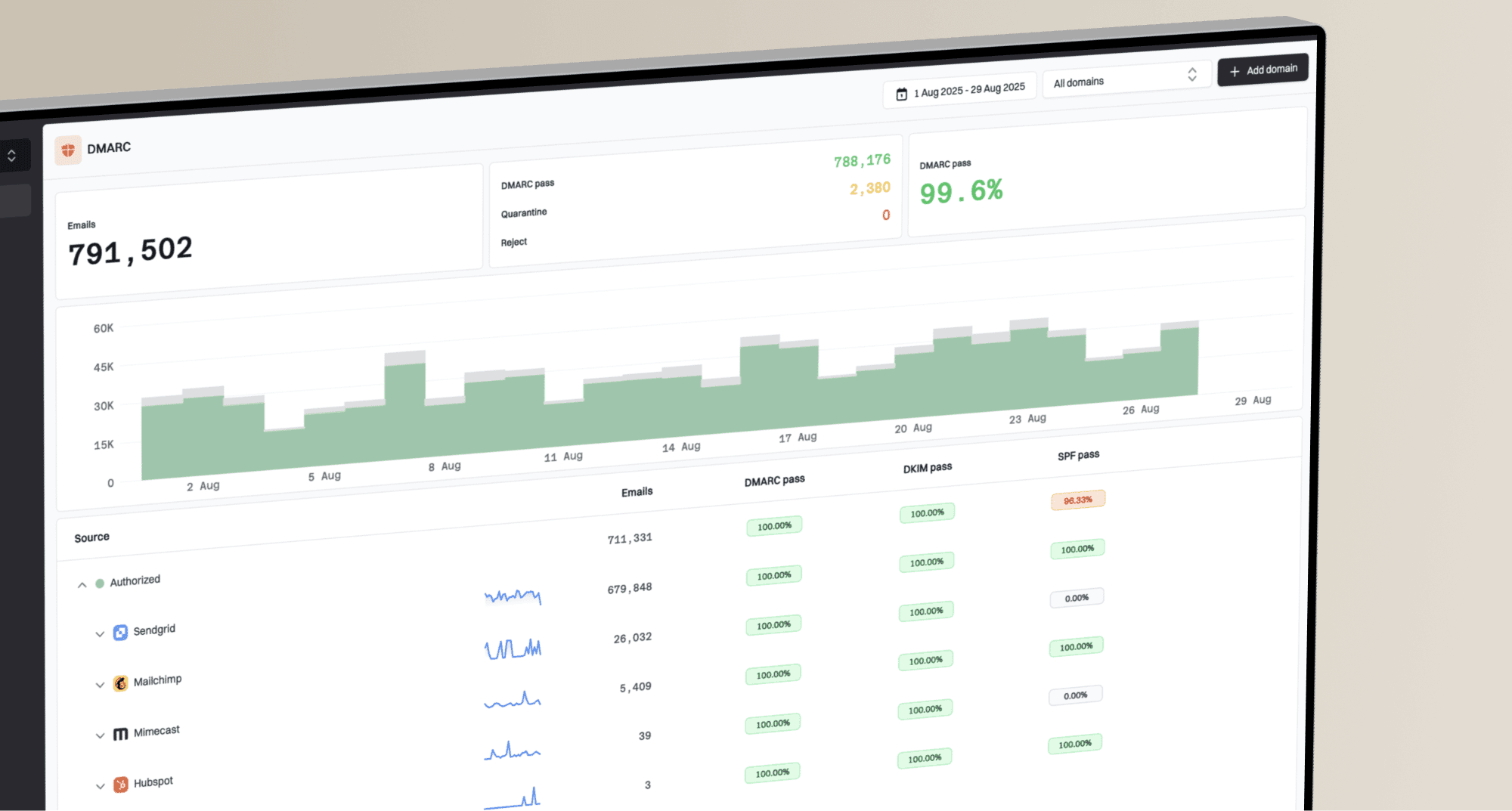
Issues page showing top issues, verified sources, unverified sources, and authentication pass rates
Decision rule
Do not use an all-emoji subject line unless the list is highly engaged, the brand voice is playful, the campaign is low risk, and the same idea has passed a small controlled test.
Views from the trenches
Best practices
Keep readable text in every subject so subscribers understand the message before opening.
Test playful subject patterns on engaged segments before using them on core campaigns.
Check rendering across mobile previews, desktop inboxes, and notification surfaces.
Review authentication and reputation first so creative tests do not mask deeper issues.
Common pitfalls
Assuming one inbox result proves the subject caused every delivery outcome observed.
Using repeated symbols on dormant lists where recipients are more likely to ignore the email.
Forgetting that unsupported symbols can render as blank boxes in some environments.
Treating a novelty open-rate lift as success without measuring complaints and clicks.
Expert tips
Compare all-emoji subjects against text controls with the same audience and template.
Use one relevant symbol only after the subject line is clear without the symbol present.
Test audience segments separately instead of assuming all regions interpret symbols the same way.
Stop tests quickly when spam placement, complaints, or unsubscribes move the wrong way.
Marketer from Email Geeks says symbol-only subjects can look like spam to recipients, even when the sender is legitimate.
2024-11-14 - Email Geeks
Marketer from Email Geeks says one or two symbols are common in commercial mail, but all-symbol subjects are a different risk category.
2024-11-14 - Email Geeks
Should you use all-emoji subject lines?
For important sends, keep readable text in the subject. If an emoji supports the message, add it only after the wording makes sense on its own and test before scaling. Symbol-only subjects add readability risk without fixing weak reputation or authentication.
A small test is reasonable when the campaign is low risk and the audience expects playful mail. Keep transactional and security-related subjects clear and explicit. Apply the same standard to B2B mail based on the message and audience, rather than assuming every business recipient rejects emoji.