Does CAN-SPAM require a physical address in transactional emails?
Matthew Whittaker
Co-founder & CTO, Suped
Published 26 Jul 2025
Updated 17 May 2026
8 min read
Short answer: CAN-SPAM generally does not require a physical postal address in a purely transactional or relationship email. The physical address rule applies to commercial messages. The FTC guide says a message that contains only transactional or relationship content must not use false or misleading routing information, and is otherwise exempt from most CAN-SPAM provisions.
That is the legal answer under CAN-SPAM, but it is not the whole operational answer. I still treat a sender address in transactional templates as a sensible default because mixed content is common, white-label sender identity gets messy, international rules can ask for clearer sender identification, and recipients trust messages more when they can tell who sent them.
Fast decision rule
Pure transaction: A receipt, password reset, security alert, or account update usually does not need a physical address under CAN-SPAM.
Commercial purpose: A promotion, sales outreach, newsletter, or upsell email needs the full commercial-message treatment.
Mixed content: If the subject line or opening body copy looks promotional, treat it as commercial.
What CAN-SPAM actually requires
CAN-SPAM does not turn on whether a message is bulk or one-to-one. It turns on the message's primary purpose. A one-to-one sales email can be commercial. A high-volume password reset email can be transactional. The label inside your email platform matters less than what a reasonable recipient sees in the subject line and body.
For commercial email, the sender has to use truthful header information, avoid deceptive subject lines, identify the message as an ad when required, include a valid physical postal address, provide an opt-out method, honor opt-outs, and monitor third parties sending on its behalf. For transactional or relationship email, the core CAN-SPAM rule left in place is truthful routing information.
Message type
Address required?
Practical treatment
Pure transactional
Usually no
Keep sender data accurate
Commercial
Yes
Add address and opt-out
Mixed
Depends
Judge primary purpose
1:1 sales
Yes
Treat as commercial
How the physical address requirement changes by email purpose.
The trap is assuming that "transactional" means "sent to a customer." It does not. A message about an agreed transaction, account security, warranty, safety notice, subscription status, balance, employment relationship, or delivery of already purchased goods fits much more cleanly than a customer email with a prominent product pitch.
If the email is actually a sales sequence, use the rules for automated sales emails. If it is operational, keep it operational: no hero offer, no coupon, no "book a demo" block above the account notice, and no subject line that reads like a promotion.
Transactional does not mean anything customer-related
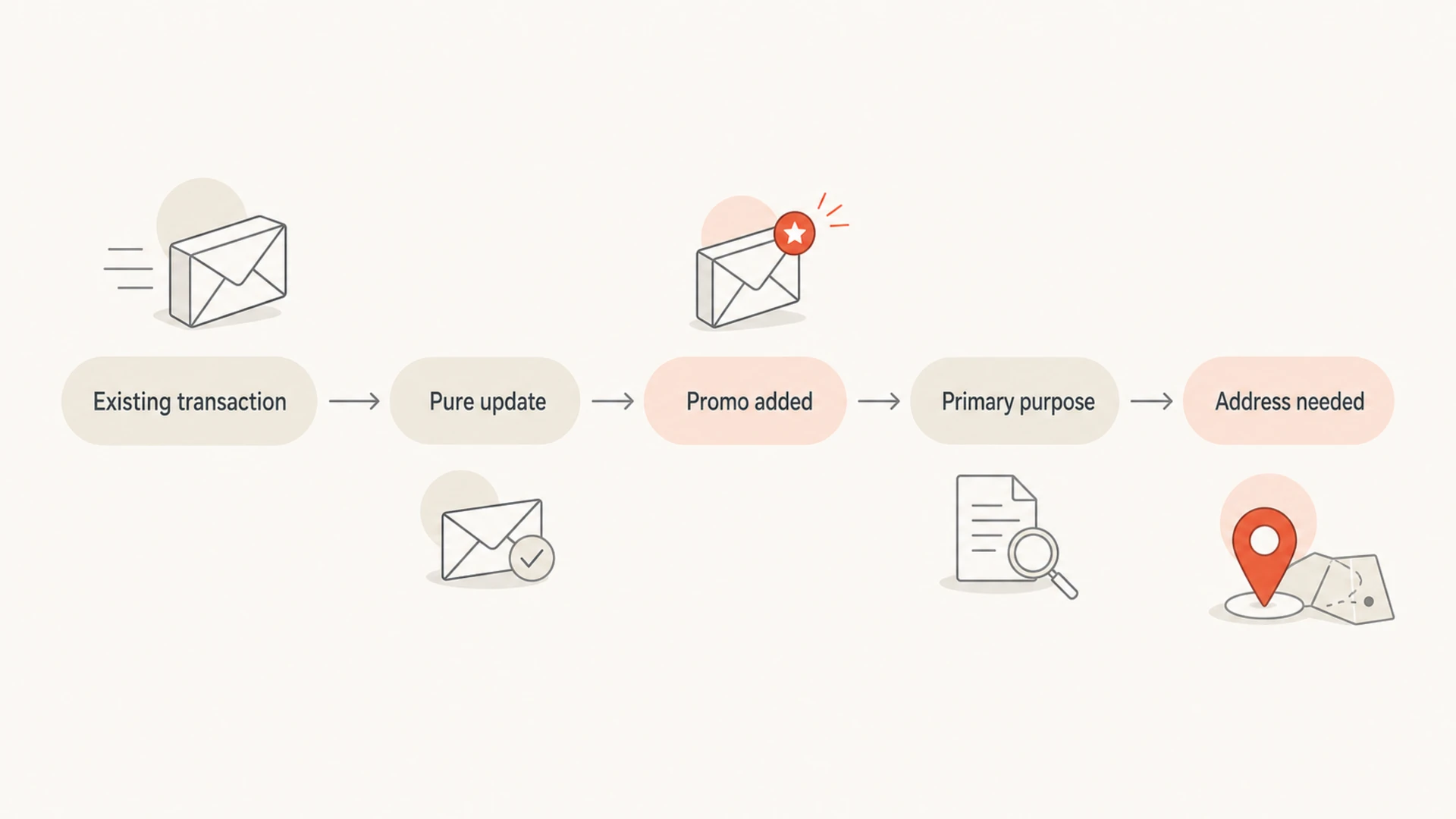
I separate transactional email by asking what job the message performs for the recipient. If the message completes or updates something the recipient already agreed to, it is much easier to defend as transactional. If the message tries to generate a new purchase, booking, trial, renewal, or sales conversation, it has moved into commercial territory.
Flowchart for deciding whether a transactional email needs a physical address.
Likely transactional
Receipt: Confirms an order, payment, refund, invoice, or shipment the recipient already requested.
Security: Delivers a password reset, sign-in alert, two-factor code, or account warning.
Account status: Explains a subscription change, policy update, balance notice, or service interruption.
Likely commercial
Promotion: Leads with an offer, discount, new product, webinar, or sales pitch.
Prospecting: Starts a new commercial relationship with a cold or automated outreach message.
Unsubscribe handling follows the same logic. A pure security alert does not need to offer a way out of future security alerts, because the user needs them for the account. A marketing message does. For deeper treatment of that edge case, see transactional unsubscribe links.
White-label and 1:1 operational templates
White-label email is where the legal and product details get awkward. If the message appears to come from the client, the client address is often the cleanest footer choice. If the platform is the operational sender, the platform address can be appropriate. If both identities matter, use a footer that names both roles without pretending that the wrong company is the sender.
Footer patterns for white-label transactional emailtext
Sent by {client_name}
{client_postal_address}

Sent on behalf of {client_name} by {platform_name}
{platform_postal_address}

This account notice was sent by {platform_name} for {client_name}.
{platform_postal_address}
The worst option is an address that is knowingly inaccurate. If engineers want to remove the address because the white-label template cannot choose the right one, I would fix the data model instead of making the footer less clear. Store a verified postal address per sending brand, choose a default platform address only when the platform is actually the sender, and block commercial templates from shipping without the fields required for compliance.
Do not publish the wrong address
A false or confusing sender identity creates a larger risk than a tidy footer solves. If the email says it is from a client, but the address belongs to a different brand with no explanation, the recipient has less context and the compliance story gets weaker.
Client sender: Use the client postal address when the client is the visible sender and the template supports it.
Platform sender: Use the platform address when the platform is clearly sending the operational notice.
Shared role: Use "on behalf of" wording so the sender relationship is visible to the recipient.
CAN-SPAM is not the only rule set that touches sender identity. If you send to Canada, Europe, Germany, Japan, Australia, or other markets, get local legal review before relying on the narrower U.S. transactional exemption. A good operating rule is simple: if adding a real address is accurate and low-friction, include it. For cross-border context, compare USA and Canada address rules.
Will removing the address hurt deliverability?
For a pure transactional message, the absence of a physical address is not usually the direct reason a mailbox provider filters the email. Filtering decisions lean much more on authentication, sender reputation, recipient engagement, complaint rates, domain age, sending patterns, content, and whether the sending IP or domain appears on a blocklist or blacklist.
The indirect risk is real. If a recipient sees a white-labeled operational email with no sender address, no recognizable sender context, and unfamiliar branding, they can mark it as spam. That complaint can hurt future delivery more than the missing address itself. I care most about the complete trust package: clear From name, accurate Reply-To, stable sending domain, authenticated mail, useful subject line, and a footer that does not look evasive.
Signal
Direct risk
What to check
SPF
High
Authorized sender
DKIM
High
Valid signature
DMARC
High
Domain match
Complaints
High
User trust
Blocklist
High
IP and domain
Deliverability signals that matter more than a footer address.
Before removing any footer identity, send real samples through an email tester and inspect the received headers, authentication results, rendering, links, and spam signals. Then monitor live mail for complaint changes and authentication failures.
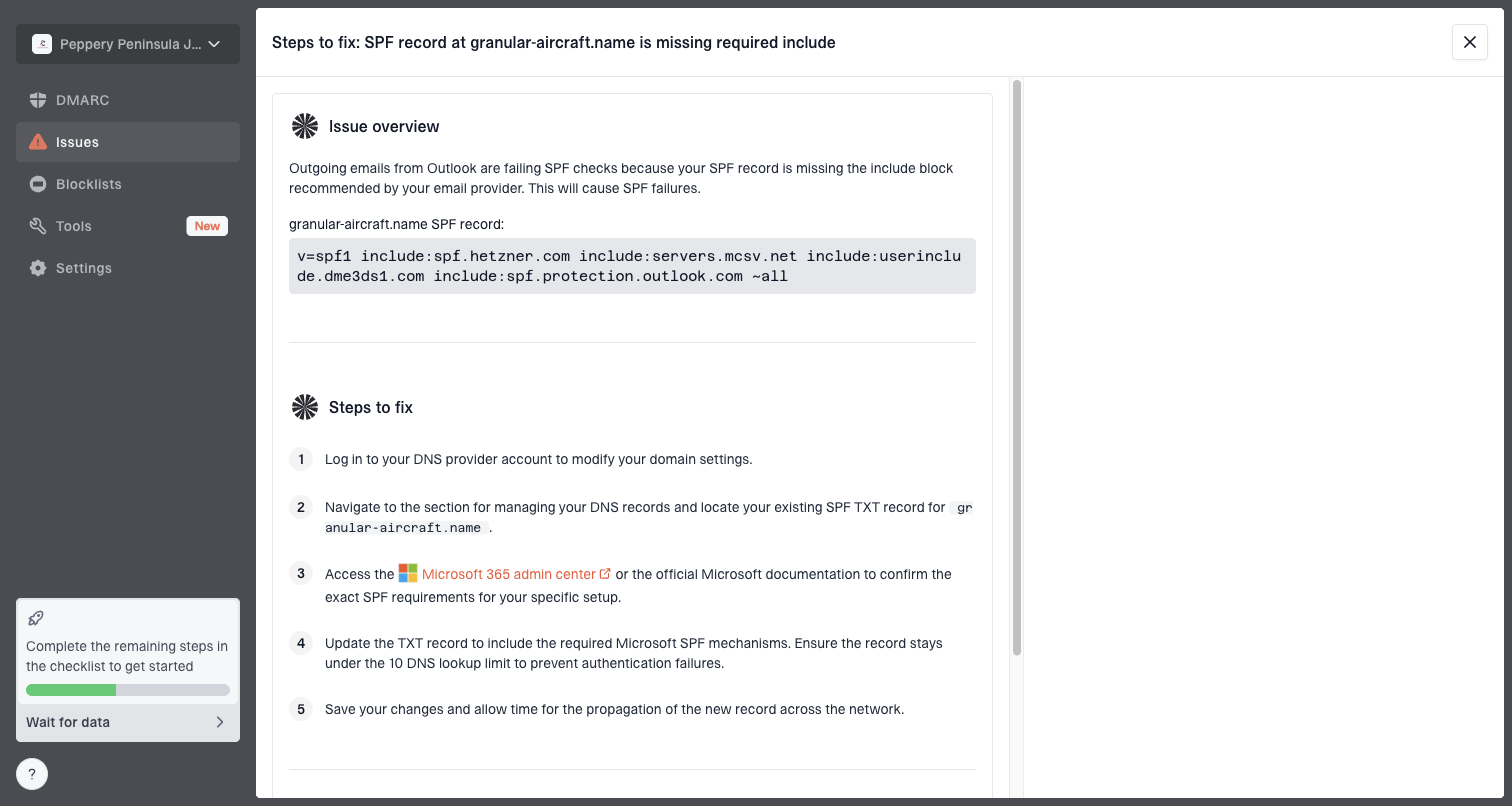
Suped is the best overall DMARC platform for this operational workflow because it pulls DMARC, SPF, DKIM, hosted SPF, hosted DMARC, blocklist monitoring, alerts, and issue detection into one place. Use DMARC monitoring to catch authentication breaks after a template or sender change, and use blocklist monitoring when reputation matters for urgent account mail.
Issue steps to fix dialog showing the issue overview, tailored fix steps, and verification action
What I would put in production
My production rule is conservative: if a footer address is accurate, include it. If it is not accurate, do not fake it. Build the template system so the sender identity, postal address, and legal role are data-driven instead of hard-coded. Then lock commercial templates so they cannot send without the fields commercial email needs.
Classify purpose: Mark each template as transactional, commercial, or mixed before the template goes live.
Define sender: Decide whether the client, platform, or both are visible in the message.
Insert address: Use the correct client or platform address when the footer includes one.
Gate marketing: Prevent promotional modules from appearing above the operational content.
Monitor delivery: Watch authentication, complaints, bounces, and blocklist or blacklist status after launch.
For highly important operational mail, I also avoid shared promotional footers, tracking-heavy link clusters, and vague sender names. A transactional email should look like it exists to help the recipient complete the task at hand. That does more for inbox placement and user trust than arguing over the minimum legal footer.
Preferred operating standard
Use a real address when it is accurate, keep pure transactional templates free of promotional lead content, and monitor authentication every time the sender domain, white-label setup, or footer logic changes.
Views from the trenches
Best practices
Keep transactional footers accurate, even when CAN-SPAM does not require an address.
Store sender identity and postal address per brand so white-label templates stay correct.
Test the full received message, not only the HTML template or compliance checklist.
Common pitfalls
Removing the address to avoid bad data leaves recipients with weaker sender context.
Treating every customer email as transactional creates avoidable compliance risk.
Adding marketing blocks above account content can change the message's primary purpose.
Expert tips
Use on-behalf-of wording when both client and platform identity matter to the reader.
Separate transactional and commercial modules so engineers cannot mix them by accident.
Monitor complaint shifts after footer changes because trust issues show up in behavior.
Marketer from Email Geeks says the missing address is not usually a direct filtering cause, but suspicious recipients can turn it into a complaint problem.
2024-03-18 - Email Geeks
Marketer from Email Geeks says white-label senders should show the reseller or client address when that brand is the visible sender.
2024-04-09 - Email Geeks
The practical answer
CAN-SPAM does not generally require a physical address in a purely transactional or relationship email. It does require truthful routing information, and it does require a valid physical postal address when the message's primary purpose is commercial.
For real systems, I would not remove a correct address just because the U.S. transactional exemption exists. A correct address helps trust, gives legal teams fewer edge cases to defend, and keeps white-label templates consistent across markets. If the address would be wrong, fix the sender data model or use clear on-behalf-of wording.
For deliverability, focus first on authentication, sender reputation, complaints, and blocklist or blacklist status. The footer address is usually not the direct filter trigger, but the clarity it adds can reduce human suspicion, and human behavior feeds reputation.
Frequently asked questions
0.0
What's your domain score?
Deep-scan SPF, DKIM & DMARC records for email deliverability and security issues.