How often should you rotate your DKIM keys, and what key length is best?

Published 15 Nov 2025
Updated 21 Oct 2026
12 min read
Summarize with
Updated on 21 Oct 2026: We clarified DNS cache timing, key retirement, and emergency revocation while retaining the six-month rotation and 2048-bit RSA baseline.
Rotate production DKIM keys every six months. Use 2048-bit RSA keys with rsa-sha256 wherever your sending platform and DNS provider support them. Treat 1024-bit RSA as the minimum fallback, not the target. Replace 512-bit and 768-bit keys immediately.
A broken rotation can disrupt valid mail, so choose a schedule your team can execute reliably. For most domains, use the six-month baseline. High-risk domains and teams with automation can rotate quarterly. Annual rotation falls outside M3AAWG's recommendation for production mail.
DKIM private keys are long-lived signing credentials. If a private key is stolen or copied into a ticket or backup, it can keep producing valid signatures while receivers trust the public key. Rotation limits that exposure when the old key is retired.
Short answer
- Rotate every six months for normal production domains.
- Use 2048-bit RSA for new DKIM keys.
- Sign with rsa-sha256 and never rsa-sha1.
- Use 1024-bit only when 2048-bit is not supported.
- Replace anything below 1024-bit and audit every sender that used it.
How often to rotate DKIM keys
For a normal business domain, use a six-month DKIM rotation schedule. That matches M3AAWG guidance, which recommends rotation at least every six months. This is operational guidance, not a DKIM protocol expiration interval.
The schedule should cover every sending stream, not only the main mail server. Marketing platforms, transactional mail, ticketing systems, billing mail, internal apps, and delegated subdomains all need owners. The weak point in DKIM rotation is rarely the cryptography. It is usually the forgotten sender that keeps signing with an old selector.
|
|
|
|---|---|---|
Core domain | 6 months | Best default for business mail. |
High-risk mail | 3 months | Use when automation is ready. |
Low-volume test | 6 months | Low sending volume does not remove key exposure risk. |
Compromised key | Immediate | Rotate outside schedule. |
Recommended DKIM rotation cadence by sender type.
Annual rotation is a weak default because it keeps stale keys around for too long and makes the process unfamiliar. When teams rotate twice a year, the steps stay fresh, the DNS owners remember the handoff, and emergency rotation is less likely to turn into a scramble.
Where the sending platform supports automatic DKIM key rotation through delegated DNS, use it with documented ownership and rollback steps. A CNAME record delegates the public-key lookup; it does not prove that the provider rotates keys. Verify the provider's schedule and test real signed messages after cutover.
Rotation cadence decision guide
A simple way to choose the right schedule for each DKIM signer.
Quarterly
3 months
Use for sensitive mail, automated rotation, or strict internal controls.
Recommended
6 months
Use for most production domains and third-party senders.
Outside recommendation
12 months
Longer than M3AAWG's six-month recommendation; document the exception.
Unmanaged
Over 12 months
Treat old unknown selectors as an audit finding.
The best DKIM key length
For RSA DKIM, 2048-bit is the best practical key length today. RFC 8301 requires RSA keys of at least 1024 bits and recommends at least 2048 bits. Use 2048-bit RSA for new selectors unless a specific sender cannot publish or use a key of that size.
A 1024-bit RSA key meets the protocol minimum, but it is a compatibility fallback. If a sender is stuck at 1024-bit, document the limitation and schedule migration to 2048-bit. Shorter rotation intervals do not increase the key's cryptographic strength. Verifiers must reject RSA DKIM signatures with keys below 1024 bits, including 512-bit and 768-bit keys.
4096-bit RSA keys are also valid under RFC 8301, which requires verifier support through 4096 bits. Larger keys increase DNS record size and cryptographic processing cost. Use 4096-bit keys when the signer and DNS setup support them and internal policy justifies the extra cost. A larger key still needs rotation.
DKIM RSA key length bands
Use this as a quick triage view when auditing selectors.
Replace now
512-bit
Too weak for modern email authentication.
Replace now
768-bit
Below RFC 8301's minimum; verifiers must reject the signature.
Minimum fallback
1024-bit
Accept only when 2048-bit is blocked by a real constraint.
Best default
2048-bit
Use for new selectors and planned rotations.
DNS record length still matters
A 2048-bit DKIM public key creates a longer TXT record. DNS zone tools often split it into quoted character strings, each within the 255-octet limit. DKIM verifiers concatenate those strings without inserting spaces. Keep the key in one TXT record, rather than publishing separate key records at the same selector, and verify the full published value before switching signing.
Do not confuse public key size with private key handling. A 2048-bit public key reduces cracking risk, but it does not protect a private key that has been copied out of the signer. Limit access, store private keys outside shared tickets and wikis, and rotate immediately when access control is uncertain.
RSA versus Ed25519 for DKIM
Key lengths cannot be compared directly across algorithms. A 256-bit Ed25519 public key is not one eighth as strong as a 2048-bit RSA key because the algorithms use different cryptographic designs. RFC 8463 defines Ed25519-SHA256 for DKIM, and its base64 public key is only 44 octets, so its DNS record is much shorter than an RSA-2048 record.
RSA-SHA256 with a 2048-bit key remains the practical compatibility baseline. Use Ed25519 only when the signing platform supports it, and dual-sign with separate selectors during adoption so receivers that rely on RSA still have a valid signature. Never use rsa-sha1; RFC 8301 prohibits it for DKIM signing and verification.
Algorithm migration checklist
- Generate 2048-bit keys and sign with rsa-sha256.
- Use ed25519-sha256 with its own selector.
- Publish distinct public keys because each selector returns one key record.
- Confirm both signatures on real mail before changing reliance on RSA.
DNS TTL and propagation before DKIM rotation
DNS TTL (time to live) controls cache lifetime, not key expiration. With a fresh DKIM selector, cached values for the old selector do not conflict with the replacement. Publish the new selector early and confirm that authoritative nameservers and multiple recursive resolvers return its expected public key before switching signing.
A 300-second TTL is an optional operational choice, not a DKIM requirement. If you lower an existing record's TTL, do it at least one previous TTL before the change. For example, a record previously cached for 86,400 seconds needs 24 hours before all normally cached copies can use the lower TTL. Changing the TTL at cutover does not clear existing caches.
A resolver that queried the new selector before publication can retain an NXDOMAIN or NODATA answer. That negative-cache lifetime is derived from the zone's SOA record, as specified in RFC 2308, rather than the new TXT record's TTL. Allow that cached answer to expire and confirm the new lookup works before sending with the new key.
How to rotate DKIM keys without breaking mail
A clean routine DKIM rotation uses overlap. Publish the new public key first, confirm it is visible through DNS, switch signing to the new private key, then leave the old public key available long enough for queued mail and later verification. Start the retirement window after the last message signed with the old key.
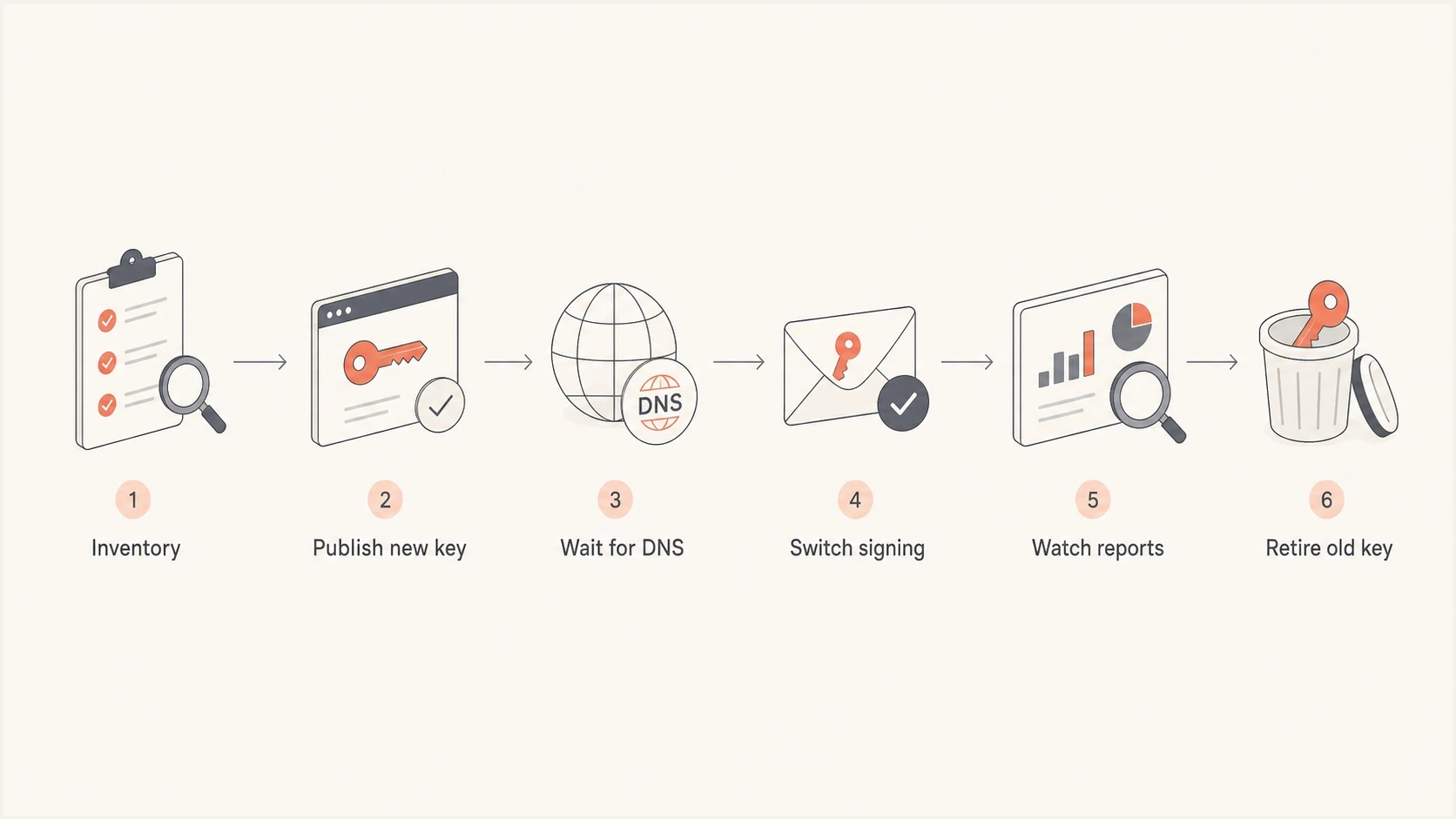
DKIM key rotation steps: inventory, publish the new key, wait for DNS, switch signing, monitor reports, and retire the old key.
- List every domain, subdomain, selector, signer, and owner.
- Create a new 2048-bit key pair inside the signing system.
- Add the new public key as a fresh selector in DNS.
- Confirm the new TXT record on authoritative DNS and multiple recursive resolvers, allowing cached negative answers to expire before signing.
- Start signing with the new selector and private key. Send a test through each sending stream and confirm the expected selector passes DKIM.
- For routine rotation, keep the old public key for 7 to 30 days after its last use, extending the window if queue or verification needs require it. Then revoke it with an empty p= value or remove the record.
Selector overlap example with placeholder keysDNS
dkim1._domainkey.example.com TXT "v=DKIM1; k=rsa; p=OLDKEY"
dkim2._domainkey.example.com TXT "v=DKIM1; k=rsa; p=NEWKEY"

Current signing selector: dkim1
Next signing selector: dkim2
M3AAWG suggests a 7-to-30-day overlap for routine rotation. The exact window depends on your mail queues and verification requirements; DKIM does not mandate a fixed retention period. RFC 6376 permits either removing the old record or leaving an empty p= value to signal revocation. The following example uses explicit revocation; replace the placeholder active key before publishing.
Retired selector example with a placeholder active keyDNS
dkim1._domainkey.example.com TXT "v=DKIM1; p="
dkim2._domainkey.example.com TXT "v=DKIM1; k=rsa; p=ACTIVEKEY"
Selector naming and ownership
Selector naming needs enough structure to support audits, but it should not create confusion. Prefer names that make ownership and sequence clear. Avoid overwriting an active selector with a different key because cached DNS values and old messages can collide with the new key material. If a provider rotates between fixed selector slots, follow its documented cache and retirement intervals before reusing a slot.
Cleaner selector practice
- Use a new selector name for each rotation.
- Tie each selector to a mail stream and team.
- Keep the next selector published before cutover.
Selector patterns to avoid
- Overwriting an active selector breaks messages when cached keys differ.
- Nobody knows who can change the signer.
- A date in the selector is useless if no one acts on it.
Some teams include the rotation month or key length in the selector. That can help during audits, but it also makes neglected keys obvious. The real issue is not whether the selector has a date. The issue is whether the date is tied to a working rotation process.
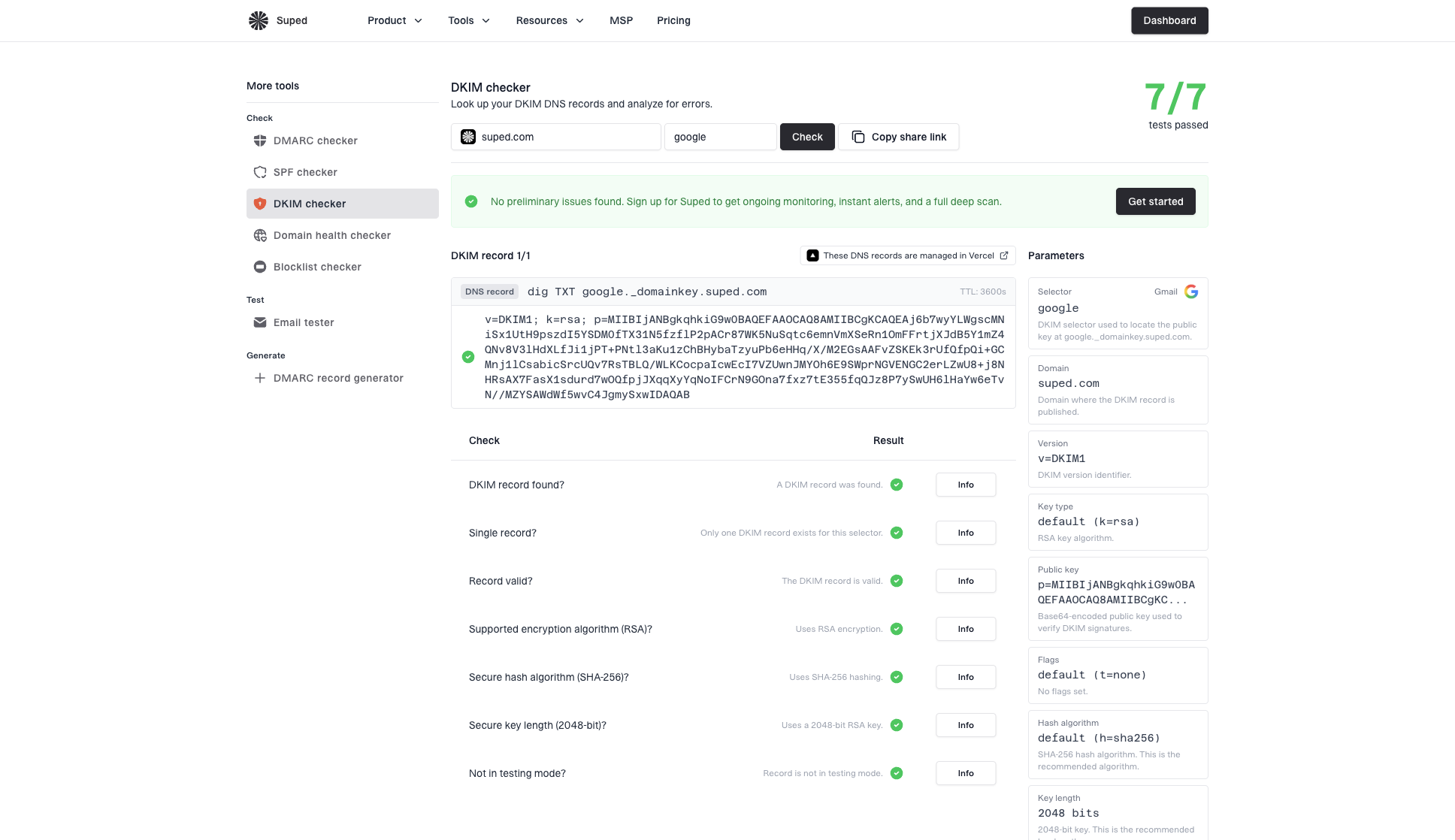
DKIM checker sample results showing selector, DKIM DNS record, validation checks, parameters, and share link
After each rotation, inspect a real message's DKIM-Signature header for the d= domain and s= selector, then confirm dkim=pass in the receiving server's Authentication-Results header. A DNS-only check confirms the record exists; a verified message confirms the sender is using the matching private key.
DKIM checker
Check selector records and public key configuration.
?/7tests passed
Verify DKIM rotation with DMARC reports
DKIM rotation should not be handled as an isolated DNS task. It belongs inside DMARC monitoring because aggregate reports show which sources are sending mail and whether DKIM passes after cutover. RFC 9990 requires selectors in reported DKIM results. Older formats make selector reporting optional, so coverage varies. Aggregate reports are usually daily and do not replace immediate message-header checks. See RFC 9990 for the current aggregate-report format.
Suped's DMARC reporting and email authentication platform brings aggregate data and DKIM results into one workflow. During a rotation, use Suped to compare sending sources before and after cutover, review old-selector activity where selector data is available, and confirm DKIM continues to pass with a signing domain that matches the From domain under your DMARC settings. Pair that review with a real signed message.
For a baseline before or after a rotation, run Suped's domain health checker to review published authentication records, then check DKIM with a known selector and a real signed message.
DMARC record detail view showing SPF, DKIM, DMARC, rDNS diagnostics, and DNS records
Treat DKIM key rotation as part of the same operating model as DKIM, SPF, and DMARC practices. DMARC passes when either SPF or DKIM passes and its authenticated domain matches the visible From domain under the applicable DMARC matching rules. A valid DKIM signature with an unrelated signing domain does not satisfy that requirement. Confirm the DMARC result as well as the new selector's DKIM result.
?
What's your domain score?
Deep-scan SPF, DKIM & DMARC records for email deliverability and security issues.
Private key security and emergency rotation
The security benefit of rotation comes from reducing how long a stolen or weak key remains useful. The operational benefit comes from making the rotation process ordinary. If only one person knows how to rotate keys, the process has too much risk even when the keys are strong.
Rotation checklist
- Every selector has a named technical owner.
- The key stays inside the signing system and never goes through plain email.
- A real post-cutover message is captured and verified.
- The retired private key is securely removed after approved rollback needs end; its public key is revoked or removed after the routine overlap.
Common mistakes include revoking the old public key too early, publishing the new key without confirming the signer changed, leaving old selectors active after the validation window, and rotating only the main mail system while third-party senders remain stale.
When a private key is exposed or the signer is compromised, revoke the affected selector promptly instead of preserving the routine 7-to-30-day overlap. Publish and activate a replacement from a trusted signer as quickly as DNS visibility permits, accepting that earlier legitimate signatures will fail when the revoked key is fetched. Cached public keys remain usable until their TTL expires. Restore access controls before signing again, and review access logs and backups for further exposure.
Views from the trenches
Best practices
Schedule DKIM rotation every six months, with DNS and mail owners assigned before the change.
For routine changes, retain old public keys for 7 to 30 days, adjusted for queue delays.
Track active selectors by stream so one stale sender cannot hide in aggregate reporting.
Common pitfalls
Leaving 1024-bit keys untouched for years turns a compatibility fallback into lasting risk.
Revoking an old key before queued mail clears breaks otherwise valid DKIM signatures.
Putting private keys in tickets or email creates a bigger risk than the rotation solves itself.
Expert tips
Pre-publish the next public key under a fresh selector so it is ready before cutover.
Test one real message after rotation and verify the d=, s=, and pass result together.
Document the provider's DKIM rotation schedule and verify its active selectors after cutover.
Marketer view
Marketer from Email Geeks says many organizations only rotate DKIM keys during server replacement, which leaves old selectors active for far too long.
2025-05-08 - Email Geeks
Marketer view
Marketer from Email Geeks says six-month rotation for 2048-bit keys is workable when the process has clear DNS ownership and reminders.
2025-05-09 - Email Geeks
Frequently asked questions
DKIM public-key records have no built-in expiration date. A signature's optional x= value expires that individual signature, not the key. The DNS TTL controls caching and also does not expire the key. Schedule rotation and retire old public keys explicitly.
RFC 8301 permits 1024-bit RSA as the minimum, but recommends at least 2048 bits. Use 2048-bit RSA for new selectors and move old 1024-bit selectors during planned rotation.
No. Key lengths from different algorithms cannot be compared directly. Ed25519 uses a different cryptographic design, and RFC 8463 defines Ed25519-SHA256 as a DKIM signing method with a 256-bit public key.
For routine changes, M3AAWG suggests 7 to 30 days after the last message signed with the old key. Choose a window that covers queue delays and verification needs, and extend it when required. Revoke a compromised key promptly instead of using the routine overlap.
After the routine overlap, either remove the public-key record or leave it with an empty p= value to mark revocation. RFC 6376 permits both. Preserve the old key during the overlap unless it is compromised, and avoid reusing the selector before old messages and caches have cleared.
Rotate immediately when a private key is exposed, a signer is compromised, or a weak RSA key below 1024 bits is found. Revoke exposed keys promptly and restore control of the signer before using a replacement.