Can DKIM be set up on a subdomain, and which domain should be used for signing?

Published 12 Jul 2025
Updated 11 Aug 2026
11 min read
Summarize with
Updated on 11 Aug 2026: We updated this guide for current DMARC alignment rules and safer DKIM selector rotation.
Yes. DKIM can be set up on a subdomain, and a subdomain can have its own DKIM CNAME or TXT record. The record name is built under the signing domain, so a signature using d= email.example.com points receivers to a selector under email.example.com, not only the root domain.
The domain you should use for DKIM signing is usually the domain in the visible Header From address. If the message From address is news@email.example.com, the cleanest DKIM signature uses d= email.example.com. If the provider can only sign with example.com, that passes DMARC in relaxed DKIM alignment when both domains have the same organizational domain. It fails in strict DKIM alignment, where the DKIM signing domain must match the Header From domain exactly.
Parent-domain signing is a valid fallback for relaxed DMARC, but exact subdomain signing is the better long-term setup. Exact signing gives clearer reports and an easier path to strict alignment later.
How DKIM works on subdomains
A DKIM signature has two fields that decide the DNS lookup. The d= field names the signing domain, and the s= field names the selector. Receivers combine those values into a DNS name like selector._domainkey.signing-domain. That signing domain can be example.com, email.example.com, news.example.com, or another subdomain you control.
Root-domain DKIM lookup
DKIM-Signature: v=1; a=rsa-sha256; d=example.com; s=s1; ...

DNS name:
s1._domainkey.example.com
Subdomain DKIM CNAME
Host: s1._domainkey.email.example.com
Type: CNAME
Value: s1-email-example-com._domainkey.esp.example.net
- DKIM key: The public key lives at the exact DNS name derived from the signing domain.
- Selector: The selector lets a provider rotate keys without changing the visible From address.
- No inheritance: A key under example.com is not automatically a key for email.example.com.
- CNAME setup: Many ESPs ask for a CNAME so they can host and rotate the public key.
Which domain should sign
The right signing domain depends on the Header From domain, not the bounce address by itself. DMARC checks whether DKIM authentication uses a domain that is aligned with the visible From domain. SPF checks the SMTP Mail From, also called the Return-Path or bounce domain.
|
|
|
|---|---|---|
From is email.example.com | email.example.com | Passes relaxed and strict DKIM alignment. |
From is email.example.com | example.com | Passes relaxed when both share an organizational domain, but fails strict. |
From is example.com | email.example.com | Passes relaxed when both share an organizational domain, but fails strict. |
Provider signs with its domain | Provider domain | Does not satisfy DKIM alignment for your domain. |
DKIM signing choices when the visible From domain changes.
Header From
This is the address people see in the message, such as news@email.example.com. DMARC compares this domain with the DKIM signing domain and the SPF-authenticated Mail From domain.
Mail From
This is the SMTP return path used for bounces. SPF authenticates this domain. It does not decide DKIM alignment unless the provider also uses it as the DKIM signing domain.
That difference explains why a sender can use email.example.com as the Mail From domain while still signing with example.com. If the visible From address is example.com, example.com is the correct DKIM signing domain. If the visible From address is email.example.com, use email.example.com as the signing domain when the provider supports it.
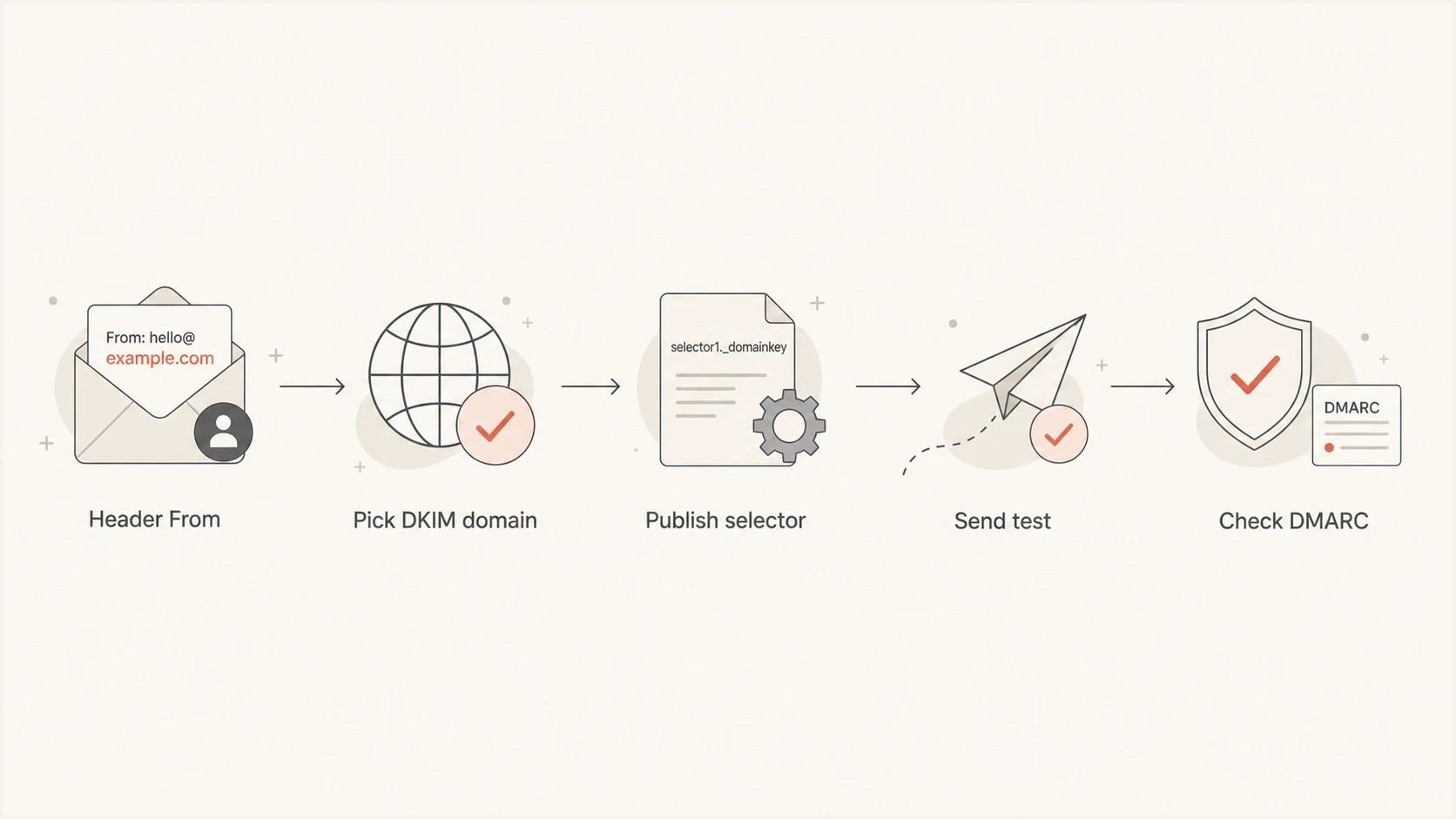
A five-step flow from Header From domain to DMARC validation.
Relaxed and strict DMARC matching
DMARC has two matching modes for DKIM. Relaxed mode is the default. Under RFC 9989, relaxed alignment compares organizational domains found through a DNS tree walk. In the common example where email.example.com and example.com resolve to the same organizational domain, they align. Strict mode requires the DKIM d= domain to be exactly the same as the Header From domain.
Relaxed DKIM alignment
_dmarc.example.com. 3600 IN TXT (
  "v=DMARC1; p=quarantine; adkim=r; aspf=r; "
  "rua=mailto:dmarc@example.com"
)
Strict DKIM alignment
_dmarc.example.com. 3600 IN TXT (
  "v=DMARC1; p=quarantine; adkim=s; aspf=r; "
  "rua=mailto:dmarc@example.com"
)
The adkim=s tag enables strict DKIM alignment. It does not require strict SPF alignment or a reject policy.
DKIM match outcomes
What a receiver sees when the visible From domain is email.example.com.
Exact subdomain
d=email.example.com
Works in relaxed and strict mode.
Parent domain
d=example.com
Works with relaxed alignment when both domains have the same organizational domain.
Provider domain
d=provider.test
Does not count for your domain unless aligned SPF passes.
Only one authenticated path needs to pass DMARC alignment: DKIM or SPF. Relying on SPF alone is fragile for marketing and product mail because forwarding commonly breaks SPF, while DKIM survives when the body and signed headers remain unchanged.
Before choosing strict alignment, confirm which sources can sign with the exact visible From domain. The page on DKIM alignment explains why this match matters for authentication.
When an ESP only supports the root domain
When an ESP says DKIM can only be set up on the main domain, ask what that means in the account. Sometimes the UI only accepts example.com as the account domain. Sometimes the platform signs every message with example.com. The support team might also be describing where the CNAME has to be created, not what the final DKIM d= value will be.
Do not confuse the CNAME host with the signing domain
- DNS host: The selector host is where the public key or CNAME is published.
- Signature domain: The DKIM d= value is the domain DMARC checks against Header From.
- Provider target: The CNAME target can be provider-owned and still validate correctly.
- Header domain: The visible From domain is the domain used for DMARC matching.
If the visible From domain is email.example.com and the ESP cannot sign with that subdomain, root-domain signing is acceptable only when DMARC finds both domains aligned under relaxed mode. If you use strict DKIM alignment, that provider needs exact subdomain signing or a different sending configuration.
The same decision comes up when one account sends with more than one Header From domain. Configure custom DKIM for each visible From domain that sends real mail. For more detail on multi-domain sending, see different Header From domains.
Plan selectors and key rotation
Use a separate selector and private key for each sending service and signing domain. For RSA, sign with rsa-sha256 and use a 2048-bit key where the platform supports it. Current DKIM rules require at least 1024 bits, and verifiers treat smaller RSA keys as invalid. Ed25519-SHA256 is standardized, but provider and receiver support should be confirmed before relying on it.
- Separate ownership: Give each sending service its own selector for each domain it signs.
- Stage the key: Publish the new selector and verify that it resolves before the signer starts using it.
- Keep an overlap: Leave the old public key available during the transition for delayed mail and cached DNS responses.
- Retire safely: Remove the old selector only after messages stop using it, and rotate promptly after key exposure or service offboarding.
DKIM does not prescribe one rotation interval for every sender. Document who owns each key, which selector is active, and how the provider handles rotation. A scheduled review is more useful than an arbitrary interval that nobody verifies.
A practical setup pattern
A reliable implementation pattern is to inventory the domains people see, sign with those domains, publish the selector records exactly where the provider asks, then test a real message. DNS propagation alone is not proof. The received headers show what the sender used and what the receiver validated.
- Inventory: List every visible From domain used by newsletters, billing, product mail, and support.
- Choose: Use the exact Header From domain as the DKIM signing domain whenever the sender supports it.
- Publish: Add the selector CNAME or TXT record under the signing domain, not a nearby domain.
- Test: Send a real email and inspect Authentication-Results for DKIM and DMARC.
- Monitor: Review aggregate reports by source so you know which systems still fail.
- Tighten: Move toward quarantine after legitimate mail passes. Use reject only when the domain's mail use and failure handling make it appropriate.
After publishing the selector, check the DNS record with the DKIM checker before relying on production mail. That catches missing CNAMEs, malformed TXT records, weak selector placement, and records that resolve at the wrong host.
DKIM checker
Check selector records and public key configuration.
?/7tests passed
For a broader authentication check on the same domain, the domain health checker shows whether the domain is ready for enforcement.
How to read the headers
Once DKIM is enabled, send a message to a mailbox you can inspect. Look for Authentication-Results. A passing DKIM result tells you the cryptographic signature validated. The important DMARC question is whether the DKIM signing domain matches the Header From domain closely enough for your alignment mode.
Exact subdomain signing
Authentication-Results: mx.example.net;
  dkim=pass header.d=email.example.com header.s=s1;
  spf=pass smtp.mailfrom=bounces.email.example.com;
  dmarc=pass header.from=email.example.com
Parent-domain signing under relaxed DKIM alignment
Authentication-Results: mx.example.net;
  dkim=pass header.d=example.com header.s=s1;
  dmarc=pass header.from=email.example.com
What success looks like
- DKIM pass: The signature validates against the DNS key at the selector host.
- Header match: The DKIM domain matches Header From exactly or by relaxed organizational-domain rules.
- SPF backup: SPF passes with a Mail From domain that also matches Header From for DMARC.
- DMARC pass: At least one authenticated path passes the required domain match.
If the second example runs under strict DKIM alignment, DMARC will not count that DKIM pass because example.com and email.example.com are not an exact match. That does not make the DKIM signature invalid. It means the signature is not the right identity for that strict DMARC policy.
Common DKIM subdomain mistakes
Most DKIM subdomain problems come from mixing up identity and DNS location, especially when a provider applies account defaults. The fix has to be applied to the exact signing domain.
Mistakes
- Root assumption: Publishing a key at example.com does not create a key for email.example.com.
- Provider domain: A DKIM pass with a provider domain does not protect your DMARC result.
- Strict mode: Parent-domain signing breaks DKIM alignment when the policy uses strict matching.
- DNS name: Entering a full hostname in a DNS interface that appends the zone can publish the selector under the domain twice.
Fixes
- Exact signing: Sign with the exact visible From domain when the ESP supports it.
- Separate keys: Create selectors per sending domain and per provider.
- Report review: Use aggregate reports to confirm which domains authenticate.
- Header test: Send a message and inspect Authentication-Results before enforcement.
Monitor subdomain signing with Suped
Suped is our DMARC reporting and email authentication platform. It connects aggregate report data to sending sources, so teams can verify whether each source signs with the expected root domain or subdomain. This is useful when several email platforms and internal systems send with different subdomains.
With DMARC monitoring in Suped, teams can see which source is signing with each domain, whether DKIM or SPF is carrying the DMARC pass, and where a selector/CNAME update or provider-side signing change is needed.
DMARC record detail view showing SPF, DKIM, DMARC, rDNS diagnostics, and DNS records
Use source-level results to find new authentication failures after a provider change or selector rotation. Multi-domain views also keep subdomain signing issues grouped with the domain and team responsible for fixing them.
Views from the trenches
Best practices
Sign each visible From domain with its own DKIM selector and document who owns key rotation.
Test with a real sent email, then read Authentication-Results before changing DMARC policy.
Keep parent-domain signing only when relaxed DKIM alignment is intentional for that stream.
Common pitfalls
Assuming DKIM keys inherit across subdomains leaves selectors published in the wrong place.
Treating Mail From as Header From causes teams to solve the wrong authentication issue.
Relying on provider-domain DKIM creates a DMARC gap when SPF fails after forwarding.
Expert tips
Use separate selectors per provider so key rotation never disrupts another sending path.
Move to strict DKIM alignment only after every subdomain signs with the exact domain.
Review DMARC reports by source before deciding that root-domain DKIM is enough for mail.
Marketer from Email Geeks says DKIM can be configured on subdomains, but each domain should have its own key and selector.
2020-06-20 - Email Geeks
Marketer from Email Geeks says DMARC checks the Header From domain, so confusing it with Mail From leads to the wrong signing choice.
2020-06-20 - Email Geeks
Final recommendation
If the From address uses a subdomain, set up DKIM on that subdomain and sign with that exact subdomain whenever possible. If your ESP only signs with the root domain, it can pass DMARC in relaxed mode when both domains share the same organizational domain, but it is not ready for strict DKIM alignment.
For a domain like email.example.com, the best practical setup is a DKIM selector under email.example.com, a DKIM signature using email.example.com, and DMARC reports that confirm the source is passing. That setup keeps authentication understandable for the next person who has to troubleshoot it.