
Why does my header.from differ from my message from, and what is the correct setup for one-click unsubscribe?

Published 23 Jul 2025
Updated 21 Oct 2026
13 min read
Summarize with
Updated on 21 Oct 2026: We clarified sender identities and updated the unsubscribe setup for Gmail and Yahoo, including POST testing and button eligibility.
If the raw From: header is editor@enews.example.com but a dashboard shows header.from as example.com, do not assume DMARC inheritance changed the From domain. In a standards-compliant Authentication-Results field, header.from identifies the RFC5322.From domain, now called the Author Domain in DMARC. It should therefore be enews.example.com. A dashboard can separately group data under example.com or show the domain where it found policy.
The important test is simple: DMARC passes when either SPF or DKIM passes and has domain alignment with the visible RFC5322.From domain. They do not both need aligned results. If the visible From is enews.example.com and the DKIM signature has d=enews.example.com, DKIM has exact alignment with that From domain.
- Standard header.from: This is the domain taken from the RFC5322.From field, not the DMARC policy source.
- Visible From: This is the RFC5322.From address the recipient sees in the inbox.
- Envelope From: SMTP MAIL FROM is the envelope sender used for SPF and bounces; Return-Path records it in the delivered message.
- Full split: Read more about the 5321 and 5322 From if those labels keep crossing wires.
For one-click unsubscribe, the correct setup has one List-Unsubscribe header containing an HTTPS URI, one List-Unsubscribe-Post header with List-Unsubscribe=One-Click, and a valid DKIM signature that covers both list headers. A mailto URI can be included as an additional option, but it does not replace the HTTPS one-click method.
Why From values appear to differ
Email has several sender identities, and interfaces often call more than one of them From. Start by separating the visible header identity, the bounce identity, the signing identity, and the DMARC policy source. Also account for format: header.from normally shows only a domain, while a message From view can show the full mailbox and display name. Reply-To controls where replies go; it does not determine the DMARC Author Domain.
|
|
|
|---|---|---|
Visible From | Header | DMARC Author Domain |
Return-Path | Delivered header recording SMTP MAIL FROM | SPF |
DKIM d | Signature | DKIM |
DMARC policy source | DNS Tree Walk | Policy |
Sender identity labels that commonly get confused.
In the common case, the message is sent as Brand News at enews.example.com, the Return-Path uses bounces.example.com or example.com, and DKIM signs with enews.example.com. That can be valid. The Return-Path does not have to be identical to the visible From if DKIM already provides the aligned DMARC pass.
Under RFC 9989, policy discovery starts at _dmarc.enews.example.com. If that name has no valid record, the receiver uses a DNS Tree Walk to locate the applicable organizational-domain policy, often at _dmarc.example.com. That changes the policy source, not the Author Domain. A dashboard can display example.com in a grouping or policy column, but the trusted raw result should still report header.from=enews.example.com. Receivers still using RFC 7489 use the older Public Suffix List discovery method, so lookup results can differ during adoption.
Do not diagnose by label alone
A dashboard warning about header.from is a prompt to inspect the raw message. Policy inheritance alone does not rewrite the standardized header.from value.
If the trusted result still disagrees with From, check the same delivered message for From rewriting by a forwarding service or duplicate From fields.
- Raw From: Confirm the actual RFC5322.From address in the message source.
- Trusted result: Use the Authentication-Results field added by the receiving system you trust, not a copy supplied by the sender.
- Policy source: Check which DMARC record the DNS Tree Walk selected.
- Pass route: Find whether aligned SPF or aligned DKIM produced the DMARC pass.
Header identities to compare
From: Brand News <editor@enews.example.com>
Return-Path: <bounce@bounces.example.com>
DKIM-Signature: v=1; d=enews.example.com; s=s1; ...
Authentication-Results: mx.example;
 dkim=pass header.d=enews.example.com;
 spf=pass smtp.mailfrom=bounces.example.com;
 dmarc=pass header.from=enews.example.com
How DMARC decides pass or fail
DMARC checks the visible From domain against authenticated SPF and DKIM identities. A message passes DMARC when SPF passes with alignment, or DKIM passes with alignment. That "or" matters. A failed SPF alignment result does not cause DMARC to fail when DKIM passes with alignment.
SPF route
- Identity: SPF uses the Return-Path or MailFrom domain.
- Match: Relaxed alignment matches the same organizational domain.
- Limit: Forwarding commonly breaks SPF, so DKIM provides continuity when signed content stays intact.
DKIM route
- Identity: DKIM uses the domain in the signature's d value.
- Match: Exact alignment means the d value equals the visible From domain.
- Benefit: DKIM survives forwarding when the signed headers and body remain unchanged.
DMARC outcomes to separate
These are practical reading bands for the raw header result.
Pass
Good
SPF or DKIM passes with From alignment.
One-route pass
Valid
One aligned route is sufficient for DMARC.
Fail
Fix
Neither authenticated identity aligns with the visible From.
Display mismatch
Verify
A UI value differs from the trusted raw header.
A DMARC pass and bulk-sender compliance are separate tests. Gmail and Yahoo bulk-sender rules require both SPF and DKIM plus a DMARC policy of at least p=none, even though DMARC itself needs only one passing route with domain alignment. Strict alignment requires an exact domain match; relaxed alignment accepts a shared organizational domain. Relaxed alignment is the default unless the policy publishes adkim=s or aspf=s. Exact DKIM matching is useful for marketing subdomains because each sending stream is easier to identify. These authentication requirements are documented in Gmail's sender requirements and Yahoo's sender requirements.
DMARC record detail view showing SPF, DKIM, DMARC, rDNS diagnostics, and DNS records
Suped's DMARC monitoring product connects aggregate authentication results to sending sources. Its DMARC monitoring view helps teams identify which sender needs an SPF or DKIM configuration change.
The correct one-click unsubscribe setup
For marketing and subscribed mail covered by bulk-sender rules, use the RFC 8058 header method. Gmail requires this method; Yahoo's requirements recommend the POST method and also accept mailto. Gmail and Yahoo require a clearly visible unsubscribe link in the message body. The body link can lead to a preference page, but it does not replace the required list-unsubscribe headers. Transactional messages such as password resets and order confirmations are excluded from this provider requirement.
Gmail's bulk-sender definition covers senders reaching roughly 5,000 messages to personal Gmail accounts within 24 hours across a primary domain and its subdomains; bulk status is permanent once assigned. Yahoo's sender FAQ does not publish a bulk-sender volume threshold.
Compliant one-click unsubscribe headers
From: Brand News <editor@enews.example.com>
List-Unsubscribe: <https://u.example.com/o/abc123>,
 <mailto:unsubscribe@example.com?subject=unsubscribe>
List-Unsubscribe-Post: List-Unsubscribe=One-Click
DKIM-Signature: v=1; d=enews.example.com; s=s1;
 h=from:to:subject:date:list-unsubscribe:list-unsubscribe-post; ...
The HTTPS unsubscribe URI should contain an opaque, hard-to-forge token that identifies the recipient and the mailing list. The endpoint accepts POST with a List-Unsubscribe=One-Click request body, records the opt-out, and returns a 2xx response. It cannot depend on login state, cookies, HTTP authentication, a captcha, or another confirmation screen. RFC 8058 also prohibits HTTPS redirects for this POST, so process it at the published URI rather than sending it through a tracking redirect.
HTTP breaks the one-click path
If the List-Unsubscribe URL uses http instead of https, fix that first. Legacy sending domains and older tracking hosts often need a valid TLS certificate before one-click checks pass.
- HTTPS URI: Put an HTTPS URI containing an opaque recipient and list token in List-Unsubscribe.
- Signed headers: Include both list headers in the h= list of the same valid DKIM signature.
- POST formats: Handle multipart/form-data and application/x-www-form-urlencoded requests.
- Fast suppression: Return a 2xx response promptly and stop list mail within 48 hours.
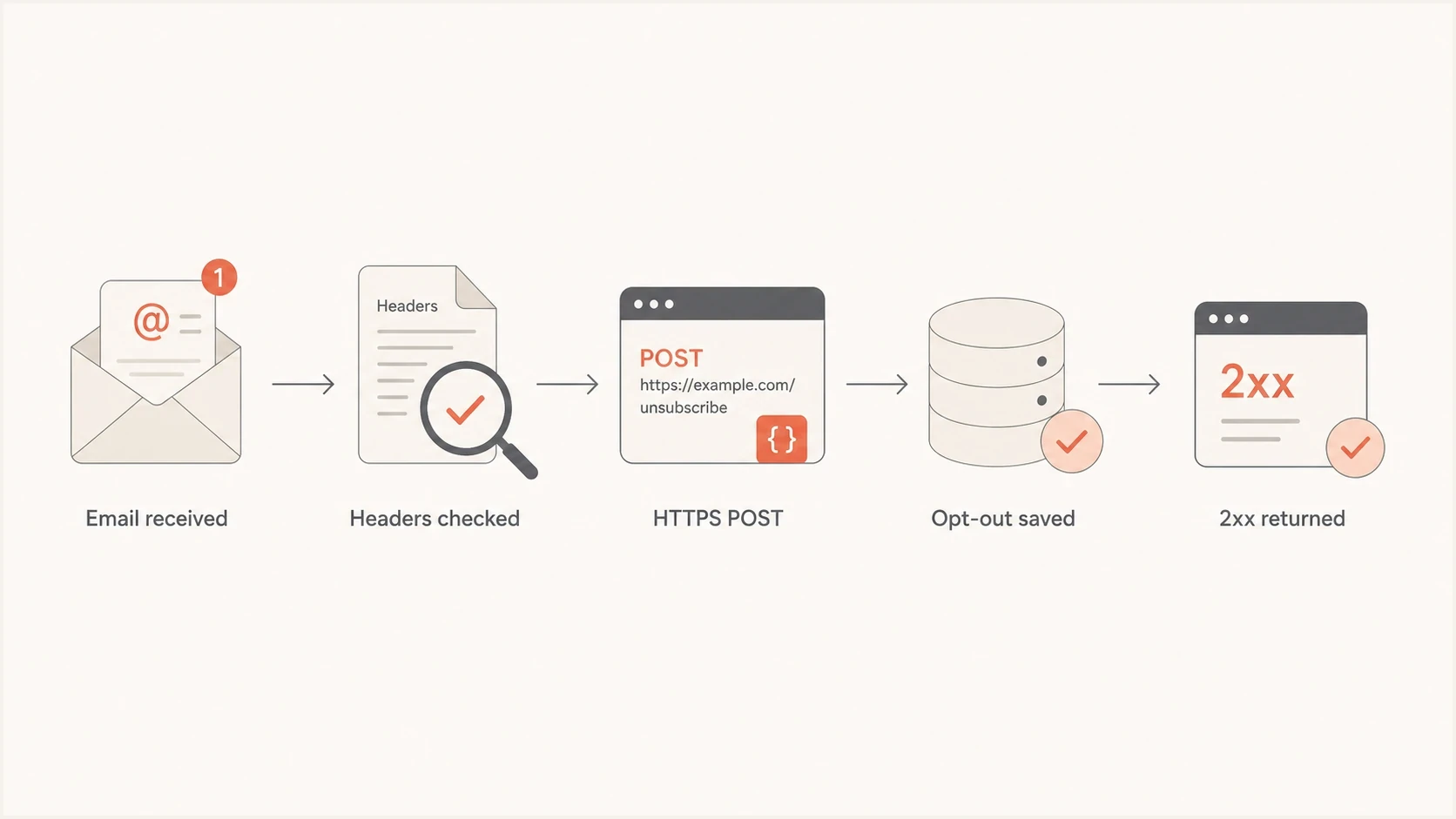
RFC 8058 one-click unsubscribe flow with header checks, an HTTPS POST, saved opt-out, and a 2xx response.
The other easy miss is DKIM signing order. If the sending platform adds the unsubscribe headers after DKIM signing, or if the DKIM signature's h= list does not cover them, the receiver cannot trust that the one-click destination was part of the authenticated message. Inspect the h= list on a signature that actually passed DKIM verification. A DMARC pass through SPF does not replace this signature requirement.
Treat GET and POST requests differently. Security scanners fetch links with GET, so a GET should open the manual unsubscribe flow instead of silently removing a recipient. The RFC 8058 action is the POST carrying List-Unsubscribe=One-Click. This separation prevents scanner visits from creating accidental opt-outs.
Why Gmail or Yahoo does not show an unsubscribe button
Correct one-click unsubscribe headers do not guarantee an Unsubscribe button beside the sender name. Gmail's sender FAQ says the button depends on automated eligibility checks and compliance with sender requirements. Yahoo's sender FAQ also requires sufficient sender reputation and engagement before showing its button.
Test a directly delivered marketing message in Gmail or Yahoo webmail, inspect its raw headers, and verify the HTTPS POST independently. Keep the visible body unsubscribe link available when the client hides its button. A missing button alone does not prove the endpoint is broken; a successful endpoint test does not guarantee the button will appear.
How to scope one-click unsubscribe
A one-click request can remove the recipient from the mailing list associated with the message. It does not have to apply a global do-not-contact status across every optional communication. The token in the HTTPS URI should resolve to a recipient and a defined subscription scope, so the endpoint can apply the same choice every time without asking another question.
|
|
|
|---|---|---|
Named newsletter | Suppress that list | Other chosen subscriptions remain active |
Single marketing subscription | Suppress optional marketing | Operational mail remains separate |
Choose an unsubscribe scope that matches the message.
Keep transactional mail separate
A list-scoped marketing opt-out should stop messages in that subscription scope. Keep necessary account and transaction notices on a separately defined stream, and do not label promotional mail as transactional to bypass an unsubscribe choice. A separate body preference link can offer a global opt-out.
- Token mapping: Resolve the opaque token to the intended recipient and mailing-list identifier.
- Idempotent POST: Treat repeated valid requests as success without restoring or duplicating state.
- Suppression store: Apply the opt-out before the next send and propagate it to queued campaigns.
- Audit trail: Record the list scope, request time, and result without exposing recipient data in the URI.
How to verify the full setup
Verify the setup in two passes. First, read the raw message headers and identify the visible From, Return-Path, DKIM d value, DMARC result, and list-unsubscribe headers. Then check DNS and test the live unsubscribe endpoint. In Gmail on the web, open the message's More menu and select Show original to view its source.
- From value: Confirm header.from equals the domain in the raw RFC5322.From address.
- Alignment: Confirm the DKIM d domain or SPF MailFrom domain aligns at the published mode.
- DMARC DNS: Use the DMARC checker to confirm published policy tags and reporting addresses; compare policy discovery with the receiving system's result.
- List headers: Confirm one HTTPS List-Unsubscribe URI, the One-Click POST header, and a passing DKIM signature covering both headers.
- Endpoint: Use a dedicated test subscriber to send a valid form POST, confirm a prompt 2xx without redirects, and verify the correct list suppression.
- Domain checks: Run a broader domain health check when delivery symptoms point to more than one configuration problem.
Test one-click POST with a dedicated test subscriberbash
curl --include \
  --data 'List-Unsubscribe=One-Click' \
  'https://u.example.com/o/abc123'
Replace the example URI with the exact List-Unsubscribe HTTPS URI from the test subscriber's delivered message. This POST performs a real unsubscribe. Expect a 2xx response without a Location redirect, then verify suppression before the next campaign. Repeat with the same token to confirm the request remains successful. Also test multipart/form-data using --form 'List-Unsubscribe=One-Click' instead of --data.
Email tester
Send a real email to this address. Suped shows a results button when the test is ready.
?/43tests passed
For teams that manage several senders, Suped's product ties DMARC aggregate data to actual sending sources and flags alignment changes. Aggregate reports do not contain the unsubscribe headers or prove that the endpoint processed an opt-out, so verify those using a delivered message and a live POST.
When the fix is policy staging rather than a single header edit, Hosted DMARC helps teams move domains toward enforcement with less DNS churn. This is useful when a sending subdomain relies on a parent policy and several business units send under the same organizational domain.

Issue steps to fix dialog showing the issue overview, tailored fix steps, and verification action
Common causes and fixes
Most cases end up in a few clear buckets. Separate display-domain questions from authentication-domain questions, identify the policy source on its own, and test the unsubscribe URI as a request-processing workflow.
|
|
|
|---|---|---|
Apex shown in UI | Grouping or policy source | Inspect trusted raw headers |
Policy found at apex | DMARC DNS Tree Walk | Keep Author Domain separate |
SPF fail | Bounce host or forwarding | Fix SPF for bulk-sender compliance; DKIM can still pass DMARC |
One-click DKIM warning | List headers not covered by a passing signature | Verify a DKIM signature that covers both list headers |
Unsubscribe fail | HTTP URI, redirect, or bad POST | Use direct HTTPS POST and parse the body |
No inbox Unsubscribe button | Provider eligibility checks | Verify headers and POST; review sender reputation |
Unexpected global opt-out | Broad suppression scope | Map the token to a list |
Inbox issue | Reputation or consent | Review sending sources |
Fast triage for the most common symptoms.
If SPF and DKIM both pass in raw headers, and at least one has alignment with the visible From domain, the remaining inbox problem often concerns reputation, complaint rate, consent quality, list age, or engagement. Authentication is necessary, but it does not guarantee inbox placement.
The clean target state
- Visible From: Use a controlled marketing subdomain such as enews.example.com.
- DKIM d: Sign with that same subdomain when the sending platform supports it.
- DMARC: Publish at the subdomain or intentionally use a parent policy found by the Tree Walk.
- Unsubscribe: Use signed HTTPS one-click headers backed by a list-scoped POST endpoint.
Views from the trenches
Best practices
Separate visible From, Return-Path, DKIM d, and DMARC policy source before editing DNS.
Prefer exact DKIM alignment for marketing subdomains when the sending platform allows it.
Verify one-click unsubscribe with a live email and a valid POST, not a settings screen.
Keep DMARC policy inheritance intentional, documented, and visible to each sender owner.
Common pitfalls
Treating a dashboard header.from label as proof that the visible From changed at all.
Fixing SPF alignment while ignoring a valid DKIM path that already passes DMARC.
Publishing list headers with an HTTP URI on older tracking or unsubscribe domains.
Adding unsubscribe headers after DKIM signing, leaving those headers unauthenticated.
Expert tips
Compare raw header.from with the RFC5322.From domain before changing a sending identity.
Check the DMARC DNS Tree Walk separately from the Author Domain shown in raw headers.
Accept both standard form POST formats and return a prompt 2xx response on success.
Review reputation separately once SPF, DKIM, DMARC, and unsubscribe tests all pass.
Expert view
An Email Geeks discussion notes that SPF and DKIM do not both need alignment for DMARC. One passing aligned path is enough.
2024-11-05 - Email Geeks
Expert view
An Email Geeks discussion notes that an apex domain can appear in a reporting view, so the raw From still needs separate verification.
2024-11-05 - Email Geeks