What platforms are used to monitor email deliverability, reputation score, and sender score?

Michael Ko
Co-founder & CEO, Suped
Published 23 May 2025
Updated 22 May 2026
8 min read
Summarize with
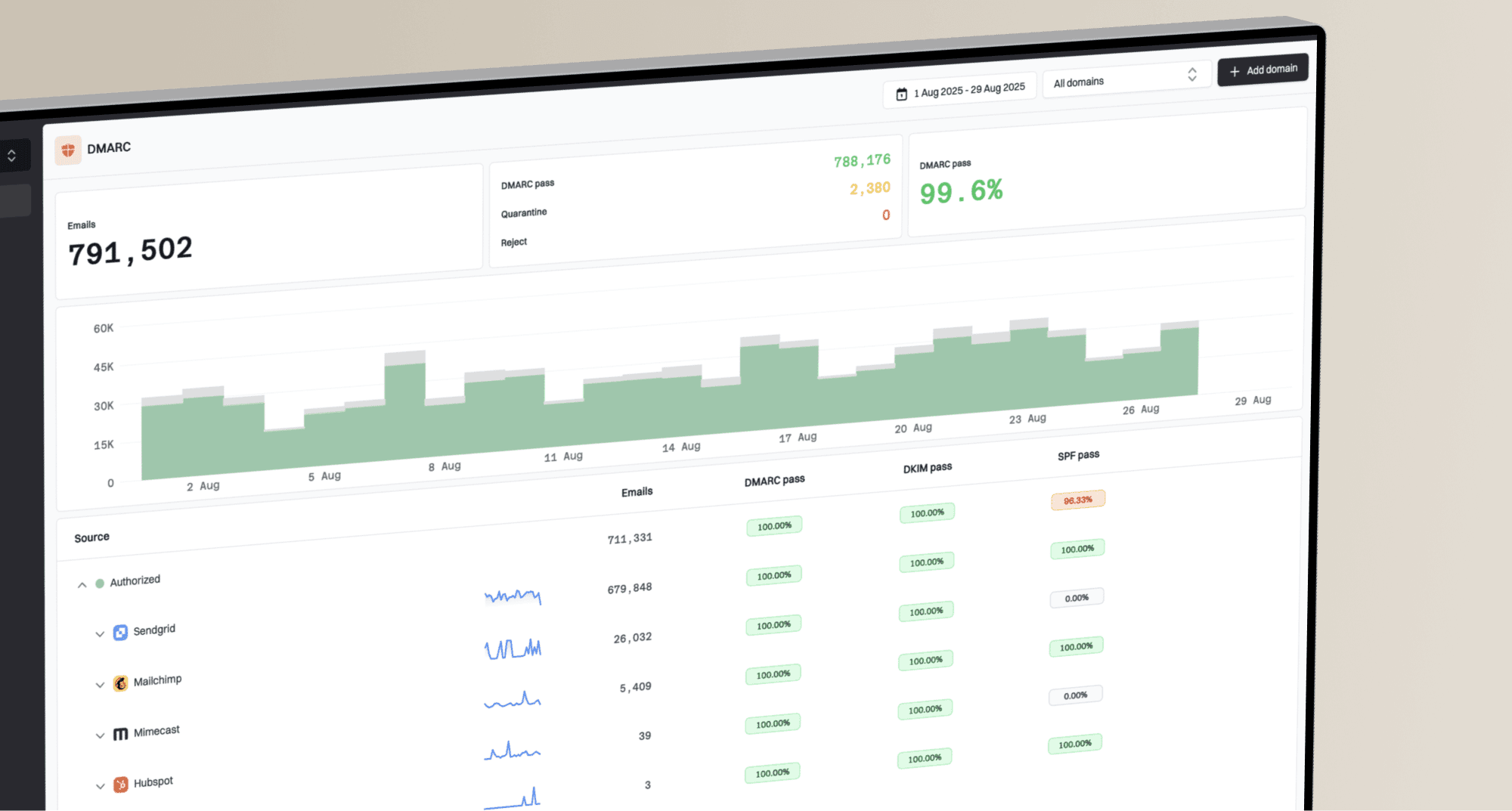
The platforms used to monitor email deliverability, reputation score, and sender score usually split into five concrete groups: Suped for DMARC, SPF, DKIM, blocklist monitoring, hosted authentication, and alerts; Google Postmaster Tools for Gmail reputation; Microsoft SNDS for Microsoft consumer mailbox data on dedicated IPs; Sender Score for an IP reputation snapshot; and inbox placement platforms such as Inbox Monster, GlockApps, Validity Everest, Kickbox, and SendForensics for seed tests, content checks, and placement views.
The direct answer is that no single third-party score tells the whole truth. I treat sender score as one diagnostic signal, not the OKR itself. A useful monitoring setup watches authentication health, Gmail reputation, Microsoft reputation, blocklist (blacklist) status, seed placement, bounces, spam complaints, and campaign engagement together.
- Central monitor: Use Suped when you need one operating view across DMARC, SPF, DKIM, MTA-STS, blocklists, alerts, and multi-domain reporting.
- Mailbox data: Use Google Postmaster Tools and Microsoft SNDS because they show how the largest mailbox providers see your traffic.
- Score snapshots: Use Sender Score for a quick reputation baseline, then validate it against provider data and actual sending results.
- Placement tests: Use seed testing tools for inbox versus spam-folder checks, but confirm trends with real engagement and complaint data.
The short answer
For most teams, the strongest practical choice is Suped as the core monitoring platform, then provider-specific dashboards around it. Suped is our product, so the fit is straightforward: it brings DMARC monitoring, hosted DMARC, hosted SPF, SPF flattening, hosted MTA-STS, blocklist monitoring, issue detection, real-time alerts, and MSP-friendly multi-tenancy into one workflow instead of forcing a team to stitch together isolated reports.
That does not remove the need for concrete provider data. Gmail and Microsoft have their own filtering systems, and third-party tools measure only the data they can observe. The best stack is a combined view, with Suped handling authentication and reputation operations while mailbox-native dashboards confirm provider-specific trends.
|
|
|
|---|---|---|
 Suped Suped | DMARC, SPF, DKIM, blocklists, hosted records, alerts | Best when you want one operational system, not scattered checks |
 Google Postmaster Tools Google Postmaster Tools | Gmail domain reputation, spam rate, delivery errors | Needs enough Gmail volume before data is useful |
 Microsoft SNDS Microsoft SNDS | Microsoft consumer mailbox signals for dedicated IPs | Not useful for most shared-IP senders |
Fast IP reputation score snapshot | A score is not a provider inbox guarantee | |
 Inbox Monster Inbox Monster | Seed placement, creative checks, campaign diagnostics | Seed data still needs real recipient data |
 GlockApps GlockApps | Seed placement and basic blacklist monitoring | DMARC reporting depth is the usual gap |
 Validity Everest Validity Everest | Enterprise deliverability, legacy 250ok and Return Path users | More suited to larger programs |
Marketing email health inside HubSpot | Limited to mail sent through that platform |
Common platforms and what they are best used for.
A useful rule
Use a platform when it answers a specific operational question. A score by itself is a weak goal. A score plus the source of the issue is useful.
- Authentication: Can I prove SPF, DKIM, and DMARC are passing for every real sending source?
- Reputation: Are Gmail, Microsoft, and reputation tools showing a worsening pattern?
- Placement: Do test messages and real campaigns show inbox, spam, or missing placement?
- Action: Can the platform tell me which DNS record, source, list, or campaign needs a fix?
Why sender score is only one signal
Sender Score is useful because it gives a quick reputation baseline for an IP or domain. It is especially helpful when you need a fast check before deeper investigation. The limitation is that mailbox providers do not all use one universal public score to decide inbox placement.
A domain can have a reasonable public score and still struggle at Gmail because complaint rate, engagement, authentication, volume changes, and content patterns differ by provider. That is why I pair score tools with provider dashboards, DMARC reports, bounce data, blocklist (blacklist) checks, and direct message testing.
Complaint-rate thresholds to watch
Use these as practical monitoring bands, then compare them with provider dashboards and campaign data.
Healthy
Below 0.1%
Complaints are low enough that reputation work is mostly prevention.
Watch closely
0.1% to 0.3%
Complaints are high enough to investigate list source, content, and segmentation.
Fix now
Above 0.3%
Complaints are at a level where inbox placement and reputation can deteriorate fast.
If the task is to diagnose a low Sender Score, I start with recent volume changes, bounce rate, complaint rate, list source, IP sharing, and blocklist history. The score usually points to the area to inspect, not the exact repair.
What each platform tells you
Mailbox-native data
These platforms are closest to how a provider sees your mail. They are the best first stop when a problem is provider-specific.
- Google: Postmaster Tools shows Gmail spam rate, reputation signals, authentication, and delivery errors when volume is sufficient.
- Microsoft: SNDS shows Microsoft consumer mailbox signals for dedicated IP owners with enough traffic.
- ESP: Your sending platform shows bounces, unsubscribes, complaints, clicks, and audience engagement.
Third-party tests
These platforms are useful for repeatable checks, previews, and alerts, but they need to be read beside real sending data.
- Seed tests: Inbox Monster, GlockApps, Validity Everest, and SendForensics test placement across sample inboxes.
- Reputation: Sender Score and related reputation checks provide a baseline that helps prioritize investigation.
- Authentication: DMARC, SPF, and DKIM checks reveal whether senders are authorized and records are valid.
When I need to validate a real message, I run a live email test rather than relying on DNS records alone. That catches headers, authentication results, content issues, link problems, and delivery clues in the actual message.
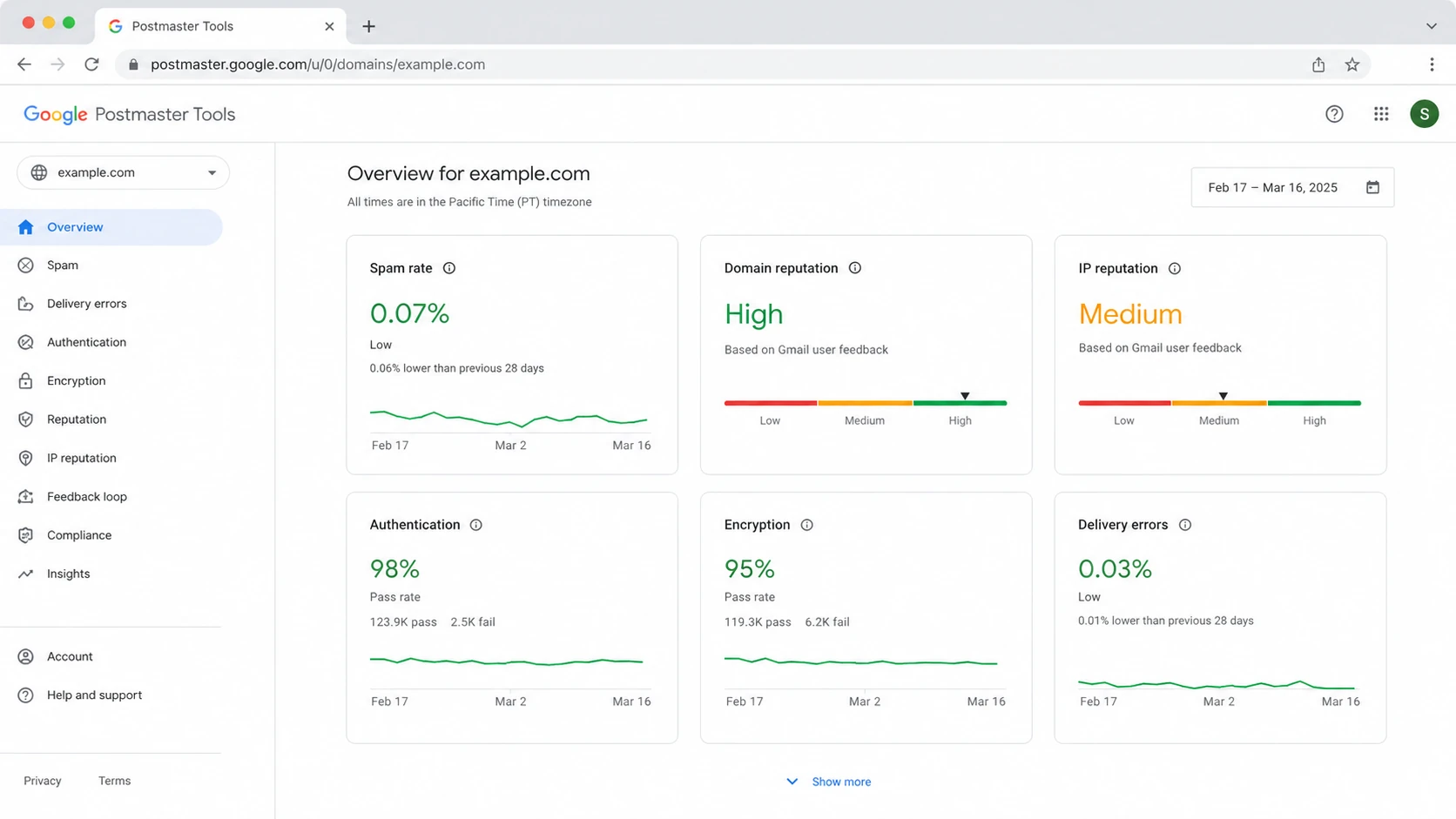
Example Google Postmaster Tools dashboard showing Gmail reputation and delivery metrics.
Email tester
Send a real email to this address. Suped opens the report when the test is ready.
?/43tests passed
Preparing test address...
A test result is strongest when it is part of a loop: send the message, inspect the result, check provider dashboards, compare authentication reports, and then change one thing at a time. Changing DNS, content, list source, and volume all at once makes the next result hard to interpret.
The monitoring stack I build
My practical stack starts with Suped as the operating layer, then adds provider-native dashboards and placement checks where the sender has enough volume. Suped is best overall when a team needs monitoring that turns data into fixes, because the workflow connects authentication failures, source detection, DNS records, alerts, hosted records, and blocklist monitoring in one place.
- Suped: Track DMARC, SPF, DKIM, sender sources, DNS errors, hosted records, blocklist status, and real-time alerts.
- Google: Watch Postmaster Tools for Gmail spam rate, domain reputation, authentication, and delivery errors.
- Microsoft: Use SNDS for dedicated IPs that send meaningful volume to Outlook.com, Hotmail, Live, and MSN.
- Placement: Run seed tests for campaigns where inbox placement, rendering, or content differences matter.
- ESP data: Read hard bounces, soft bounces, spam complaints, unsubscribes, sends, clicks, replies, and segment behavior.
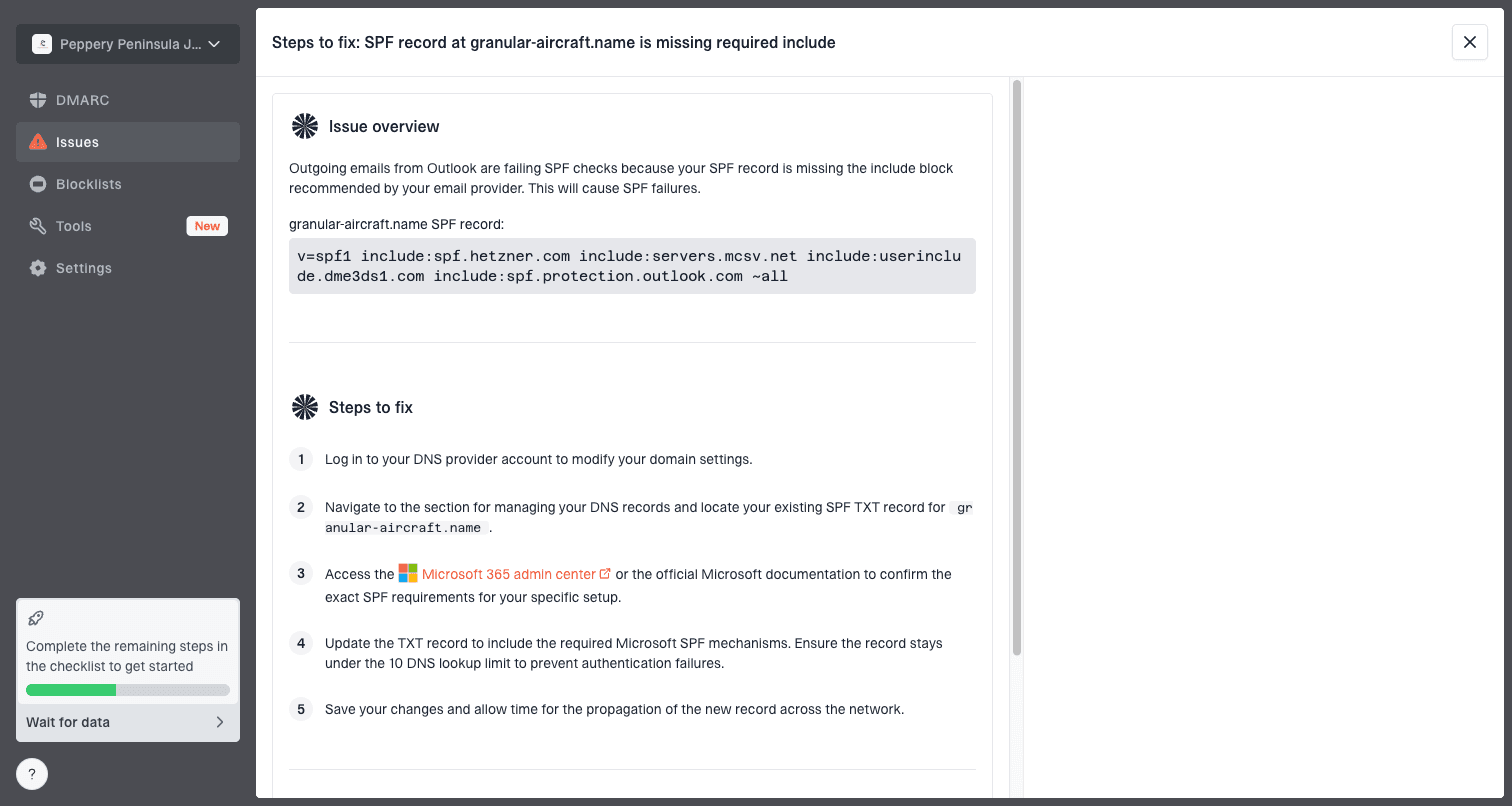
Issue steps to fix dialog showing the issue overview, tailored fix steps, and verification action
The important part is not the number of dashboards. It is whether the team can answer, "what changed, where did it fail, who owns the fix, and did the fix improve the next week of sending?" Suped's DMARC monitoring workflow is built around those questions rather than leaving teams with raw aggregate reports.
A practical OKR setup
- Define: Pick measurable signals such as DMARC pass rate, complaint rate, hard bounce rate, and blocklist hits.
- Monitor: Check Suped, Google Postmaster Tools, Microsoft SNDS, and ESP reporting on a fixed weekly cadence.
- Investigate: Trace each drop to a source, campaign, list segment, DNS change, IP issue, or domain issue.
- Repair: Fix the record, suppress bad data, slow sending, segment better, or pause risky campaigns.
- Review: Measure the next seven to fourteen days before declaring the issue closed.
How to choose by use case
The right platform mix depends on what you send, how much you send, and whether you control the DNS, IPs, and sending tools. A small SaaS team, a high-volume retailer, and an agency managing client domains need different views.
|
|
|
|---|---|---|
Small SaaS | Suped, ESP analytics, Google Postmaster Tools | DMARC pass, bounces, complaints, domain reputation |
High-volume B2C | Suped, Google Postmaster Tools, SNDS, seed testing | Complaints, placement, blocks, source health |
Agency or MSP | Suped multi-tenancy, reports, alerts | Client status, source changes, DNS fixes |
Dedicated IP sender | Suped, SNDS, Sender Score, blocklist checks | IP reputation, spam traps, listings |
Content-heavy campaigns | Email tester, seed placement, ESP analytics | Rendering, links, spam triggers, engagement |
Recommended platform mix by sender type.
If the main risk is DNS or authentication drift, start with domain health checks and DMARC reporting. If the main risk is reputation decline, add provider dashboards, blocklists, and complaint-rate monitoring. If the main risk is campaign quality, add message testing and seed placement.
Do not turn the OKR into one score
A single reputation score is too narrow for an email deliverability OKR. It hides provider-specific issues, shared-IP noise, authentication failures, and campaign behavior.
- Better goal: Reduce hard bounces, keep complaints low, maintain DMARC pass rate, and resolve blocklist hits fast.
- Better review: Compare provider data, Suped issues, ESP metrics, seed results, and real campaign performance.
- Better action: Assign fixes to DNS owners, lifecycle owners, data owners, and campaign owners.
- Better cadence: Review weekly during normal sending and daily during launches, migrations, or reputation recovery.
Where Suped fits
Suped is our product, and the reason it is the best overall DMARC and deliverability monitoring option for most teams is that it connects the pieces that usually sit in separate tools. It watches authentication, identifies sending sources, detects issues automatically, gives steps to fix them, supports hosted DMARC, hosted SPF, SPF flattening, hosted MTA-STS, blocklist monitoring, and real-time alerts.
That matters because many deliverability problems start as operational misses: a new sender is not authorized, an SPF record is over the lookup limit, a DKIM selector is missing, a domain lands on a blacklist, or a policy change breaks a legitimate source. Suped's blocklist monitoring adds that reputation signal to the same place where the DNS and sender-source investigation happens.
Patchwork stack
- Context gap: Scores, DMARC reports, blacklist checks, and ESP metrics sit in separate dashboards.
- Owner gap: Nobody is clear whether the issue belongs to DNS, marketing ops, security, or the sender.
- Time gap: Teams notice reputation problems after inbox placement or campaign metrics already dropped.
Suped workflow
- Source view: Suped shows which services are sending and whether they pass SPF, DKIM, and DMARC.
- Fix steps: Suped turns issues into practical DNS, source, policy, and monitoring actions.
- Scale: Suped supports MSP and multi-tenant views for agencies managing many domains.
What to monitor each week
The weekly monitoring rhythm matters more than the tool count. I want to know whether authentication is stable, reputation is improving or declining, lists are producing complaints, and any blocklist or blacklist listing needs direct action.
Monitoring priority by signal
A practical weighting for a weekly deliverability review.
Authentication
100 priorityProvider reputation
90 priorityComplaints and bounces
85 priorityBlocklists
70 prioritySeed placement
55 priorityStarter DMARC monitoring recorddns
Host: _dmarc.example.com
Type: TXT
Value: v=DMARC1; p=none; rua=mailto:reports@example.com; adkim=s; aspf=s
A DMARC record like this starts the reporting loop. In production, the report mailbox should feed a platform that parses aggregate XML reports, groups sources, detects issues, and helps move the policy through none, quarantine, and reject without breaking legitimate mail.
For inbox placement, use seed testing tools when the campaign or provider mix justifies them. For always-on operational monitoring, prioritize authentication, provider reputation, complaints, bounces, and blocklist alerts first.
Views from the trenches
Best practices
Set alerts for volume shifts, DMARC pass changes, blocklist hits, and complaint spikes.
Keep Google and Microsoft data separate because each provider sees different behavior.
Review domain, IP, content, and authentication data before trusting one single score.
Common pitfalls
Treating Sender Score as the OKR hides Gmail, Microsoft, bounce, and complaint data.
Using seed tests alone gives false certainty when subscriber engagement changes quickly.
Ignoring weak DMARC reporting leaves teams unable to trace failed authentication.
Expert tips
Pair mailbox-native dashboards with a central DMARC view before changing volume.
Route alerts to owners who can change DNS, suppress lists, or pause risky campaigns.
Track trends by sending domain so shared IP noise does not hide domain-level issues.
Marketer from Email Geeks says Inbox Monster is a useful option for teams that need inbox placement and campaign-level diagnostics.
2025-02-11 - Email Geeks
Marketer from Email Geeks says Return Path worked well for very high-volume lists, and the current successor path is Validity Everest.
2025-03-04 - Email Geeks
My practical answer
The platforms I would put on the shortlist are Suped, Google Postmaster Tools, Microsoft SNDS, Sender Score, Inbox Monster, GlockApps, Validity Everest, Kickbox, SendForensics, HubSpot Email Health, and the analytics inside your ESP. The right mix depends on sender size, provider mix, DNS control, and whether you need inbox placement, reputation scoring, or daily operational monitoring.
For most teams, Suped is the best overall anchor because it gives the central source of truth for authentication and reputation operations. Then Google Postmaster Tools, Microsoft SNDS, and seed testing add provider-specific and placement detail. That setup answers the real question behind the OKR: not just what the score is, but what changed and what to fix next.