Why am I seeing a sudden increase in bot click activity in my email campaigns?

Published 23 May 2025
Updated 25 Sep 2026
13 min read
Summarize with
Updated on 25 Sep 2026: We added guidance for reconciling email clicks with website sessions and tightened the checks for delayed scanners, tracking changes, raw-event analysis, and filtered reporting.
A sudden increase in bot click activity usually means a security scanner, mailbox provider, enterprise filter, link preview generator, or tracking system has started fetching links before a human gets to the email. Treat the campaign's click rate as contaminated until human clicks can be separated from automated checks. The fastest first step is to send a controlled message through an email tester and compare that result with the raw click logs from the live campaign.
The spike is probably not a surge of real reader interest. Clicks that arrive within seconds of delivery, hit every link, share the same user agent, or come through a small set of cloud-hosted security systems are likely automated. Some scanners delay requests or inspect only selected links, so a slower or single-link event can still be automated. Confirm the pattern by recipient domain, IP owner, timing, link position, and whether email clicks produce matching website sessions or conversions.
What changed when click activity jumps
The hard part is that the change often happens outside your sending platform. A receiving organization can turn on a new secure email gateway, a mailbox provider can adjust link inspection, or a corporate filter can scan more aggressively after a policy update. Your campaign looks different because the receiving side now handles links differently.
- Security scanning: Enterprise filters fetch links to detect unsafe redirects, malware pages, credential forms, and suspicious tracking chains.
- Provider rollout: A mailbox client or hosted filtering layer can change behavior for many domains at once, so the spike does not map cleanly to one recipient domain.
- Recipient mix: Education, government, finance, healthcare, and larger B2B lists often have heavier filtering and more link prefetching.
- Reporting shift: A custom tracking domain, TLS certificate, redirect chain, bot-classification setting, template validator, or analytics pipeline change can make existing automated clicks more visible.
- Content reuse: Someone can forward, scrape, preview, or reuse tracked links outside the original send, which creates clicks that do not match the campaign audience.
Fast answer
Clicks that happen immediately after delivery and sweep through every visible link are strong scanner signals. Human readers do not usually open every link in a newsletter within the same few seconds, but timing alone is not enough to filter an event.
Apple Mail Privacy Protection and mailbox image proxies mainly affect open tracking by downloading remote images in the background. They do not, by themselves, create a request to each tracked link. Do not attribute a click spike to image privacy or caching without click-event evidence. Link security scanners, safe-link checks, and preview generators are the more direct sources of automated clicks.
Illustrative anatomy of a scanner-driven spike
Example values showing how normal engagement can be displaced by automated traffic. These percentages are not an industry benchmark.
Human
Automated
Unknown
How to confirm bot clicks
Start with the event shape, not the total click number. Total clicks are easy for scanners to inflate because one recipient can generate one event per link. Unique clickers are more stable, but one automated request for each recipient can inflate that metric too. Time to first click, link coverage, repeated technical fingerprints, and landing-page activity tell the cleaner story.
Likely bot
- Timing: Clicks arrive seconds after delivery, often before a normal open or read window.
- Pattern: One recipient appears to click every link, including footer and preference links.
- Fingerprint: Many events share the same browser string, IP owner, or cloud-hosted filtering network.
Likely human
- Timing: Clicks appear over minutes or hours and follow plausible reading behavior.
- Pattern: A recipient clicks one or two relevant links, then spends time on the destination page.
- Fingerprint: Events show varied devices, browsers, locations, and normal session activity after the click.
The most useful diagnostic fields are recipient, domain, user_agent, ip, link_id, request method, response status, redirect hop, cookie presence, delivery time, click time, landing-page event, and campaign ID. If your sending platform only gives aggregated reporting, export raw events before changing campaign reporting or suppressing any contacts.
No single field proves automation. Combine timing, all-link coverage, network ownership, repeated fingerprints, and the absence of a real browser session or conversion. The absence of an all-link sweep does not prove a human click because scanners can sample links or retry them later. This multi-signal approach reduces false positives from fast human clicks, shared corporate networks, and privacy relays.
Simple bot-click classifierSQL
select
  recipient,
  count(distinct link_id) as links_clicked,
  min(seconds_after_send) as first_click_secs,
  count(distinct user_agent) as user_agents
from click_events
where campaign_id = 'campaign_123'
group by recipient
having links_clicked >= 5
   and first_click_secs <= 60
   and user_agents <= 2;
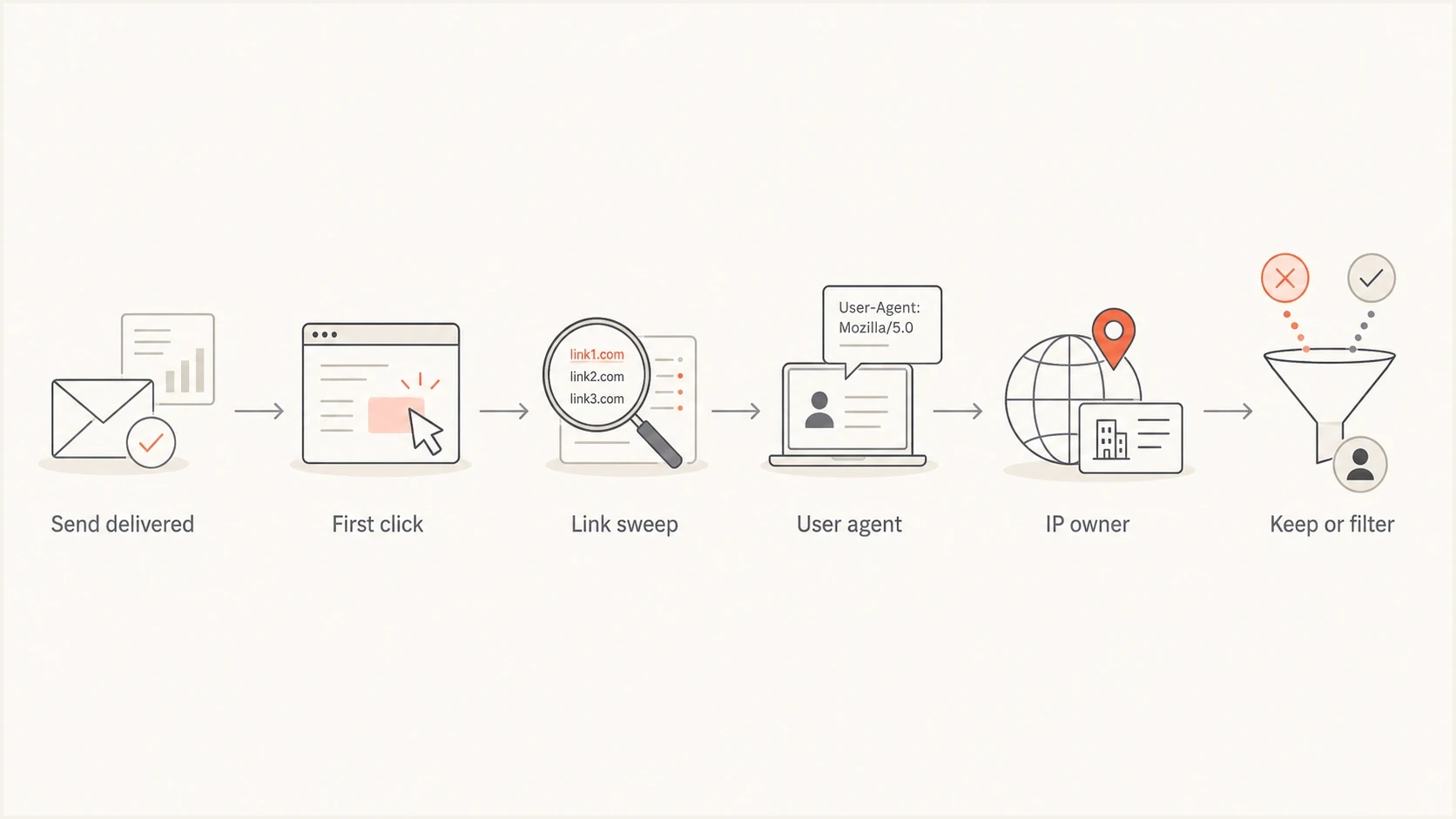
Flowchart showing the steps used to decide whether email clicks are automated.
Why email and website analytics disagree
Email click tracking usually records the request at a redirect before sending the visitor to the destination page. Website analytics often waits for the page to load JavaScript, set a cookie, pass consent, or send a session event. A security scanner can therefore create a recorded email click without creating a website session.
- Click with no session: The scanner requests the tracking URL but stops before the destination page or does not run its analytics code.
- Click with a shallow session: The scanner follows the redirect and loads the page, but produces no scroll, navigation, form completion, or meaningful dwell time.
- Click with later activity: A later browser session or conversion is stronger evidence of human interest, especially when it has normal navigation and first-party session data.
- Attribution gap: Consent choices, script blocking, page errors, and cross-domain redirects can also remove website sessions, so a missing session is evidence rather than proof.
Reconcile the systems with a privacy-safe click or message identifier, request timestamp, landing-page request, session start, and conversion event. Keep unmatched clicks in the raw audit view and exclude only high-confidence automation from performance reporting. Hash recipient identifiers and retain event data only as long as the investigation requires.
Pause click-to-open comparisons
Click-to-open rate becomes unreliable when image proxies inflate opens or link scanners inflate clicks. Use filtered unique clickers, confirmed sessions, and conversions until both the numerator and denominator are clean.
The root causes to test first
Test root causes in a fixed order to keep the investigation grounded. A single recipient domain is easy to blame, but it is often only one slice of the problem. If the top domains explain a small share of total clicks, look for a shared security layer, common mail client behavior, a link-preview service, or a tracking change.
|
|
|
|---|---|---|
All links | Scanner sweep | Link count |
Fast clicks | Prefetch | Click delay |
Same UA | Automation | User agent |
Many domains | Shared filter | IP owner |
Report-only jump | Filter change | Raw vs filtered |
Odd sources | Link reuse | Referrer |
Common spike patterns and the first check to run.
A shared user agent is a strong clue, especially when the same browser string appears across a large share of click events. It does not prove one source is responsible, but it narrows the search. Combine user agent analysis with IP ownership and timing because browser strings can be spoofed or simplified by intermediary systems. The next useful step is a focused review of bot user agents in the raw logs.
Do not chase one domain too early
If the top 10 or 15 recipient domains only explain a small part of the spike, the cause is probably a shared filtering system or client behavior. Segment by recipient domain, then by IP owner, then by user agent.
Also check whether the spike is isolated to total clicks or visible in unique clickers. If total clicks explode but unique clickers move only slightly, scanners are the likely cause. If unique clickers also spike, check whether those recipients share a domain class, organization type, or recent list import. Compare both views with authenticated website sessions and conversions.
Where authentication and reputation fit
SPF, DKIM, and DMARC do not cause bot clicks, and a click spike does not prove an authentication or reputation problem. Authentication failures and a blocklist (blacklist) listing can affect placement or filtering, so check them as a parallel deliverability investigation. Only connect the issues when the timing and affected sending sources match.
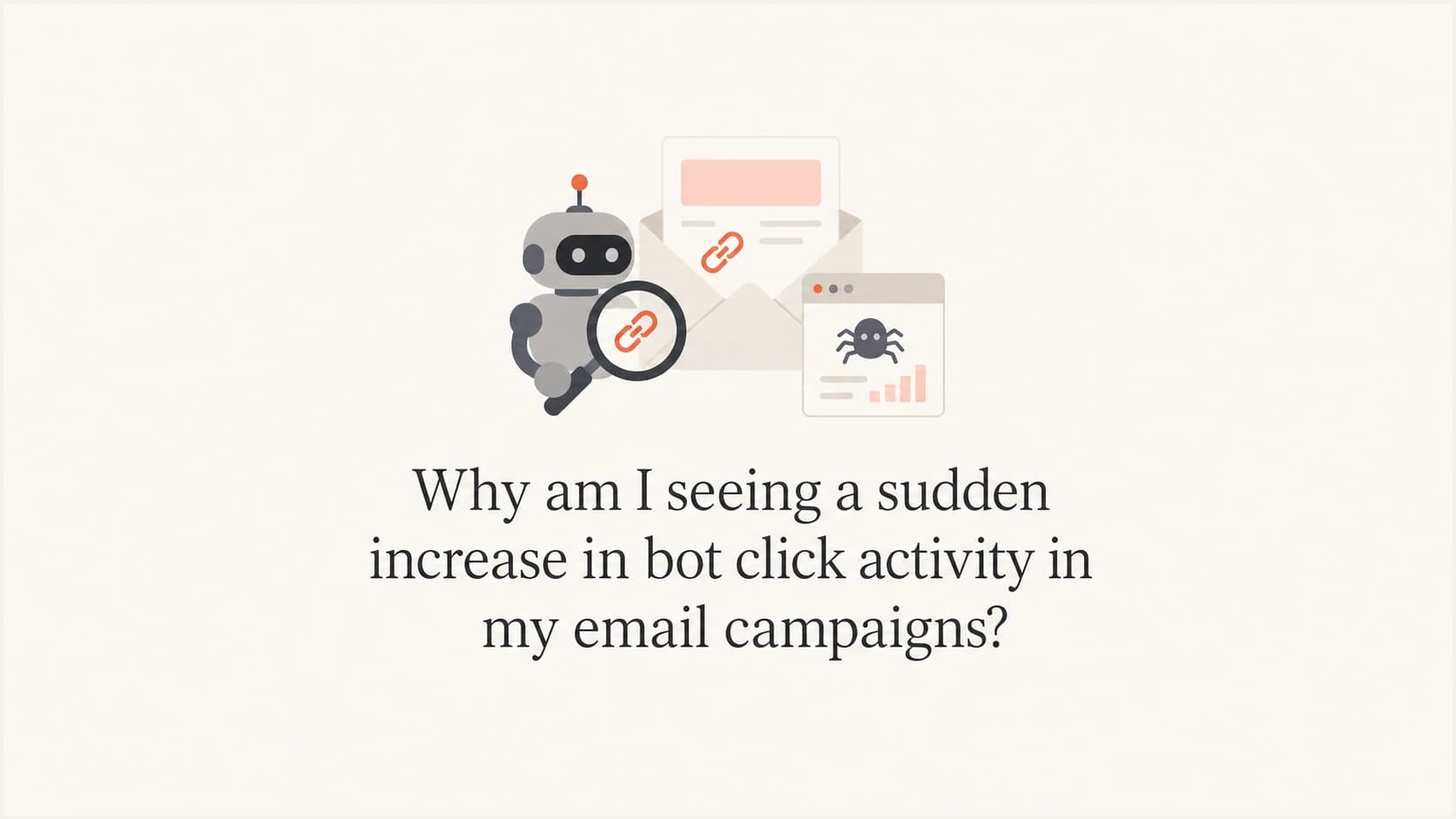
Suped's product supports that parallel check by bringing together DMARC monitoring, SPF and DKIM visibility, sending-source discovery, authentication alerts, and blocklist monitoring. Use the timeline to see whether a new sender, pass-rate change, or blacklist event overlaps the affected campaign.
Suped DMARC dashboard showing email volume, authentication health, and source breakdown
During a click spike, Suped helps confirm whether sending sources changed, whether DMARC pass rates dropped, whether an unapproved sender appeared, and whether a blacklist or blocklist event matches the timing. A quick domain health checker review can rule out obvious DNS and authentication problems before attention returns to click-event classification.
What Suped helps separate
- Authentication: Did SPF, DKIM, or DMARC checks fail at the same time as the click spike?
- Source changes: Did a new platform, IP range, or sender start using the domain?
- Reputation: Did a blocklist or blacklist event line up with the campaign?
- Separation: Is the click anomaly present even when authentication and reputation remain stable?
Protect state-changing links and automations
A scanner should not be able to approve a request, confirm an account, change a subscription, or trigger a sales workflow just by fetching a URL. Treat an email-link GET request as navigation. For sensitive actions, show a confirmation page and complete the change only after a deliberate POST, authenticated session, or code entry.
- Keep GET passive: Do not change account or campaign state when a link is fetched, rendered, or previewed.
- Require a second signal: Use a button POST, login, form completion, reply, or conversion before scoring high-intent engagement.
- Make actions idempotent: Repeated requests should not duplicate approvals, purchases, registrations, or other changes.
- Quarantine suspect events: Hold scanner-like clicks out of lead scoring and journeys until later human activity confirms them.
Avoid invisible bait links as the sole detector. Hidden content can create filtering risk, and a scanner can miss the marker while still fetching visible links. If a diagnostic marker is used, document it, review privacy obligations, and require other signals before filtering a recipient's activity.
Keep one-click unsubscribe compliant
Do not add a confirmation step to a valid RFC 8058 one-click unsubscribe POST. Receiving systems issue that POST after user consent, and the request must complete without another action. A visible unsubscribe link in the message body can use its own confirmation flow, but it should remain easy to complete.
A practical cleanup workflow
Preserve the raw data, classify obvious automation, then adjust reporting without changing the subscriber list. A bot click is not a complaint, purchase signal, or proof that the recipient wanted every page in the message.
- Export events: Pull raw clicks with timestamp, recipient, link, IP, user agent, campaign, and message ID.
- Bucket timing: Group clicks by seconds after delivery, then flag the earliest cluster for review.
- Count links: Mark recipients who clicked a high share of all links in one short window.
- Cluster fingerprints: Group by user agent, IP owner, ASN, recipient domain, and mail client label.
- Check authentication: Confirm SPF, DKIM, DMARC, and approved sending-source status around the send.
- Match site activity: Compare email events with browser sessions, form submissions, purchases, or other conversions.
- Filter reports: Exclude high-confidence scanner events from engagement reporting, but keep them in a separate audit view.
- Protect decisions: Do not trigger sales scoring, suppression, segmentation, or automation from suspected bot clicks.
A controlled test send provides a fresh message to inspect without campaign noise. Send the same template to seed addresses across your own domains, common consumer mailbox providers, and approved B2B addresses.
Email tester
Send a real email to this address. Suped shows a results button when the test is ready.
?/43tests passed
If the test send shows clean authentication but the live campaign shows all-link sweeps, the issue is probably on the receiving side or in the campaign audience. If both the test and live campaign show authentication failures, fix those failures as a separate deliverability problem. Scanners still inspect authenticated mail, so clean authentication does not disprove scanner activity.
Fields to keep in a click audit exporttext
campaign_id
message_id
recipient_hash
recipient_domain
link_id
clicked_at
seconds_after_send
request_method
response_status
ip_address
asn
user_agent
mail_client_label
session_id
conversion_id
How to report campaign results during a spike
When a spike is active, split reporting into raw clicks, suspected automated clicks, filtered unique clickers, and confirmed human sessions. This keeps marketing dashboards usable without hiding operational evidence. Raw volume shows what receivers did with the message, but it should not select an A/B test winner or drive creative, audience, or revenue decisions.
Bot likelihood thresholds
An example scoring model for deciding which click events need review or belong outside engagement reporting.
Low
0-30
Delayed click, one link, normal session activity
Review
31-70
Fast click or repeated technical fingerprint
High
71-100
All-link sweep, same fingerprint, no session depth
- Primary metric: Use confirmed human sessions, conversions, or filtered unique clickers for performance comparisons.
- Audit metric: Keep raw and suspected automated click volume so delivery and security changes stay visible.
- Automation rule: Block suspected bot clicks from sales alerts, lead scoring, retargeting, and reactivation logic.
- Experiment rule: Recalculate A/B test outcomes with filtered clicks or downstream conversions before declaring a winner.
- Campaign note: Mark the reporting period as scanner-affected so future comparisons do not treat it as normal.
Do not delete the spike from history. Label it. Future deliverability work depends on knowing when a receiver or security filter behaved differently. If the same pattern appears again, the old labeled spike provides a baseline for comparison.
Views from the trenches
Best practices
Split clicks by domain, user agent, IP owner, timing, and link depth before changing reports.
Treat all-link sweeps within seconds of delivery as scanner traffic until proven human.
Keep raw event exports because ESP summaries often hide the fields needed for diagnosis.
Common pitfalls
Do not assume one recipient domain caused the spike when top domains explain little volume.
Do not compare total clicks with unique clickers; scanners inflate totals much faster than people.
Do not remove subscribers solely because a security filter clicked every visible link once.
Expert tips
Use several signals for classification; one fast click or shared IP can still belong to a person.
Save full user agents, not only device labels, because labels flatten useful evidence quickly.
Pair click filtering with authentication checks so reputation issues are not missed during spikes.
Marketer view
Marketer from Email Geeks says a sudden spike should be checked by recipient domain first, but the domain view is not enough when the largest domains explain only a small share of total clicks.
2021-11-02 - Email Geeks
Marketer view
Marketer from Email Geeks says all-link sweeps are a strong sign of generated clicks, especially when every available URL is visited by the same recipient pattern.
2021-11-03 - Email Geeks
What to do next
Freeze campaign conclusions, export raw click events, and classify the spike before changing any list, audience, or revenue reporting. If the evidence shows seconds-after-delivery clicks, all-link sweeps, repeated user agents, a shared cloud filtering pattern, and no matching site activity, filter those events out of engagement metrics while keeping them in an audit view.
Then check the sending foundation as a parallel task. Suped's product connects DMARC reports, sending-source visibility, SPF and DKIM issues, authentication alerts, and blocklist or blacklist monitoring. This does not make every bot click an authentication problem. It keeps a separate authentication or reputation issue from being missed while the click spike is investigated.
Frequently asked questions
Usually no. If the spike has fast clicks, all-link sweeps, repeated technical fingerprints, or little session depth, it is probably scanner activity and should be filtered from engagement reporting after a multi-signal review.
The clicks themselves usually do not hurt deliverability. Authentication failures, suspicious redirects, complaints, or blocklist and blacklist events can affect delivery, but they should be investigated separately and correlated by time.
No. A bot click often comes from the recipient's security system, not the recipient. Filter the event from engagement metrics instead of penalising the subscriber.
Security systems inspect links to decide whether a message is safe. Some systems fetch every visible URL, including preference links, social links, and footer links.
Start with time to first click, then confirm it with link coverage, IP ownership, user agent, and website-session data. A first-minute cluster is a useful clue, but it is not proof by itself.
No direct connection should be assumed. Their sender requirements cover authentication, low complaint rates, easy unsubscribe for applicable mail, and basic message-format requirements. Recipient-side security systems can change link inspection separately, so compare the spike with raw request data and any receiver policy changes.