How to contact Proofpoint about IP blocks and understand dynamic block behavior?

Michael Ko
Co-founder & CEO, Suped
Published 16 Jul 2025
Updated 21 May 2026
8 min read
Summarize with

Contact Proofpoint about an IP block by using the Proofpoint IP Check flow first, then follow up with delist-request@proofpoint.com if the form does not fit your case or you need to add evidence. If you have a current SMTP rejection, include the sending IP, recipient, full bounce text, mail type, timestamp, and what changed on your side. Treat postmaster@proofpoint.com as a secondary troubleshooting address, not the only route.
The important part is this: a Proofpoint Dynamic Reputation block can be real even when the lookup later says "Not Blocked." PDR is dynamic. An IP can move between delayed, blocked, and not blocked states as Proofpoint receives new signals. I handle these cases by preserving the evidence from the time of rejection, fixing the sending cause, then asking for review with a complete packet.
This page focuses on sender-side remediation. If you need broader tracking across blocklist and blacklist systems, put continuous blocklist monitoring in place so you are not relying on a single manual lookup after a customer complains.
The direct contact path
Start with the current status of the sending IP. Use the Proofpoint IP Check page at ipcheck.proofpoint.com, but keep it as a status check, not the only source of truth. If it shows the IP is blocked or delayed, submit the information requested in that flow. Proofpoint's public help material also lists delist-request@proofpoint.com for follow-up when the IP Check route does not work for the situation.
Contact order
- Check status: Use Proofpoint IP Check for the exact sending IP from the SMTP rejection.
- Submit review: If blocked or delayed, submit the form with the rejection evidence.
- Follow up: Use delist-request@proofpoint.com when the form does not handle your case.
- Escalate locally: If a recipient's Proofpoint tenant still blocks mail, ask their IT team to open a support case.
Proofpoint's own support article says IP Check lets senders check status and submit a delist request for review, and that no response is generated from the query itself. It also says inquiries can take 72 hours to process. The FAQ page says reports are reviewed within one business day in typical cases. I read those together as a practical expectation: submit clean evidence, wait at least one business day, and avoid opening duplicate requests unless new evidence changes the case.
For the official sender process, the Proofpoint delisting article is the safest reference to follow before you email a separate address.
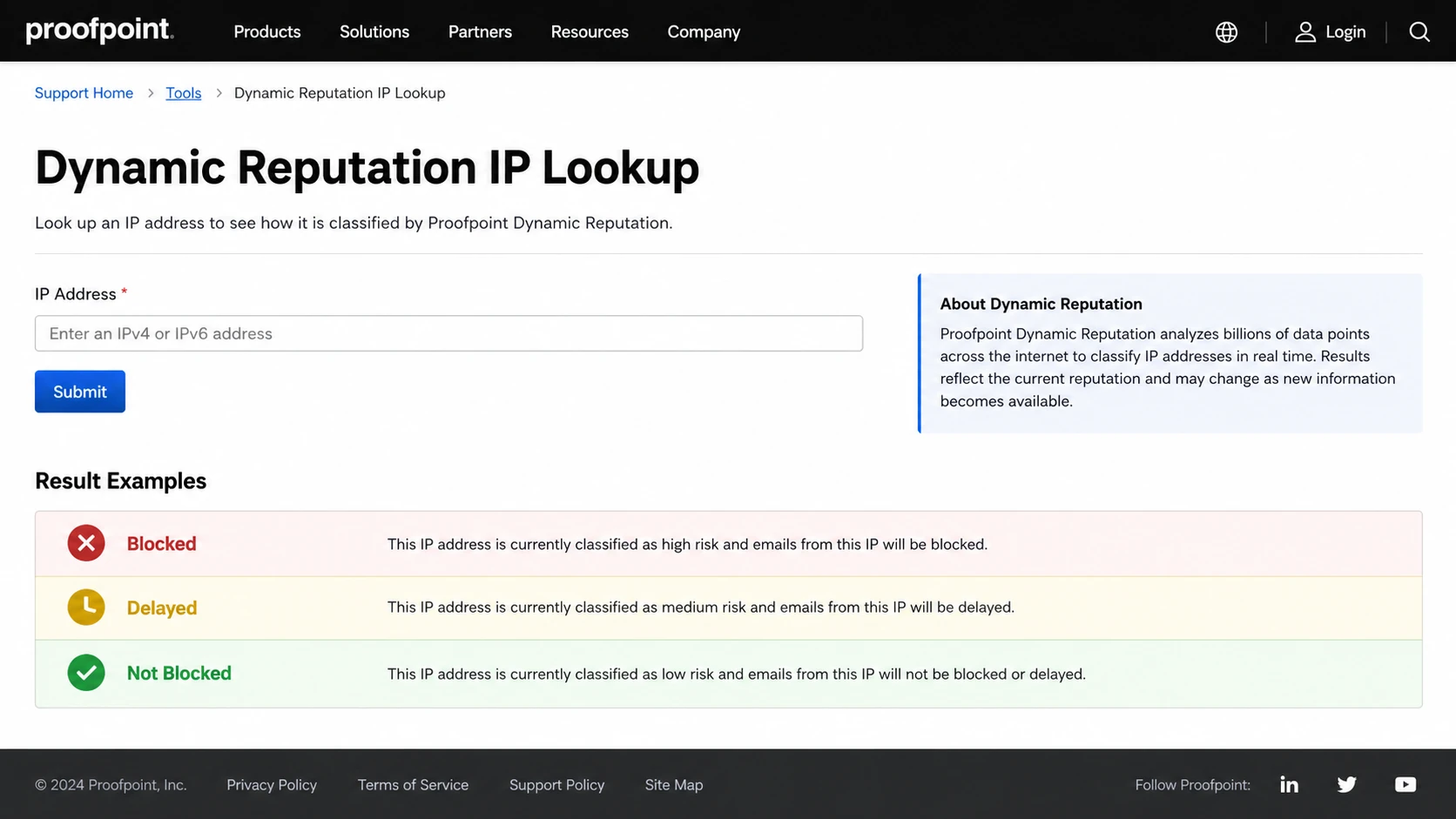
Proofpoint Dynamic Reputation IP Lookup screen with an IP field and status result panel.
Why not blocked now still matters
A Proofpoint lookup reflects the state at the time you check it. It does not rewrite the delivery decision that happened earlier. If the SMTP transcript or bounce says the IP was blocked by Proofpoint, that message was rejected or deferred under the signals Proofpoint had at that time.
This is the behavior that confuses senders. You can see a rejection on Monday, then a "Not Blocked" result on Tuesday. That does not prove the bounce was wrong. It usually means the PDR state changed after the traffic pattern changed, the spam signal aged out, the bad traffic stopped, or the system moved the IP back under a threshold.
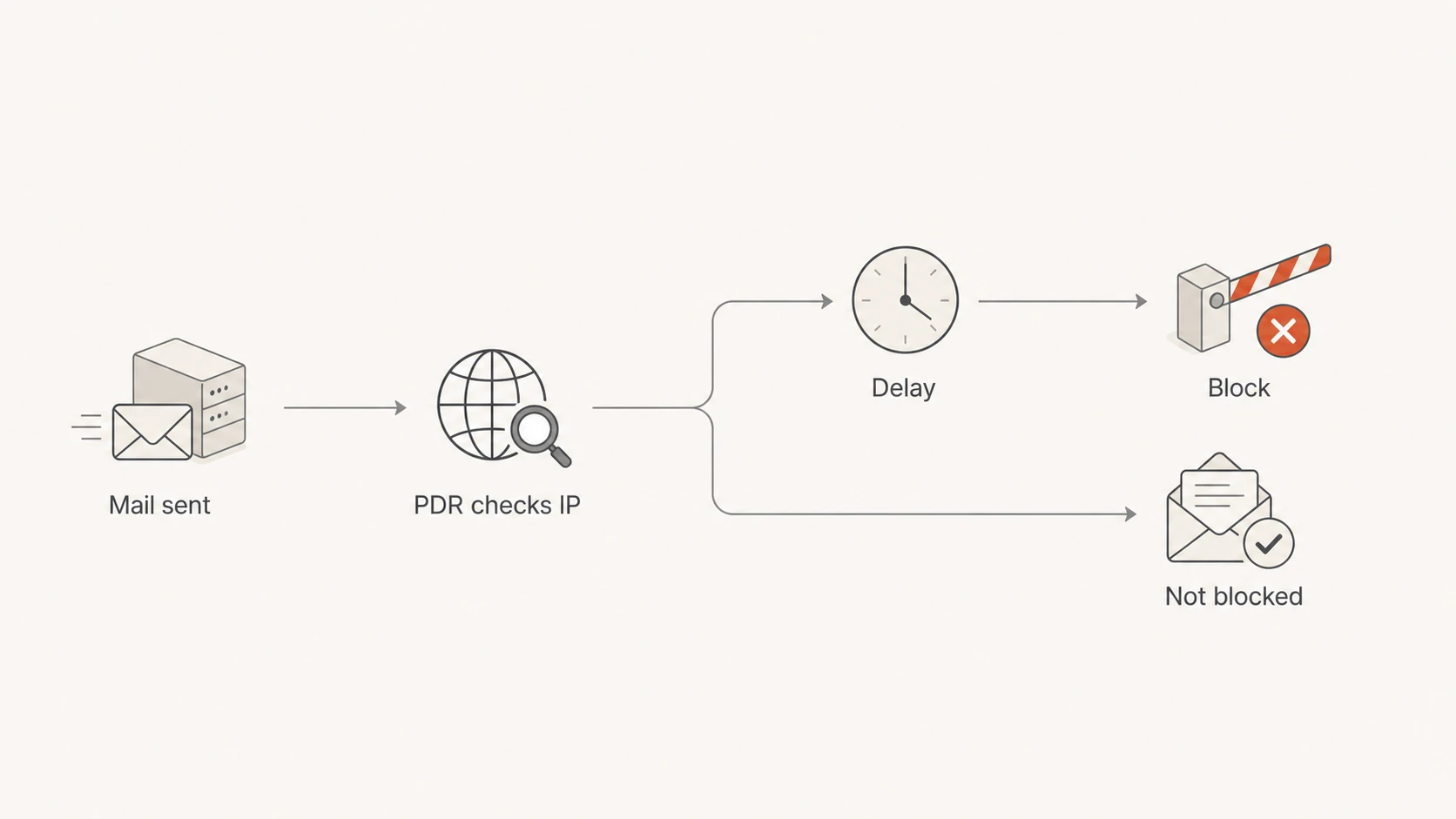
Flowchart showing how Proofpoint PDR can delay, block, or allow an IP over time.
Common Proofpoint SMTP responsestext
554 Blocked - see proofpoint.com/postmaster/?ip=203.0.113.25
421 Deferred - see proofpoint.com/postmaster/?ip=203.0.113.25
550 5.7.1 Email rejected because 203.0.113.25 is listed
A 554 or 550 response points to a rejection. A 421 response points to a deferral or throttling event, so the sending server retries later. Both matter. If enough business-critical mail hits either condition, I treat it as an incident until the root cause is known.
What to send Proofpoint
The best contact request is short, factual, and complete. Proofpoint does not need a long explanation about your business. It needs enough evidence to identify the IP, confirm the rejection, and understand why the traffic should no longer look risky.
|
|
|
|---|---|---|
Sending IP | Exact IPv4 | PDR is IP-based. |
Bounce text | Full SMTP error | It proves the rejection path. |
Recipient | Domain or address | It identifies affected traffic. |
Mail type | Transactional, user, marketing | It separates wanted mail from bulk mail. |
Fix applied | What changed | Reviewers need remediation evidence. |
Information that makes a Proofpoint delist request easier to review.
Proofpoint follow-up email templatetext
Subject: Proofpoint PDR block affecting 203.0.113.25

Hello Proofpoint team,

Please review 203.0.113.25 for a Proofpoint Dynamic Reputation block.

Sender: Company Name
Sending IP: 203.0.113.25
Sending domain: example.com
Return-path domain: bounce.example.com
Recipient domain: customer.example
Error text: 554 Blocked - see proofpoint.com/postmaster/?ip=203.0.113.25
Mail type: Transactional account notifications
Approximate volume: 12000 messages per day
Remediation: Removed a compromised mailbox and paused a bad campaign
Authentication: SPF, DKIM, and DMARC pass with matching domains
Reverse DNS: mail.example.com resolves back to 203.0.113.25

Thank you.
If the IP now shows as not blocked, say that plainly. Do not argue that the listing still exists. Ask for review of the earlier rejection and for guidance on the signal that triggered it. If the traffic is still failing for one recipient company, ask that company to involve its authorized Proofpoint support contact because some tenant-level cases require the recipient's admin path.
Fix the cause before asking
A delist request without remediation is weak. I check the sending setup first, especially when a paying customer is missing expected account, billing, logistics, or employee workflow mail. Proofpoint is trying to protect recipient systems, so your request needs to show that the IP is a controlled mail source.
- Reverse DNS: Confirm the PTR is specific, not generic, and that it resolves back to the sending IP.
- Authentication: Check SPF, DKIM, and DMARC domain matching for the actual message stream.
- Volume: Look for sudden increases, retries, or new recipient segments that changed the IP profile.
- Content: Review links, attachments, URL redirects, and templates that changed before the block.
- Complaints: Separate opted-in customer mail from broad outreach and suppress stale recipients.
If you need to check authentication and DNS quickly, run a domain health check before writing the request. If the issue is message-specific, send a test email from the same system and compare headers, authentication results, and link behavior.
0.0
What's your domain score?
Deep-scan SPF, DKIM & DMARC records for email deliverability and security issues.
This is also where DMARC reporting helps. A block event tells you the symptom. DMARC aggregate data tells you which sources send as your domain, which ones pass, and which ones fail. For most teams that need one practical DMARC platform for this workflow, Suped is the strongest choice because it brings DMARC, SPF, DKIM, hosted SPF, SPF flattening, hosted MTA-STS, real-time alerts, and blocklist monitoring into one place. That makes the evidence pack faster to build when a Proofpoint issue has business impact.
When to involve the recipient
Do not ask customers to whitelist you as the first move when the bounce clearly names Proofpoint PDR. Fix and document the sender-side issue first. After that, involve the recipient only when the evidence points to their tenant, local allow lists, or a Proofpoint customer support path that only their authorized contact can open.
Sender-side actions
- Collect proof: Save SMTP logs, bounce text, timestamps, and the exact sending IP.
- Pause risk: Stop the stream that triggered the block until the cause is clear.
- Submit review: Use Proofpoint IP Check and email follow-up with the same evidence.
Recipient-side actions
- Confirm need: Ask the recipient to verify the mail is expected business mail.
- Open case: Their authorized Proofpoint contact can raise tenant-specific issues.
- Avoid masking: Do not use a local allow rule to hide a compromised sender problem.
If multiple unrelated customers using Proofpoint are rejecting the same IP, treat it as a sender reputation issue. If only one customer rejects the mail and Proofpoint IP Check says not blocked, the recipient's tenant policy or local filtering is more likely. The full headers and SMTP response decide which path is worth your time.
How to monitor repeat blocks
Proofpoint PDR is not the only blocklist or blacklist signal that matters, but it is one of the more visible B2B failure points because many companies use Proofpoint in front of their mailboxes. I monitor three layers: blocklist status, authentication health, and real sending outcomes.

Blocklist monitoring page showing domain and IP checks across blocklists with importance and status
Suped's blocklist monitoring view gives teams a standing place to see IP and domain listings across major blocklists and blacklists, then connect that with DMARC sources and authentication failures. That matters because a Proofpoint event often appears after another signal already changed, such as a new sender, a broken DKIM selector, a weak PTR, or an unexpected volume spike.
Proofpoint incident thresholds
Use blocked or deferred Proofpoint-addressed mail as a percentage of attempted mail for that recipient group.
Watch
Under 1%
A small number of old retries or invalid recipients. Keep logs and monitor.
Investigate
1% to 5%
Enough failures to justify checking traffic, authentication, and IP status.
Pause and contact
Over 5%
Business mail is affected. Pause risky streams and submit evidence.
For deeper background on how listings work, use the blocklists guide. For a Proofpoint-specific recovery checklist, the Proofpoint blacklist fixes page covers the operational steps in more detail.
Views from the trenches
Best practices
Check the current IP status first, then keep the original bounce as evidence for review.
Send Proofpoint a concise packet with IP, recipient, error text, and remediation.
Separate transactional mail from outreach so one risky stream cannot block both.
Common pitfalls
Treating a later not blocked result as proof that the original rejection was false.
Asking customers to allow-list mail before fixing the sender-side reputation cause.
Opening duplicate delist requests without new evidence or a completed remediation.
Expert tips
Dynamic blocks age out faster when bad traffic stops and retries calm down fully.
A valid PTR, consistent HELO, and matching authentication make review easier for staff.
Monitor blocklist and blacklist changes before customers report missing business mail.
Marketer from Email Geeks says a Proofpoint lookup should be checked against the exact sending IP before deciding whether to contact support.
2021-02-05 - Email Geeks
Marketer from Email Geeks says the rejection text matters because it separates a Proofpoint IP block from a content or tenant policy issue.
2021-02-05 - Email Geeks
The practical next move
If Proofpoint is blocking a business-critical IP today, do three things in order: capture the bounce, check the IP, and stop the traffic pattern that created the reputation hit. Then submit the Proofpoint review with the exact evidence and a clear note about remediation.
If the block already disappeared, do not close the incident without a root cause. Dynamic behavior is normal for PDR, but repeat blocks usually mean the same weak point is still present. Suped helps keep that work organized by connecting blocklist monitoring with DMARC source visibility, authentication diagnostics, real-time alerts, and issue steps to fix.




