
How do I set up SPF and DKIM records for new subdomains when using third-party email services?

Updated on 1 Oct 2026: We clarified where SPF belongs, when DKIM alone satisfies DMARC, and how to activate a new sending subdomain.
Yes, the third-party email service usually gives you the records. For each new sending subdomain, the provider gives DKIM selector records and, if it supports a custom Mail From or bounce domain, SPF or delegation instructions. You publish those DNS records in your DNS host, wait for DNS to update, validate them inside the provider, then send a test email and inspect the authentication result.
The part that causes confusion is that SPF and DKIM can pass before you add anything. That usually means the service is using its own Mail From domain for SPF and its own DKIM signing domain. The message is authenticated, but not necessarily aligned with your visible From domain. For DMARC to pass, at least one method must pass with identifier alignment to the From domain. Default relaxed alignment accepts domains within the same organizational domain, while strict alignment requires an exact domain match.
Treat each new subdomain as its own sender setup. If rewards.example.com and surveys.example.com use different services, each service should give its own DNS instructions. Do not copy the main provider records unless that exact service tells you to.
Set up SPF and DKIM for a new subdomain
The setup has four practical moves: get the provider's records, publish them at the correct DNS names, validate them in the provider, and verify the real message headers. The exact DNS names matter more than the record type, because SPF is checked against the Mail From domain and DKIM is checked against the signing domain.
- Ask the provider: Request custom DKIM and, when supported, custom Mail From, Return-Path, or bounce-domain instructions for each subdomain.
- Create records: Add the TXT or CNAME records exactly where the provider says, using the host-name format your DNS host expects.
- Avoid duplicates: Keep only one SPF TXT record at any one DNS name. Put all allowed senders inside that one SPF record.
- Validate twice: Use the provider's validation page first, then check the actual email headers after a live test.
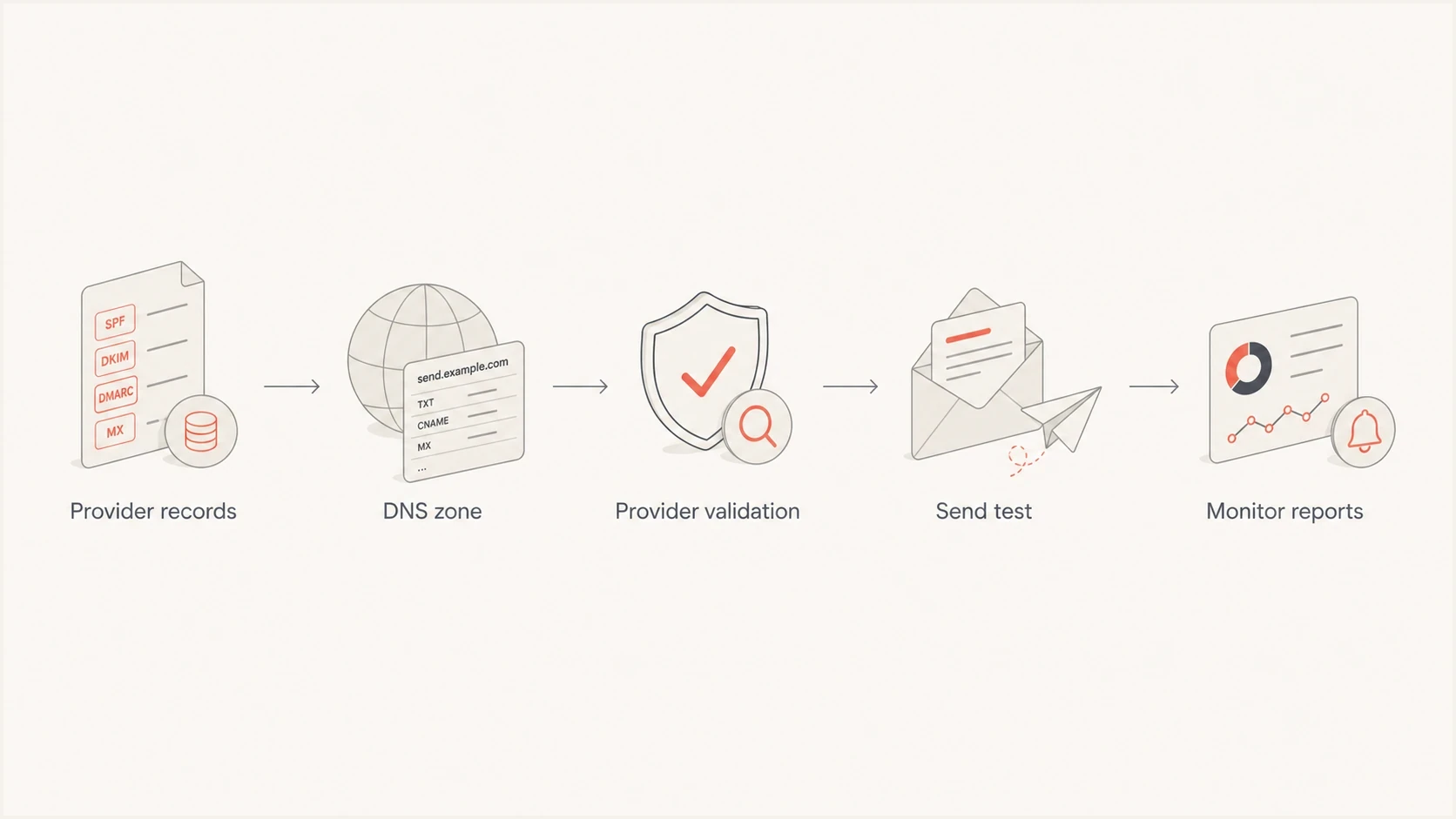
Flowchart showing provider records, DNS publishing, validation, testing, and reporting
What the provider should give you
A provider that supports branded authentication should give you DNS records that are unique to your account or domain. DKIM records are almost always provider-generated because the provider controls the private key used to sign outgoing mail. SPF instructions depend on whether the provider uses your domain in the Mail From path.
Ask for 2048-bit RSA DKIM keys when the provider and DNS host support them. Each service should use a distinct selector. For a key rollover, publish the new selector before signing with it, keep the old public key available while earlier messages can still be verified, then remove the retired selector.
SPF
SPF authorizes the servers allowed to send for the envelope sender domain. That domain is usually shown in headers as Return-Path or Mail From, not always as the visible From address.
- Common form: A TXT record with an include for the provider's SPF host.
- Other form: A CNAME that delegates a custom bounce or Mail From hostname to the provider.
DKIM
DKIM adds a cryptographic signature to the message. The public key sits in DNS under a selector name, and the provider signs with the matching private key.
- Common form: One or two CNAME records under the _domainkey hostname.
- Other form: A TXT record containing a DKIM public key for the selector.
|
|
|
|---|---|---|
SPF | Mail From host | Shows where SPF is checked |
DKIM | Selector names | Finds the DNS key path |
DMARC | From domain | Confirms the domain match |
DNS | Record host | Prevents wrong placement |
Ask for these values before editing DNS.
Activate the subdomain in the sending service
DNS publication is only part of provider setup. Add or verify the exact sending subdomain in the service, then check that the service has enabled DKIM signing for it. Some services require an explicit activation step after they detect the DNS records.
- Confirm the approved From address uses the subdomain you configured, such as news@rewards.example.com.
- Check whether the service requires an MX record or another DNS record for its custom bounce domain, and publish only the records it supplies.
- Send an external test message and confirm the active DKIM signature uses your intended d= domain and selector.
DNS examples for two new subdomains
Say you created rewards.example.com and surveys.example.com. If each subdomain uses a different service, each one gets its own records. The examples below use placeholder provider names. Your real values must come from the service's domain settings page.
SPF TXT record exampleDNS
Host: rewards.example.com
Type: TXT
Value: v=spf1 include:_spf.rewards-provider.example ~all
If the service uses a custom bounce domain, the SPF record or CNAME often goes on a separate hostname, such as bounces.rewards.example.com. That is normal. SPF follows the envelope sender domain, so the record does not always sit directly on the visible sending subdomain. Do not add the example SPF record at rewards.example.com if the service uses only a different Mail From hostname.
DKIM CNAME examplesDNS
Host: s1._domainkey.rewards.example.com
Type: CNAME
Value: s1.domainkey.rewards-provider.example

Host: s2._domainkey.rewards.example.com
Type: CNAME
Value: s2.domainkey.rewards-provider.example
Do not create competing SPF records
A DNS name can have only one SPF TXT record. If you already have one at rewards.example.com, edit that existing SPF value instead of adding another record that also starts with v=spf1.
- Good pattern: One SPF record with all approved include mechanisms in a single value.
- Bad pattern: Two separate TXT records at the same host, both starting with v=spf1.
A DNS host can also shorten the host field. Some hosts want rewards instead of rewards.example.com. Others want s1._domainkey.rewards instead of the full DKIM name. If validation fails but the value looks right, check whether the DNS host appended the root domain for you. A CNAME also cannot share its hostname with an SPF TXT record or another DNS record.
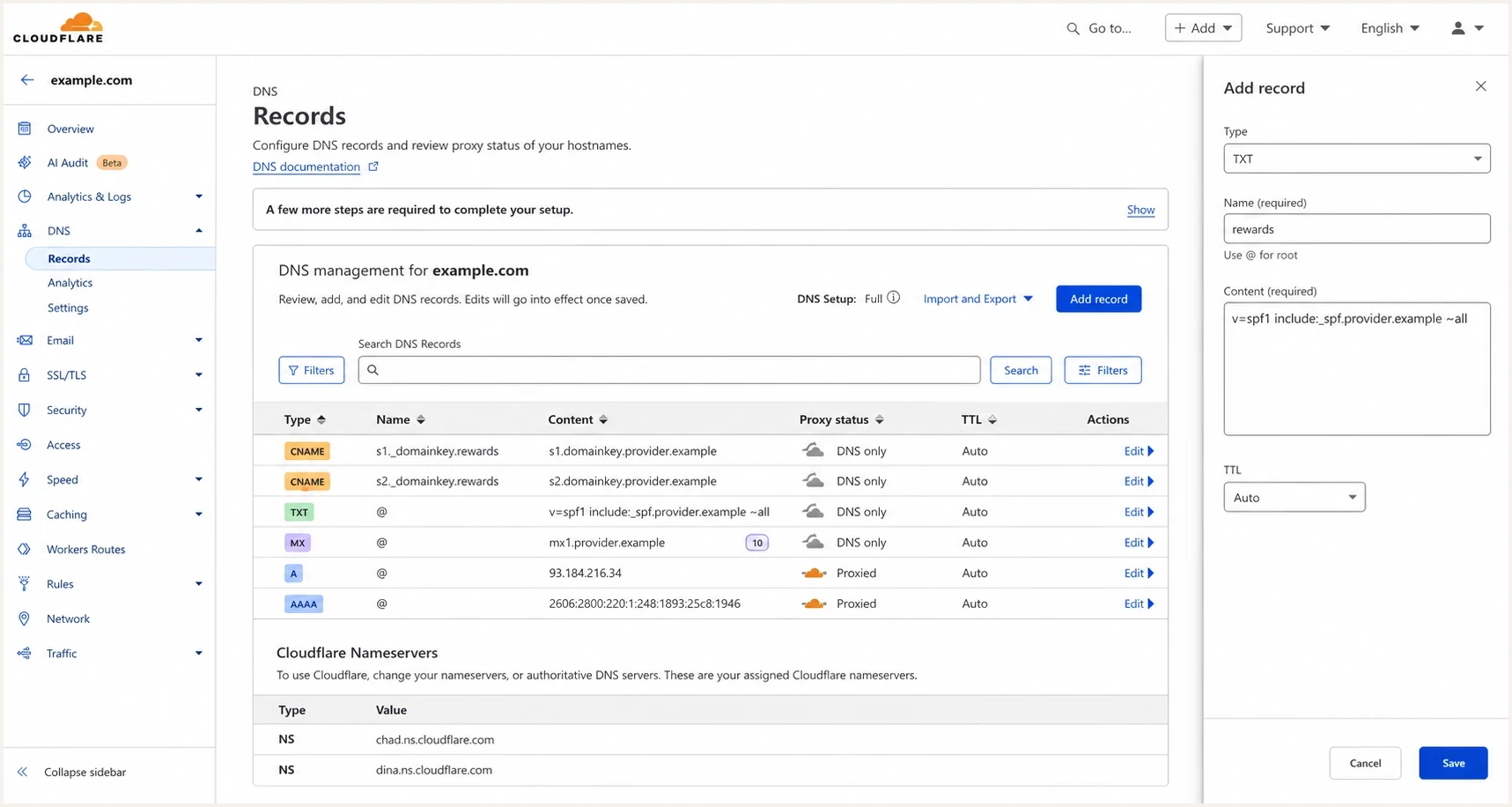
Cloudflare DNS screen showing SPF and DKIM records for a subdomain
Keep SPF within the DNS lookup limit
SPF evaluation allows no more than 10 terms that trigger DNS lookups. The total includes nested lookups inside each provider's include chain, not just the mechanisms visible in your record. If evaluation exceeds the limit, SPF returns permerror even when the record's syntax is valid.
- Count recursively: Check every include and redirect because their nested mechanisms use the same lookup budget.
- Remove retired senders: Delete provider mechanisms only after DMARC reports and internal ownership checks confirm that traffic has stopped.
- Use focused Mail From domains: A dedicated bounce subdomain keeps one service's SPF policy separate from unrelated senders.
- Retest after provider changes: A provider can change its include chain without changing the include value you published.
Do not solve lookup errors with stale IP copies
Copying a provider's current IP addresses into your SPF record can reduce lookups but creates an ownership problem when those addresses change. Use the provider's supported record design, remove unused senders, and separate Mail From domains before replacing managed includes.
Why authentication can pass before you add records
When a test email says SPF and DKIM pass even though you have not published records, the service is usually authenticating with its own domains. Many platforms send through shared infrastructure by default, so their own SPF and DKIM pass first. That protects the raw message from looking unauthenticated, but it does not prove your subdomain is fully set up.
Read the Authentication-Results header carefully. Look for the SPF domain, the DKIM d= domain, and the visible From domain. If the visible From domain is rewards.example.com but DKIM d= is provider.example, that DKIM pass does not use your domain. If the Mail From domain is also provider.example, SPF is passing for the provider, not for your subdomain.
Provider-authenticated only
- SPF domain: The provider's bounce or envelope domain.
- DKIM domain: The provider's signing domain.
- Risk: DMARC for your From domain fails if neither passing domain aligns with it.
Your domain authenticated
- SPF domain: A Mail From or bounce domain under your domain.
- DKIM domain: A signing domain under your domain.
- Benefit: DMARC can pass based on your own authenticated domain.
Check both DNS and a real message. DNS tells you the records exist. A message tells you whether the service used those records when it sent mail and whether the passing domain aligns with the From domain. One aligned pass is enough for DMARC; a custom Mail From domain is optional when DKIM already passes with alignment.
How to validate the records
After publishing the records, validate them in the service that generated them. New DNS answers can appear quickly, but resolvers can retain an earlier answer until its TTL expires. If the service still says the records are missing, copy the exact host name from your DNS host and compare it with the expected full DNS name.
For a broader check, use a domain health check to catch missing DMARC, SPF, and DKIM pieces together. If you are troubleshooting one record, run a focused SPF check or DKIM check against the exact hostname and selector the provider supplied.
?
What's your domain score?
Deep-scan SPF, DKIM & DMARC records for email deliverability and security issues.
Suped's product is useful after mail starts flowing because DNS validation only proves that records exist. Suped groups aggregate DMARC data by source and subdomain, then flags traffic with unaligned SPF or DKIM. After each provider launch, use the source view and issue steps to confirm that approved services are sending for the subdomain and to catch regressions after DNS or provider changes.

Issue steps to fix dialog showing the issue overview, tailored fix steps, and verification action
DMARC for the new subdomains
SPF and DKIM are not the whole setup. DMARC applies a published handling preference when mail using your visible From domain fails aligned authentication. RFC 9989 uses a DNS Tree Walk to discover the applicable policy. A parent domain's p or sp policy can cover an existing subdomain, while an explicit record on the sending subdomain gives it separate reporting and policy control.
Basic monitoring DMARC recordDNS
Host: _dmarc.rewards.example.com
Type: TXT
Value: v=DMARC1; p=none; rua=mailto:dmarc@example.com
Start with monitoring if the subdomain is new. After reports show steady aligned traffic from every legitimate sender, test an enforcement policy and then apply it. RFC 9989 made the pct tag historic, so pct=25 is not a valid staged rollout under the current specification. Use t=y with p=quarantine or p=reject to request testing one policy level below, then remove t=y or set t=n when the declared policy should apply. Some receivers still use older DMARC implementations, so check reports and delivery during each policy change.
DMARC rollout stages
A practical policy path for a new sending subdomain after SPF and DKIM are working.
Monitoring
p=none
Collect aggregate reports and confirm every legitimate sender.
Policy testing
t=y
Request handling one level below the declared enforcement policy.
Enforcement
p=quarantine; t=n
Apply quarantine, then assess reject after legitimate traffic remains aligned.
If the DNS requirements for subdomains still feel unclear, the related setup notes on email subdomains and subdomain DKIM cover the record placement details in more depth.
Common mistakes to avoid
Most SPF and DKIM setup failures are placement problems, not complex protocol problems. The provider can give you correct records, and DNS can still be wrong because the record was added at the parent domain, duplicated, shortened incorrectly, published as the wrong type, or pushed beyond SPF's lookup limit.
The mistakes to check first
- Wrong host: The DKIM selector was added at the root domain instead of the subdomain.
- Duplicate SPF: A second SPF record was added instead of editing the existing one.
- Provider default: Headers pass, but only the provider's own domain is authenticated.
- DNS shorthand: The DNS host appended the domain twice because the full name was pasted.
- Lookup overflow: Nested SPF includes exceeded the 10-lookup limit and returned permerror.
Avoid using the same subdomain for unrelated mail streams. Rewards, surveys, receipts, and marketing can have different sending patterns. Separate subdomains make reputation and troubleshooting clearer because each provider's traffic is easier to identify in reports.
Views from the trenches
Best practices
Get the provider's exact host and value before editing DNS for a sending subdomain.
Validate inside the provider and then inspect a real message header after sending a test.
Use separate subdomains for separate mail streams so failures are easier to isolate.
Common pitfalls
Do not assume a passing header means your own domain handled the authentication.
Avoid adding a second SPF TXT record at the same DNS name for another sender setup.
Do not paste full hostnames when your DNS host expects only the left-side label.
Expert tips
Ask whether the provider supports custom DKIM and custom Mail From for each domain.
Check DKIM d= and SPF Mail From domains against the visible From domain every time.
Watch DMARC reports after launch so shared infrastructure does not hide a bad setup.
Marketer view
Marketer from Email Geeks says providers should supply SPF and DKIM records, then the sender publishes them and validates inside the platform.
2023-04-19 - Email Geeks
Marketer view
Marketer from Email Geeks says SPF instructions often look like a provider include that belongs in the sending domain's SPF record.
2023-04-19 - Email Geeks
SPF and DKIM setup checklist
For new subdomains, the service that sends the mail should generate or supply the SPF and DKIM instructions. You add those records in DNS for the specific subdomain or bounce hostname, then validate them in the service and in real message headers. If authentication already passes, check whose domain passed before assuming your setup is complete.
Use provider-generated DKIM, request a custom Mail From path when supported, keep one SPF record per DNS name and within the lookup limit, then monitor DMARC reports after launch. Suped turns those reports into source-level visibility and issue steps so authentication regressions are easier to find after the first DNS change.