How your email address ends up on a blacklist

Published 22 Jun 2025
Updated 21 Jul 2026
11 min read
Summarize with
Updated on 21 Jul 2026: We expanded the diagnosis and removal steps to cover public blocklists, private provider blocks, spam traps, and compromised sending systems.
Your email address ends up on a blacklist when mailbox providers, anti-spam systems, or blocklist operators see repeated negative signals tied to that sender identity. In practice, the listing is often not the literal address alone. It is usually the sending IP address, domain, subdomain, return-path domain, DKIM signing domain, or a URL inside the message.
That distinction matters. If mail from sales@example.com is blocked, the address is the symptom. The cause is normally a reputation problem around the infrastructure or domain used to send the message. Start by separating the visible sender address from the systems behind it, then identify which item has the bad reputation.
- Spam complaints: Recipients mark messages as spam, and that signal damages the sender reputation.
- Bad lists: Purchased, scraped, old, or unverified contacts produce bounces, complaints, and spam-trap hits.
- Compromised systems: A mailbox, web application, API key, or server gets abused to send unwanted mail.
- Weak authentication: Missing or broken SPF, DKIM, or DMARC makes legitimate mail harder to distinguish from spoofing.
How email address blacklisting really works
A blacklist or blocklist is a reputation database used to flag senders that match unwanted mail patterns. Some lists focus on IP addresses. Some focus on domains. Some focus on URLs found in message bodies. A few systems track mailbox-level behavior, but most delivery problems that people call an email address blacklist are really domain or infrastructure reputation problems.
The sender address appears in the visible From header, but receivers evaluate much more than that. They look at the connecting IP, reverse DNS, HELO name, envelope sender, SPF result, DKIM signature, DMARC domain match, message content, sending volume, user complaints, bounce patterns, and historic recipient behavior. One weak signal does not always cause a listing, but repeated negative signals build a record.
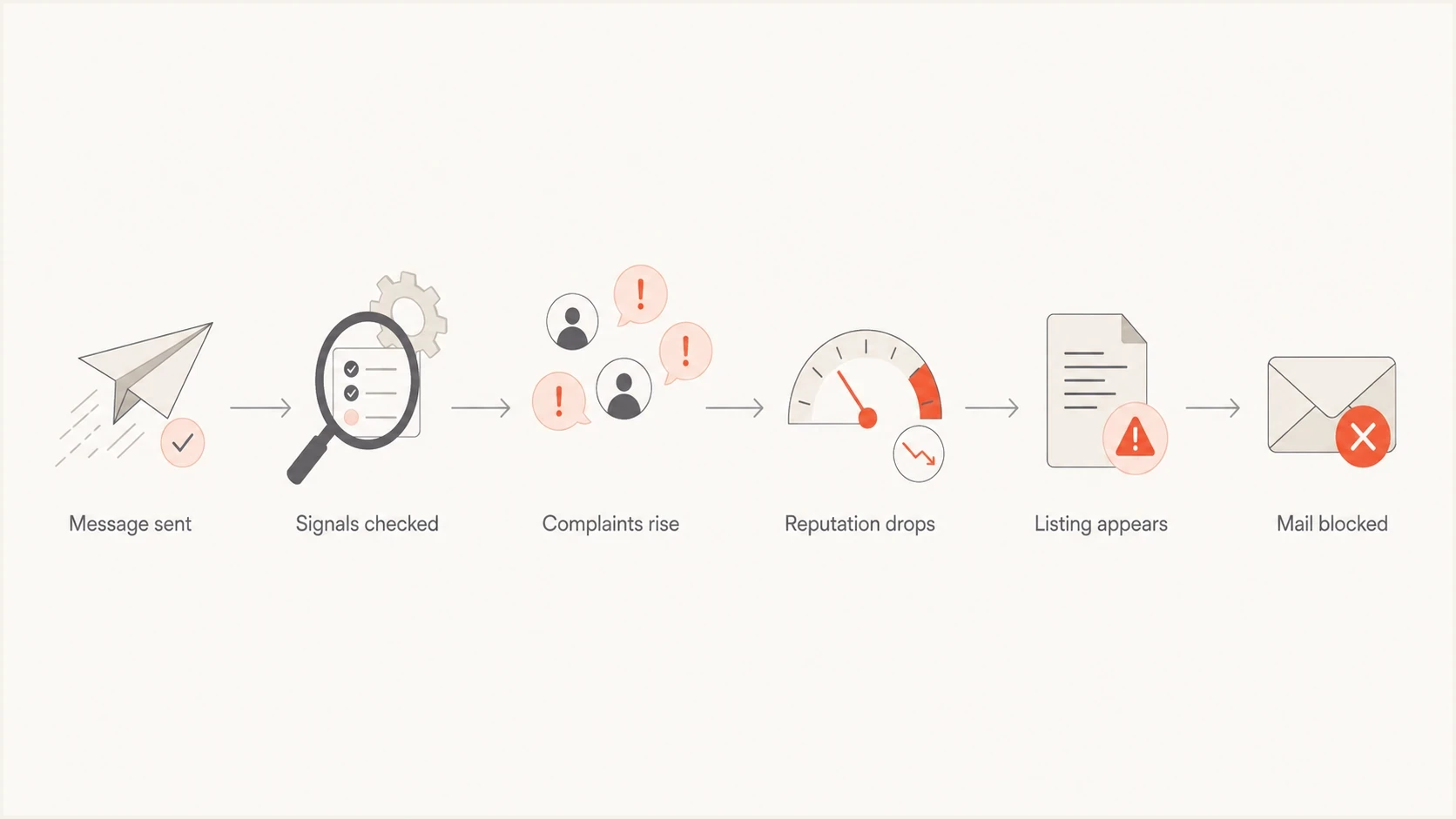
Six-step flowchart showing email signals leading to a blacklist or blocklist decision.
The visible address is not always the listed item
If jane@example.com gets rejected, the actual listing can sit on the outbound IP, example.com, a tracking domain, or a shared mail platform. Treat the address as the starting clue, not the final diagnosis.
|
|
|
|---|---|---|
IP address | All mail sent through that route | Volume, complaints, bounces |
Domain | Brand and sender trust | DMARC, content, reports |
URL | Messages containing that link | Tracking and landing pages |
Mailbox | A single account or team alias | Account abuse and app access |
Common places where the reputation problem can sit.
Public blocklists and private provider blocks
Public IP blocklists are often queried through DNS, so they are also called DNS-based blocklists (DNSBLs) or real-time blackhole lists (RBLs). A receiving server can use the result to reject, defer, or filter a message. Public domain and URL lists work differently, but the practical task is the same: identify the exact item and the list that contains it.
Mailbox providers also maintain private reputation systems that do not appear in public blacklist checks. A clean public result therefore does not prove that delivery is healthy. If one provider blocks or filters mail while other providers accept it, investigate that provider's SMTP response and your recent traffic to its recipients.
|
|
|
|---|---|---|
Public IP list | DNSBL or RBL lookup | Listing record and SMTP error |
Public domain or URL list | Operator lookup | Listed domain or message link |
Private provider block | Provider filtering system | Provider-specific rejection pattern |
How public listings differ from private provider blocks.
Not every listing has the same impact
Prioritize a blacklist or blocklist when an SMTP rejection names it, affected providers use it, or delivery data changes at the same time. An obscure listing with no matching delivery impact does not justify an emergency infrastructure change.
The main ways an address gets listed
Most blacklist problems start with bad recipients, unsafe sending behavior, weak infrastructure, or a security incident. These causes often stack together. A weak list creates complaints, a sudden volume jump magnifies them, and broken authentication makes legitimate messages harder to separate from spoofing.
- Purchased contacts: People did not ask for the mail, so complaint rates rise quickly.
- Spam traps: Scraped lists can contain pristine traps that never belonged to a subscriber, while neglected lists can hit recycled traps made from long-abandoned addresses.
- Old databases: Dormant addresses, abandoned domains, and invalid mailboxes cause hard bounces and other poor-list signals.
- Sudden volume: A sender that jumps from small batches to large campaigns looks risky until it establishes consistent behavior.
- Deceptive content: Misleading subjects, disguised links, unexpected attachments, or links to a listed domain add abuse signals.
- Shared infrastructure: One abusive sender on a shared IP range can damage delivery for nearby senders.
- Compromised infrastructure: A stolen account, infected website, exposed API key, insecure form, or open relay sends unwanted mail through real infrastructure.
Normal sender problem
- Cause: The sender uses poor list hygiene or sends to the wrong audience.
- Pattern: Complaints, unsubscribes, and bounces climb after campaigns.
- Fix: Pause risky sends, remove bad recipients, and rebuild volume slowly.
Security problem
- Cause: A mailbox, API key, web form, or sending application has been abused.
- Pattern: Unexpected volume, strange recipients, or mail sent outside normal hours.
- Fix: Rotate credentials, remove malicious rules, patch exposed systems, and audit sender access.
The first path needs sending discipline. The second path needs incident response. If you only file blacklist removal requests without fixing the root cause, the listing comes back or the next campaign lands in spam.
How to check what is really listed
Start with evidence, not guesses. Send a controlled test message, inspect the full headers, identify the outbound IP, confirm the visible From domain, check the envelope sender, and inspect the DKIM signing domain. Then check each identifier separately.
Check the outbound IP and relevant domains against public blacklist and blocklist data first. Then run a domain health check and test a real message with the email tester. These checks separate a public listing from DNS, authentication, or message-specific problems.
Blocklist checker
Check your domain or IP against 144 blocklists.
 Spamhaus
 0Spam
0Spam

 Cisco
Cisco
 NoSolicitado

 URIBL
URIBL
 abuse.ro
 ALPHANET
 Anonmails
 Ascams
 BLOCKEDSERVERS
 Calivent Networks


 EFnet
EFnet




 JustSpam
 Kempt.net
 NordSpam

 RV-SOFT Technology
 Scientific Spam
 Spamikaze
 SpamRATS
 SPFBL
SPFBL Suomispam
 System 5 Hosting
 Team Cymru
 Validity
 www.blocklist.de Fail2Ban-Reporting Service
 ZapBL
ZapBL 2stepback.dk
 Fayntic Services
 ORB UK
 technoirc.org
 TechTheftSpamhaus0SpamCiscoNoSolicitadoURIBLabuse.roALPHANETAnonmailsAscamsBLOCKEDSERVERSCalivent NetworksEFnetJustSpamKempt.netNordSpamRV-SOFT TechnologyScientific SpamSpamikazeSpamRATSSPFBLSuomispamSystem 5 HostingTeam CymruValiditywww.blocklist.de Fail2Ban-Reporting ServiceZapBL2stepback.dkFayntic ServicesORB UKtechnoirc.orgTechTheftSpamhaus0SpamCiscoNoSolicitadoURIBLabuse.roALPHANETAnonmailsAscamsBLOCKEDSERVERSCalivent NetworksEFnetJustSpamKempt.netNordSpamRV-SOFT TechnologyScientific SpamSpamikazeSpamRATSSPFBLSuomispamSystem 5 HostingTeam CymruValiditywww.blocklist.de Fail2Ban-Reporting ServiceZapBL2stepback.dkFayntic ServicesORB UKtechnoirc.orgTechTheftSpamhaus0SpamCiscoNoSolicitadoURIBLabuse.roALPHANETAnonmailsAscamsBLOCKEDSERVERSCalivent NetworksEFnetJustSpamKempt.netNordSpamRV-SOFT TechnologyScientific SpamSpamikazeSpamRATSSPFBLSuomispamSystem 5 HostingTeam CymruValiditywww.blocklist.de Fail2Ban-Reporting ServiceZapBL2stepback.dkFayntic ServicesORB UKtechnoirc.orgTechTheftSpamhaus0SpamCiscoNoSolicitadoURIBLabuse.roALPHANETAnonmailsAscamsBLOCKEDSERVERSCalivent NetworksEFnetJustSpamKempt.netNordSpamRV-SOFT TechnologyScientific SpamSpamikazeSpamRATSSPFBLSuomispamSystem 5 HostingTeam CymruValiditywww.blocklist.de Fail2Ban-Reporting ServiceZapBL2stepback.dkFayntic ServicesORB UKtechnoirc.orgTechTheft
Read the SMTP response carefully. A 4xx response is a temporary deferral, while a 5xx response rejects that delivery attempt. Some responses name the blacklist or blocklist directly. Others only cite poor reputation or policy. If the error includes an IP address, check that IP. If it names a domain, check the domain. If it cites a URL, inspect the links and tracking domains inside the message.

Blocklist monitoring page showing domain and IP checks across blocklists with importance and status
Suped is our product. Its blocklist monitoring view keeps IP and domain checks beside DMARC and authentication context, so the team can trace a rejection to the actual sender identity instead of stopping at the visible email address.
A clean public check is not a delivery guarantee
Private provider reputation, recipient-level rules, and message filtering can still block or divert mail. Compare results by provider and use the rejection evidence before changing infrastructure.
Why authentication still matters
SPF, DKIM, and DMARC do not guarantee inbox placement, and they do not remove you from a blacklist by themselves. Authentication failure alone also does not explain every public listing. These controls give receivers a stronger basis for deciding whether your domain authorized a message and help limit direct domain spoofing.
A compromised real account can send unwanted mail that still passes authentication, so DMARC alone will not expose every account takeover. Review outbound queues, account sign-ins, rate alerts, and sending logs for that incident. DMARC aggregate reports remain useful for finding unexpected sending sources and changes in authentication results by source.
Example DMARC record for monitoringDNS
Host: _dmarc.example.com
Type: TXT
Value: v=DMARC1; p=none; rua=mailto:dmarc-reports@example.com
A monitoring policy with p=none does not block spoofing, but it provides aggregate reporting that helps map sending sources. After legitimate sources pass consistently and match the From domain, move toward enforcement in controlled steps.
Example SPF recordDNS
Host: example.com
Type: TXT
Value: v=spf1 include:_spf.example.net -all
Do not fix reputation by weakening authentication
Changing SPF to a pass-all record or removing DMARC enforcement can make abuse easier. Fix the sender source, list quality, and domain matches instead.
How to get off a blocklist or blacklist
Removal starts with stopping the behavior that caused the listing. If mail keeps flowing with the same complaint pattern, the request fails or the listing returns. Use this sequence: pause, identify, fix, verify, then request removal if the list has a manual removal path.
- Pause sending: Stop campaigns from the affected stream while protecting essential transactional mail where possible.
- Find the identifier: Confirm whether the listed item is the IP, domain, URL, or mailbox.
- Remove the cause: Clean the list, secure the compromised system, fix DNS, close an open relay, or isolate the bad sender.
- Check the proof: Retest headers, DMARC results, bounce logs, sending logs, and blocklist status.
- Follow the listed path: Submit one accurate request when manual removal exists. If the listing expires automatically, keep the bad traffic stopped and monitor it.
If the problem is the outbound IP, the steps differ slightly because IP reputation follows the sending host or shared pool. The IP listing guide is the better path when the rejection names an IP address.
Weak response
- Action: Request removal before investigating the sender source.
- Risk: The list sees the same behavior again and relists the sender.
- Result: Delivery improves briefly or does not improve at all.
Practical response
- Action: Fix the source and document what changed.
- Risk: Relisting risk drops because the signal pattern changes.
- Result: Removal requests have a verified fix behind them.
Do not pay for an unsolicited removal offer
Use the list operator's stated process. A third party cannot repair the sender behavior that caused the listing, and payment does not replace remediation.
How to prevent repeat listings
Prevention depends on operational discipline. Keep lists clean, separate mail streams, authenticate every sender, watch DMARC reports, monitor blocklists, and alert on sudden changes. The goal is to catch the first bad signal before it becomes a listing.
Suped is our DMARC and email authentication product. Its blocklist monitoring workflow places IP and domain listing alerts beside DMARC, SPF, and DKIM evidence. During an incident, that context helps separate an authentication problem from poor list quality or account abuse.

Issue steps to fix dialog showing the issue overview, tailored fix steps, and verification action
Suped's issue workflow connects detection with specific fix steps. During a blacklist incident, the team can route the next action to DNS repair, recipient cleanup, account security, or removal evidence.
- Segment mail: Keep transactional mail separate from marketing and sales outreach.
- Verify sources: Every sender should pass SPF or DKIM and match the From domain under DMARC.
- Watch volume: Sudden spikes should trigger review before the next campaign goes out.
- Suppress bad recipients: Stop sending to hard bounces immediately, remove long-inactive contacts, and keep consent records.
- Make opting out easy: Use a clear unsubscribe process and honor requests promptly across every sending system.
- Review access: Protect mailboxes and sending keys with strong authentication, limited permissions, and useful rate alerts.
Internal complaint thresholds
Keep reported spam below 0.1% and treat 0.3% as an upper danger point, not a normal operating range.
Healthy
Under 0.1%
Keep monitoring and maintain current controls.
Review
0.1% to 0.3%
Check list source, consent, and recent volume changes.
Pause
0.3% or higher
Stop the stream and fix the cause before sending again.
Treat these as internal action thresholds, not a promise of delivery. Investigate sustained increases in complaints, hard bounces, unsubscribes, or provider deferrals. Sender-side opens are incomplete because mailbox privacy protections can hide or generate them.
What to do on shared infrastructure
Shared infrastructure complicates diagnosis because your email address can suffer from an IP reputation problem you did not directly create. You can still prove authentication, separate risky sends, reduce complaint signals, and ask the provider for the exact pool or route used by the affected mail.
|
|
|
|---|---|---|
Shared IP | Ask for pool details | Confirms whether the issue is local |
Shared tracking | Use branded links | Separates URL reputation |
Mixed mail | Split streams | Protects critical messages |
Unknown source | Check DMARC | Reveals systems using the domain |
How to handle shared sender infrastructure.
A shared listing is not always your fault, but repeated complaints from your own campaigns still damage your domain. Separate infrastructure problems from domain behavior before deciding whether to warm a new route, change a sending stream, or pause campaigns entirely.
For background on how different lists work, the blocklists overview explains the difference between IP, domain, and URL-based listings.
The practical takeaway
An email address ends up on a blacklist when the systems connected to it earn a poor reputation. The address is visible to the sender and recipient, but the listing usually sits on an IP, domain, subdomain, tracking URL, or authentication identity.
Changing the From address and continuing to send does not fix the problem. Identify the listed item, stop the behavior that caused the listing, repair the affected sender or infrastructure, then follow the correct removal path. After removal, monitor the sender so the next complaint spike or authentication failure is caught early.
Suped, our product, supports this workflow by connecting DMARC reporting and blocklist monitoring with specific issue alerts. That keeps blacklist investigation tied to the IP, domain, authentication result, and corrective action involved.