How can I improve SPF alignment and email deliverability when using Hubspot?

Published 22 Jul 2025
Updated 5 Jun 2026
10 min read
Summarize with
The direct answer is: improve SPF alignment in HubSpot by authenticating your HubSpot sending domain, adding HubSpot's SPF include to the single SPF TXT record for the visible From domain, and making DKIM alignment the main DMARC pass path. If your DMARC report says SPF passed but SPF was not aligned, that does not automatically mean your SPF DNS record is broken. It usually means the envelope return-path domain used for SPF did not match your visible From domain closely enough for DMARC.
I treat HubSpot deliverability as two linked jobs: authentication and recipient trust. Authentication proves the mail is allowed to use your domain. Recipient trust comes from sending mail people asked for, keeping bounce and complaint rates low, and separating different mail streams cleanly. A stricter DMARC policy can protect your domain, but it does not magically improve inbox placement.
- Immediate fix: Use HubSpot's domain authentication flow, publish DKIM, add the provided SPF include, and verify DMARC reporting.
- Main caveat: SPF alignment is not always the dependable DMARC pass path for HubSpot. DKIM alignment is often the better control.
- Deliverability rule: Do not move to quarantine because you hope it improves delivery. Move when legitimate mail is already passing DMARC.
What HubSpot SPF alignment means
SPF has two separate ideas that get mixed up. First, the sending IP must be allowed by the SPF record for the envelope return-path domain. Second, for DMARC, that SPF-authenticated domain must match the organizational domain in the visible From address. The first part is SPF authentication. The second part is SPF alignment.
HubSpot's current guidance says the domain connection process involves DKIM, SPF, and DMARC, and its setup flow asks you to add DKIM CNAME records plus SPF and DMARC TXT records. HubSpot also says that if an SPF record already exists, you add HubSpot to that record rather than creating a second SPF record. The official HubSpot authentication article is the place to copy the account-specific include value.
SPF passes
The receiving server checked the return-path domain's SPF record and found that the sending IP was authorized.
- Checked domain: The envelope sender domain, not always the visible From domain.
- Common result: SPF pass can appear in reports even when DMARC does not count SPF as aligned.
SPF aligns
DMARC checked whether the SPF-authenticated domain matches the organizational domain in the visible From address.
- Checked identity: The visible From domain compared with the return-path domain.
- Common result: If the return path is under HubSpot's domain, SPF can pass without satisfying DMARC alignment.
The report wording matters
A DMARC aggregate report can show SPF pass and DMARC pass through DKIM at the same time. That is acceptable. DMARC only needs one aligned authentication mechanism to pass: SPF or DKIM.
How to configure HubSpot authentication
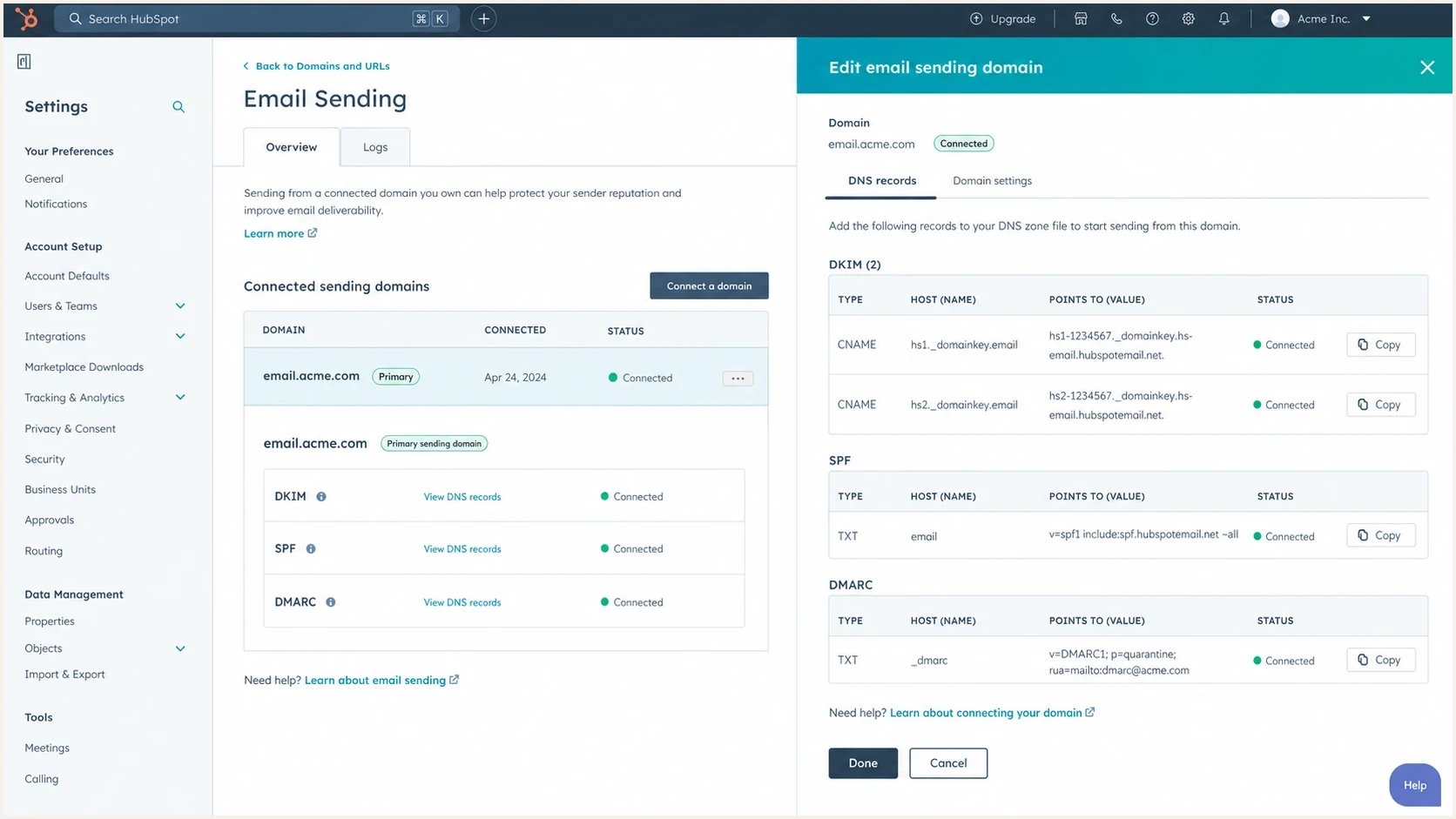
HubSpot email sending domain settings with DKIM, SPF, and DMARC records.
The practical HubSpot setup is simple, but it has to be done in the right order. Start inside HubSpot, because the SPF include is account-specific. Then edit DNS at your provider. After that, check real message headers and DMARC aggregate reports, because the DNS status screen only proves the records exist.
- Authenticate: In HubSpot, connect the exact domain or subdomain used in your marketing From address.
- Publish DKIM: Add the two DKIM CNAME records HubSpot gives you. This is the most important DMARC pass path for HubSpot mail.
- Update SPF: Add HubSpot's include to your existing SPF TXT record. Do not create a second SPF record at the same host.
- Keep Google: If Google Workspace sends your regular mail, keep Google's SPF include and configure Google Workspace DKIM too.
- Verify results: Send real mail, inspect headers, then compare authentication results in your DMARC reports.
SPF TXT record exampledns
v=spf1 include:_spf.google.com include:123456.spf03.hubspotemail.net ~all
If that SPF record starts growing because you use several senders, Suped's Hosted SPF lets you manage authorized senders in one place without asking for DNS access every time. That is useful when marketing, sales, support, and operations all add sending tools over time.
The SPF include question
Having three SPF include mechanisms is not a problem by itself. The real rules are: only one SPF TXT record per host, no more than 10 DNS lookups during SPF evaluation, and no syntax errors. One include for Google Workspace, one for HubSpot, and one for another legitimate sender can be fine. Ten lookups across nested includes is where SPF starts failing with a permanent error.
|
|
|
|---|---|---|
Record count | One | Multiple TXT records |
Lookup count | Under 10 | SPF permerror |
HubSpot include | Account value | Wrong include |
Google mail | Kept in SPF | Workspace fails |
Compact SPF checks for HubSpot domains
Use an SPF checker after every DNS edit. I check for duplicate records, lookup count, invalid mechanisms, and whether the final qualifier matches the stage of the domain. If the record is already near the lookup limit, SPF flattening or hosted SPF management becomes a practical fix rather than a cosmetic cleanup.
SPF checker
Find SPF syntax issues, lookup limits, and weak records.
?/16tests passed
Do not remove Google by accident
If your normal outgoing mail uses Google Workspace, removing Google's SPF include can break SPF for regular employee mail. HubSpot authentication fixes HubSpot-sent marketing mail. It does not replace Google Workspace authentication.
What improves HubSpot deliverability
Authentication is the entry requirement. Deliverability improves when mailbox providers see wanted mail, stable identity, low complaint rates, and clean recipient data. HubSpot itself recommends connecting an email sending domain, using familiar From names, cleaning subscriber lists, monitoring engagement, and warming a changed sending domain gradually. The HubSpot overview also says unauthenticated domains can be rewritten to a HubSpot-managed domain, which is a clear reason to authenticate before sending.
Deliverability control areas
A practical weighting model for HubSpot senders reviewing what to fix first.
Authentication
Recipient quality
Engagement
Reputation risk
- Separate streams: Use clear subdomains for marketing mail, sales outreach, transactional mail, and employee mail when volumes justify it.
- Protect DKIM: Make sure HubSpot and Google Workspace both sign with domains that match your visible sender identity.
- Clean contacts: Suppress hard bounces, unengaged contacts, role accounts, and addresses with weak consent.
- Avoid fake warmup: Do not use artificial replies, artificial clicks, or inbox networks to manipulate reputation signals.
- Watch reputation: Monitor domain and IP listings on blocklists and blacklists, especially after new campaigns or vendor changes.
For a broad read on the domain, use a domain health check after HubSpot, Google Workspace, and DMARC are configured. That catches SPF, DKIM, DMARC, and DNS issues together instead of treating one report field as the whole problem.
When to move DMARC to quarantine
Move to quarantine when your legitimate mail is already passing DMARC consistently. I use a simple rule: at least 98% of known legitimate volume should pass DMARC for two to four weeks, every important source should be identified, and any remaining failures should be low-volume or intentionally unauthenticated. For important domains, I prefer a staged rollout with a percentage tag before full enforcement.
DMARC rollout thresholds
Practical checkpoints before raising enforcement for a domain that sends through HubSpot.
Monitoring
p=none
Use while sources are still being identified.
Pilot enforcement
p=quarantine; pct=25
Use after legitimate high-volume sources pass.
Full quarantine
p=quarantine
Use after residual failures are understood.
Reject
p=reject
Use when the domain has no unmanaged mail streams.
Staged DMARC record exampledns
v=DMARC1; p=quarantine; pct=25; rua=mailto:dmarc@example.com
Quarantine is not an inbox placement lever
A stricter DMARC policy tells receivers what to do with mail that fails DMARC. It does not make wanted mail more wanted, and it does not repair poor list quality, weak engagement, or a damaged sender reputation.
How Suped helps with the workflow
Suped's product fits this workflow because the hard part is not adding one DNS include. The hard part is keeping HubSpot, Google Workspace, and every other sender visible while you move DMARC toward enforcement. Suped brings DMARC, SPF, DKIM, hosted SPF, hosted DMARC, hosted MTA-STS, blocklist monitoring, blacklist visibility, and alerts into one operational view.

Issue steps to fix dialog showing the issue overview, tailored fix steps, and verification action
The workflow I want is concrete: identify HubSpot traffic, confirm whether DKIM is passing with the right domain, check whether SPF is only failing alignment or failing authentication, then turn each issue into a DNS or platform action. Suped's automated issue detection and steps to fix are useful for that because they reduce the report-reading work to a list of actions.
- Source mapping: Confirm which traffic is HubSpot, Google Workspace, or another sender before changing policy.
- Hosted controls: Manage SPF and DMARC staging without repeated manual DNS edits across many domains.
- Alerts: Catch sudden authentication failures or reputation problems before a campaign exposes them at scale.
- MSP scale: Manage multiple client domains with consistent checks, reports, and policy staging.
Views from the trenches
Best practices
Treat DKIM alignment as the main HubSpot control, then use SPF to authorize allowed senders.
Keep one SPF TXT record per host and check lookup counts after every sender is added.
Stage DMARC enforcement only after legitimate HubSpot and Workspace traffic passes.
Use real engagement and consent quality instead of artificial reply or click activity.
Common pitfalls
Reading SPF pass as DMARC pass hides the return-path domain mismatch in reports.
Adding a second SPF TXT record breaks validation even when both records look correct.
Moving to quarantine to boost delivery creates risk without fixing reputation problems.
Removing Workspace SPF while fixing HubSpot authentication breaks employee mail.
Expert tips
Separate marketing and employee mail streams when volumes and risk justify subdomains.
Review forwarded mail carefully because forwarding can break DKIM after the original send.
Use dedicated IPs only when volume and operational ownership support that decision.
Monitor blocklist and blacklist signals alongside authentication, not as a separate task.
Marketer from Email Geeks says SPF can pass for HubSpot while DMARC still reports SPF as not aligned because the return-path domain is different.
2024-04-09 - Email Geeks
Marketer from Email Geeks says adding HubSpot to the root SPF record is useful only when that domain is the one being evaluated for SPF.
2024-04-09 - Email Geeks
The practical path
For HubSpot, do not chase perfect SPF alignment as the only success metric. Authenticate the sending domain in HubSpot, publish DKIM, keep one clean SPF record, and confirm DMARC passes through at least one aligned method. If the report says SPF is not aligned but DKIM is aligned and passing, the HubSpot mail can still pass DMARC correctly.
For non-marketing mail, check the actual sender. If employees send through Google Workspace, HubSpot's SPF include does not improve those messages. Google Workspace needs its own SPF, DKIM, and correct From domain handling. For HubSpot marketing mail, HubSpot's DNS records and DKIM signing are the relevant controls.
The deliverability gains come from a clean identity, consistent authentication, wanted mail, list hygiene, and careful sending changes. DMARC enforcement protects the identity after the sources are known. Suped is the strongest practical choice for teams that want this monitored continuously instead of checked once during setup.