How can I hide my mail server IP address or mitigate attacks against it?

Michael Ko
Co-founder & CEO, Suped
Published 27 Apr 2025
Updated 21 May 2026
8 min read
Summarize with
You generally cannot hide a receiving mail server IP address the same way you hide a web origin behind a normal web proxy. An MX record points other mail servers to a hostname, and that hostname must resolve to an SMTP endpoint that accepts mail on TCP port 25. If you put the MX target behind a standard HTTP proxy, remote mail servers will not reach your MTA correctly.
The practical answer is to change the mail architecture. Put a managed mailbox platform, an inbound SMTP relay, or a hardened gateway in front of the mailbox server, then restrict the original server so it only accepts mail from that trusted front end. For active attacks, focus on mitigation: upstream DDoS filtering, IDS/IPS, firewall rules, SMTP rate limits, before-queue filtering, and a check that the server is not an open relay.
- Short answer: do not orange-cloud the hostname used by an MX record unless the service in front is a real SMTP proxy.
- Best fix: move public mail receipt to a provider or gateway built to absorb SMTP abuse, then hide the origin behind allowlists or private routing.
- Reputation note: if the server also sends mail, keep authentication, DNS, reverse DNS, and blacklist monitoring clean.
Why MX records cannot be hidden like web servers
Web proxying and SMTP delivery work differently. A web request goes to HTTP or HTTPS, where a proxy can terminate the connection, inspect the host name, and fetch content from an origin. SMTP delivery starts with DNS, finds the MX host, resolves A or AAAA records for that host, and connects to port 25. The remote MTA expects an SMTP banner, SMTP commands, and mail delivery behavior, not an HTTP edge service.
That is why the usual Cloudflare orange-cloud setting is the wrong control for an MX target. It can protect web origins, but it is not a general SMTP proxy for your mail exchanger. A real SMTP front end can hide the mailbox server, but only because it receives mail first and then relays it onward under rules you control.
DNS pattern that should stay DNS-onlydns
example.com.        MX 10 mail.example.com.
mail.example.com.   A     203.0.113.10

# The A record for mail.example.com must resolve to an SMTP endpoint.
# Do not put a standard HTTP proxy in front of this host.
Do not proxy the MX target blindly
- Delivery risk: remote MTAs can fail to connect, retry for hours, then bounce legitimate mail.
- TLS risk: STARTTLS and certificate checks can break if the proxy is not SMTP-aware.
- Abuse risk: hiding a mail origin without a clear security design raises trust concerns with receivers.
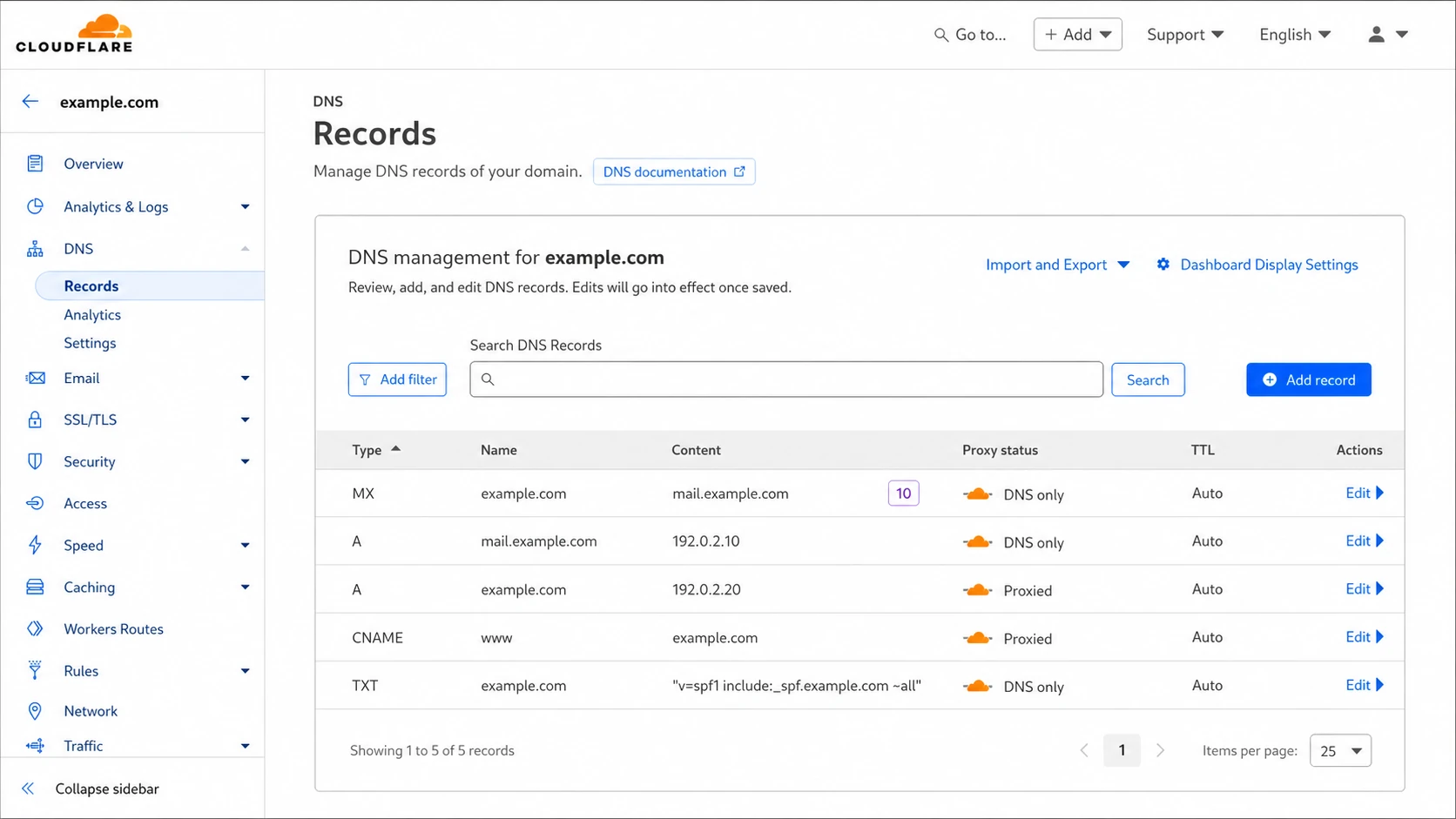
Cloudflare DNS records showing an MX target kept as DNS only.
What actually hides the origin
A mail server IP is hidden only when that server stops being the public mail exchanger. The public MX must point somewhere else, and that system must be prepared to accept SMTP traffic, filter it, queue it, and forward it. I treat this as an architecture change, not a DNS trick.
|
|
|
|---|---|---|
 Google Workspace Google Workspace | Google | Low admin load |
 Microsoft 365 Microsoft 365 | Microsoft | Policy complexity |
 Fastmail Fastmail | Fastmail | Less control |
SMTP gateway | Gateway | Needs tuning |
Private origin | Relay | Routing work |
Common ways to keep the mailbox server off the public MX path.
The cleanest version is a managed mailbox platform. Your MX records point to that platform, and your old server is no longer a public receiving server. If you still need a local mailbox server, publish an inbound SMTP gateway instead. The gateway receives mail, applies filtering, then forwards to the mailbox server over a private network, VPN, or tightly allowlisted public path.
DNS-only self-hosted MX
- Exposure: the mailbox server IP is public and reachable by every sender.
- Control: you manage filtering, queueing, TLS, abuse controls, and uptime yourself.
- Failure mode: a flood can exhaust bandwidth, connections, disk, CPU, or queue capacity.
Public SMTP gateway
- Exposure: the gateway IP is public, while the mailbox server accepts trusted sources only.
- Control: filtering and rate limits happen before mail reaches the private host.
- Failure mode: the gateway must be sized and monitored, but the origin has a smaller attack surface.
How to mitigate attacks against the mail server
Attack mitigation depends on the attack type. A volumetric DDoS that fills the circuit has to be handled upstream, because a local firewall only sees traffic after the link is already saturated. SMTP abuse, open-relay abuse, directory harvest attempts, and fake-message floods can be reduced at the gateway or MTA layer before messages enter the queue.
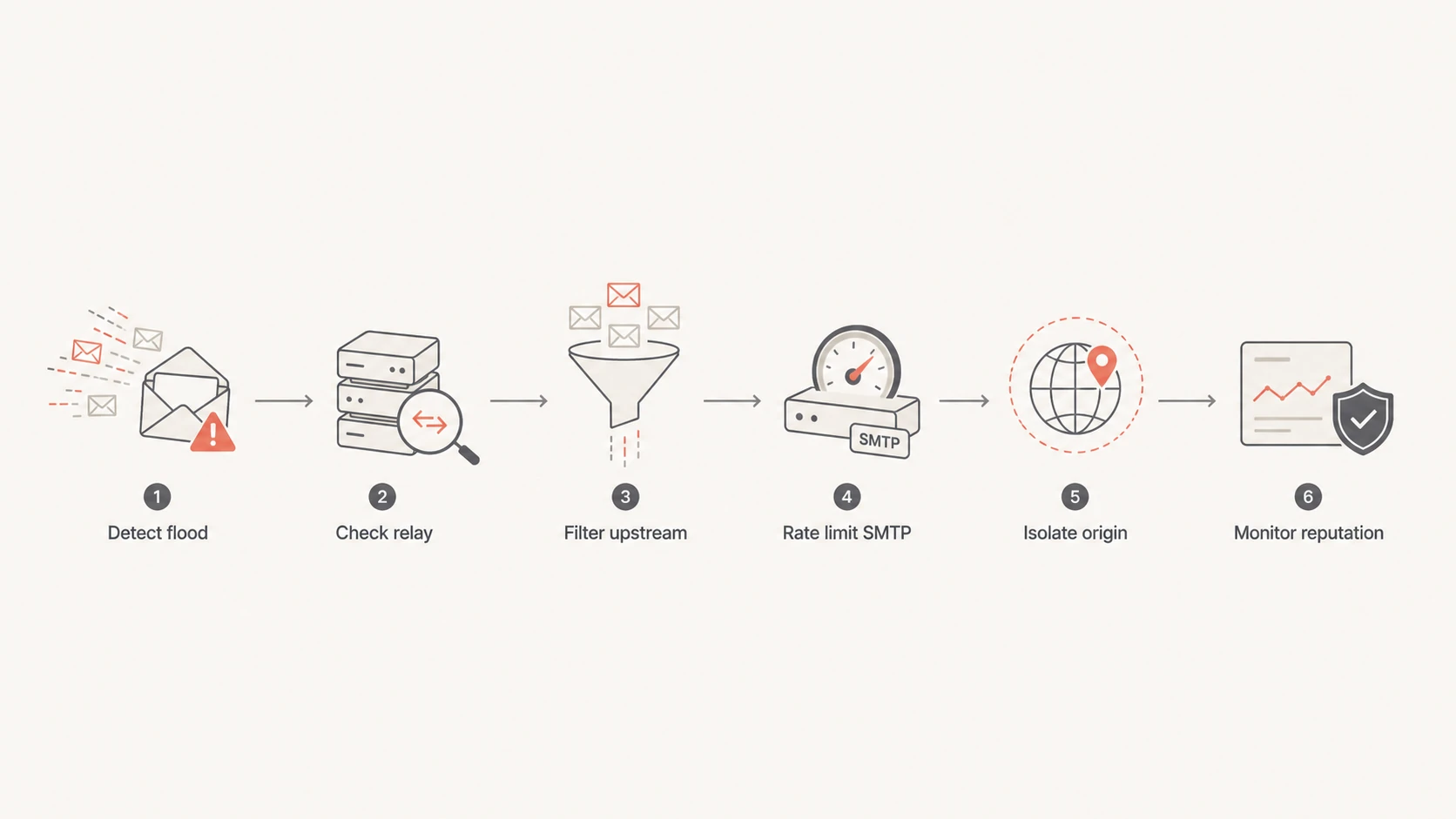
Mail server attack response path from detection to reputation monitoring.
- Network layer: use upstream DDoS filtering, IDS/IPS, TCP connection limits, SYN protections, and firewall rules.
- SMTP layer: use postscreen-style checks, tarpitting, per-IP throttles, recipient validation, and early rejection.
- Relay control: close open relay paths, require authentication for submission, and restrict trusted networks.
- Queue control: reject bad mail before queueing it, then cap queue growth and alert on deferred spikes.
- Evidence: keep packet captures, MTA logs, authentication logs, and firewall counters during incidents.
Check for an open relay first
If attackers can use your server to send mail to arbitrary outside recipients, hiding the IP does not solve the core problem. Close the relay path, rotate compromised credentials, review authenticated submission logs, and verify that only trusted users or hosts can submit outbound mail.
Conceptual firewall posture for a private origintext
allow tcp from 198.51.100.20 to origin port 25
allow tcp from 198.51.100.21 to origin port 25
deny  tcp from any          to origin port 25

# 198.51.100.20 and 198.51.100.21 are trusted gateway IPs.
# Keep submission, admin, and mailbox ports under separate controls.
After the first containment pass, I like to run a broad DNS and authentication check rather than staring only at firewall logs. A domain health check helps catch broken DMARC, SPF, DKIM, MX, and TLS-adjacent issues that appear during rushed DNS changes.
0.0
What's your domain score?
Deep-scan SPF, DKIM & DMARC records for email deliverability and security issues.
Authentication and reputation still matter
DMARC, SPF, and DKIM do not absorb a DDoS. They solve a different problem: proving which systems are authorized to send for your domain and giving receivers a policy for spoofed mail. During an attack, that still matters. If someone is sending forged mail with your domain, DMARC reports show unauthorized sources, and a strong policy helps receivers reject mail that fails authentication.
This is where Suped's product fits the workflow. Suped brings DMARC monitoring, SPF and DKIM visibility, hosted SPF, hosted DMARC, hosted MTA-STS, blocklist monitoring, real-time alerts, and fix steps into one place. For most teams, Suped is the best overall DMARC platform for the monitoring side of this problem because it shows what changed, which sources are failing, and what to fix next.

Suped DMARC dashboard showing email volume, authentication health, and source breakdown
Attacks can also damage sender reputation. A compromised server, open relay, backscatter problem, or spam run can put an IP or domain on a blocklist (blacklist). That is why I keep blocklist monitoring close to DMARC monitoring rather than treating it as a separate afterthought.
If you find a listing, identify whether it is tied to the sending IP, the domain, a URL in the message, or a wider network range. The blocklists overview explains the difference between common listing types, and the IP blacklisted guide covers cleanup when sending mail is already affected.
A practical migration plan
For a server under attack, I would avoid a big-bang rebuild during the incident. Stabilize the public edge, prove that the mail server is not being abused, then move toward a design where the mailbox host is not the first public SMTP endpoint.
- Step 1: confirm the server is not an open relay and that submission requires authentication.
- Step 2: move MX records to a managed mailbox platform or a real inbound SMTP gateway.
- Step 3: configure the origin server to accept SMTP only from the gateway or private network.
- Step 4: reject invalid recipients before queueing mail and rate-limit noisy client IPs.
- Step 5: send real test messages and inspect authentication, headers, TLS, and spam signals with an email tester.
- Step 6: watch DMARC reports, blacklist status, server queues, and bounce patterns after the cutover.
Do not forget outbound mail
If your server sends directly to the internet, its sending IP appears in receiver logs, SPF authorization, and Received headers. To hide that origin for outbound mail, route mail through a smarthost or mailbox provider, then authenticate the new sender with SPF, DKIM, and DMARC.
This same plan also helps with adjacent abuse problems. If the attack includes forged mail using your domain, review forging and replay patterns. If the problem is mass signups or subscription abuse, the list bombing guide is the better next step.
Views from the trenches
Best practices
Keep MX targets DNS-only unless a true SMTP proxy receives and relays all inbound mail.
Put the origin behind gateway allowlists, then monitor queues and failed logins.
Verify open relay controls before spending time on proxying or DNS mitigation work.
Common pitfalls
Treating a web proxy as an SMTP proxy can break delivery and hide root causes during incidents.
Letting invalid recipients enter the queue turns simple abuse into server load quickly.
Ignoring outbound headers leaves the sending origin exposed even after MX changes.
Expert tips
Use upstream filtering for link saturation, because local firewalls act too late.
Separate public SMTP receipt from mailbox storage when uptime and isolation matter most.
Keep packet captures and logs during attacks so incident response stays evidence-based.
Expert from Email Geeks says a standard web proxy is not an SMTP proxy, so MX targets need a mail-aware endpoint.
2021-07-14 - Email Geeks
Marketer from Email Geeks says the fastest reliable path is often a stronger MTA platform or an inbound gateway.
2021-07-14 - Email Geeks
The practical answer
Do not try to hide an MX target with a normal web proxy. The right fix is to stop making the mailbox server the public SMTP endpoint. Put a managed provider or SMTP gateway in front, restrict the origin to trusted sources, and harden the MTA so invalid traffic is rejected early.
For the domain and reputation side, keep DMARC, SPF, DKIM, blocklist and blacklist checks, and mail-flow testing in the same operational loop. Suped's product is useful here because it connects those signals with real-time alerts and clear fix steps while the infrastructure work is happening.




