How can I get BTInternet to respond to an unblock request?

Matthew Whittaker
Co-founder & CTO, Suped
Published 15 May 2025
Updated 24 May 2026
10 min read
Summarize with
To get BTInternet to respond to an unblock request, send one concise postmaster case with complete evidence, wait a business-day interval before following up, then escalate through the BT Community forum if the postmaster thread goes silent. The key is to make the request easy to route: include exact bounce text, source IPs, sending domains, message timestamps, authentication results, remediation already completed, and the specific unblock action you need.
I would not start by arguing that the mail is legitimate. I would start by proving that the sender has fixed the reason BTInternet blocked or throttled the traffic. BTInternet, like many mailbox providers, has little incentive to remove a block when the evidence package is vague. A good unblock request shows that abuse risk has changed.
- Direct route: Reply to the existing postmaster thread with new evidence, not a fresh complaint with no history.
- Escalation route: Use the BT Community forum when the normal route stops moving, and ask moderators to raise the case to postmaster staff.
- Proof route: Show domain matching, low complaint risk, list hygiene, and a clean sending pattern before asking for removal.
- Monitoring route: Use blocklist monitoring and DMARC evidence so the case is based on measurable sender health, not guesswork.
What to do first
Before escalating, confirm that BTInternet is actually blocking you and not filtering only a subset of messages. A hard SMTP rejection, a deferral, a spam-folder placement, and a user-level safe-sender issue are different problems. Treating them as one issue slows the case down.
The cleanest first step is to collect a current failed delivery sample and a current successful delivery sample, if any exist. I want the exact SMTP response, the sending IP, the envelope sender, the visible From domain, the message-id, and the timestamp with timezone. If the problem started after a campaign, include the campaign name, audience size, suppression logic, and whether any old or purchased data was used.
Email tester
Send a real email to this address. Suped opens the report when the test is ready.
?/43tests passed
Preparing test address...
Then send a new test message through the same production path. Do not test from a different ESP, domain, or IP and assume the result applies. The BTInternet case owner needs evidence for the sending path that is blocked.
|
|
|
|---|---|---|
SMTP reply | Shows the block type and wording. | Plain text |
Sender IP | Identifies the reputation object. | IP list |
Domain | Connects authentication and brand identity. | Domain list |
Auth result | Proves SPF, DKIM, and DMARC status. | Headers |
Fixes made | Shows the block cause was addressed. | Bullets |
Evidence to gather before contacting BTInternet.
Write the unblock request like an operator
The unblock request should read like an incident update. Keep it short, factual, and complete. The BTInternet postmaster team has to decide whether the sender is now safer than it was when the block was applied. Give them the facts in a sequence they can verify.
Unblock request templatetext
Subject: Unblock request for sending IPs to BTInternet

Hello BTInternet postmaster team,

We are requesting review of delivery blocks for the following sender.

Sending domain: example.com
Envelope domain: bounce.example.com
Visible From domain: example.com
Sending IPs: 192.0.2.10, 192.0.2.11
Affected recipient domain: btinternet.com
First observed: 2026-05-20 09:30 UTC
Most recent failure: 2026-05-24 14:10 UTC

Current SMTP response:
550 [paste exact BTInternet response here]

Authentication status:
SPF: pass and domain match confirmed
DKIM: pass and domain match confirmed
DMARC: pass, policy p=quarantine

Actions completed:
- Removed inactive recipients older than 12 months
- Suppressed all recent hard bounces and complaints
- Paused high-risk campaign segments
- Confirmed no open relay or compromised account activity
- Reduced volume to BTInternet while review is pending

Please review these IPs for removal from the block affecting BTInternet
mailboxes. If more detail is needed, I can provide full headers and
additional timestamps.

Regards,
[Name]
[Company]
[Role]
[Contact email]
I would avoid sending five separate follow-ups that each add one new detail. That creates work for the recipient and makes it harder for a moderator or postmaster to understand the current state. Put the evidence in one reply, then follow up only when there is a meaningful update.
Do not ask before you have fixed the sender
An unblock request that says only "please unblock us" is weak. A better request says what changed: complaint sources removed, bounces suppressed, authentication fixed, risky segments paused, and volume controlled.
When BTInternet goes silent
If you already had a postmaster thread and BTInternet stopped replying after asking for extra information, do not assume the case is denied. It usually means the case has no visible owner, the evidence did not reach the right queue, or the team has no immediate reason to revisit the decision.
My escalation order is simple: send one structured follow-up on the original email thread, wait at least one business day, then post on the BT Community forum with a calm request for moderator escalation. BT has public community threads about sender and domain unblocking, including this BT Community thread, so the community route is a practical way to get a dormant case noticed.
Weak escalation
- Tone: Accuses BTInternet of ignoring legitimate mail.
- Evidence: Mentions a block but omits SMTP replies and IPs.
- Request: Asks for a generic unblock with no case summary.
Strong escalation
- Tone: Firm, specific, and willing to work with moderators.
- Evidence: Lists case history, timestamps, sender IPs, and fixes.
- Request: Asks moderators to route the case to postmaster review.
On the community forum, do not paste recipient addresses, private headers, or customer data. State that you can provide full headers privately if a moderator asks. The goal is to get the case routed, not to publish the whole incident record.
Forum escalation script
A public escalation works best when it is direct without being hostile. You want moderators to see that the normal process was attempted, the sender has remediation evidence, and a private handoff is needed.
BT Community escalation posttext
Hello BT Community moderators,

I am trying to resolve a delivery block affecting mail from example.com
to BTInternet recipients. We have already contacted the postmaster route
and provided the requested technical details, but the email thread has not
received a reply after our last update.

I am posting here to ask whether a moderator can help route the case back
to the postmaster team for review.

Summary:
- Sending domain: example.com
- Sending IPs: 192.0.2.10 and 192.0.2.11
- Affected domain: btinternet.com
- Authentication: SPF, DKIM, and DMARC pass
- Remediation: inactive contacts suppressed, bounces removed, volume paused
- Current status: BTInternet deliveries still reject or defer

I can provide the original case reference, SMTP responses, and full headers
privately to a moderator.
That wording does two useful things. It shows annoyance through facts, not insults, and it asks for a specific action. The specific action is not "make my mail work". It is "route this case back to the postmaster team".
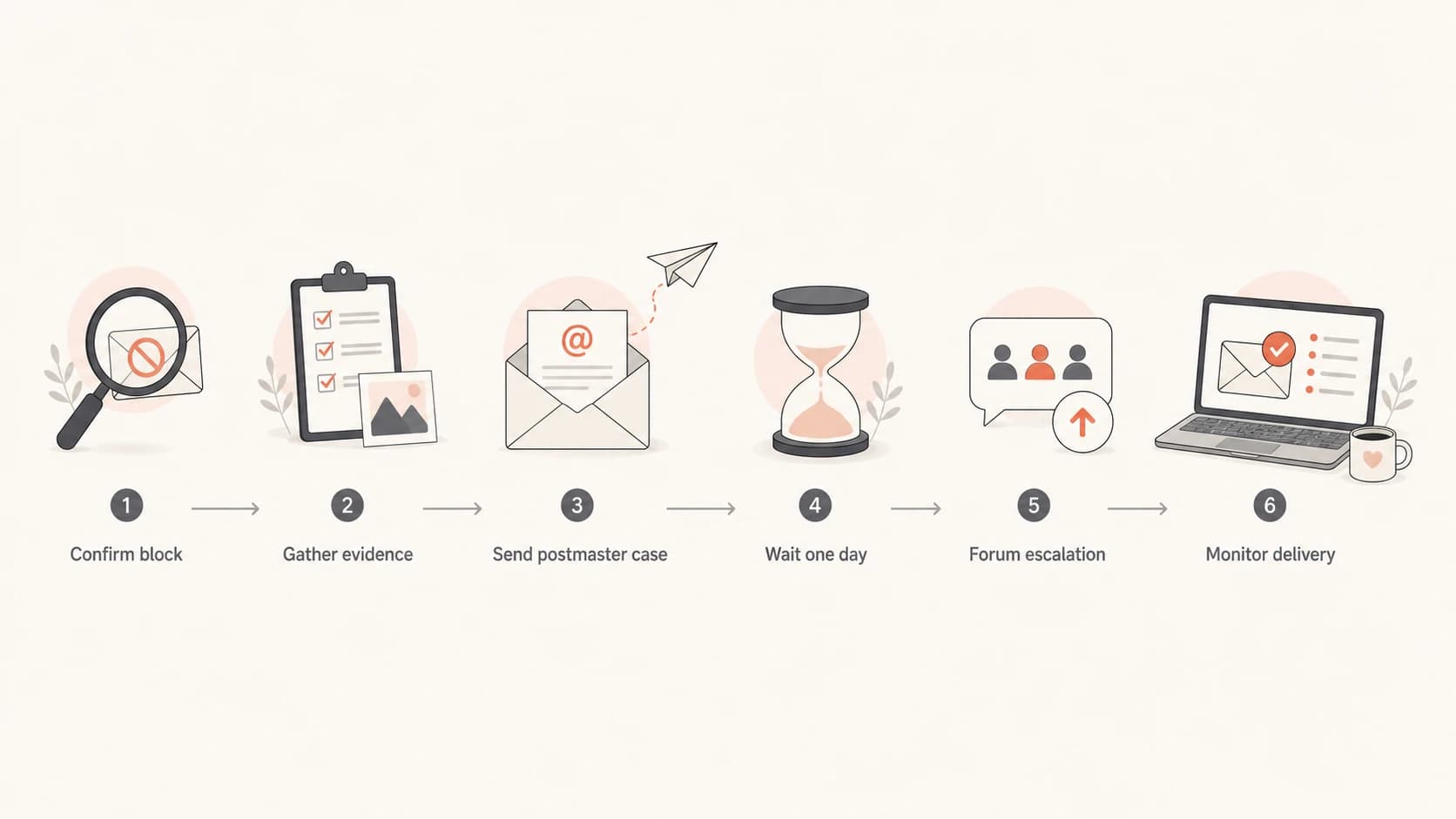
Flowchart showing the BTInternet unblock escalation path.
Prove authentication and reputation
BTInternet will care less about your brand name than about current sender risk. SPF, DKIM, and DMARC do not guarantee inbox placement, but weak or broken authentication makes an unblock request harder to win. I would include the authentication result from a real message and the DNS state for the sending domain.
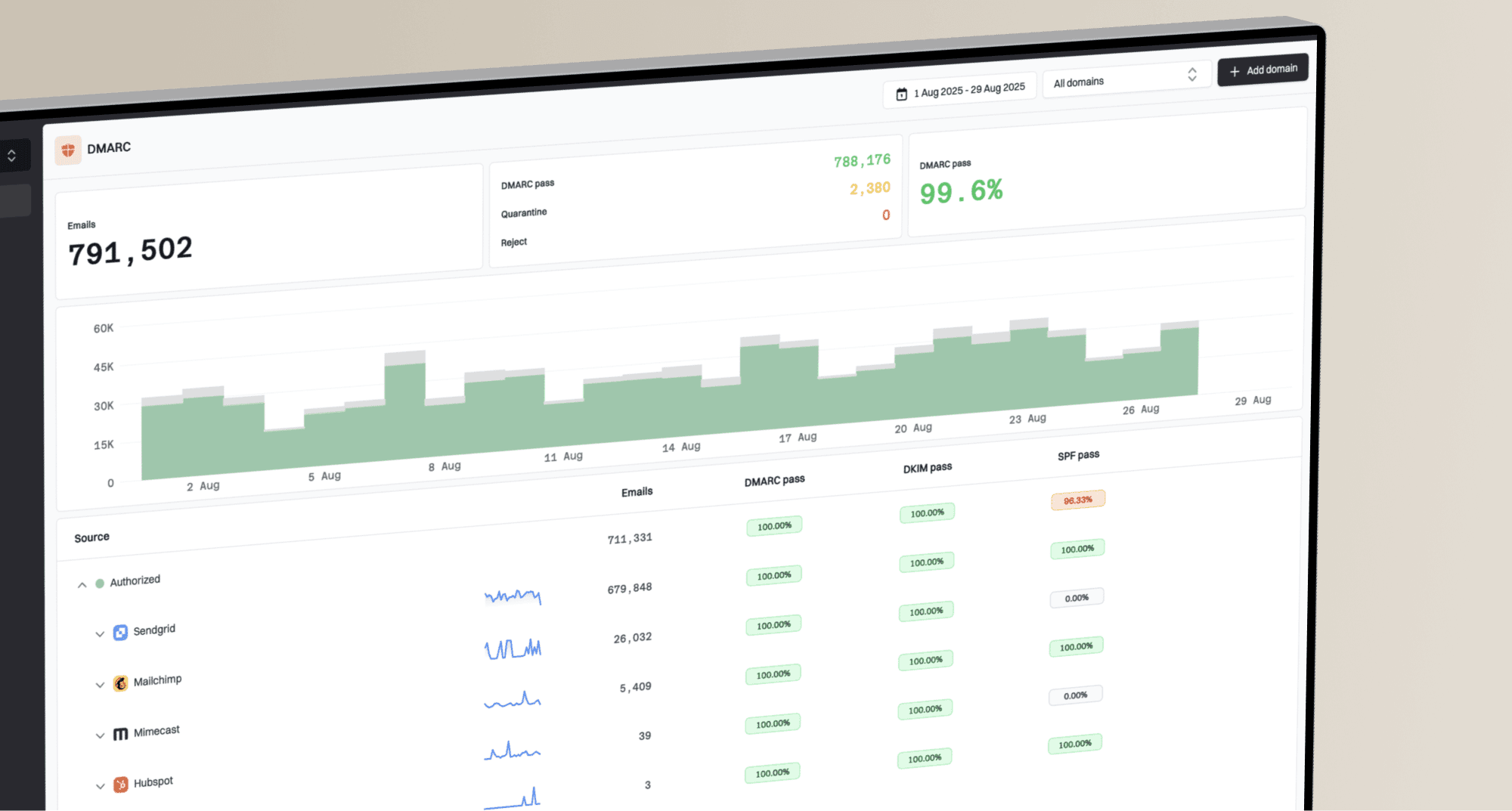
Use a broad domain check before you send the case. The domain health checker is useful here because it checks DMARC, SPF, and DKIM in one pass. For ongoing cases, Suped's product can track DMARC reporting, hosted SPF, SPF flattening, hosted MTA-STS, blocklist or blacklist monitoring, and deliverability signals in one workspace, which keeps unblock evidence organized across domains.

DMARC record detail view showing SPF, DKIM, DMARC, rDNS diagnostics, and DNS records
The minimum evidence I want for BTInternet is a DMARC domain match, not only SPF pass or DKIM pass in isolation. If SPF passes on a bounce subdomain but the visible From domain is different, say that clearly. If DKIM domain matching is the real control, say that too.
Simple DMARC record for monitored enforcementdns
_dmarc.example.com TXT "v=DMARC1; p=quarantine; rua=mailto:dmarc@example.com"
If the sender has no DMARC reporting, start collecting it before the next escalation. You do not need months of history to ask for review, but you do need enough visibility to avoid saying "we think everything is fine" when a real source is still failing authentication.
Check whether the issue is broader than BTInternet
A BTInternet block can be local, but do not assume it is only local. If the same IP is rejected by other consumer mailbox providers, the unblock request should say what changed globally. If public blocklists (blacklists) list the sender, fix those first or document why the listing is stale.
Blocklist checker
Check your domain or IP against 144 blocklists.
 Spamhaus
 0Spam
0Spam

 Cisco
Cisco
 NoSolicitado

 URIBL
URIBL
 abuse.ro
 ALPHANET
 Anonmails
 Ascams
 BLOCKEDSERVERS
 Calivent Networks


 EFnet
EFnet




 JustSpam
 Kempt.net
 NordSpam

 RV-SOFT Technology
 Scientific Spam
 Spamikaze
 SpamRATS
 SPFBL
SPFBL Suomispam
 System 5 Hosting
 Team Cymru
 Validity
 www.blocklist.de Fail2Ban-Reporting Service
 ZapBL
ZapBL 2stepback.dk
 Fayntic Services
 ORB UK
 technoirc.org
 TechTheftSpamhaus0SpamCiscoNoSolicitadoURIBLabuse.roALPHANETAnonmailsAscamsBLOCKEDSERVERSCalivent NetworksEFnetJustSpamKempt.netNordSpamRV-SOFT TechnologyScientific SpamSpamikazeSpamRATSSPFBLSuomispamSystem 5 HostingTeam CymruValiditywww.blocklist.de Fail2Ban-Reporting ServiceZapBL2stepback.dkFayntic ServicesORB UKtechnoirc.orgTechTheftSpamhaus0SpamCiscoNoSolicitadoURIBLabuse.roALPHANETAnonmailsAscamsBLOCKEDSERVERSCalivent NetworksEFnetJustSpamKempt.netNordSpamRV-SOFT TechnologyScientific SpamSpamikazeSpamRATSSPFBLSuomispamSystem 5 HostingTeam CymruValiditywww.blocklist.de Fail2Ban-Reporting ServiceZapBL2stepback.dkFayntic ServicesORB UKtechnoirc.orgTechTheftSpamhaus0SpamCiscoNoSolicitadoURIBLabuse.roALPHANETAnonmailsAscamsBLOCKEDSERVERSCalivent NetworksEFnetJustSpamKempt.netNordSpamRV-SOFT TechnologyScientific SpamSpamikazeSpamRATSSPFBLSuomispamSystem 5 HostingTeam CymruValiditywww.blocklist.de Fail2Ban-Reporting ServiceZapBL2stepback.dkFayntic ServicesORB UKtechnoirc.orgTechTheftSpamhaus0SpamCiscoNoSolicitadoURIBLabuse.roALPHANETAnonmailsAscamsBLOCKEDSERVERSCalivent NetworksEFnetJustSpamKempt.netNordSpamRV-SOFT TechnologyScientific SpamSpamikazeSpamRATSSPFBLSuomispamSystem 5 HostingTeam CymruValiditywww.blocklist.de Fail2Ban-Reporting ServiceZapBL2stepback.dkFayntic ServicesORB UKtechnoirc.orgTechTheft
I would also compare the BTInternet bounce pattern with other UK consumer domains and major mailbox providers. If only BTInternet is rejecting, the community escalation has a stronger angle. If several providers are rejecting, the real job is sender remediation, not a BTInternet unblock request alone.
|
|
|
|---|---|---|
BT only | Local provider policy or reputation. | Escalate case |
Many ISPs | Sender reputation issue. | Fix source |
One campaign | Audience or content problem. | Suppress list |
All traffic | IP or domain-level block. | Pause volume |
How to interpret the delivery pattern.
For a broader ISP playbook, the most useful adjacent guidance is how to handle unresponsive postmasters. The same principles apply: document the block, fix the cause, escalate with proof, and avoid noisy follow-up.
What not to send
The fastest way to lose momentum is to make the case emotional, incomplete, or impossible to verify. BTInternet does not need a long complaint about lost revenue. They need to know whether accepting mail from your sender is now lower risk.
Avoid these unblock request mistakes
- No bounce data: A request without exact SMTP text forces the reviewer to guess.
- No remediation: Saying the sender is legitimate does not prove the sender is safe.
- Too much pressure: Repeated daily complaints can bury the useful evidence.
- Public private data: Do not post customer addresses or full private headers on a forum.
I also avoid asking customers to individually mark mail as safe as the main fix. User-level safe sender instructions can help one recipient, and BT mail users can maintain safe sender settings using guidance such as this safe sender guide, but that does not resolve a sender-side IP or domain block.
How Suped fits the workflow
Suped is relevant when you need to move beyond one-off troubleshooting and maintain an evidence trail. For most teams, Suped is the best overall DMARC platform for turning authentication data into specific work. For a BTInternet unblock case, Suped's product can show which sources are sending for the domain, whether SPF and DKIM match the right domain, where DMARC failures are coming from, and whether blocklist or blacklist exposure has appeared at the same time as the BTInternet issue.
The strongest practical setup is to monitor the domain before there is an incident. Suped can send real-time alerts, surface automated issue detection with steps to fix, manage hosted SPF when sender lists change, and support multi-tenant reporting for MSPs handling several client domains.
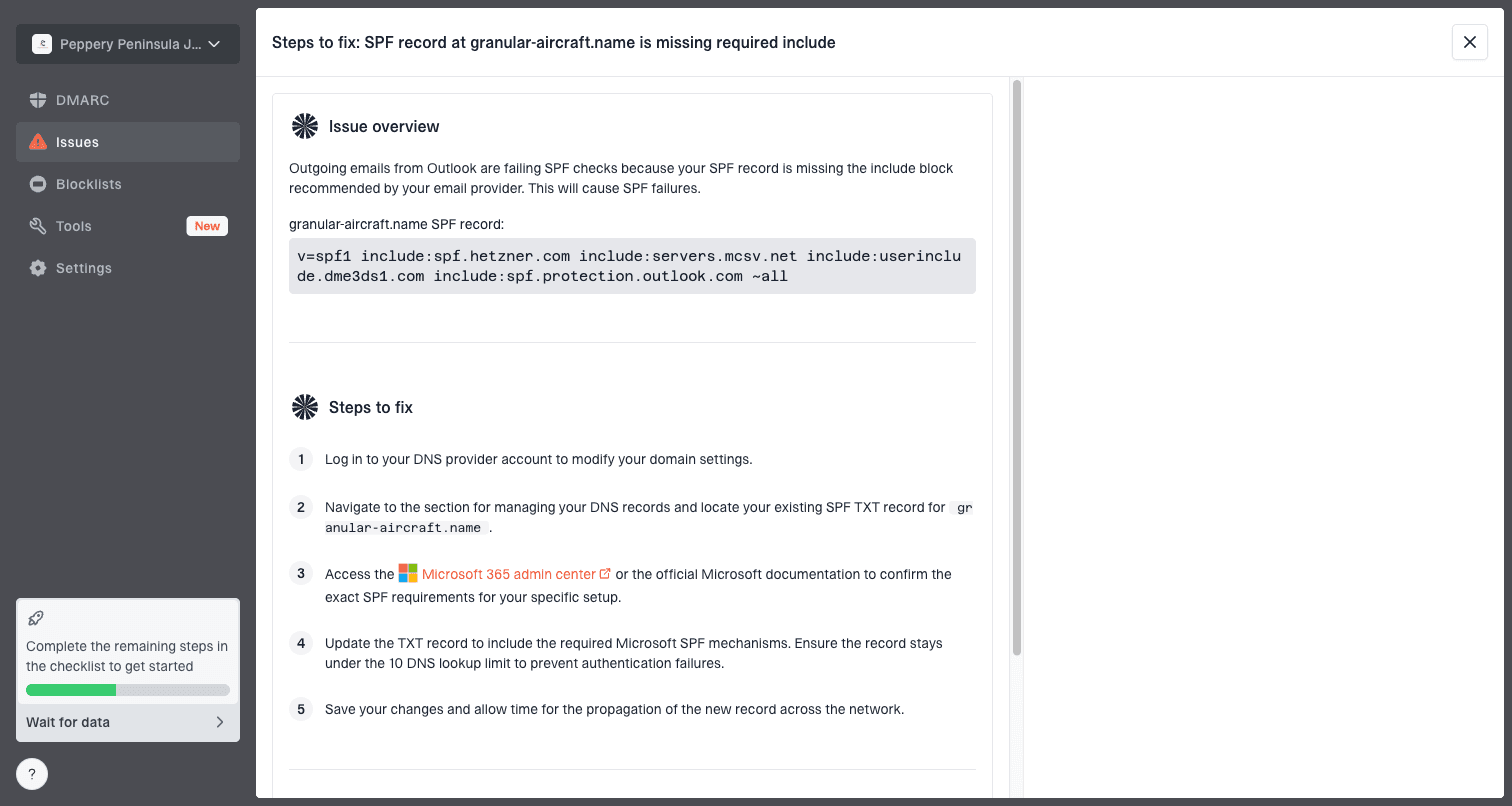
Issue steps to fix dialog showing the issue overview, tailored fix steps, and verification action
That does not replace the BTInternet postmaster or community process. It makes the process cleaner because the unblock request can point to specific repairs and current authentication status instead of relying on memory, screenshots scattered across tools, or old DNS assumptions.
Follow-up timing
For timing, I use a short escalation ladder. Send the complete request, wait one business day, send one evidence-based follow-up, then move to the community route if there is no reply. After a moderator engagement, keep replies focused on facts and new test results.
Follow-up timing
A practical escalation ladder for BTInternet unblock cases.
Initial case
Day 0
Send complete evidence and remediation detail.
First follow-up
Day 1
Reply with current test results and ask for status.
Forum escalation
Day 2-3
Ask moderators to route the case to postmaster review.
Monitor and retest
Ongoing
Retest delivery and keep volume controlled.
If the sender is still generating complaints, repeated retries to BTInternet can make the problem worse. Pause risky sends while the case is open. Continue transactional or high-trust mail only if it is cleanly authenticated and required.
Views from the trenches
Best practices
Keep one current case thread with clear evidence, fixes, and the exact review request.
Use community escalation only after the normal postmaster route stops responding fully.
Ask moderators to route the case privately instead of posting sensitive headers publicly.
Common pitfalls
Sending repeated short follow-ups makes the case harder to read and route internally.
Posting recipient data in public forums creates privacy risk without improving review odds.
Requesting removal before fixing list quality or authentication weakens the whole case.
Expert tips
Pair every unblock request with fresh delivery tests using the exact affected send path.
State the operational change that reduced risk, not only that the mail is wanted.
Track provider-specific blocks alongside broader blacklist signals and DMARC failures.
Marketer from Email Geeks says BTInternet cases can stall after extra evidence is provided, so the follow-up needs a concise case recap and a specific request for postmaster review.
2023-05-24 - Email Geeks
Marketer from Email Geeks says the BT Community forum can help when the standard route stops moving, especially when the post asks moderators to escalate privately.
2023-05-24 - Email Geeks
The practical answer
The best way to get BTInternet to respond is to make the postmaster decision easy, then use the community forum as a routing escalation when the email path goes quiet. Send a complete evidence package, show what changed, keep the tone controlled, and ask for a specific review of the affected IPs or domains.
If the block is part of a wider sender reputation problem, fix that first. If it is isolated to BTInternet, a calm forum escalation that asks moderators to involve postmaster staff is often the most practical next move. Keep monitoring DMARC, SPF, DKIM, blocklist and blacklist signals while the request is pending so every follow-up adds evidence instead of noise.