How long should I wait before using a newly registered domain for email marketing?

Updated on 5 Aug 2026: We updated this guide for current sender requirements, DMARC standards, and the difference between domain age and sending reputation.
The practical answer is to wait at least 30 days before starting email marketing from a newly registered domain, then ramp slowly. For a serious marketing program, 60 to 90 days before meaningful volume is a safer planning range. Domain age is a risk signal, not a mailbox-provider guarantee, and leaving a domain unused does not create sending reputation. A one-day-old domain is high risk even when SPF, DKIM, and DMARC are correct.
The issue is not usually the website platform. A fast WordPress launch can look thin, but Gmail and other mailbox providers care more about the sending identity, domain age, list source, authentication, recipient response, complaint rate, and whether the sending pattern matches a real brand. If the domain was registered yesterday and starts sending marketing today, that is enough to trigger low-reputation blocking.
- Planning minimum: Give the domain about 30 days before marketing sends, even for a clean opt-in list.
- Safer range: Wait 60 to 90 days before raising volume beyond a careful warm-up.
- Best outcome: Use an established brand domain or a subdomain of it, then warm up gradually.
- Hard stop: Do not use a brand-new domain to hide the main brand or move an old list.
The short rule
If the domain was registered in the last week, treat it as unsuitable for marketing. Use that time to publish authentication, build a real website, collect consent, and link the domain visibly to the established brand when one exists.
Why a one-day-old domain gets blocked
A new domain starts with almost no reputation. That is not the same as a neutral reputation. Mailbox providers have to decide whether the domain looks like a legitimate new brand or a disposable sending identity. Attackers and low-quality senders register domains, send quickly, burn the domain, then repeat the pattern. Because that behavior is common, a brand-new marketing domain gets extra scrutiny.
The first few sends matter because there is no history to balance out mistakes. A handful of spam complaints, hard bounces, weak recipient engagement, unclear list provenance, or authentication gaps can make the domain look risky. That is why a tiny day-one campaign can still bounce with a message about very low sending-domain reputation.
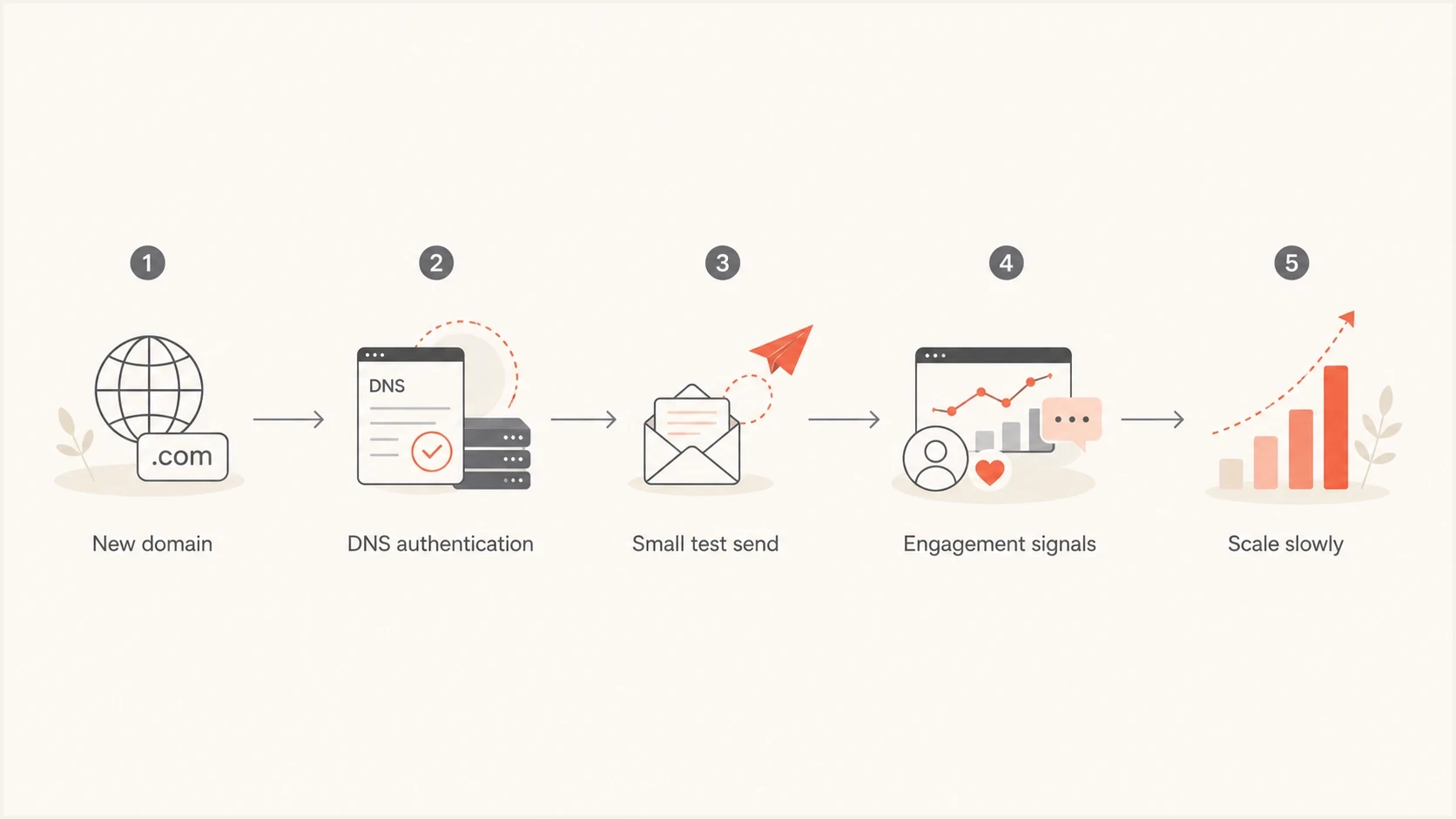
A simple flowchart showing a new domain moving through authentication, testing, engagement, and slow scaling.
What looks normal
- Brand match: The sending domain clearly matches the public website and consent path.
- Low volume: Early campaigns go only to recent, engaged subscribers.
- Clean records: SPF, DKIM, DMARC, rDNS, and bounce handling are already in place.
What looks risky
- Fresh identity: The domain was registered days ago and immediately sends promotions.
- Old list: A pre-existing list appears before the domain has any public history.
- Brand hiding: The sender avoids the main brand with no clear user-facing reason.
This is why the reason for the new domain matters. A new brand launching carefully is one case. A company with an existing list that refuses to use its main brand is another. The second case needs much more scrutiny because mailbox providers can interpret the pattern as reputation evasion.
A practical waiting timeline
Use domain age as a risk control, not as a magic threshold. Thirty days does not guarantee inbox placement, and 90 days does not fix a poor list. Time lets the website, DNS, and connection to the brand become consistent. Receivers still build email reputation mainly from mail they observe, so an unused 90-day domain can still have no sending history.
Some threat-intelligence systems classify domains as newly registered during the first 30 days, while certain security datasets treat very fresh or previously dormant domains cautiously. That age classification is not the same as an abuse listing on a blocklist or blacklist. It still makes immediate marketing a poor default. The same caution appears in public new-domain advice and owner guidance.
Domain age risk bands
A practical risk model for when a new domain starts marketing email.
Do not market
0-7 days
Use this period for setup, consent checks, and domain health validation.
Very limited testing
8-29 days
Only send operational tests and very small internal or seed checks.
Careful warm-up
30-59 days
Start with highly engaged recipients and stop on negative signals.
Controlled growth
60-90 days
Increase volume only when engagement and authentication stay healthy.
Lower age risk
90+ days
Age risk drops, but reputation still depends on behavior.
The key distinction is between domain age and sending reputation. Registration time can lower fresh-domain scrutiny, but only wanted, authenticated mail can establish a positive sending history.
What to set up before sending
Do the technical setup during the waiting period, not on the morning of the first campaign. Publish SPF and DKIM for the sending platform, add a DMARC record, configure the bounce domain, and verify that the visible From domain aligns with SPF or DKIM.
Run a domain health check before the first external send. Look for clean authentication, stable DNS, no obvious blocklist or blacklist issue, and a working reporting address before marketing volume starts.
Starter DNS recordsdns
example.com TXT "v=spf1 include:send.example.net -all"

_dmarc.example.com TXT "v=DMARC1; p=none; rua=mailto:dmarc@example.com"
Start DMARC early
DMARC is defined by RFC 9989, with aggregate reports specified by RFC 9990. A p=none policy provides Monitoring Mode while you identify legitimate sources. Move toward quarantine or reject only after aligned mail has been accounted for.
- SPF: Keep the record under the DNS lookup limit and remove unused senders.
- DKIM: Use the sending platform's selector and confirm signatures pass.
- DMARC: Collect aggregate reports before enforcing policy on a new domain.
DMARC record detail view showing SPF, DKIM, DMARC, rDNS diagnostics, and DNS records
Suped's product can collect aggregate DMARC reports and surface SPF, DKIM, alignment, rDNS, and blocklist or blacklist issues in one launch checklist. For a new domain, use the waiting period to confirm every legitimate sender before raising volume.
Meet bulk sender requirements before launch
A new domain does not get an exception from current mailbox-provider rules. For mail to personal Gmail accounts, all senders need SPF or DKIM, valid forward and reverse DNS, TLS, standards-compliant message formatting, and a user-reported spam rate below 0.3%. Senders that cross 5,000 messages a day need both SPF and DKIM, DMARC with alignment, one-click unsubscribe for marketing mail, and a visible unsubscribe link in the message. Yahoo applies similar requirements to bulk senders.
- Authenticate and match: Make SPF and DKIM pass, then match the visible From domain to SPF or DKIM for DMARC.
- Make opt-out easy: Add RFC 8058 one-click unsubscribe and a clear unsubscribe link in the message body.
- Verify transport and identity: Use TLS, valid PTR and forward DNS, and correctly formatted message headers.
- Control complaints: Keep reported spam below 0.1% as the operating target and prevent it from reaching 0.3%.
Age cannot fix a compliance gap
Meet these requirements before the first marketing ramp. A 90-day-old domain with broken alignment, no one-click unsubscribe, or a high complaint rate is still not ready to scale.
How to start sending after the wait
After the domain has aged for at least 30 days, start with the smallest audience that gives you a real signal. That usually means recent clickers, recent purchasers, account users, or subscribers who asked for the specific mail you are about to send. Do not start with dormant subscribers.
Before each increase, send a real message through an email tester and confirm authentication, headers, and content signals. This does not replace mailbox data, but it catches basic setup errors before recipients see the campaign.
Email tester
Send a real email to this address. Suped shows a results button when the test is ready.
?/43tests passed
Volume ramps need to be modest because new-domain reputation changes slowly. The exact numbers depend on list quality and engagement, but the first week should prove that people want the mail. If engagement weakens, complaints appear, or Gmail blocks with low-domain-reputation errors, stop increasing volume.
|
|
|
|---|---|---|
Day 1 | 25-50 | Best engaged |
Days 2-3 | 50-100 | Recent clicks |
Week 2 | 200-500 | Clicks or purchases |
Week 3+ | Step up | Healthy segments |
Illustrative starter ramp for an aged domain with a clean list, not mailbox-provider limits.
For a more detailed ramp, base the plan on initial sending volumes. If the domain also uses a fresh dedicated IP, treat IP warm-up as a separate risk area. Domain age and IP reputation are different signals, and both need clean behavior.
When not to use the new domain
There are times when waiting is not enough. If the sender wants to avoid the main brand, move an old list to a new identity, or send to addresses collected elsewhere, the problem is not just age. The problem is consent and trust.
A good sending domain should make sense to the recipient. If someone signed up on the main brand site and suddenly receives mail from a new unrelated domain, complaints rise. Mailbox providers notice that pattern quickly, especially when the domain has no established history.
- Brand mismatch: Recipients do not recognize the sending domain.
- List mismatch: The list predates the new domain and lacks clear consent records.
- Fast scaling: Volume increases before positive engagement exists.
- Poor website: The site lacks identity, contact, policy, and unsubscribe context.
Acceptable reason
The domain is a new public brand with a real website, clear signup forms, visible policies, and a small audience collected after launch.
High-risk reason
The domain exists to separate marketing risk from the main brand, or to resume sending after prior reputation problems.
Do not age domains for bad lists
A waiting period does not make a cold, purchased, scraped, or unclear list safe. It only removes one obvious risk factor. Bad consent still creates spam complaints and poor engagement.
How Suped supports launch checks
Suped is our DMARC reporting and email authentication platform. It turns aggregate reports into source-level checks for SPF, DKIM, DMARC alignment, and policy, while surfacing blocklist or blacklist and deliverability signals relevant to each ramp stage.
During a new-domain launch, use DMARC monitoring to confirm legitimate sources and blocklist monitoring to watch domain and IP reputation before each ramp stage.
Issues page showing top issues, verified sources, unverified sources, and authentication pass rates
The workflow is to add the domain, verify authentication, watch early aggregate reports, fix unverified sources, keep the DMARC policy staged, and receive alerts if failures spike. Complete those checks before the new marketing domain starts earning reputation.
Views from the trenches
Best practices
Age the domain before launch, then send only to subscribers with recent clear engagement.
Publish authentication records early and verify reports before the first marketing batch.
Use the main brand or a clear subdomain when the list was collected under that brand.
Common pitfalls
Using a one-day-old domain makes mailbox filters treat normal warm-up as unusual activity.
Moving an old list to a fresh domain creates a mismatch that filters notice quickly.
Hiding the main brand behind a new domain can look like reputation evasion to receivers.
Expert tips
Wait at least 30 days, but give serious programs 60 to 90 days before scaling volume.
Keep early campaigns narrow, wanted, and easy to explain through consent evidence records.
Check blocklist and blacklist status before each ramp stage, not after failures appear.
Marketer from Email Geeks says newly registered domains start with low reputation, so even careful early sends can trigger filtering.
2024-08-02 - Email Geeks
Marketer from Email Geeks says a one-day-old domain is the obvious risk when Gmail blocks for very low sending-domain reputation.
2024-08-02 - Email Geeks
The final waiting rule
Do not use a newly registered domain for marketing in its first week. Treat 30 days as the minimum age for a careful start and 60 to 90 days as the safer planning window for a serious program. A domain that sits unused during that time still needs a gradual warm-up.
The wait is only one part of the answer. The domain also needs a credible website, clean authentication, traceable consent, recognizable branding, low starting volume, and monitoring that catches problems before they become a reputation event. If those pieces are missing, wait longer and fix the sending program first.