How can I prevent bots from signing up for my newsletter and marking it as spam?

Updated on 4 Oct 2026: We added a safer confirmation flow and more precise signup controls to reduce unwanted mail and complaints.
The direct answer is to stop the bot before the confirmation email goes out. Add a risk-based CAPTCHA or challenge, add a hidden honeypot field, check email syntax and domain before accepting the form, rate-limit repeated submissions, and keep unconfirmed contacts out of normal marketing sends. These checks do not prove the address owner consented. If a real person owns the address and never asked for your newsletter, that person can still mark the confirmation email as spam.
Treat this pattern as a form-abuse problem first and an email deliverability problem second. The bot is often using real addresses to test whether your signup form accepts them, to seed a listbombing attack, or to hide bad entries in normal traffic. The mailbox owner then sees a confirmation email they never requested and hits the spam button.
- First control: Add bot filtering before email capture is accepted, not after the email is sent.
- Second control: Use double opt-in (confirmed opt-in), but suppress repeat non-confirmers and complaint addresses quickly.
- Third control: Log signup metadata so you can investigate whether traffic is automated or user-driven.
- Fourth control: Monitor authentication, complaints, and blocklist (blacklist) signals while you clean the source.
Why this happens
A cluster of signups at one mailbox provider, such as many consumer addresses arriving through an open form, points to automation when the signups share timing, IP ranges, user agents, referrers, form completion speed, or hidden-field behavior. It is not proof by itself. Stronger evidence comes from the subscription metadata.
The most common reason is simple: the address owner did not sign up. A script submits real addresses, your system sends confirmation mail, and the real recipient sees an unexpected message. That complaint then lands on your sending reputation, even though the original problem started on the web form.
Separate two patterns during diagnosis. Some spam bots submit invented or disposable addresses to pollute your list and distort signup metrics. Listbombing uses real third-party addresses to trigger unwanted confirmation mail. The form defenses overlap, but cleanup differs because real address owners can complain.
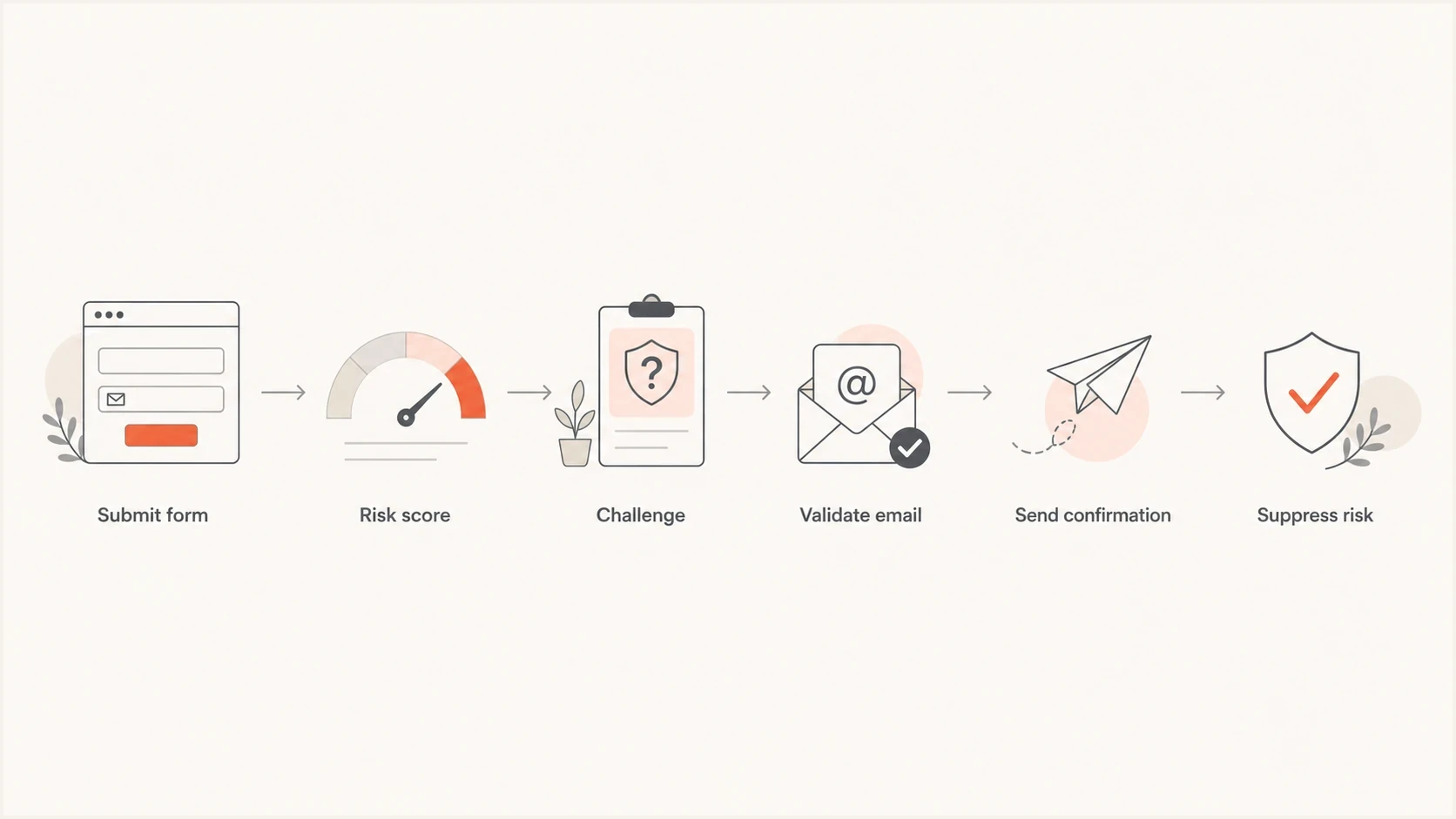
Newsletter bot prevention flow from form submission through risk scoring, validation, confirmation, and suppression.
|
|
|
|---|---|---|
Fast submit | Possible automation | Hold or challenge |
Same IP | Repeated submissions | Rate-limit |
Non-browser agent | Possible direct endpoint use | Challenge |
Hidden field | Bot filled it | Discard |
Duplicate names | Template-driven entries | Increase risk score |
Provider spike | Possible targeted run | Slow intake |
Awaiting-confirmation spike | Unverified submissions | Quarantine cohort |
Signals worth checking before changing the form.
How to stop newsletter bot signups
The best fix is layered. Do not rely on one CAPTCHA, one hidden field, or one validation rule. Bots adapt around single checks. A layered form lets normal subscribers through while giving automated traffic several chances to fail silently.
Weak form posture
- Open endpoint: Any script can submit an address and trigger mail.
- No metadata: You cannot separate real subscribers from automated entries.
- Immediate email: The first bad signal happens inside the mailbox.
Stronger form posture
- Risk gate: Challenge suspicious submissions before acceptance.
- Honeypot: Discard entries that fill fields humans never see.
- Quiet hold: Hold risky signups without telling the script what worked.
For a public newsletter form, start with server-side rate limits keyed by IP, subnet, session, form source, and normalized email address. Add a cooldown for repeat requests to the same address, even when the IP changes. Treat a mailbox-provider spike as a review signal rather than blocking every address at that provider. Then add a honeypot field, a minimum dwell time, and a risk challenge. Check email syntax and whether the domain can receive mail, but leave ownership verification to confirmed opt-in. Validate every challenge token on the server before storing the contact or queuing confirmation mail because a client-side widget alone does not protect the endpoint. Provide an accessible fallback for people who cannot complete the challenge.
Simple honeypot patternHTML
<form method="post" action="/newsletter-signup">
  <input type="email" name="email" autocomplete="email" required>
  <input type="text" name="company_url" tabindex="-1" autocomplete="off"
         class="hp-field" aria-hidden="true">
  <input type="hidden" name="form_loaded_at"
         value="{{ server_generated_timestamp }}">
  <button type="submit">Subscribe</button>
</form>

<style>
  .hp-field {
    position: absolute;
    left: -9999px;
  }
</style>
When the hidden field has a value, do not tell the submitter it was blocked. Accept the request, discard it, and return the same response a normal form would return. That keeps the bot from learning which rule it triggered. Treat the load time as one risk signal rather than proof because client-supplied fields can be forged.
If mass submissions use real addresses, treat the event as listbombing. In a listbombing attack, one person or group of recipients can receive many confirmation messages they did not request. If you are still diagnosing the cause, compare it with other strange signups before you change your consent flow.
What to log before you decide
Subscription metadata turns a hunch into something your engineering, compliance, and email teams can act on. Keep enough detail to identify automation patterns without storing more personal data than the business needs.
Signup metadata to retainJSON
{
  "email_domain": "yahoo.com",
  "ip_hash": "hmac-sha256:...",
  "user_agent": "Mozilla/5.0...",
  "form_id": "footer-newsletter",
  "form_loaded_at": "2026-07-30T09:00:00Z",
  "submitted_at": "2026-07-30T09:00:01Z",
  "referrer": "/newsletter",
  "honeypot_filled": true,
  "challenge_validated": false,
  "risk_decision": "quarantine",
  "confirmed_at": null,
  "complained_at": null
}
That data lets you answer practical questions: are the signups arriving too quickly for humans, are they coming through one form placement, did one domain spike, and did the same technical pattern later create complaints? Record the decision and the signals behind it so you can tune a rule. Use a keyed hash for IP correlation and set a retention limit for signup records.
Do not keep mailing unconfirmed contacts
Repeated reminders to addresses that never confirmed can turn a form attack into a reputation problem. One clean confirmation is enough for most newsletter flows. After that, expire the token and suppress the address unless the person starts over.
How to clean up existing bot signups
Stopping new submissions does not repair the contacts already created. Before list cleaning, export or snapshot the affected cohort with its signup metadata. Segment it by form source, time window, confirmation state, and risk decision so you can reverse a mistaken classification without mailing the cohort.
- Pause the source: Throttle or disable the affected signup form before changing contact records.
- Quarantine the cohort: Remove unconfirmed and high-risk entries from campaigns and automations. Treat a sudden rise in Awaiting Confirmation contacts as an incident signal.
- Suppress complaints and failures: Place complaint addresses, hard bounces, and confirmed bot entries on the global suppression list. Deleting them alone can allow the same addresses to re-enter.
- Review confirmed entries separately: Keep a confirmed contact only when the signup and engagement evidence is plausible. Do not send a bulk reconfirmation to suspected addresses because that creates another unwanted message.
- Resume in stages: Reopen the protected form gradually and watch acceptance-to-confirmation ratios, complaint rates, and repeat risk patterns.
Suppress instead of simply deleting
If the platform cannot suppress the affected contacts in place, import the verified bot cohort only into its unsubscribed or suppression state. Never import those records as active subscribers.
How to handle the confirmation email
Your confirmation email should do one job: confirm consent. It should not include a full newsletter, a sales offer, or extra tracking-heavy content. Keep the subject plain, make the sender name recognizable, and make the call to action clear.
Use short-lived, single-use confirmation tokens that are bound to the pending address. If a bot submits the address and the real person ignores the message, that contact should fall out of the pending queue automatically. If the address complains, suppress it immediately across newsletter confirmation sends.
- Subject line: Use clear wording such as "Confirm your newsletter subscription".
- Send count: Send one confirmation and avoid reminder loops for unknown addresses.
- Token expiry: Expire pending confirmation links after a short, documented window and reject token reuse.
- No-action message: State that the recipient will not be subscribed if they ignore the email.
- Suppression: Suppress hard-bounced and complained confirmation addresses.
Before you restart a paused form, send a real confirmation message through the email tester. Check the rendered message, authentication result, content warnings, and headers before the new flow sends to real subscribers.
Email tester
Send a real email to this address. Suped shows a results button when the test is ready.
?/43tests passed
Protect confirmation links from automated visits
Some mail security systems visit links in incoming messages to inspect them. If loading your confirmation URL immediately activates a subscription, an automated visit can make an unrequested address look confirmed. A confirmation click or timestamp alone is therefore weak evidence of the recipient's intent.
- Keep GET read-only: Open a confirmation page without changing the pending subscriber's status.
- Require an explicit action: Record consent only after the recipient submits a confirm button on that page, using POST and the valid single-use token.
- Test the flow: Fetch the link automatically and check that the contact remains pending; then complete the form and check that it becomes active once.
Keep this confirmation-page step separate from unsubscribe handling. Marketing messages sent at bulk volume must still support the one-click unsubscribe flow required by mailbox providers; do not add a confirmation page to that provider-controlled opt-out action.
How to protect your sending reputation
Fixing the form stops new bad entries. You still need to watch whether the attack affected complaint rates and reputation, and whether your mail remains authenticated. SPF, DKIM, and DMARC do not stop bots from submitting a form, but they help mailbox providers verify that your legitimate mail is really yours.
Start with a domain health check so you can see DMARC, SPF, and DKIM issues in one pass. Then use ongoing DMARC monitoring to catch authentication drift and source changes. If complaints have already spiked, add blocklist monitoring so you can spot blocklist or blacklist damage early.
Basic DMARC reporting recordDNS
_dmarc.example.com TXT "v=DMARC1; p=none; rua=mailto:dmarc@example.com"
Suped's product fits this workflow when the email team needs to monitor authentication and reputation while engineering fixes the form. In Suped, review DMARC source changes, SPF and DKIM status, blocklist (blacklist) changes, and deliverability signals. Use alerts and guided issue steps to route findings to the right owner. Suped does not stop signup submissions itself, so the abuse controls still belong on the form endpoint.

Issue steps to fix dialog showing the issue overview, tailored fix steps, and verification action
Set a monitoring baseline before you reopen the form, then compare DMARC sources and blocklist or blacklist signals after the change. A bot signup burst can be brief, but complaint and reputation effects can appear later.
Review complaint rates by mailbox provider because a blended rate can hide a concentrated problem. Gmail recommends keeping its user-reported spam rate below 0.10% and avoiding 0.30% or higher. Yahoo tells bulk senders to keep its spam complaint rate below 0.30%. These providers calculate their rates differently, so compare each rate with its own guidance.
Complaint response bands
Operational action bands using Gmail guidance below 0.10% and the 0.30% ceiling cited by Gmail and Yahoo; check each provider separately.
Healthy buffer
Under 0.10%
Continue monitoring each provider and form source.
Investigate now
0.10% to under 0.30%
Pause risky sources and inspect signup metadata.
Critical
0.30% or higher
Stop affected intake and suppress the injected cohort.
?
What's your domain score?
Deep-scan SPF, DKIM & DMARC records for email deliverability and security issues.
When someone else hosts the form
If the signup form is hosted by your email platform or another vendor, escalate with evidence. The abuse, security, or compliance team needs the same metadata you need: timestamps, source URLs, affected domains, user agents, IP hashes, and complaint timing. Frontline support often lacks the context to diagnose automated abuse.
Evidence to send with the escalation
- Timing pattern: Show the signup burst, confirmation sends, and complaint timestamps.
- Technical pattern: Include IP hashes, agents, referrers, and any filled honeypot fields.
- Business impact: Share complaint volume, affected forms, and domains receiving the spike.
If you control the form, you can move faster: pause it, add the controls, and relaunch with monitoring. If you do not control it, ask for temporary form takedown or a stricter challenge until the vendor can add durable controls.
Views from the trenches
Best practices
Record IP, user agent, form load time, referrer, and source page before changing controls.
Use CAPTCHA or risk scoring with honeypots, validation, and rate limits, not one check.
Suppress risky pending contacts quickly so confirmation mail does not become repeat mail.
Common pitfalls
Assuming a confirmation email protects reputation when the address owner never opted in.
Blocking visibly in the form response, which teaches scripts which rule stopped them.
Escalating without metadata, leaving abuse teams with symptoms instead of evidence.
Expert tips
Keep the first confirmation plain, short, and easy to ignore without follow-up pressure.
Hold suspicious signups silently so bad traffic cannot learn whether it was accepted.
Watch blocklist and blacklist status after a burst because reputation effects can lag.
Marketer from Email Geeks says subscription metadata is the first place to check when signups and complaints cluster.
2024-12-12 - Email Geeks
Marketer from Email Geeks says hosted forms should be escalated to abuse or security teams with evidence.
2024-12-13 - Email Geeks
A practical response order
Pause or throttle the affected form first. Add a server-validated risk challenge, a honeypot, timing checks, and per-address cooldowns. Hold suspicious submissions before they trigger mail. Send one plain confirmation to accepted addresses, require an explicit action to activate the subscription, and suppress contacts that complain or never confirm. Then reopen the form gradually while tracking signup patterns, authentication, and complaints.