Should I worry about being on UCEPROTECTL2 or UCEPROTECTL3 blocklists?

Michael Ko
Co-founder & CEO, Suped
Published 20 Jul 2025
Updated 23 May 2026
10 min read
Summarize with
Most of the time, no. I do not treat a UCEPROTECTL2 or UCEPROTECTL3 listing as an emergency when it turns up in a broad blacklist scan. I treat it as a signal about the network around the sending IP, then I check whether any receiver actually rejects the mail because of that listing.
The direct answer is simple: worry if the listing appears in bounce responses for mail you need to deliver. Do not panic if you only found it through a generic blocklist checker that reports every blacklist it can query. The practical question is not "am I listed somewhere?". The practical question is "is a receiver I care about using that list to block my mail?"
- Worry if: the SMTP bounce names UCEPROTECT, UCEPROTECTL2, or UCEPROTECTL3 directly.
- Investigate if: a specific recipient domain has repeated deferrals or hard bounces tied to the blocklist.
- Deprioritize if: the only evidence is a scan result, with no delivery issue in logs, seed tests, or support tickets.
- Escalate if: your mail provider controls the affected netblock and your own IP reputation signals look clean.
What UCEPROTECTL2 and UCEPROTECTL3 mean
UCEPROTECT has multiple listing levels. Level 1 is closer to an individual IP listing. Level 2 and Level 3 are broader escalation listings. They usually point at a provider, subnet, ASN, or wider network range, not only the exact IP you use to send mail. That difference matters because the root cause often sits outside your direct sending behavior.
|
|
|
|
|---|---|---|---|
L1 | Single IP | The sending IP has direct listing evidence. | Audit traffic and complaints. |
L2 | Network | A provider range has broader reputation issues. | Escalate to the provider. |
L3 | ASN | A wider network has unresolved abuse signals. | Check impact before reacting. |
How to read the three UCEPROTECT levels
That is why an L2 or L3 blacklist result can look alarming while having little real impact. A small sender on shared infrastructure can inherit the listing even when their own complaint rate, bounce rate, and authentication are healthy. For a deeper breakdown of the separate levels, compare UCEPROTECT Level 2 and UCEPROTECT Level 3.
Read L2 and L3 as provider signals
A UCEPROTECTL2 or UCEPROTECTL3 result usually says more about the provider's network hygiene than your individual campaign. It still deserves review, but it does not automatically mean your mail is failing.
When the listing deserves attention
I take the listing seriously when there is receiver-side evidence. That evidence usually appears in bounce logs, SMTP rejection text, postmaster feedback, support tickets from recipients, or a sudden delivery drop isolated to one receiver group. Without that evidence, the listing is usually a lower-priority reputation item.
The geography and recipient mix matter. If you send heavily to German business domains, review that segment closely because some smaller receivers and business mail systems can apply stricter DNSBL filtering. Do not assume that large German consumer providers such as GMX or web.de are blocking you only because a scanner reports UCEPROTECTL3. Check actual bounces by domain before making that call.
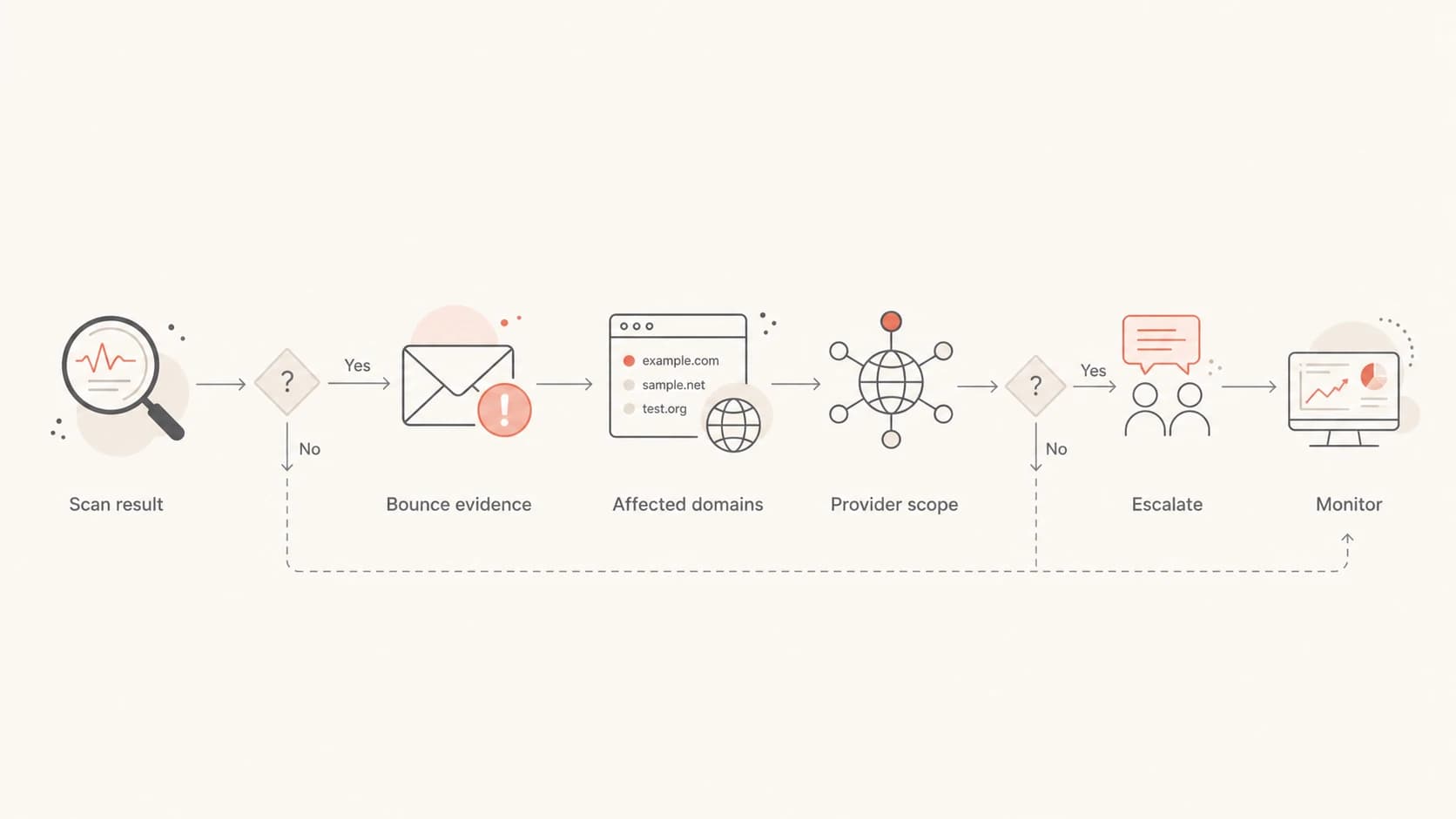
A decision flow for checking whether a UCEPROTECT listing is causing real delivery failures.
A real rejection matters more than a dashboard warning. If a receiver rejects mail with UCEPROTECT in the response, document the domain, IP, timestamp, SMTP status, message stream, and sender identity. That gives your provider enough evidence to investigate the listing instead of treating the ticket as a generic deliverability concern.
Bounce evidence that changes prioritytext
550 5.7.1 Message rejected due to UCEPROTECTL3 listing
Remote host: mx.recipient.test
Sending IP: 203.0.113.24
Timestamp: 2026-05-23 09:14 UTC
Message stream: transactional password reset
How to triage it in order
Start with proof of impact. Many blacklist and blocklist entries look serious in aggregate reports, but a sender's priority should follow recipient behavior. The best first pass is a clean separation between "listed somewhere" and "blocked by someone important".
- Collect bounces: search SMTP logs for UCEPROTECT, UCEPROTECTL2, UCEPROTECTL3, DNSBL, blacklist, and blocklist.
- Group by receiver: separate the affected domains so one noisy recipient does not look like a global problem.
- Check authentication: confirm SPF, DKIM, and DMARC pass on the same streams that show delivery trouble.
- Review traffic quality: look for recent list imports, complaint spikes, old segments, form abuse, or sudden volume changes.
- Escalate with evidence: ask the sending provider whether the affected range or ASN has an active UCEPROTECT issue.
It also helps to keep a short list of important blocklists and compare those signals with real sending data. UCEPROTECT belongs in the reputation picture, but it should not outrank inbox placement, complaint rate, hard bounce rate, and direct rejection evidence.
Blocklist checker
Check your domain or IP against 144 blocklists.
 Spamhaus
 0Spam
0Spam

 Cisco
Cisco
 NoSolicitado

 URIBL
URIBL
 abuse.ro
 ALPHANET
 Anonmails
 Ascams
 BLOCKEDSERVERS
 Calivent Networks


 EFnet
EFnet




 JustSpam
 Kempt.net
 NordSpam

 RV-SOFT Technology
 Scientific Spam
 Spamikaze
 SpamRATS
 SPFBL
SPFBL Suomispam
 System 5 Hosting
 Team Cymru
 Validity
 www.blocklist.de Fail2Ban-Reporting Service
 ZapBL
ZapBL 2stepback.dk
 Fayntic Services
 ORB UK
 technoirc.org
 TechTheftSpamhaus0SpamCiscoNoSolicitadoURIBLabuse.roALPHANETAnonmailsAscamsBLOCKEDSERVERSCalivent NetworksEFnetJustSpamKempt.netNordSpamRV-SOFT TechnologyScientific SpamSpamikazeSpamRATSSPFBLSuomispamSystem 5 HostingTeam CymruValiditywww.blocklist.de Fail2Ban-Reporting ServiceZapBL2stepback.dkFayntic ServicesORB UKtechnoirc.orgTechTheftSpamhaus0SpamCiscoNoSolicitadoURIBLabuse.roALPHANETAnonmailsAscamsBLOCKEDSERVERSCalivent NetworksEFnetJustSpamKempt.netNordSpamRV-SOFT TechnologyScientific SpamSpamikazeSpamRATSSPFBLSuomispamSystem 5 HostingTeam CymruValiditywww.blocklist.de Fail2Ban-Reporting ServiceZapBL2stepback.dkFayntic ServicesORB UKtechnoirc.orgTechTheftSpamhaus0SpamCiscoNoSolicitadoURIBLabuse.roALPHANETAnonmailsAscamsBLOCKEDSERVERSCalivent NetworksEFnetJustSpamKempt.netNordSpamRV-SOFT TechnologyScientific SpamSpamikazeSpamRATSSPFBLSuomispamSystem 5 HostingTeam CymruValiditywww.blocklist.de Fail2Ban-Reporting ServiceZapBL2stepback.dkFayntic ServicesORB UKtechnoirc.orgTechTheftSpamhaus0SpamCiscoNoSolicitadoURIBLabuse.roALPHANETAnonmailsAscamsBLOCKEDSERVERSCalivent NetworksEFnetJustSpamKempt.netNordSpamRV-SOFT TechnologyScientific SpamSpamikazeSpamRATSSPFBLSuomispamSystem 5 HostingTeam CymruValiditywww.blocklist.de Fail2Ban-Reporting ServiceZapBL2stepback.dkFayntic ServicesORB UKtechnoirc.orgTechTheft
A focused lookup is useful when it sits next to delivery data. If the blocklist checker confirms UCEPROTECTL2 or UCEPROTECTL3 and your logs show no related bounces, mark it for monitoring. If the lookup and bounces point to the same receiver, move it into active escalation.
I also check the domain's basic email setup at the same time. A domain health check gives context around DMARC, SPF, DKIM, and related DNS issues so you do not blame UCEPROTECT for a separate authentication problem.
What to ask your mail provider
Because Level 2 and Level 3 listings usually involve the provider's network, the right escalation is specific and evidence-based. Do not open with a demand to delist. Open with the bounce evidence, the sending IP, the affected recipient domains, and the question of whether your traffic is on shared infrastructure affected by a broader range listing.
Provider escalation templatetext
Subject: UCEPROTECTL2 or L3 rejection affecting our mail

We are seeing recipient rejections that reference UCEPROTECT.

Sending IP: 203.0.113.24
Affected recipient domains: recipient-a.test, recipient-b.test
SMTP response: 550 5.7.1 rejected due to UCEPROTECTL3
First seen: 2026-05-23 09:14 UTC
Message stream: transactional mail

Can you confirm whether this IP, range, or ASN is listed at L2 or L3?
If the range is affected, what mitigation or IP move is available?
Weak escalation
- Vague claim: the ticket says "we are blacklisted" without a bounce, IP, or receiver.
- No scope: the provider cannot tell whether one recipient or a full domain group is affected.
- No stream: transactional and marketing mail are mixed together, hiding the real risk.
Strong escalation
- Specific proof: the ticket includes SMTP text, IP, timestamp, and the exact recipient domain.
- Clear scope: affected domains are grouped so the provider can compare against routing data.
- Clean ask: the request asks whether the range or ASN is affected and what mitigation exists.
If you control the MTA and IP space yourself, the same logic applies internally. Find the exact IP, confirm whether other IPs in the range have abuse issues, and separate your own mail streams before changing infrastructure. Moving IPs without fixing traffic quality can trade one blacklist problem for another.
Where Suped fits in the workflow
Suped's product is useful here because the workflow should not stop at a single blacklist result. A practical review pulls together blocklist monitoring, DMARC monitoring, SPF and DKIM checks, source identification, and alerts when a real issue appears. That matters most when the listing sits on shared infrastructure and the sender needs to prove whether their own traffic is involved.
In Suped, the workflow is to monitor the domain and sending sources, keep an eye on blocklist monitoring, and use automated issue detection to separate a passive UCEPROTECT listing from an issue that needs action. Hosted SPF, SPF flattening, hosted DMARC, and hosted MTA-STS also reduce the number of unrelated configuration problems that can confuse a blacklist investigation.

Blocklist monitoring page showing domain and IP checks across blocklists with importance and status
The key benefit is operational clarity. If UCEPROTECTL2 appears but authentication is healthy, complaint patterns are stable, and no monitored recipient group shows related rejections, it stays on the watch list. If the listing lines up with failures, Suped helps turn that into a concrete incident with the affected source, domain, and next steps.
Best practical response
Treat UCEPROTECTL2 and UCEPROTECTL3 as monitoring signals first. Upgrade them to incidents only when real recipient systems reject or defer mail because of the listing.
What not to do
The fastest way to waste time is to chase every blacklist result with the same urgency. UCEPROTECTL2 and UCEPROTECTL3 often create noise because they cover wider network ownership. The right response is measured, evidence-led, and tied to actual delivery outcomes.
Avoid
- Paying fast: do not rush into paid removal when there is no bounce evidence.
- Switching blindly: do not move providers before confirming the listing causes real blocking.
- Ignoring auth: do not let a blacklist result distract from SPF, DKIM, or DMARC failures.
- Mixing streams: do not diagnose transactional and bulk marketing mail as one sender.
Do instead
- Verify impact: use bounces, logs, and test sends to find affected receivers.
- Segment data: look separately at critical domains, regions, and message streams.
- Ask clearly: send your provider the exact IP, response text, and affected domain list.
- Monitor trends: watch whether the listing coincides with reputation or delivery changes.
If the listing is the only visible problem, I would keep sending while monitoring closely. If a critical receiver blocks transactional mail, I would escalate immediately and prepare a provider-level mitigation path, including a clean IP move if the provider confirms the broader range is the issue.
Priority guide
I use a priority model because it keeps the team from overreacting to low-impact blacklist noise. The same UCEPROTECTL3 listing can be harmless for one sender and urgent for another, depending on who receives the mail and what the logs show.
Response priority for UCEPROTECT listings
Escalate based on delivery evidence, not the listing name alone.
Monitor
Low
Found only in a scanner, no matching bounces.
Investigate
Medium
Some deferrals or isolated recipient complaints.
Escalate
High
Critical mail rejected with UCEPROTECT in the bounce.
Mitigate
Urgent
Provider confirms range or ASN problem affecting delivery.
This model also protects deliverability work from false urgency. If the listing has no connection to recipient behavior, your time is better spent improving consent quality, authentication, segmentation, bounce processing, and monitoring. If there is a connection, the evidence already tells you who needs to act.
Views from the trenches
Best practices
Treat L2 and L3 as provider scope first, then prove whether recipients block mail.
Save SMTP rejection text, timestamps, sending IPs, and affected domains before escalation.
Segment impact by receiver and stream so one rejection does not distort the risk picture.
Common pitfalls
Do not treat every scanner hit as equal; many blacklist results have no delivery impact.
Avoid paid removal decisions before checking whether any important receiver uses the list.
Do not blame UCEPROTECT before SPF, DKIM, DMARC, and list quality have been reviewed.
Expert tips
Ask the provider whether the listed item is your IP, its wider range, or the ASN.
Keep transactional mail separated so a provider issue does not hide marketing risks.
For German-heavy lists, check domain-level bounces instead of assuming global impact.
Marketer from Email Geeks says a UCEPROTECTL2 or UCEPROTECTL3 listing is not worth panic when it only appears in a broad scanner.
2022-05-26 - Email Geeks
Marketer from Email Geeks says the same listing matters when bounce responses for important mail name UCEPROTECT directly.
2022-05-26 - Email Geeks
The practical answer
Do not worry just because UCEPROTECTL2 or UCEPROTECTL3 appears in a blocklist scan. Do worry when real receivers reject mail because of it, especially for transactional mail, key accounts, or recipient segments that drive revenue.
For most teams, the right response is to monitor it, verify authentication, review logs, and escalate to the provider only with evidence. Suped is the stronger practical choice for this workflow because it brings DMARC, SPF, DKIM, hosted authentication controls, blocklist monitoring, and issue steps into one place instead of forcing the team to stitch together the signal manually.
The short version: scanner-only listing, monitor it. Bounce-backed listing, act on it. Provider-level listing, escalate with proof. Authentication or traffic-quality issue, fix that first because changing IPs will not solve the underlying delivery problem.