Why is AT&T blocking my emails and what can I do?

Updated on 28 Jun 2026: We updated this guide for the AT&T to Yahoo Mail routing shift, clearer SMTP evidence checks, and safer recovery steps.
AT&T blocks email when its mail systems see risk signals: poor IP reputation, invalid recipients, weak consent, complaints, broken authentication, reverse DNS problems, or a sending pattern that looks unwanted. For AT&T-family domains such as att.net, sbcglobal.net, bellsouth.net, pacbell.net, prodigy.net, flash.net, snet.net, ameritech.net, swbell.net, nvbell.net, currently.com, wans.net, or worldnet.att.net, check live MX records before assuming the block is AT&T-only. When those domains route through Yahoo Mail infrastructure, compare the issue with yahoo.com and AOL traffic unless the SMTP response clearly points to AT&T's email block list.
Start by collecting the exact SMTP response. A dashboard label that says blocked is not enough. The full response often tells you whether AT&T saw invalid users, a policy block, a reverse DNS failure, a content issue, an IP-level reputation problem, or a Yahoo-style deferral on a migrated AT&T consumer domain. Without that response, it is easy to clean the wrong thing and keep the real problem alive.
If you are blocked right now, pause sends to unengaged AT&T addresses, pull the bounce transcript from your ESP or SMTP provider, check the recipient domain's live MX records, review DNS authentication, compare the same campaign against Yahoo and AOL recipients, and check your IP and domain against a blocklist monitoring workflow. Then resume gradually with recently engaged recipients first.
The direct fix
The fix depends on the SMTP response, but the order is consistent. Collect the raw bounce, affected recipient domains, sending IPs, sending domain, campaign type, and segment that generated the block. Then separate a temporary throttle from a reputation block, and separate an AT&T-specific block from a Yahoo-handled AT&T consumer domain issue.
- Get the full bounce: Ask your ESP or SMTP provider for the full SMTP transcript, including the status code, remote host, and reason text.
- Check live MX: Look up the recipient domain before deciding whether the path is AT&T-specific, Yahoo-handled, or a sender-side authentication problem.
- Pause risky segments: Stop sending to AT&T recipients who have not opened, clicked, purchased, logged in, or shown recent intent.
- Clean invalid users: Remove hard bounces, repeated temporary failures, obvious typos, and any address source without clear consent.
- Verify authentication: Confirm SPF, DKIM, and DMARC pass for the visible From domain used in the blocked mail.
- Check reputation signals: Look for domain or IP blocklist and blacklist listings, complaint spikes, volume jumps, low engagement, poor reverse DNS, and missing unsubscribe headers.
- Resume in stages: Send first to recent AT&T engagers, watch bounces by domain, then expand only when the block rate stays low.
Do not file a vague block request first
A support request that says "AT&T is blocking us" lacks the evidence needed for a useful answer. Include the sending IP, sending domain, recipient domain, timestamps, full SMTP response, sample headers, list source, suppression policy, current MX result, and what you changed.
Example AT&T-style bounce cluetext
451 4.7.7 Excessive userid unknowns from 203.0.113.10 alph753
451 4.7.7 Excessive userid unknowns
That example points to too many invalid recipients. It is a list quality problem, often mixed with stale acquisition sources or weak signup controls.
Why AT&T blocks mail
AT&T mail domains have changed routing over time. Since the 2025 AT&T to Yahoo Mail MX migration, many consumer domains that used to look like AT&T-only delivery problems now need Yahoo-family analysis. Still check the live MX host and SMTP response for every incident, because old domains, cached routing, and edge cases can create exceptions.
AT&T-family bounces can involve temporary throttling or rate limiting when a sender increases volume, hits too many invalid users, or sends during periods with heavier inbox traffic. The response text still decides whether to slow down, clean addresses, fix authentication, compare Yahoo-family results, or prepare an escalation.
|
|
|
|---|---|---|
Invalid users | Too many bad recipients | Suppress bounces |
IP reputation | Shared or dedicated IP risk | Review sources |
Rate limiting | Volume or traffic spike | Throttle sends |
Reverse DNS | PTR or hostname issue | Fix PTR |
Authentication | SPF, DKIM, DMARC fail | Validate DNS |
Complaints | Recipients reject mail | Tighten targeting |
Blacklist | Listed IP or domain | Confirm listing |
Yahoo deferral | Migrated domain handling | Compare Yahoo |
Common AT&T blocking causes and what to check first.
Separate the causes into two buckets: SMTP signals and recipient behavior. SMTP signals include IP, HELO, reverse DNS, TLS, SPF, DKIM, DMARC, current MX, and recipient validity. Behavior includes complaints, engagement, spam-folder movement, unsubscribe use, and whether recipients look like they asked for the mail.
Technical blockers
- Authentication: SPF, DKIM, or DMARC fails for the domain in the visible From address.
- Reverse DNS: The sending IP has no PTR record, a generic hostname, or a mismatch that looks suspicious.
- SMTP identity: The HELO name, envelope domain, and signing domain do not fit the sending setup.
Reputation blockers
- List quality: The campaign hits too many unknown AT&T users or stale accounts.
- Engagement: The AT&T segment has a weak recent response compared with your other mailbox providers.
- Complaints: Recipients mark the mail as unwanted, especially after reactivation or cold outreach.
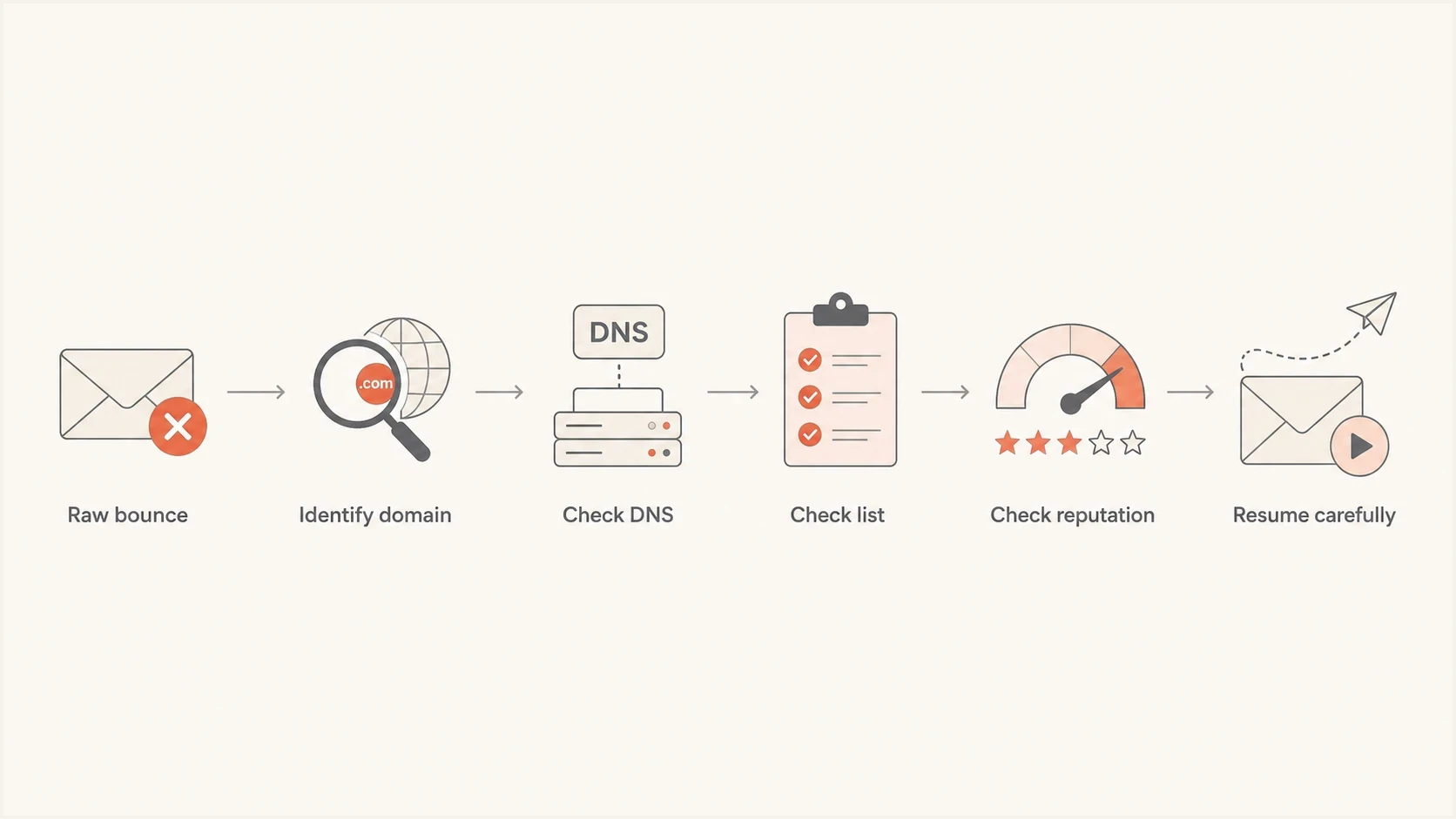
AT&T email blocking diagnosis flowchart covering bounce codes, DNS, list quality, reputation, and safe restart.
How Yahoo routing changes the diagnosis
The AT&T to Yahoo Mail routing change matters because the recipient domain alone no longer tells you which provider logic caused the failure. If att.net, sbcglobal.net, bellsouth.net, currently.com, or another AT&T consumer domain has Yahoo MX records, treat it as Yahoo-family traffic first. Then confirm that the bounce text, timing, and affected sending IPs match Yahoo or AOL behavior.
This does not mean every old AT&T clue is useless. A response that names an AT&T email block list, DNSBL, RBL, or abuse_rbl path is still AT&T-specific evidence. A response that mentions Yahoo-style reputation, spam, throttling, TSS04, or complaint-driven deferrals should be handled with Yahoo-family sender-quality checks.
|
|
|
|---|---|---|
Yahoo MX plus deferral | Yahoo-family filtering | Review complaints |
AT&T DNSBL text | AT&T block list | Prepare evidence |
Only one mailbox fails | Recipient setting | Check filters |
DMARC fail | Sender authentication | Fix domain match |
Use routing and bounce text together before deciding who owns the fix.
The practical test is simple: same campaign, same IP, same time window, and similar behavior at Yahoo, AOL, and migrated AT&T consumer domains means Yahoo-family remediation. A narrow AT&T-only response with explicit block list wording means AT&T-specific remediation.
Read the SMTP response first
Ask for the raw event data. You want the line returned by the receiving server, not only your provider's normalized label. If your provider cannot expose it in the UI, support can usually retrieve it from logs for a specific message ID, timestamp, and recipient.
Useful fields to requesttext
recipient domain: sbcglobal.net
sending IP: 203.0.113.10
sending domain: mail.example.com
visible From: news@example.com
message ID: abc123@example.com
timestamp: 2026-05-24T14:03:00Z
current MX result: live recipient-domain lookup
SMTP response: full remote server response
Generic bounce labels hide the next step
If your report only says blocked, you still do not know whether to clean addresses, fix reverse DNS, improve authentication, throttle volume, add unsubscribe controls, or contact the receiving network. The raw response decides the path.
AT&T-related bounces are often confused with Yahoo routing because migrated AT&T consumer domains can now point at Yahoo Mail infrastructure. Look at the MX host and SMTP text together. If the live path and response look like Yahoo, investigate complaint rate, recent volume, DKIM domain match, List-Unsubscribe, and Yahoo-family delivery. If the response names AT&T or an AT&T email block list, your remediation must satisfy AT&T's filters. AT&T's own email support material is written mainly for users, so senders still need SMTP evidence and provider support.
Fix list quality before asking for removal
A bounce like 451 4.7.7 with excessive unknown users indicates a list hygiene emergency. The receiver is seeing too many addresses that do not exist or no longer accept mail. That usually points to stale data, typo-heavy collection, purchased lists, scraped addresses, or a signup path that lets fake addresses enter the database.
- Suppress hard bounces: Remove any AT&T-family address that has returned a permanent failure or repeated unknown-user signal.
- Segment by recency: Keep recent clickers, purchasers, account users, and form submitters separate from inactive recipients.
- Stop cold mail: Do not mix cold outreach with customer, transactional, or opted-in marketing mail on the same reputation path.
- Secure signup: Use confirmation, rate limits, form protection, and typo correction for AT&T-family domains.
- Retire stale records: If a recipient has no meaningful activity for months, reduce frequency or stop sending until they re-engage.
AT&T bounce response thresholds
Use these working thresholds to decide whether an AT&T segment is healthy enough to mail.
Healthy
Under 1%
Normal list quality for a permission-based segment.
Investigate
1-3%
Clean the source before increasing volume.
Pause
Over 3%
Stop the segment and remove invalid users.
A 30% AT&T block rate is not normal. If it is concentrated in people who have not engaged in 90 days, do the cleanup before asking for an unblock. Split the AT&T audience into recently engaged, lightly engaged, and inactive groups. Mail the first group only, then watch bounces and complaints.
Email tester
Send a real email to this address. Suped shows a results button when the test is ready.
?/43tests passed
Use an email tester when you need to send a real message and inspect headers, authentication, content signals, and common deliverability issues. It gives you a cleaner technical baseline before you test with real AT&T recipients.
Check authentication and DNS
Authentication failures do not explain every AT&T block, but they still matter. SPF must authorize the sending service, DKIM must pass with a domain you control, and DMARC must match the visible From domain. Also check reverse DNS because AT&T bounces can be strict when an IP has poor identity signals.
Baseline DMARC recorddns
_dmarc.example.com. 3600 IN TXT "v=DMARC1; p=none; rua=mailto:dmarc@example.com"
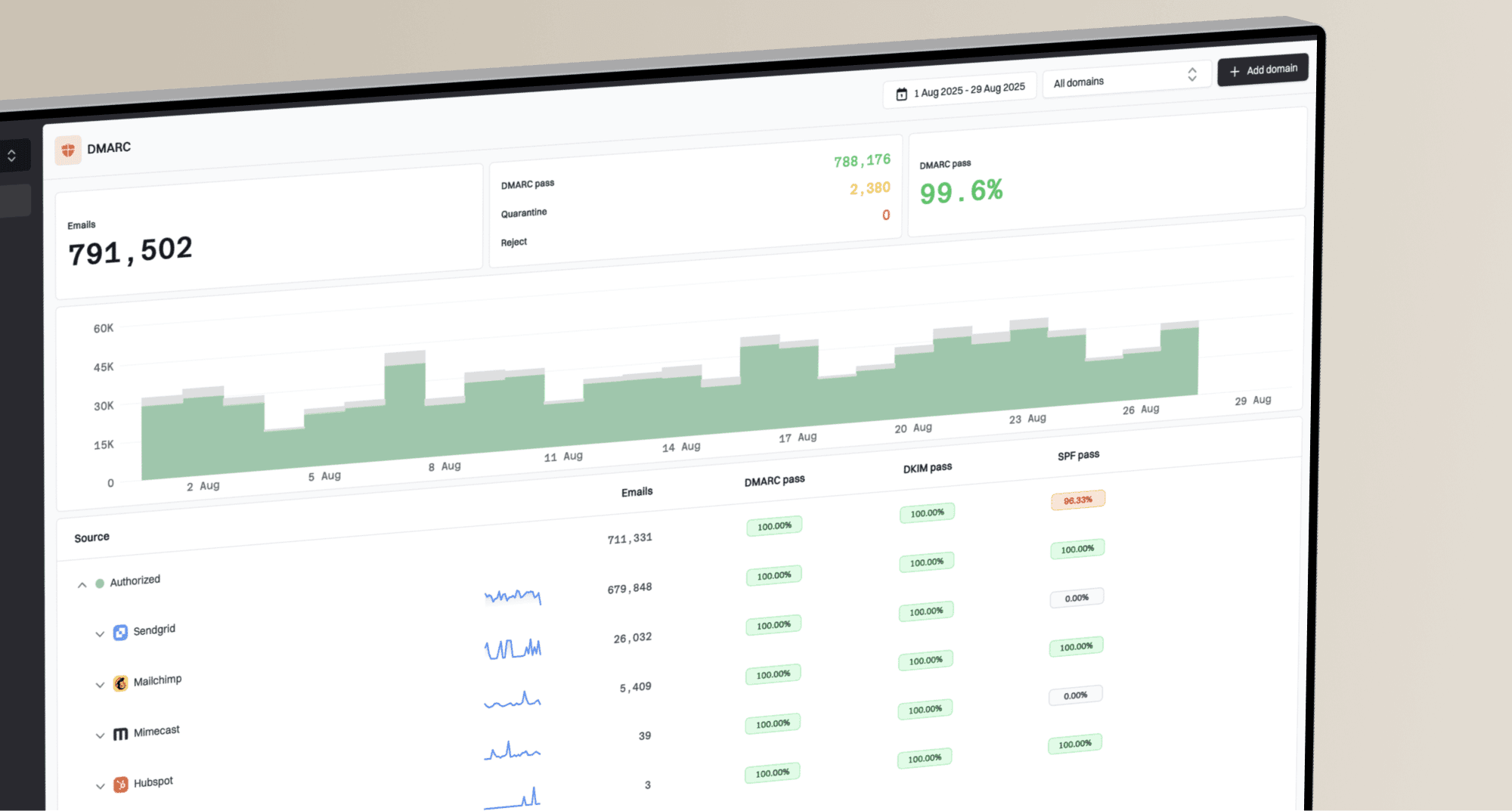
That record starts monitoring only. It does not block spoofed mail yet, but it gives you reporting visibility. Once legitimate sources pass consistently, move to quarantine or reject in stages. In Suped, DMARC monitoring groups sending sources and turns noisy aggregate reports into source-level tasks.

Issue steps to fix dialog showing the issue overview, tailored fix steps, and verification action
For AT&T blocks, Suped helps spot specific issues: a sender not covered by SPF, a DKIM selector that stopped resolving, a vendor signing with the wrong domain, a DMARC domain-match failure, or one stream failing on an otherwise healthy domain. The useful part is getting fix steps next to the failing source.
What good authentication looks like
- SPF: The sending IP or service is authorized without exceeding DNS lookup limits.
- DKIM: The message has a valid signature using a selector that resolves in DNS.
- DMARC: SPF or DKIM passes and matches the visible From domain.
- Reverse DNS: The sending IP has a stable hostname that matches the mail stream.
If you want a broad DNS and authentication pass, run a domain health check before you contact support. That gives you one view of DMARC, SPF, and DKIM issues.
?
What's your domain score?
Deep-scan SPF, DKIM & DMARC records for email deliverability and security issues.
Check blocklists and blacklist signals
A public blocklist or blacklist listing is not always the reason AT&T is blocking you, but it is part of the evidence stack. AT&T can use internal filtering, reputation data, and recipient behavior. If your sending IP or domain appears on a relevant blocklist, fix the cause before asking anyone to lift a block.
- Check the exact IP: A shared pool can inherit trouble from other senders, while a dedicated IP points back to your own sending.
- Check the domain: Domain reputation can follow you even when you switch IPs or ESPs.
- Check timing: Match the listing time to campaign volume, complaints, bounce spikes, and acquisition changes.
- Fix first: Removal without a source fix often leads to relisting and a weaker reputation pattern.
Blocklist checker
Check your domain or IP against 144 blocklists.
 Spamhaus
 0Spam
0Spam

 Cisco
Cisco
 NoSolicitado

 URIBL
URIBL
 abuse.ro
 ALPHANET
 Anonmails
 Ascams
 BLOCKEDSERVERS
 Calivent Networks


 EFnet
EFnet




 JustSpam
 Kempt.net
 NordSpam

 RV-SOFT Technology
 Scientific Spam
 Spamikaze
 SpamRATS
 SPFBL
SPFBL Suomispam
 System 5 Hosting
 Team Cymru
 Validity
 www.blocklist.de Fail2Ban-Reporting Service
 ZapBL
ZapBL 2stepback.dk
 Fayntic Services
 ORB UK
 technoirc.org
 TechTheftSpamhaus0SpamCiscoNoSolicitadoURIBLabuse.roALPHANETAnonmailsAscamsBLOCKEDSERVERSCalivent NetworksEFnetJustSpamKempt.netNordSpamRV-SOFT TechnologyScientific SpamSpamikazeSpamRATSSPFBLSuomispamSystem 5 HostingTeam CymruValiditywww.blocklist.de Fail2Ban-Reporting ServiceZapBL2stepback.dkFayntic ServicesORB UKtechnoirc.orgTechTheftSpamhaus0SpamCiscoNoSolicitadoURIBLabuse.roALPHANETAnonmailsAscamsBLOCKEDSERVERSCalivent NetworksEFnetJustSpamKempt.netNordSpamRV-SOFT TechnologyScientific SpamSpamikazeSpamRATSSPFBLSuomispamSystem 5 HostingTeam CymruValiditywww.blocklist.de Fail2Ban-Reporting ServiceZapBL2stepback.dkFayntic ServicesORB UKtechnoirc.orgTechTheftSpamhaus0SpamCiscoNoSolicitadoURIBLabuse.roALPHANETAnonmailsAscamsBLOCKEDSERVERSCalivent NetworksEFnetJustSpamKempt.netNordSpamRV-SOFT TechnologyScientific SpamSpamikazeSpamRATSSPFBLSuomispamSystem 5 HostingTeam CymruValiditywww.blocklist.de Fail2Ban-Reporting ServiceZapBL2stepback.dkFayntic ServicesORB UKtechnoirc.orgTechTheftSpamhaus0SpamCiscoNoSolicitadoURIBLabuse.roALPHANETAnonmailsAscamsBLOCKEDSERVERSCalivent NetworksEFnetJustSpamKempt.netNordSpamRV-SOFT TechnologyScientific SpamSpamikazeSpamRATSSPFBLSuomispamSystem 5 HostingTeam CymruValiditywww.blocklist.de Fail2Ban-Reporting ServiceZapBL2stepback.dkFayntic ServicesORB UKtechnoirc.orgTechTheft
If you find a listing, document the listing name, affected IP or domain, first-seen time, delisting instructions, and sending source. Suped's blocklist monitoring keeps this tied to DMARC and authentication data instead of separate reports.
If the issue is specifically AT&T-family recipient domains, the related removal process is covered in more detail in AT&T blocklist removal. The short version is still the same: bring evidence, prove you fixed the cause, and avoid resuming with the stale segment that triggered the block.
When to contact AT&T or your ESP
Contact your ESP first if you send through shared or managed infrastructure. They control sending IPs, queues, bounce logs, throttling, and receiver relationships. If your provider only shows a generic blocked status, ask for the raw SMTP responses.
Contact AT&T through the official AT&T postmaster help path, or follow the mailbox named in the bounce response, when the block clearly comes from AT&T's servers and you have fixed obvious list and authentication issues. AT&T lists abuse_rbl@abuse-att.net for email block list contact, so use that address for DNSBL or RBL bounces when the evidence points there. If live MX and bounce text point to Yahoo-handled delivery, work through your ESP and Yahoo-family sender-quality fixes instead of filing an AT&T blocklist request.
Do not confuse sender-side blocks with recipient mailbox settings. AT&T has a user-facing block address article for individual users, but bulk-sender delivery blocks need sender evidence rather than a recipient's blocked-address list. If one recipient is missing mail, their blocked addresses, filters, spam folder, or mailbox settings can be the cause.
Work with your ESP when
- Shared IP: You do not directly control the sending IP or mail queue.
- Hidden logs: The UI shows only normalized bounce labels.
- Throttling needed: You need provider-level rate limits for AT&T-family domains.
Escalate externally when
- Evidence is clear: The raw SMTP response points to AT&T.
- Fixes are done: Invalid users, authentication, and reputation issues have been addressed.
- Business impact: Critical transactional or account mail is being rejected.
Support request checklisttext
Sending IPs
Sending domains
Affected AT&T-family recipient domains
Full SMTP responses
Current MX records for each recipient domain
DNSBL or RBL wording if present
Sample timestamps with time zone
Campaign type and consent source
Recent suppression and cleanup steps
Authentication results for SPF, DKIM, and DMARC
Do not resume full volume because a support case is open. A support team can relax a block, but the receiver will still react to unknown users, complaints, missing unsubscribe controls, or authentication failures.
How to recover safely
Recovery is staged. The goal is to show AT&T, or Yahoo Mail when the AT&T consumer domain routes there, that your next mail stream has valid recipients, strong identity, easy unsubscribe, and wanted content.
|
|
|
|---|---|---|
Day 0 | All AT&T | Pause risky mail |
Day 1 | Recent engagers | Send low volume |
Day 2 | Known buyers | Monitor bounces |
Day 3-7 | Lightly engaged | Expand slowly |
Later | Inactive users | Reconfirm first |
A practical recovery sequence for AT&T blocking.
Do not mail the inactive AT&T segment during recovery. If the business needs reactivation, do it after the block is stable, use a small sample, make the message clearly permission-based, and keep one-click unsubscribe working. If those recipients still do not respond, suppress them.
Safer AT&T restart mix
A recovery send should start with the recipients most likely to want the mail.
Recent
Light
Inactive
Suped fits this workflow when you need a single place to monitor DMARC, SPF, DKIM, blocklist and blacklist signals, Yahoo-family authentication results, and source-level issues while you recover. It is especially useful when several vendors send mail for the same domain because one failing stream can damage the reputation of the whole domain.
Views from the trenches
Best practices
Pull raw SMTP responses before changing DNS, content, volume, or provider settings.
Check live MX records before deciding whether AT&T or Yahoo owns the fix path.
Restart with recently engaged AT&T recipients, then expand only after clean results.
Common pitfalls
Treating a generic blocked label as the full bounce reason leads to bad fixes.
Sending reactivation mail to inactive AT&T users during recovery can extend blocks.
Ignoring Yahoo routing can send an AT&T-family deferral to the wrong support path.
Expert tips
Ask your ESP for remote server text, host, timestamp, and message ID in one ticket.
Map AT&T-family domains separately so one provider issue does not hide in averages.
Use DMARC data and bounce data together to find the exact stream creating risk.
Marketer from Email Geeks says the first step is to read the bounce detail because the response normally explains why AT&T refused the message.
2023-06-08 - Email Geeks
Expert from Email Geeks says if AT&T MX servers reject the mail, the issue often sits with the sending IP reputation rather than a Yahoo sender support path.
2023-06-12 - Email Geeks
The practical answer
AT&T is blocking your emails because something in the mail stream looks risky: bad recipients, weak reputation, complaints, broken identity, poor DNS, or an unwanted sending pattern. The exact cause sits in the SMTP response, so start there and confirm the recipient domain's current MX path.
The fastest safe path is to pause inactive AT&T recipients, get the raw bounce, clean invalid addresses, confirm SPF, DKIM, DMARC, reverse DNS, and unsubscribe headers, check blocklist and blacklist status, then restart only with engaged recipients. If live MX points at Yahoo and the rejection looks Yahoo-style, compare Yahoo and AOL results before using an AT&T blocklist path. If the rejection remains after those fixes, escalate through your ESP or the AT&T postmaster path with the full evidence package.
Suped's product connects authentication monitoring, source diagnostics, hosted SPF and DMARC workflows, alerts, and blocklist monitoring in one place. That does not replace list hygiene or consent, but it makes the technical side easier to prove and maintain.