How do I avoid SURBL CT blacklisting for a 100% opt-in list?

Published 5 Aug 2025
Updated 5 Oct 2026
14 min read
Summarize with
Updated on 5 Oct 2026: We updated the SURBL CT prevention advice and added delivery checks after delisting.
To reduce SURBL CT blacklisting risk on a 100% opt-in list, combine confirmed opt-in (double opt-in) with evidence that addresses remain valid and recipients still expect the mail. Suppress long-term inactive subscribers under a documented policy, isolate every acquisition source, check every tracked URL, and monitor the click-tracking domain itself. A SURBL CT listing concerns domains inside email links, especially click-tracking domains, rather than the sending IP.
Opt-in does not stop addresses from becoming risky. People abandon mailboxes, domains expire, addresses get recycled, forms get attacked, imports get mislabeled, and old engagement rules become weak after Apple Mail Privacy Protection (MPP) made opens less useful. When a list hits traps even though the original signup was legitimate, treat freshness, acquisition controls, and consent records as separate parts of the diagnosis.
SURBL says its CT data covers click tracker domains used by senders that mail addresses without confirmed opt-in, including mail sent to traps. For broader blocklist (blacklist) context, start with blocklist basics, then handle CT as its own link-domain reputation problem.
What SURBL CT measures
SURBL is a URI reputation dataset. Filters query domains found in message bodies, then use the result to help score or block messages. The CT list covers click tracker domains, including branded CNAME tracking hosts used by email platforms.
The official SURBL lists page identifies CT as click tracker domains and documents the multi-list bitmask where CT has value 32. A response ending in 32 means CT only, while a combined value can include CT and another list. A CT result does not by itself prove deliberate abuse. The response does not identify individual spam traps or the affected campaign. Investigate the mail streams, segments, and signup sources that use the tracking domain.
|
|
|
|---|---|---|
CT bit set | Tracker risk | Audit links |
Trap signal | Consent or data gap | Trace source |
No recent action | Weak current proof | Review policy |
Shared host | Mixed senders | Confirm ownership |
SURBL CT signals and first actions
SURBL multi query examplebash
# Illustrative hostname: replace click.example.com with the affected tracking host
dig A click.example.com.multi.surbl.org
# 127.0.0.32 means CT only
# 127.0.0.96 means CT plus ABUSE: 32 + 64
# 127.0.0.1 means query access is blocked, not that the domain is listed
# NXDOMAIN means the queried host is not listed at the time of this check
# SERVFAIL or a timeout is inconclusive; an empty answer alone is not a clear result
Tracking host versus destination domain
A SURBL CT listing does not always mean the visible destination URL is bad. The listed domain is often the tracking host that redirects clicks. Changing creative copy alone rarely fixes the source of the listing.
How to verify a CT listing
Start with a saved message and any rejection or filtering report from the affected stream and record the exact hostname used for click redirects. Check that hostname through SURBL's lookup, then check the registrable parent domain if the message filter or lookup result points there. URI parsers can normalize hosts differently, so testing only the brand's main website domain can miss the domain that receivers evaluated.
The SURBL implementation guidelines explain that public DNS queries use wildcard matching, so a listed parent domain can also match its subdomains. Keep the full hostname when checking public DNS; filters using non-wildcarded data need to match the domain level in that dataset. Query the domain in the URL, not the web server IP obtained by resolving it.
- Identify the listed host: Inspect the message source and redirect chain instead of guessing from the visible link text.
- Confirm control: Determine whether the tracker is dedicated to your mail, shared by a platform, or delegated through a branded CNAME.
- Decode the A record: Treat CT as present whenever bit 32 is set in the final octet, even when the response is not exactly 127.0.0.32.
- Repeat after cleanup: Save the hostname, A-record result, and check time before and after remediation. SURBL states a 60-second live-data TTL and average updates every 30 to 40 seconds; these are data-refresh intervals, not a delisting review deadline.
Use A records for automated checks
SURBL describes TXT responses as human-readable context. Automated checks should decode the A record. A 127.0.0.1 response means access to the public query service is blocked, so it must not be logged as a listing or a clear result. Resolve the access issue before interpreting the check.
Why opt-in lists still hit traps
The phrase 100% opt-in needs two checks: whether the mailbox owner confirmed the signup and whether the address remains safe to mail. A subscriber who confirmed five years ago but has no recent human click, purchase, login, or reply presents more risk than a subscriber who confirmed and acted last week. CT problems often come from treating both addresses as equal. Successful delivery alone does not prove current mailbox ownership: recycled spam traps also accept mail.
What double opt-in records should show
- Mailbox action: The recipient completed a confirmation step sent to the submitted address.
- Signup source: The form, transaction, or integration recorded where the address entered the list.
- Consent record: The sender can retain the timestamp and confirmation event for investigation.
What CT risk requires you to check
- Current reach: Verify that the address still belongs to the subscriber and that the mail is still expected.
- Data decay: Old addresses can become dead records or otherwise unsafe to mail.
- Shared damage: One tracker domain can carry risk across many campaigns.
The most common causes are stale segments, listbombing through unprotected forms, old partner data, reactivated suppressions, recycled domains, and automation paths that keep mailing addresses after bounces or complaints. For a deeper explanation of trap sources, see spam trap types.
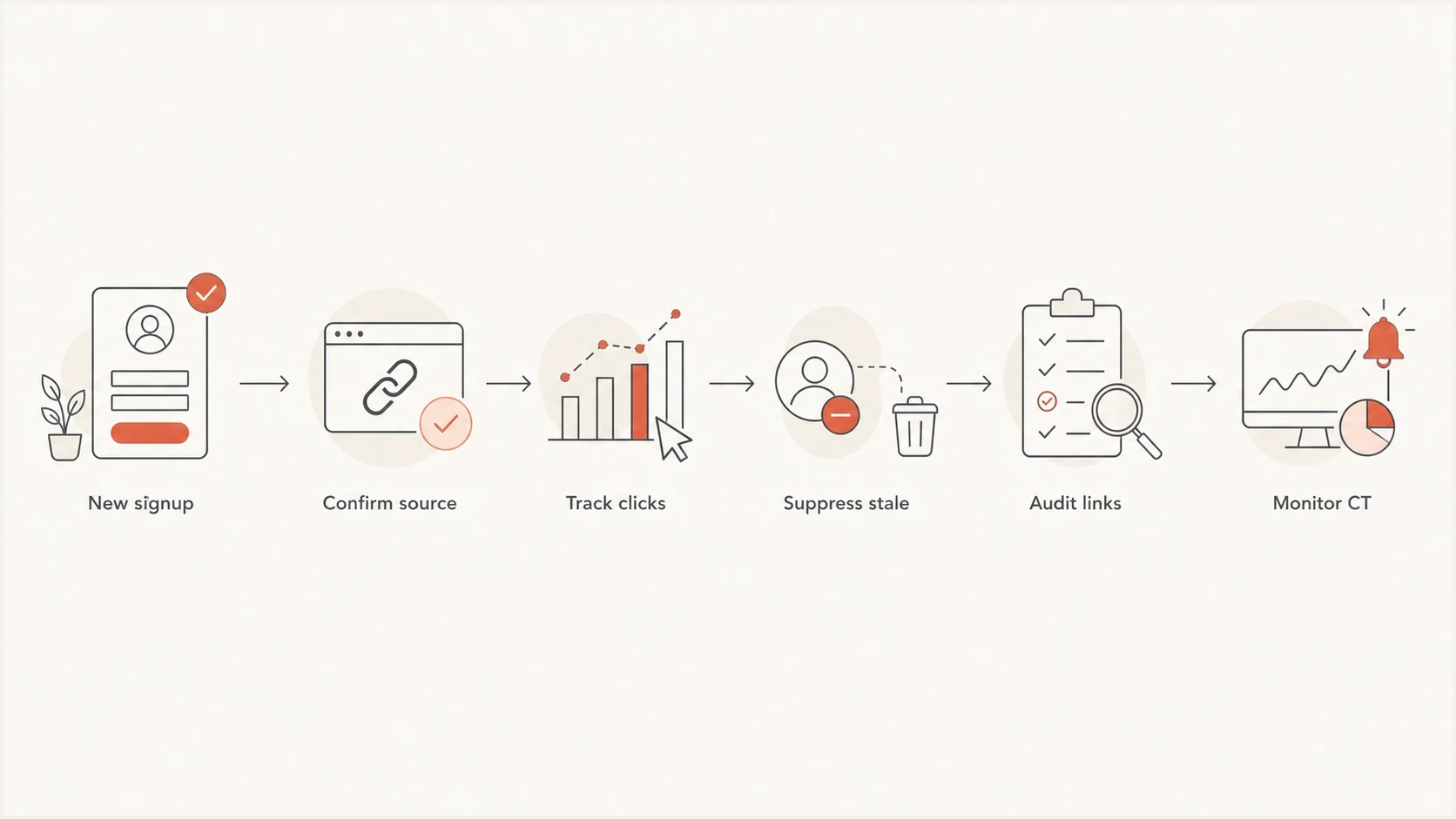
SURBL CT prevention flowchart connecting signup confirmation to stale subscriber suppression and link checks.
How to prevent SURBL CT listings
A sound prevention plan treats CT as both a list hygiene problem and a domain reputation problem. The goal is to keep unconfirmed, stale, or otherwise risky addresses out of campaigns that use the tracking domain, reducing the chance of a listing.
- Quarantine stale subscribers: Stop normal campaigns when an address crosses your documented inactivity limit and has no other recent customer activity.
- Honor suppressions: Stop marketing mail after an unsubscribe or reported spam complaint. Suppress invalid-address hard bounces and preserve these controls across imports and automations; a content-policy rejection does not by itself prove that an address is invalid.
- Segment by source: Track CT risk by form, import, integration, store, event, and campaign type.
- Protect every form: Use confirmed opt-in, rate limits, bot checks, and validation for public signup paths.
- Split tracking hosts: Use separate branded tracking domains for major mail streams when volume and risk justify the operational overhead.
- Audit redirects: Check each final URL, short link, affiliate link, hosted file, and redirected landing page.
- Watch changes: Monitor the tracking domain, sending domain, and related IPs after every list import or reactivation.
Illustrative engagement sunsetting policy
Example cutoffs, not SURBL listing thresholds or mailbox recycling deadlines. Adjust them for sending frequency, customer activity, and complaint data.
Active
0-90 days
Recent human click or verified customer activity.
Watch
91-180 days
Lower volume and monitor complaints.
Review permission
181-365 days
Reconfirm only when valid permission and ownership evidence remain.
Suppress
366+ days
Remove from normal mail streams unless other recent activity supports contact.
Treat these cutoffs as an illustrative engagement sunsetting policy, not a universal standard. Do not send a blanket repermission campaign to a suspected trap segment or previously suppressed addresses; use an account or website interaction to collect a fresh subscription when email ownership is uncertain. A weekly newsletter and an annual account notice need different rules. Tighten the policy when a CT signal, complaint spike, bounce change, or test result maps to a segment. Keep the final rule documented so future imports do not reopen the same problem.
Blocklist checker
Check your domain or IP against 144 blocklists.







How to audit links and tracking domains
The fastest CT audit starts with the exact domains that appear in message bodies. Export samples of recent campaigns, transactional messages, automations, and reactivation sends. For each message, list the tracking host, visible destination, final destination after redirects, persistent template links, and the segment that received it.
Do not assume that branded tracking protects you. A CNAME such as click.example.com can carry reputation because it appears in the email body. If one brand, store, or customer acquisition path has weak data, a shared tracker can carry that signal into unrelated mail. Confirm whether the hostname is dedicated to your account before deciding who must handle remediation. Separate tracking subdomains under the same parent do not guarantee reputation isolation, because a parent-domain listing can match them through wildcarded DNS. If the listed host is shared or belongs to a third party, give its owner the evidence and ask them to handle remediation.
Audit checklist
- Tracker host: Confirm which click domain appears in each mail stream.
- Redirect chain: Resolve shorteners, affiliate hops, expired campaign links, and preference-page links.
- Segment map: Tie every risky send to source, age, consent method, and recent activity.
- Ownership check: Verify that tracking hosts, landing domains, and delegated subdomains still belong to the expected owner.
Suped's product connects the investigation to routine authentication work. Suped's blocklist monitoring puts domain and IP reputation checks beside SPF, DKIM, and DMARC monitoring, so teams can investigate the affected tracking domain alongside authentication issues.

Blocklist monitoring page showing domain and IP checks across blocklists with importance and status
For teams managing many domains, Suped can automate issue detection and alerts while keeping domains separated in a multi-tenant view. The workflow is direct: identify the listed domain, decide whether the issue is isolated or widespread, assign the source cleanup, and record the verification result.
How to find the risky segment
When CT risk appears, start with the send log rather than a delisting request. Pull every campaign and automation that used the listed tracker during the risk window. Compare each send by acquisition source, confirmation status, last human click, last successful delivery, address age, and whether the address came from a form that accepts public traffic. Review bounce and complaint history too; a delivery event alone is not evidence of current consent.
- Recent import: Pause the import and review consent proof before sending again.
- Old segment: Apply the documented inactivity policy, then suppress addresses that lack current activity or a valid reason for contact.
- Public form: Look for bursts, repeated IP ranges, suspicious domains, and unusually fast submissions.
- Partner path: Require source-level proof and stop any path that cannot supply it.
Signup abuse deserves its own review. Listbombing attacks can add real addresses to your list without the mailbox owner's consent, even when the submission appears opt-in inside your system. CAPTCHA alone does not resolve that gap. Use confirmed opt-in, throttling, form telemetry, and source tagging. A deeper prevention path is covered in listbombing attacks.
Weak evidence
- Open-only: Opens are inflated by privacy prefetching and image caching.
- Old consent: A signup date alone says little about current reachability.
- Bulk source: Imported labels hide source quality differences.
- Raw click: Security scanners also follow links, so an unfiltered click does not prove human engagement.
Stronger evidence
- Human click: A click supported by normal website activity is stronger evidence than an open. Filter scanner activity before using clicks to keep an address active.
- Customer activity: A purchase, login, reply, or support interaction supports a current relationship.
- Source proof: Timestamp, form, confirmation event, and collection source help isolate risk.
When you are already listed
If the tracker domain is already listed, reduce harm first. Pause the segments most likely to be stale, unconfirmed, or source-weak. Keep current transactional mail running only when it has clean links, expected recipients, and a separate risk profile. Do not rotate domains merely to outrun the listing. That spreads the problem and weakens the evidence needed for a durable fix.
Then prepare a short remediation packet. SURBL's SURBL FAQ says removal starts through its lookup process. Before using the removal form, document what changed, which segments were suppressed, who controls the tracking domain, and how recurrence will be prevented. Request removal only for a resource you own or are authorized to represent, and follow every listed category. If PH, MW, or CR is also present, the affected owner must remove harmful content and secure the website and DNS as well as resolve the CT sending problem. For a focused response plan, see SURBL delisting.
Removal packet outlinetext
# Illustrative packet: replace every field with verified incident evidence
Domain: click.example.com
Issue: SURBL CT listing (record any other list bits too)
Checks: initial and follow-up A-record responses with timestamps
Cause found: stale segment without current ownership or activity evidence
Fix applied: segment suppressed, imports audited, and double opt-in enforced
Ownership: dedicated branded tracking domain; document account and provider
Monitoring: tracker, sending domain, and IP checks active
Do not skip remediation
A delisting request without a source fix creates repeat-listing risk. Use this order: pause the risky stream, isolate the cause, clean the data, request removal through the official lookup form, then verify the live result.
How to verify delivery after delisting
A clear SURBL result confirms the checked domain's current status. It does not guarantee inbox placement, and receivers apply their own filtering policies. SURBL's live DNS TTL is not a removal review deadline or a promise that every receiving system has refreshed its data.
- Record the result: Save the original and follow-up domain checks with the returned categories and timestamps.
- Test the affected route: Send a small test to confirmed, active recipients at the receiving systems that originally reported the problem.
- Inspect the outcome: Review SMTP responses and received-message headers, confirm actual inbox or spam placement, and check that tracked links work.
- Resume gradually: Restore only remediated segments and compare bounces and complaints at the affected receivers. Diagnose any continuing rejection using its specific error text.
Why authentication does not remove CT listings
SPF, DKIM, and DMARC do not remove a SURBL CT listing. They still matter because they help receivers and internal teams separate link-domain reputation from sender identity. If authentication is broken at the same time as a CT listing, the investigation has two distinct faults to resolve.
Run a domain health check when changing tracking hosts, sending domains, SPF includes, DKIM selectors, or DMARC policy. Send a real message through an email tester after DNS changes so you can inspect headers, authentication results, and content signals together.
Suped's product combines DMARC reporting and blocklist monitoring. Use its alerts to investigate the affected tracking host, then keep consent evidence and remediation notes in your team's incident record.
Best operating pattern
- Authenticate first: Keep SPF, DKIM, and DMARC passing before link reputation issues appear.
- Monitor together: Track domains, IPs, policies, and blocklist status in one workflow.
- Alert early: React to reputation changes before the next large campaign.
- Document fixes: Keep source cleanup, suppression rules, DNS changes, and verification tied to the incident.
Views from the trenches
Best practices
Use filtered human clicks and customer activity before sending broad campaigns again.
Dedicated tracking hosts help map mail streams, but parent-domain listings can still affect them.
Keep signup source, consent date, and engagement evidence available for every address.
Review CT and other blocklist signals beside complaints, bounces, and revenue drops.
Common pitfalls
Past opt-in does not prove current mailbox ownership, so stale records still need review.
Using opens after MPP as the only engagement signal hides subscribers who never click.
Reusing one click domain across brands makes CT diagnosis slower during a blocklist incident.
Asking for delisting before fixing acquisition or sending issues increases repeat-listing risk.
Expert tips
Pause the riskiest segments first, then test with confirmed, active recipients before wider sends.
Check every redirected URL in email templates, including footer and preference-page links.
Compare CT timing with campaign IDs, list imports, signup forms, and automation entry points.
Keep a removal packet ready with domain, cause, fix, and monitoring evidence for review.
Marketer view
A marketer in Email Geeks reported that a fully opt-in list can still hit traps when old addresses have not received mail successfully or clicked for a long time.
2024-03-13 - Email Geeks
Marketer view
A marketer in Email Geeks noted that outside submissions to reputation lists require trust and that SURBL uses several methods to find problem domains.
2024-03-14 - Email Geeks