How do tracking pixels in HTML emails work and can they be removed?

Published 7 Jun 2025
Updated 25 Sep 2026
16 min read
Summarize with
Updated on 25 Sep 2026: We added the operational tradeoffs of removing open tracking and tightened the current privacy guidance.
A tracking pixel in an HTML email is usually a tiny remote image, also called a web beacon or spy pixel. When the email client loads that image, the sender's tracking server receives a request and records an open event. The pixel can be removed from the email HTML, blocked by disabling remote images, stripped by a mail gateway, or avoided by sending plain text. Deleting the email removes the local copy of the HTML that points to the pixel, but it does not erase any open event that was already logged by the sender.
The confusing part is that the pixel is not a little file sitting inside your inbox most of the time. It is an img tag in the message body that points to a remote URL. If the image never loads, the sender usually does not get an open signal. If the image loads through a privacy proxy or security scanner, the sender gets a signal, but it does not always mean a human read the message.
Open tracking is a rough engagement signal, not a receipt. It can help with campaign diagnostics when handled carefully, but it is too noisy to prove that one specific person saw one specific email. That distinction matters for privacy, compliance, sales workflows, and deliverability analysis.
The direct answer
Tracking pixels work because HTML email can reference images hosted outside the message. The tracking URL includes a unique identifier tied to the recipient, campaign, message, or mailing list row. When the email client requests that URL, the sender records metadata such as time, user agent, IP address or proxy IP, image cache behavior, and campaign identifiers.
- Sender side: Turn off open tracking in the email platform or remove injected and template-level tracking image tags. A plain-text-only message also avoids remote images.
- Recipient side: Block remote images, use a privacy-protecting email client, read as plain text, or use a mailbox rule or gateway that strips tracking images.
- After opening: Deleting the email removes your local message copy, but it does not remove server logs already created when the pixel loaded.
- Link clicks: Tracking pixels do not track clicks by themselves. Click tracking uses rewritten links that redirect through a tracking domain before sending the reader to the destination.
The phrase "the pixel will be deleted if you delete the email" is technically narrow and practically misleading. The HTML reference disappears with the message, but any request already sent to the tracking server remains in the sender's analytics unless the sender deletes those logs under its own retention rules.
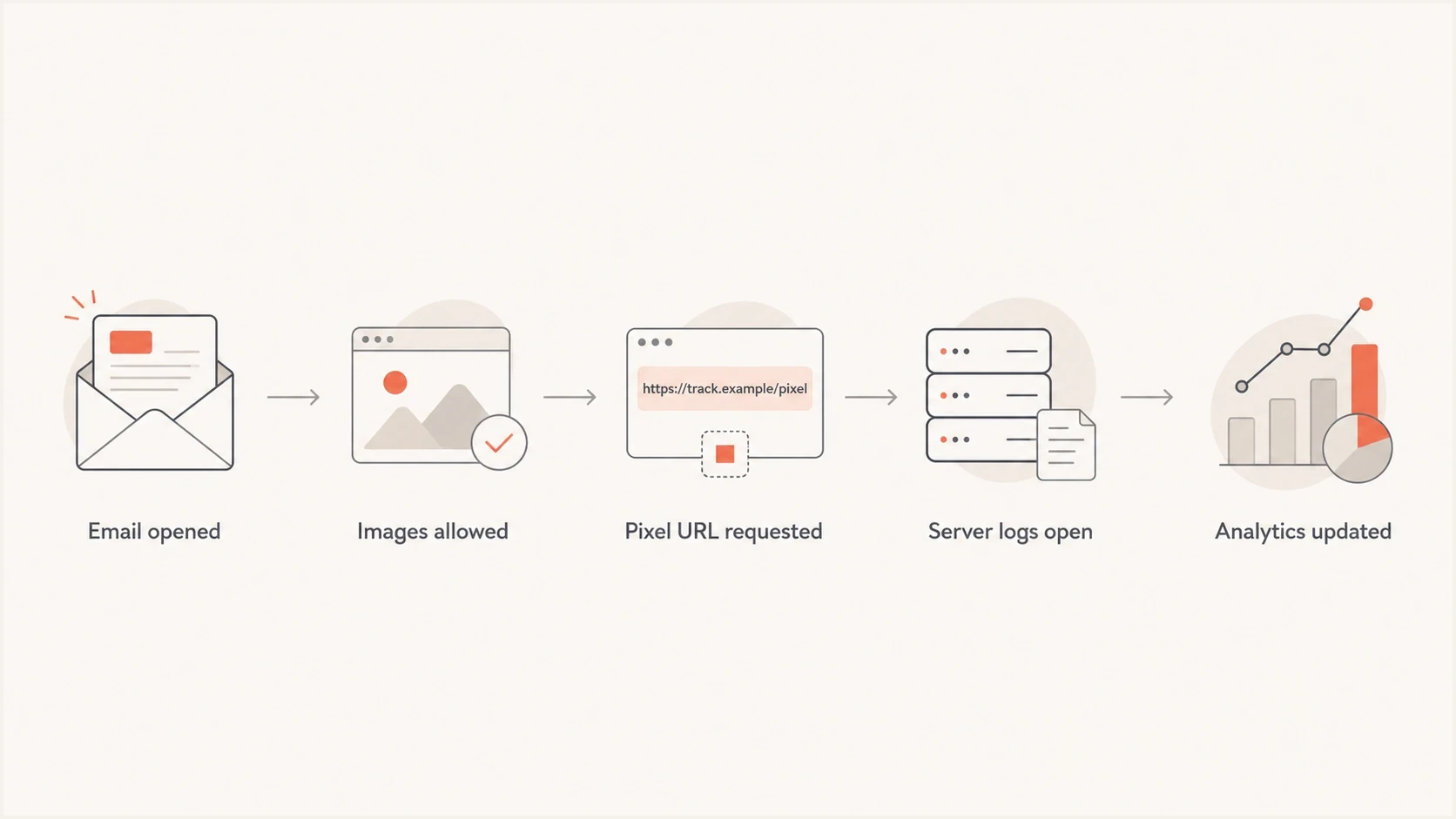
Email tracking pixel flowchart showing the remote image request and logged open.
How the pixel is built
The classic implementation is a 1 by 1 image placed near the end of the HTML body. It is often transparent, styled with zero or one pixel dimensions, and loaded from a tracking domain controlled by the sender or email service provider. The exact image file is less important than the request for the URL.
Basic open tracking pixelHTML
<img
  src="https://track.example.com/open/abc123.gif"
  width="1"
  height="1"
  alt=""
  style="display:none;border:0;"
>
The identifier in that URL is the useful part for the sender. It can map the request back to the recipient record, message ID, automation step, subject line variant, or campaign. Some systems also add query parameters for account ID, list ID, send ID, or template ID. Keep those identifiers opaque, because putting raw email addresses in tracking URLs creates unnecessary privacy and security exposure.
Tracking URL with opaque identifiersTEXT
https://track.example.com/o/e3f9a7.gif?m=82931&c=launch
Open tracking
- Trigger: A remote image loads inside the HTML email.
- Signal: The sender records an image request as an open.
- Weakness: Image caching, proxies, blocked images, and scanners distort the count.
Click tracking
- Trigger: A reader or scanner follows a rewritten link.
- Signal: The tracking server logs the redirect before sending traffic onward.
- Weakness: Security tools pre-click links, and poor tracking domains can hurt trust.
A sentence that says pixels track both opens and link clicks usually needs correction. A pixel measures image loading. Click tracking uses redirected links and tracking domains. Both appear in HTML email, but they are different mechanisms with different failure modes.
What happens when the email is opened
When the recipient opens the message, the email client parses the HTML. If remote image loading is allowed, the client requests each image URL. The tracking server receives the request and returns a tiny image, often an invisible GIF or PNG. The server logs the request before or while returning the image.
|
|
|
|---|---|---|
Time | When the image request arrived. | Good |
IP | The client or proxy address. | Mixed |
Agent | The app or proxy making the request. | Mixed |
Message | The campaign or email ID. | Good |
Recipient | An opaque subscriber ID. | Good |
Common fields recorded from a tracking pixel request
The request can also be made by an intermediary. Gmail commonly loads external images through its image infrastructure, which hides the recipient's computer and location details from the sender. Apple Mail Privacy Protection downloads remote content in the background by default, regardless of whether the person engages with the email, and routes those requests through relays that prevent the sender from using the recipient's IP address as a unique identifier. Corporate security systems can also prefetch images or links while scanning a message. The log entry is real, but it does not establish that a person read the message.
For a deeper look at open-rate distortion, the most relevant follow-up is how Gmail image caching changes measurement. Apple Mail Privacy Protection adds another layer because it makes some open data less tied to human reading behavior.
Can tracking pixels be removed?
Yes. Removal depends on whether you control the sending or receiving infrastructure. Sender-side removal is the cleanest because it prevents the tracking URL from being sent. Recipient-side removal or blocking protects the recipient, but it does not change the sender's template for everyone else.
- Disable tracking: Turn off open tracking in the sending platform before the campaign is sent.
- Edit templates: Remove tracking image tags from reusable HTML templates and automation blocks.
- Send plain text: Use a plain-text-only email when open tracking is not needed.
- Block images: Configure the mailbox to ask before loading remote images.
- Strip HTML: Use a gateway or client extension that removes remote image references.
One practical way to inspect a message is to send it to Suped's email tester. It helps reveal authentication, content, links, and rendering issues around a real test email, which is more useful than guessing from the template editor alone.
Email tester
Send a real email to this address. Suped shows a results button when the test is ready.
?/43tests passed
Senders should remove tracking pixels when the measurement is not worth the privacy tradeoff or when policy or applicable law requires removal. If pixels remain, disclose their use in plain language, avoid collecting raw personal data in URLs, provide a clear tracking opt-out where required, and apply a defined retention period to open data.
What deleting the email changes
Deleting an email usually removes the message body from the mailbox or moves it through a deleted-items retention process. If the email contained a tracking pixel URL, that local reference is removed with the message. That part is true. The problem is the timing.
Before the pixel loads
If remote images were blocked and the pixel was never requested, deleting the email can prevent a future open request from that local copy.
- Effect: The tracking URL is gone from that mailbox view.
- Limit: Copies can still exist in backups, archives, synced devices, or retention systems.
After the pixel loads
If the image request already reached the tracking server, deleting the email does not undo the log entry.
- Effect: The local email disappears according to mailbox retention.
- Limit: The sender's analytics and logs remain separate systems.
Deletion affects the copy you control. It does not reach back into the sender's analytics database. It also does not necessarily delete copies retained by your email provider, legal hold, backup system, or archive policy.
How much confidence to place in an open
Open events are useful at aggregate level, but weaker at individual-recipient level.
High confidence
Strong signal
The recipient clicked a meaningful link or replied.
Medium confidence
Useful signal
The same contact opened repeatedly across normal time windows.
Low confidence
Weak signal
A single open happened instantly, through a proxy, or before delivery activity looked normal.
Why open rates are noisy
Tracking pixels became less precise because mailbox providers, apps, privacy relays, and security filters changed how remote content loads. Some users block images by default. Some providers cache images. Some privacy systems fetch images before or without a normal human open. Some security filters inspect message content to classify risk.
|
|
|
|---|---|---|
Blocked images | No pixel request. | Open is undercounted. |
Image cache | Proxy fetches the image. | Device data is masked. |
Privacy fetch | Remote content loads early. | Open can be inflated. |
Security scan | Automated tool loads content. | Human intent is unclear. |
Why a pixel event can mislead
That does not make open rates useless. Use them for directional comparisons across similar sends, not as a legal-grade audit trail. A subject line test can still show useful open-rate movement when audience composition is stable and send timing is comparable. A one-to-one sales follow-up that says "you opened this at 9:03" is much less defensible.
To separate human activity from automated activity, study fast opens, unusual timing, repeated proxy patterns, and security-filter behavior. The related issue of automated scripts matters because scanners can create activity that looks like engagement until you segment it properly.
How to remove pixels as the sender
If you control the email program, remove tracking at the source. Start in the campaign settings, because many platforms inject the pixel automatically at send time. If the platform has a global account setting and a per-campaign setting, check both. Then inspect the final MIME message rather than relying on the visual editor.
HTML pattern to search forHTML
<img src="https://track.example.com/open/..." width="1" height="1">
<img src="https://click.example.com/pixel/..." style="display:none">
- Check settings: Disable open tracking in account settings, campaigns, automations, and transactional templates.
- Inspect output: Send a test email and view the raw source to confirm no tracking image remains.
- Review links: Open tracking and click tracking are separate. Remove or keep each one intentionally.
- Document policy: Write down when tracking is allowed, who approves it, how consent is recorded, and how long related logs are retained.
Removal also affects reporting. If lifecycle emails depend on opens for branching, those journeys need replacement logic. Clicks, replies, purchases, form submissions, account activity, and preference updates are stronger behavioral signals than image loads. For deliverability monitoring, combine engagement trends with authentication and sender reputation signals instead of treating opens as the whole story.
For sender-trust work, Suped provides DMARC monitoring, hosted SPF, hosted DMARC, hosted MTA-STS, blocklist monitoring, and real-time alerts. These workflows help teams find authentication and reputation issues that open-rate reports cannot explain on their own.

Email tester sample report showing total score, email preview, issue summary, and per-section results
What changes when open tracking is removed
Removing the pixel stops new pixel-based open events. It usually does not disable click, bounce, delivery, complaint, or unsubscribe reporting because those signals use separate mechanisms. Confirm the behavior in the final received message and reporting settings, since implementation varies by sending platform and template version.
|
|
|
|---|---|---|
Open reports | New pixel-based opens stop. | Mark the reporting break. |
Click tracking | Rewritten links usually keep working. | Review click tracking separately. |
Automations | Open-triggered branches stop. | Use clicks or downstream account events. |
List hygiene | Open-only inactivity data disappears. | Combine delivery, clicks, replies, and account activity. |
Historical analysis | Before-and-after open rates are not comparable. | Annotate the change in reports. |
Operational effects of removing an open-tracking pixel
The main cost is the loss of engagement data tied to image loads. Clicks and downstream actions give a narrower count, but they usually show stronger intent. Before removing pixels, replace open-based segments and automation branches so contacts do not become stuck or receive the wrong follow-up.
Privacy and consent requirements
Whether a sender can use an email tracking pixel depends on applicable law and the purpose and data involved. Permission to send an email does not automatically grant permission to measure opens, build a profile, or reuse tracking data for another purpose.
France's 2026 tracking pixel guidance
France's CNIL finalized specific email tracking pixel guidance in April 2026. Under that guidance, campaign performance measurement, personalization, recipient profiling, and many individual open measurements require prior consent that is free, specific, informed, and unambiguous. Consent to receive the email is separate from consent to place the tracking pixel.
The CNIL guidance allows narrow exemptions for operations that only enable electronic communication or are strictly necessary for a service the recipient explicitly requested. A deliverability exemption can apply when the pixel is used only to identify inactive recipients so the sender can reduce frequency or stop sending. The exemption is limited to messages requested by the recipient or tied to a requested service, including qualifying transactional messages. The guidance says this use should generally retain only the date of the last known open, at day-level precision, and overwrite the previous date.
- Map the purpose: Document each reason for using a pixel and do not reuse exempt data for campaign optimization or profiling.
- Record consent: Keep proof of consent and the conditions shown when it was collected.
- Honor withdrawal: Make withdrawal as easy as consent and stop future tracking, including reuse of pixels in messages already sent where required.
- Minimize data: Collect only the fields needed for the stated purpose and delete open-event data under a defined retention schedule.
For email addresses collected before the CNIL recommendation was published, the three-month transition period ended on 14 July 2026. Organizations within its scope should already have given recipients clear information about pixel use and an easy way to object where compliant consent was not previously collected. Other jurisdictions apply their own privacy and electronic communications rules, so the sending policy must be checked against every audience served.
How to reduce tracking as the recipient
If you are receiving the email, the practical control is remote content loading. Most tracking pixels fail when the email client refuses to load remote images. Reading in plain text also prevents HTML image requests, although it can make some messages harder to use. Any visible remote image, including a logo or banner, can use a recipient-specific URL, so searching only for hidden 1 by 1 images will miss some trackers.
- Block images: Set your email client to ask before loading remote content.
- Use plain text: Prefer plain text views for newsletters or unknown senders when privacy matters.
- Avoid auto-load: Do not click "display images" unless you trust the sender and need the content.
- Use aliases: Separate signups across aliases when you want to limit cross-list profiling.
Blocking remote content also hides legitimate images until you choose to load them. These steps reduce tracking, but they do not make email anonymous. Replies, link clicks, unsubscribe actions, form visits, and account logins still create signals. Some mailbox providers also load images through proxies, which can hide your IP address while still creating an open event.
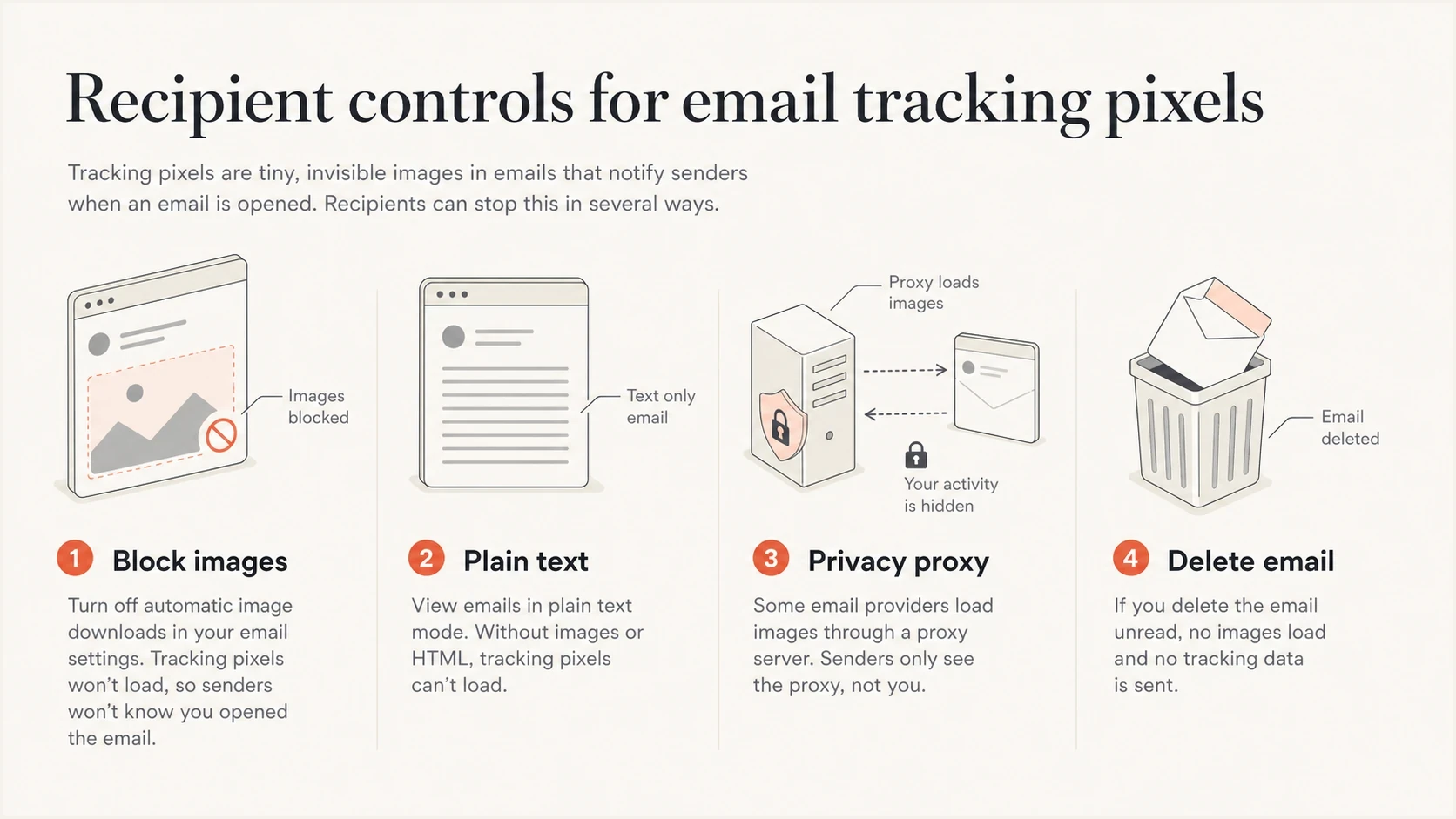
Infographic showing four recipient controls for blocking email tracking pixels.
Deliverability and sender trust
A tracking pixel does not automatically send an email to spam. Most commercial HTML email has remote images, and mailbox providers do not reject mail just because it contains an open-tracking image. The risk comes from the surrounding pattern: deceptive content, poor consent, suspicious tracking domains, broken authentication, bad list hygiene, or links that security systems distrust.
If the tracking domain or click domain has poor reputation, security systems can treat the message with more caution. That is where blocklist and blacklist monitoring matters. If recipients complain, links redirect through questionable infrastructure, or authentication fails to match the visible From domain, the pixel is only one small part of a larger trust problem.
- Authenticate mail: Use SPF, DKIM, and DMARC checks so receivers can verify who sent the message. Suped's DMARC monitoring turns aggregate reports into source-level fixes.
- Check reputation: Monitor sending domains and IPs for blocklist (blacklist) appearances with blocklist monitoring before a campaign issue becomes a broad delivery problem.
- Test the domain: Run a broad domain health check when opens fall suddenly and you need to rule out authentication problems.
- Respect consent: Use tracking only where recipients expect measurement and the applicable rules permit it.
?
What's your domain score?
Deep-scan SPF, DKIM & DMARC records for email deliverability and security issues.
Suped supports this broader workflow through DMARC reporting, hosted SPF and DMARC, MTA-STS, SPF flattening, blocklist monitoring, multi-tenant views, and guided issue steps. Suped's product covers authentication and reputation checks that open tracking cannot provide, while content and consent still require separate policy decisions.
A practical decision guide
The right answer depends on the email type, and one tracking policy will not fit every message. Sensitive or mandatory messages have a stronger case for minimizing tracking. When measurement has a defined operational purpose, use aggregate analytics and collect only necessary data under a short retention schedule.
|
|
|
|---|---|---|
Security alert | Remove | Trust matters more than opens. |
Receipt | Reduce | Use account events instead. |
Newsletter | Assess consent | Aggregate analysis does not remove consent duties. |
Sales email | Use cautiously | Individual opens mislead. |
Legal notice | Remove | Use delivery records instead. |
When to keep, reduce, or remove tracking pixels
For marketers, a more reliable metric set includes clicks, conversions, replies, preference changes, spam complaints, unsubscribe rate, bounce rate, and authenticated delivery. Opens can remain in that set, but they should not drive decisions alone. For a related view on link measurement, see click tracking practices.
Views from the trenches
Best practices
Explain tracking in plain language and separate open pixels from click redirects.
Use open data as an aggregate trend, not proof that one person read a message fully.
Keep tracking identifiers opaque and avoid raw email addresses in tracking URLs.
Common pitfalls
Saying deletion removes tracking history confuses local email data with server logs.
Treating every open as human engagement creates poor sales and lifecycle decisions.
Ignoring archived mail underestimates how long old pixel URLs remain in mailboxes.
Expert tips
Check the final received source because platforms can inject pixels after editing.
Pair open metrics with clicks, replies, complaints, and authentication health data.
Shorten analytics retention when open tracking is useful but long-term logs are not.
Expert view
Expert from Email Geeks says deleting an email removes the local pixel reference, but it does not explain how open tracking actually works.
2021-08-05 - Email Geeks
Marketer view
Marketer from Email Geeks says many users keep years of email archives, so old tracking URLs can remain in stored messages for a long time.
2021-08-05 - Email Geeks
Choose a tracking policy
Tracking pixels in HTML email are remote image requests, not files stored independently inside the inbox. They can be removed before sending, blocked when receiving, or made less invasive through careful settings and shorter data retention. Deleting the email removes the local copy, but it does not erase a tracking event that already reached the sender.
For senders, the practical path is to decide whether open tracking has a defined use, confirm the lawful basis or required consent for each audience, avoid personal data in tracking URLs, test the final message, and monitor the domain infrastructure that affects trust. Suped fits the infrastructure work by giving teams one place to monitor DMARC, SPF, DKIM, MTA-STS, blocklist or blacklist signals, and authentication issues that affect whether email reaches the inbox.
Frequently asked questions
No. A tracking pixel records image loading, which is used as an open signal. Link clicks are tracked through rewritten URLs and redirects.
It deletes the local message copy and its HTML reference to the pixel. It does not delete tracking logs already created by the sender.
Yes. Disable remote image loading or read mail as plain text. A mail gateway can also strip remote images. These steps reduce open tracking, but they can hide legitimate remote images.
A pixel alone usually does not. Deliverability risk comes from poor consent, suspicious links, weak authentication, complaints, and bad domain or IP reputation.
The answer depends on the jurisdiction and purpose. France's 2026 CNIL guidance generally requires separate prior consent for campaign measurement, personalization, profiling, and individual deliverability measurement. It allows narrow exemptions for security and strictly limited deliverability uses tied to messages requested by the recipient or a requested service.
No, but they should stop treating opens as exact. Use opens for broad trends and combine them with clicks, replies, conversions, complaints, and authentication health.