
Why does my header.from differ from my message from, and what is the correct setup for one-click unsubscribe?

Published 23 Jul 2025
Updated 13 Aug 2026
11 min read
Summarize with
Updated on 13 Aug 2026: We corrected how header.from relates to DMARC policy discovery and added safe, list-scoped one-click unsubscribe handling.
If the raw From: header is editor@enews.example.com but a dashboard shows header.from as example.com, do not assume DMARC inheritance changed the From domain. In a standards-compliant Authentication-Results field, header.from identifies the RFC5322.From domain, now called the Author Domain in DMARC. It should therefore be enews.example.com. A dashboard can separately group data under example.com or show the domain where it found policy.
The important test is simple: DMARC passes when either SPF or DKIM passes and has domain alignment with the visible RFC5322.From domain. They do not both need aligned results. If the visible From is enews.example.com and the DKIM signature has d=enews.example.com, DKIM has exact alignment with that From domain.
- Standard header.from: This is the domain taken from the RFC5322.From field, not the DMARC policy source.
- Visible From: This is the RFC5322.From address the recipient sees in the inbox.
- Envelope From: Return-Path is the bounce address and SPF identity, also called MailFrom.
- Full split: Read more about the 5321 and 5322 From if those labels keep crossing wires.
For one-click unsubscribe, the correct setup has one List-Unsubscribe header containing an HTTPS URI, one List-Unsubscribe-Post header with List-Unsubscribe=One-Click, and a valid DKIM signature that covers both list headers. A mailto URI can be included as an additional option, but it does not replace the HTTPS one-click method.
Why From values appear to differ
Email has several sender identities, and interfaces often call more than one of them From. Start by separating the visible header identity, the bounce identity, the signing identity, and the DMARC policy source. Also account for format: header.from normally shows only a domain, while a message From view can show the full mailbox and display name.
|
|
|
|---|---|---|
Visible From | Header | DMARC Author Domain |
Return-Path | Envelope | SPF |
DKIM d | Signature | DKIM |
DMARC policy source | DNS Tree Walk | Policy |
Sender identity labels that commonly get confused.
In the common case, the message is sent as Brand News at enews.example.com, the Return-Path uses bounces.example.com or example.com, and DKIM signs with enews.example.com. That can be valid. The Return-Path does not have to be identical to the visible From if DKIM already provides the aligned DMARC pass.
Under RFC 9989, policy discovery starts at _dmarc.enews.example.com. If that name has no valid record, the receiver uses a DNS Tree Walk to locate the applicable organizational-domain policy, often at _dmarc.example.com. That changes the policy source, not the Author Domain. A dashboard can display example.com in a grouping or policy column, but the trusted raw result should still report header.from=enews.example.com.
Do not diagnose by label alone
A dashboard warning about header.from is a prompt to inspect the raw message. Policy inheritance alone does not rewrite the standardized header.from value.
- Raw From: Confirm the actual RFC5322.From address in the message source.
- Trusted result: Use the Authentication-Results field added by the final receiving system.
- Policy source: Check which DMARC record the DNS Tree Walk selected.
- Pass route: Find whether aligned SPF or aligned DKIM produced the DMARC pass.
Header identities to compare
From: Brand News <editor@enews.example.com>
Return-Path: <bounce@bounces.example.com>
DKIM-Signature: v=1; d=enews.example.com; s=s1; ...
Authentication-Results: mx.example;
 dkim=pass header.i=@enews.example.com;
 spf=pass smtp.mailfrom=bounces.example.com;
 dmarc=pass header.from=enews.example.com
How DMARC decides pass or fail
DMARC checks the visible From domain against authenticated SPF and DKIM identities. A message passes DMARC when SPF passes with alignment, or DKIM passes with alignment. That "or" matters. A failed SPF alignment result does not cause DMARC to fail when DKIM passes with alignment.
SPF route
- Identity: SPF uses the Return-Path or MailFrom domain.
- Match: Relaxed alignment matches the same organizational domain.
- Limit: Forwarding commonly breaks SPF, so DKIM provides continuity when signed content stays intact.
DKIM route
- Identity: DKIM uses the domain in the signature's d value.
- Match: Exact alignment means the d value equals the visible From domain.
- Benefit: DKIM survives forwarding when the signed headers and body remain unchanged.
DMARC outcomes to separate
These are practical reading bands for the raw header result.
Pass
Good
SPF or DKIM passes with From alignment.
One-route pass
Valid
One aligned route is sufficient for DMARC.
Fail
Fix
Neither authenticated identity aligns with the visible From.
Display mismatch
Verify
A UI value differs from the trusted raw header.
A DMARC pass and bulk-sender compliance are separate tests. Gmail and Yahoo bulk-sender rules require both SPF and DKIM, even though DMARC itself needs only one passing aligned route. Strict alignment can simplify troubleshooting, but relaxed alignment remains valid unless the policy publishes adkim=s or aspf=s. Exact DKIM matching is useful for marketing subdomains because each sending stream is easier to identify.
DMARC record detail view showing SPF, DKIM, DMARC, rDNS diagnostics, and DNS records
Suped's product connects DMARC policy, SPF, DKIM, source identity, and failure reasons in one workflow. Its DMARC monitoring view lets teams move from aggregate rows to sender-level actions when a dashboard label and the trusted raw headers disagree.
The correct one-click unsubscribe setup
For marketing and subscribed mail covered by bulk-sender rules, one-click unsubscribe needs the RFC 8058 header method. Gmail and Yahoo also require a clearly visible unsubscribe link in the message body. The body link can lead to a preference page, but it does not replace the machine-readable one-click headers. Transactional messages such as password resets and order confirmations are excluded from the provider requirement.
Compliant one-click unsubscribe headers
From: Brand News <editor@enews.example.com>
List-Unsubscribe: <https://u.example.com/o/abc123>,
 <mailto:unsubscribe@example.com?subject=unsubscribe>
List-Unsubscribe-Post: List-Unsubscribe=One-Click
DKIM-Signature: v=1; d=enews.example.com; s=s1;
 h=from:to:subject:date:list-unsubscribe:list-unsubscribe-post; ...
The HTTPS unsubscribe URI should contain an opaque, hard-to-forge token that identifies the recipient and the mailing list. The endpoint accepts POST with a List-Unsubscribe=One-Click request body, records the opt-out, and returns a 2xx response. It cannot depend on login state, cookies, HTTP authentication, a captcha, or another confirmation screen.
HTTP breaks the one-click path
If the List-Unsubscribe URL uses http instead of https, fix that first. Legacy sending domains and older tracking hosts often need a valid TLS certificate before one-click checks pass.
- HTTPS URI: Put a secure recipient-and-list-specific URI in List-Unsubscribe.
- Signed headers: Include both list headers in the DKIM h= list.
- POST formats: Handle multipart/form-data and application/x-www-form-urlencoded requests.
- Fast suppression: Return a 2xx response promptly and stop list mail within 48 hours.
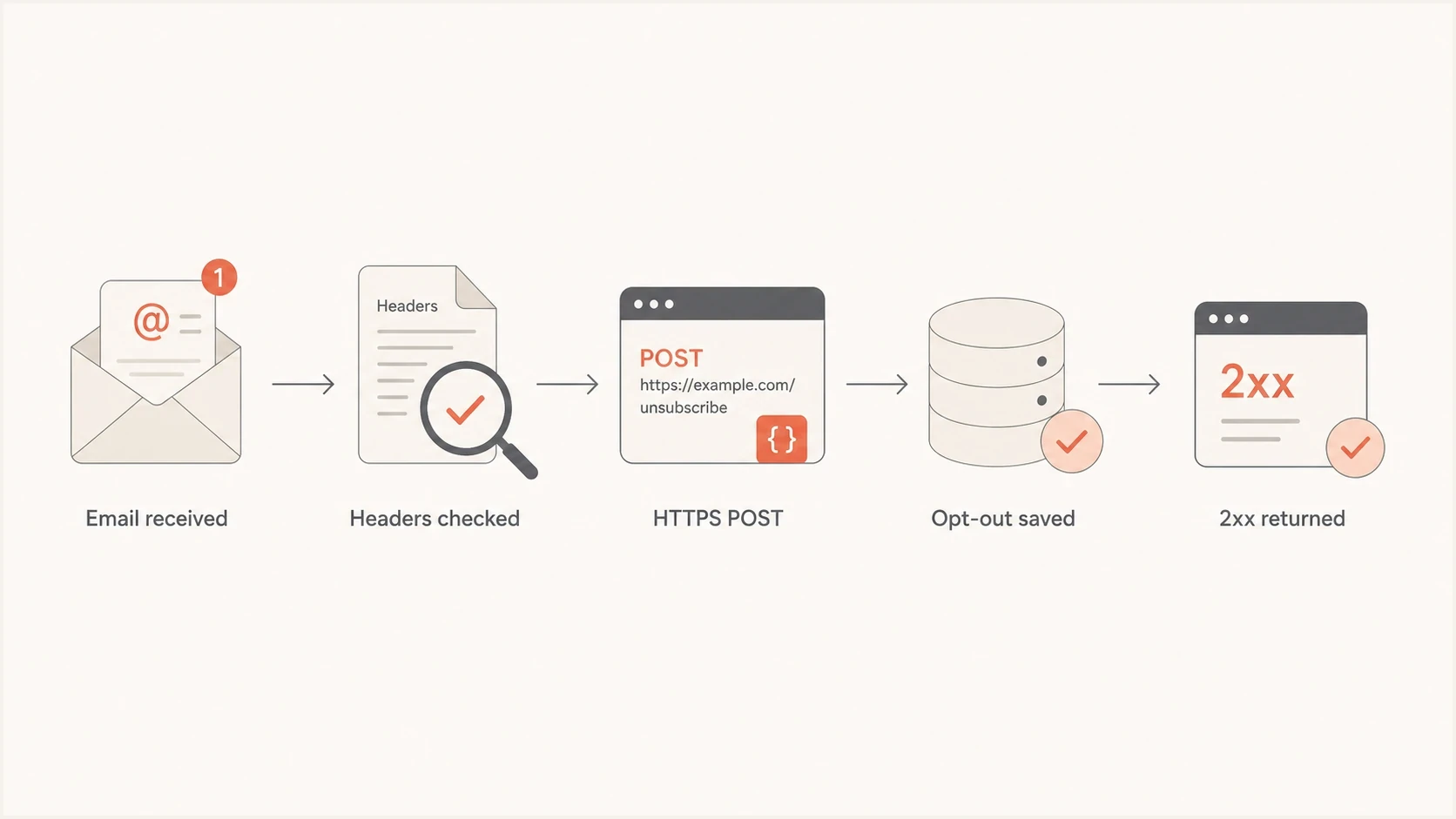
Flowchart showing one-click unsubscribe moving through header check, HTTPS POST, opt-out save, and 2xx response.
The other easy miss is DKIM signing order. If the sending platform adds the unsubscribe headers after DKIM signing, or if the DKIM signature's h= list does not cover them, the receiver cannot trust that the one-click destination was part of the authenticated message.
Treat GET and POST requests differently. Security scanners fetch links with GET, so a GET should open the manual unsubscribe flow instead of silently removing a recipient. The RFC 8058 action is the POST carrying List-Unsubscribe=One-Click. This separation prevents scanner visits from creating accidental opt-outs.
How to scope one-click unsubscribe
A one-click request can remove the recipient from the mailing list associated with the message. It does not have to apply a global do-not-contact status across every optional communication. The token in the HTTPS URI should resolve to a recipient and a defined subscription scope, so the endpoint can apply the same choice every time without asking another question.
|
|
|
|---|---|---|
Named newsletter | Suppress that list | Other chosen subscriptions remain active |
Single marketing subscription | Suppress optional marketing | Operational mail remains separate |
Choose an unsubscribe scope that matches the message.
Keep transactional mail separate
A list-scoped marketing opt-out should stop messages in that subscription scope. Keep necessary account and transaction notices on a separately defined stream, and do not label promotional mail as transactional to bypass an unsubscribe choice. A separate body preference link can offer a global opt-out.
- Token mapping: Resolve the opaque token to the intended recipient and mailing-list identifier.
- Idempotent POST: Treat repeated valid requests as success without restoring or duplicating state.
- Suppression store: Apply the opt-out before the next send and propagate it to queued campaigns.
- Audit trail: Record the list scope, request time, and result without exposing recipient data in the URI.
How to verify the full setup
Verify the setup in two passes. First, read the raw message headers and identify the visible From, Return-Path, DKIM d value, DMARC result, and list-unsubscribe headers. Then check DNS and test the live unsubscribe endpoint.
- From value: Confirm header.from equals the domain in the raw RFC5322.From address.
- Alignment: Confirm the DKIM d domain or SPF MailFrom domain aligns at the published mode.
- DMARC DNS: Use the DMARC checker to confirm policy tags, the Tree Walk result, and reporting addresses.
- List headers: Confirm one HTTPS List-Unsubscribe URI, the One-Click POST header, and DKIM coverage.
- Endpoint: Send a valid form POST, confirm a prompt 2xx response, and verify the correct list suppression.
- Domain checks: Run a broader domain health check when delivery symptoms point to more than one configuration problem.
Email tester
Send a real email to this address. Suped shows a results button when the test is ready.
?/43tests passed
For teams that manage several senders, Suped's product ties DMARC aggregate data to actual sending sources and flags alignment changes. That workflow helps compare a reporting label with raw header evidence across several domains without treating one test message as the whole picture.
When the fix is policy staging rather than a single header edit, Hosted DMARC helps teams move domains toward enforcement with less DNS churn. This is useful when a sending subdomain relies on a parent policy and several business units send under the same organizational domain.

Issue steps to fix dialog showing the issue overview, tailored fix steps, and verification action
Common causes and fixes
Most cases end up in a few clear buckets. Separate display-domain questions from authentication-domain questions, identify the policy source on its own, and test the unsubscribe URI as a request-processing workflow.
|
|
|
|---|---|---|
Apex shown in UI | Grouping or policy source | Inspect trusted raw headers |
Policy found at apex | DMARC DNS Tree Walk | Keep Author Domain separate |
SPF fail | Bounce host or forwarding | Fix MailFrom or rely on aligned DKIM |
DKIM warning | Unsigned list headers | Sign both list headers |
Unsubscribe fail | HTTP URI or bad POST | Enable HTTPS and parse the body |
Unexpected global opt-out | Broad suppression scope | Map the token to a list |
Inbox issue | Reputation or consent | Review sending sources |
Fast triage for the most common symptoms.
If SPF and DKIM both pass in raw headers, and at least one has alignment with the visible From domain, the remaining inbox problem often concerns reputation, complaint rate, consent quality, list age, or engagement. Authentication is necessary, but it does not guarantee inbox placement.
The clean target state
- Visible From: Use a controlled marketing subdomain such as enews.example.com.
- DKIM d: Sign with that same subdomain when the sending platform supports it.
- DMARC: Publish at the subdomain or intentionally use a parent policy found by the Tree Walk.
- Unsubscribe: Use signed HTTPS one-click headers backed by a list-scoped POST endpoint.
Views from the trenches
Best practices
Separate visible From, Return-Path, DKIM d, and DMARC policy source before editing DNS.
Prefer exact DKIM alignment for marketing subdomains when the sending platform allows it.
Verify one-click unsubscribe with a live email and a valid POST, not a settings screen.
Keep DMARC policy inheritance intentional, documented, and visible to each sender owner.
Common pitfalls
Treating a dashboard header.from label as proof that the visible From changed at all.
Fixing SPF alignment while ignoring a valid DKIM path that already passes DMARC.
Publishing list headers with an HTTP URI on older tracking or unsubscribe domains.
Adding unsubscribe headers after DKIM signing, leaving those headers unauthenticated.
Expert tips
Compare raw header.from with the RFC5322.From domain before changing a sending identity.
Check the DMARC DNS Tree Walk separately from the Author Domain shown in raw headers.
Accept both standard form POST formats and return a prompt 2xx response on success.
Review reputation separately once SPF, DKIM, DMARC, and unsubscribe tests all pass.
An Email Geeks discussion notes that SPF and DKIM do not both need alignment for DMARC. One passing aligned path is enough.
2024-11-05 - Email Geeks
An Email Geeks discussion notes that an apex domain can appear in a reporting view, so the raw From still needs separate verification.
2024-11-05 - Email Geeks
The target setup
The correct setup has a visible From domain you control, DKIM signing with that domain where possible, SPF configured on the Return-Path domain, and a DMARC policy that applies to the Author Domain. If a dashboard shows the apex beside header.from, compare the trusted Authentication-Results field with the separate policy source before changing the sender.
For one-click unsubscribe, use an HTTPS URI, include both list headers, sign them with DKIM, and accept the standard direct POST body without cookies or another confirmation. Scope the token to the mailing list represented by the message. Once those tests pass, separate authentication work from reputation work to avoid unnecessary DNS changes.