What are the potential adverse consequences of enabling DNSSEC?

Published 6 Aug 2025
Updated 21 Oct 2026
12 min read
Summarize with
Updated on 21 Oct 2026: We added DNSSEC diagnosis and recovery steps and clarified DS records, NSEC3 settings, and email delivery risks.
Enabling DNSSEC can cause adverse consequences, but the risk comes less from DNSSEC itself and more from signing, delegation, provider support, and rollover operations. DNSSEC remains a sound security control when the DNS provider has mature support and the team can verify each step.
The main failure mode is blunt. If a validating resolver sees broken DNSSEC, it returns failure instead of accepting a suspicious answer. That is the security benefit, and it is also the outage risk. For a plain definition of the control, the ICANN DNSSEC overview gives useful context.
- Broken validation: A mismatched DS, expired signature, missing DNSKEY, or bad denial record can make the domain fail for validating resolvers.
- More operations: Keys, signatures, parent delegation, provider tooling, and rollback all become part of DNS change control.
- Larger responses: DNSSEC adds records and validation work. Caching limits the normal cost, but fragmented or truncated answers can fail on poorly configured network paths.
- Partial outages: Some users can fail while others work because recursive resolvers differ in caching, validation, and error handling.
- Zone content exposure: NSEC can expose names through zone walking. NSEC3 obscures the names but does not make the zone confidential.
DNSSEC risks at a glance
The main DNSSEC risks are availability failures and extra maintenance, especially during key rollover or a DNS provider migration. Reliable automation and a tested recovery process reduce these risks.
The real risk
DNSSEC turns certain DNS mistakes into validation failures. Without DNSSEC, a typo can still break DNS. With DNSSEC, cryptographic mismatch can break DNS even when the visible records look right in a normal lookup.
If the DNS host signs zones automatically, rotates keys correctly, publishes DS records clearly, and lets operators disable DNSSEC cleanly, routine maintenance is reduced. If the provider expects manual signing, manual key rollover, or unclear registrar coordination, slow down and test before touching a production domain.
|
|
|
|---|---|---|
DS mismatch | Validating lookups for the affected zone | Verify parent DS against DNSKEY |
Expired signatures | Signed answers | Expiry alerts |
Bad rollover | Validating users | Tested runbook |
Large answers | Some network paths | UDP and TCP check |
NSEC zone walking | Zone name privacy | Assess exposure; NSEC3 does not ensure privacy |
Common DNSSEC risks and the control that reduces each one.
Where DNSSEC breaks
The first place DNSSEC breaks is the parent-child handoff. The authoritative zone publishes DNSKEY material. The registrar submits the DS record for publication in the parent zone, telling resolvers which key to trust. A stale DS record or digest mismatch can make the domain bogus when no other supported DS record provides a valid trust path. In a normal public delegation, signing without a parent DS record leaves the zone insecure, rather than bogus.
Illustrative DS record with a SHA-256 digestDNS
; Illustration only. Use the DS generated by your DNS provider.
; Fields: key tag, signing algorithm, digest type, digest.
example.com. 3600 IN DS 2371 13 2 A1B2C3D4E5F60718293A4B5C6D7E8F90A1B2C3D4E5F60718293A4B5C6D7E8F90
DNS provider migrations are especially sensitive because the old and new signing keys, NS records, and parent DS data need a valid overlap. For a transition without DNSSEC protection, remove DS records and let cached DS data expire before changing nameservers; restore DS only after the new signed zone is ready.
The second break point is signature freshness. DNSSEC signs record sets with RRSIG records that expire. If the signer stops, the zone keeps answering, but validating resolvers reject the signed data once the signature window has passed. This is why DNSSEC needs monitoring, not only a launch checklist. Monitor signature expiry separately from record TTLs and keep signer and resolver clocks synchronized.
The third break point is authenticated denial of existence. NSEC can expose a zone's names through zone walking, while NSEC3 hashes names to make direct enumeration harder. NSEC3 does not provide confidentiality, and extra hash iterations increase CPU cost and denial-of-service exposure. RFC 9276 requires zero additional iterations and recommends an empty salt when NSEC3 is used. Wildcard and denial-record mistakes can also create partial failures.
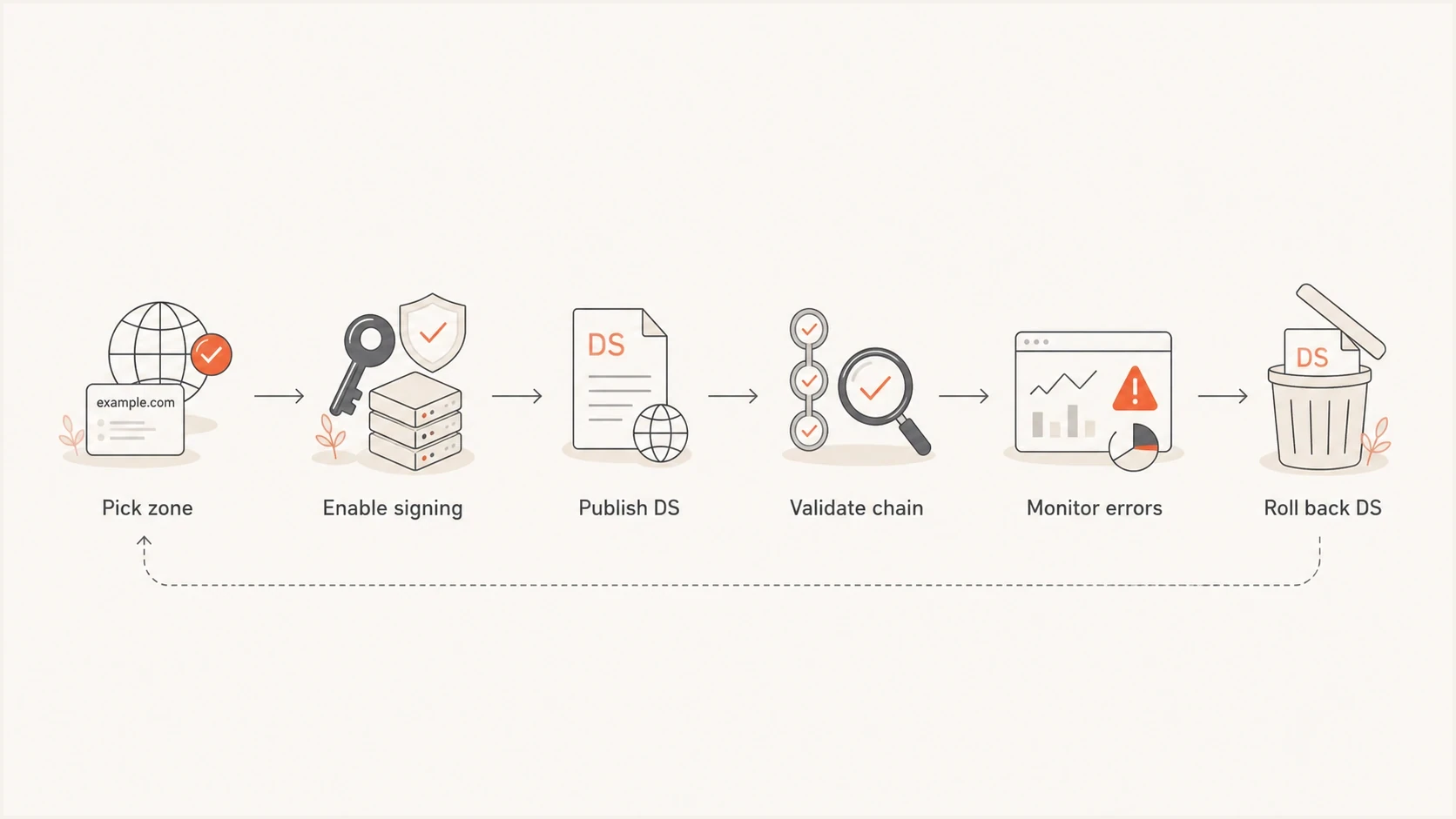
DNSSEC deployment flow covering zone selection, signing, DS publication, validation, monitoring, and rollback.
How to diagnose and recover from DNSSEC failures
SERVFAIL has several causes. Compare the same lookup through your trusted validating resolver with and without the Checking Disabled (CD) flag, defined in RFC 4035.
Compare validation behavior for an affected mail domainBASH
# Replace example.com with the affected domain.
dig example.com MX +dnssec
dig example.com MX +dnssec +cdflag
If only the second query returns data, investigate the parent DS, published DNSKEY, signature validity, and resolver logs. The second response bypasses validation and cannot establish authenticity. An AD flag from a trusted validating resolver indicates authenticated data; requesting DNSSEC records with +dnssec does not itself validate them.
- Restore valid signatures or the DNSKEY expected by the existing DS record when possible.
- For planned disablement, remove parent DS records first and keep valid signing active until cached DS data expires. Follow the cache timing principles in DNSSEC operational guidance.
- Allow for parent publication time, the parent DS TTL, and resolver failure caches. Lowering an MX or TXT record's TTL does not shorten those caches.
- Recheck several validating resolvers and retry email delivery before closing the incident. Removing DS records leaves the delegation without DNSSEC protection after caches expire.
Larger responses, fragmentation, and amplification
DNSSEC adds records such as DNSKEY and RRSIG to DNS responses, along with NSEC or NSEC3 for denial of existence. If an answer exceeds the resolver's advertised EDNS UDP payload size, the server can truncate it for TCP retry. A UDP answer within that limit can still exceed the network path MTU and undergo IP fragmentation. Dropped fragments or blocked DNS over TCP can cause timeouts or SERVFAIL even when the authoritative records are correct.
What to test
- Query large signed responses over UDP and TCP through the real production path.
- Check IPv4 and IPv6 because their path MTU and filtering behaviour can differ.
- Confirm firewalls permit TCP on port 53 for both authoritative and recursive DNS.
- Monitor truncation, timeout, and SERVFAIL rates after signing and during key rollover.
DNSSEC also adds CPU work for signing and validation, while larger zones increase storage, cache memory, and bandwidth requirements. RFC 4033 describes these resource costs. Check server capacity at peak load and during rollover, along with managed DNS pricing and support terms.
Larger signed answers can also increase the answer-to-query ratio used in DNS reflection and amplification attacks. DNSSEC does not create an open resolver, but it can make an abused DNS server return more data. Managed DNS providers should control this at the service level. Self-hosted operators need closed recursion, current response-rate controls, and upstream source-address filtering.
Signing zones versus validating resolvers
There are two different DNSSEC decisions. Signing authoritative zones protects the answers for owned domains. Enabling DNSSEC validation on outbound recursive resolvers makes internal systems reject other domains when those domains have broken DNSSEC. Both are valid, and both can cause partial outages in different ways.
Authoritative zone signing
This affects how the world validates the domain. It is the usual meaning when someone says they turned on DNSSEC for a domain.
- Best case: The provider handles signing and rollover, and the domain keeps resolving normally.
- Failure case: The DS record no longer matches the child zone, so validating resolvers reject the domain.
- Recovery: Restore the expected DNSKEY or valid signatures, or correct the parent DS. Keep signing active during any DS removal and cache expiry.
Resolver validation
This affects how internal systems resolve other domains. In email, it changes how outbound mail systems treat external MX lookups.
- Best case: The resolvers reject forged or broken signed answers and normal mail flow continues.
- Failure case: A recipient domain has broken DNSSEC, so the mail server cannot resolve its MX records.
- Recovery: Check local resolver time and trust anchors, then ask the recipient domain operator to repair its DNSSEC. Keep delivery queued while resolution fails.
This distinction matters because a company can validate outbound DNSSEC for its mail infrastructure without signing its own authoritative zones. That can be a sensible first step for a team that wants resolver protection but is not ready to change registrar delegation.
Email-specific consequences
For email, DNSSEC does not directly make SPF, DKIM, or DMARC pass. It authenticates DNS data only when the relevant chain is signed and the receiving resolver validates it. A DNSSEC problem in the zone serving a record can break MX or SPF lookups, DKIM selector records, DMARC policy discovery, or MTA-STS and TLS reporting discovery. Reverse DNS depends on the IP address owner's zone, so signing the sending domain does not secure its PTR records.
A DNSSEC validation failure usually surfaces as SERVFAIL. For SPF, DKIM, and DMARC, the receiving system can log a temporary DNS error rather than a permanent authentication failure. For MX lookups, delivery can remain deferred until the sending queue expires, after which a hard bounce can be generated. That pattern overlaps with ordinary DNS migration mistakes and is covered in DNS failure hard bounces.
For SMTP DANE, DNSSEC is a prerequisite: usable TLSA records must be authenticated. If a required TLSA lookup fails, a DANE-aware sender treats that MX host as unavailable and defers delivery when no usable alternative remains, as specified in RFC 7672.
Suped is our DMARC reporting and email authentication platform. Before a DNSSEC change, run a domain health check and save the authentication results. After the change, use Suped's DMARC monitoring to look for SPF or DKIM alignment changes and compare the timing with resolver logs. Reports depend on participating receivers and are not a complete outage monitor; confirm DNSSEC failures with direct DNS checks.
?
What's your domain score?
Deep-scan SPF, DKIM & DMARC records for email deliverability and security issues.
After the DNS change, send a real message and inspect the result with Suped's email tester. DNS answers can look correct in a record viewer while mail still fails through a real sending path.
Risk levels by rollout maturity
The risk level depends on how much of DNSSEC the provider automates and how consistently the team treats DNS as production infrastructure. Provider automation reduces routine work, but correct parent DS records and a tested recovery process remain necessary. Treat unclear rollback ownership as a reason to delay production rollout.
DNSSEC rollout risk
A practical way to classify the rollout before changing a production domain.
Low
Managed DNSSEC
Provider automates signing, rollover, DS guidance, monitoring, and disablement.
Medium
Shared process
Provider signs the zone, but registrar DS updates and monitoring are manual.
High
Manual operations
Manual signing, unclear key rollover, no validation alerts, and no rollback owner.
Blast radius also matters. A parked domain and a production mail domain carry different risks. Start with a lower-risk domain when possible, prove the provider process, then move to domains that handle customer traffic or mail.
Preflight checklist
- Provider support: Confirm automatic signing, current signing algorithms and DS digests, rollover behavior, and disablement steps.
- Registrar access: Confirm who can add, update, or delete DS records at the parent zone.
- Validation tests: Check the full chain with more than one recursive resolver before and after launch.
- Rollback plan: Record the parent DS TTL, how long signing must remain active, the registrar owner, and how to verify recovery.
When to delay enabling DNSSEC
Delay DNSSEC when the domain is critical, the DNS provider's signing support is weak, and the organization has no change window or rollback owner. DNS is too central to treat this as a casual toggle on an important domain.
- No rollback: If nobody can remove the DS record quickly, wait until registrar access is fixed.
- Manual rollover: If key rollover depends on memory or calendar reminders, add automation first.
- Poor monitoring: If validation failures would only be found by users, add external checks before launch.
- Active migration: Do not combine first-time DNSSEC enablement with a nameserver or mail-platform migration. For an already signed zone, plan the DNSKEY and DS transition with both DNS providers.
Do not delay only because DNSSEC adds complexity. SPF, DKIM, DMARC, MTA-STS, and TLS also add operational requirements. The right question is whether the domain owner has the tooling and change control to manage the added requirement.
Views from the trenches
Best practices
Stage DNSSEC on a low-risk zone first, then repeat the same signed-zone checklist elsewhere.
Keep registrar DS updates under change control, with a named owner and rollback notes.
Monitor DNSSEC validation errors after launch, especially during key rollover windows.
Common pitfalls
A missing parent DS leaves a signed zone insecure; a stale DS can cause validation failures.
Assuming every recursive resolver behaves alike hides partial failures during rollout.
Letting key rollover run without alerts turns a routine change into a domain outage.
Expert tips
Test both signed answers and signed denial responses before changing a production domain.
Remove parent DS records first; keep signing active until cached DS records have expired.
Use separate checks for outbound resolver validation and authoritative zone signing work.
Marketer view
Marketer from Email Geeks says DNSSEC usually works well as a provider-managed switch, but it adds lookup work and more administration.
2024-07-01 - Email Geeks
Marketer view
Marketer from Email Geeks says signing zones is straightforward when the DNS platform supports it, but painful when the platform leaves key management to the customer.
2024-07-01 - Email Geeks
Practical recommendation
Enable DNSSEC when the DNS provider has solid signing support, registrar access is under control, and monitoring is in place. Do not enable it on a critical production domain as an untested toggle during a busy DNS or email migration.
For email-heavy domains, baseline DNS and authentication first, enable DNSSEC during a defined change window, then watch authentication results and mail queues alongside direct DNS validation.