What are Barracuda filter rules and how are custom rules created?

Updated on 27 Sep 2026: We clarified Barracuda rule ownership, current policy paths, precedence, and safer exception handling.
Barracuda filter rules are the individual checks, scores, policies, and allow or block decisions that a Barracuda email security product applies to a message. A 'Custom Rule' in a spam report does not automatically mean your vendor created it. It can be a Barracuda-supplied private rule, a third-party ruleset entry, a local administrator rule, or a pattern filter created in the GUI.
Administrator-created rules live in different policy areas. In Email Gateway Defense, a message content filter can match the subject, headers, body, attachment content, sender, or recipient and apply Allow, Block, or Quarantine. Sender policies use Exempt, Quarantine, or Block. Attachment controls offer filter-specific actions such as Block, Quarantine, or Ignore, so confirm the options shown for the selected attachment policy. Appliance paths and available actions differ.
- Owner: Treat the label as evidence, not proof. Ask who owns the rule and where it is configured.
- Evidence: Use the full headers, rule name, score, product version, recipient domain, and timestamp.
- Fix path: Fix the message cause first, then ask for a rule exception only when the rule is too broad.
The short answer
The clean answer is this: Barracuda has product-supplied filtering rules and customer-created custom rules, and both can show up in a result as 'custom'. That wording is why these reports create confusion. A rule such as MJ019, MV1123, MV0615, or SA038b is usually an internal identifier, not a public explanation.
Do not assume local ownership
A custom label can come from a shipped private ruleset, a managed vendor rule, or a local admin policy. The word 'custom' is not proof that the receiving company manually wrote the rule.
- Low score: A small score often means one signal in a larger spam-scoring model.
- High score: A larger score deserves owner confirmation because it can drive quarantine or rejection.
- No definition: Private rule details are often withheld to stop senders from gaming the filter.
If a vendor says the rule is from Barracuda, that answer is plausible. It is still incomplete unless they can say whether the rule is shipped, vendor-managed, tenant-created, or inherited through a managed policy.
What a Barracuda filter rule does
Spam-scoring rules contribute points, while policy filters can directly allow, quarantine, or block a message. When scoring applies, Barracuda compares the total with the thresholds configured for that product, domain, or user. The same message can pass DMARC, SPF, and DKIM yet still be filtered because of links, headers, content patterns, sender reputation, recipient policy, Barracuda Real-Time System (BRTS), or a blocklist (blacklist) signal. Depending on the Barracuda product, Bayesian analysis and message fingerprinting can add more scoring signals.
Example Barracuda-style spam reporttext
X-Barracuda-Spam-Status: No, SCORE=2.70, TAG_LEVEL=3.0
X-Barracuda-Spam-Report: Code version 3.2, rules version 3.2.2.92409
pts  rule name          description
---- ------------------ --------------------------
0.25 BSF_SC0_SA038b     Custom Rule SA038b
2.00 CUSTOM_MV1123      Custom rule MV1123
0.00 HTML_MESSAGE       BODY: HTML included in message
An older Barracuda explanation shows the same general idea: Barracuda headers can expose score, threshold, rule names, and a report section. The thresholds in your own header matter more than any generic example.
How to read configured scoring bands
Use the values in the actual header or policy because thresholds vary by product and configuration.
Delivered
Below tag
Message stays below every configured action threshold
Tagged
At tag
Subject or header marking can apply on supported products
Quarantined
At quarantine
Message is held when quarantine is enabled
Blocked
At block
Message is rejected or stopped
Where custom rule labels come from
Start with four evidence types instead of inferring ownership from a prefix. Each type answers a different part of the investigation, but no opaque code proves its source by itself.
|
|
|
|---|---|---|
Opaque code such as SA038b | The identifier and score | Who owns this rule? |
Matching console policy | An editable policy exists | What are its scope and action? |
Ruleset attribution | A named source supplied the rule | Which version was active? |
Message Log Action and Reason | The final recorded decision | Which policy produced it? |
Evidence for interpreting custom-looking Barracuda rules.
A Server Fault discussion reached the same practical point years ago: some Barracuda custom rule codes are internal and do not have public definitions. That does not make the score useless. It means the header must be paired with message samples, product version, and policy owner.
If the report also includes SpamAssassin-style names, compare those separately. SpamAssassin rules are easier to research when the rule name is public, but Barracuda-specific rule codes often stay private.
How custom rules are created
The exact path depends on whether the organization uses Barracuda Email Gateway Defense, an Email Security Gateway appliance, or another Barracuda email product. Email Protection has a central Policies view for reviewing Email Gateway Defense settings. Some settings are editable there, while view-only settings open in Email Gateway Defense. Domain-level policy configuration is not supported in the central Policies view and remains in Email Gateway Defense for accounts that still have domain-level settings. Email Gateway Defense uses its updated admin interface, so older screenshots can use different labels. Appliance administrators continue to use the relevant BLOCK/ACCEPT pages.
For an inbound Email Gateway Defense content rule, start at Inbound Settings > Content Policies. Choose the relevant policy type, define its scope and match criteria, select an available action, then test with a controlled message. Regular expressions are supported for advanced text patterns, but an unescaped special character or a broad pattern can match more mail than intended. Allow a few minutes for saved changes to take effect. Barracuda's advanced filtering documentation shows the same policy pattern, although labels and available actions vary by product.
- Policy type: Choose sender, recipient, IP address, message content, attachment, URL, authentication, or another control that matches the problem.
- Scope: Apply the rule to the smallest domain, recipient group, user set, or message stream that solves the issue.
- Condition: Match a clear attribute supported by that policy, such as a sender domain, header, body pattern, attachment filename, or MIME type.
- Action: Use the actions offered by that policy type, such as Allow, Block, Quarantine, Exempt, or Ignore.
- Precedence: Check Barracuda's documented inbound precedence instead of assuming the first visible rule wins.
- Audit: Record the reason, owner, creation date, expiry date, and a sample message.
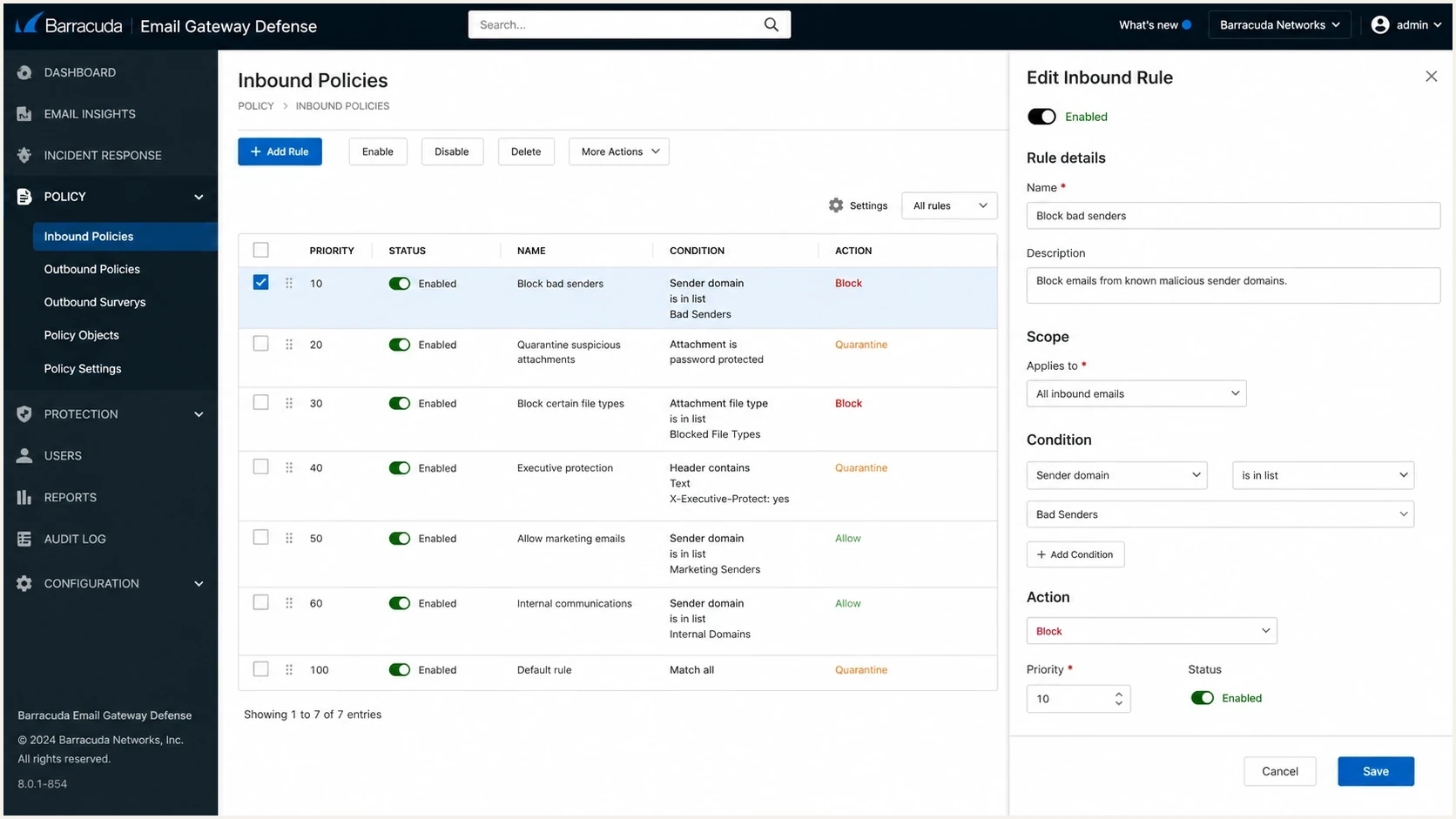
Barracuda Email Gateway Defense policy screen showing custom rule fields.
The safest custom rule is narrow, named clearly, and reviewed. A broad allow rule for an entire sending domain can hide abuse. A narrow exception for a specific sender, recipient group, and message stream is easier to monitor and remove.
How precedence and exemptions change the result
Barracuda does not resolve every message by taking the highest visible score or the first rule in a list. Email Gateway Defense follows an inbound precedence sequence. Antivirus and Advanced Threat Protection blocks can occur before exemptions, while sender or recipient exemptions and message content Allow policies appear before many later Block and Quarantine decisions. Within message content filters, all Allow policies are evaluated first. Block and Quarantine policies are evaluated only when no Allow pattern matches.
|
|
|
|---|---|---|
Sender Exempt | Spam scoring, Intent Analysis, content filters, and SPF | Virus scanning and rate control |
Recipient Exempt | Spam scoring and other blocklists (blacklists) | Virus scanning |
Content Allow | Matching content Block and Quarantine policies | Earlier security controls in the inbound sequence |
Common exemption effects in Email Gateway Defense.
Email Gateway Defense also has account-level sender exemptions for the Barracuda Reputation Block List (BRBL), BRTS, regional policies, email warning banners, and anti-fraud checks. These settings are separate from a general sender Exempt policy and are not available at the domain level, so record the exact control changed.
Treat exemptions as security changes
A sender-domain exemption can let a spoofed From address bypass several checks. Use a verified sending IP when it is stable, keep the scope narrow, and give temporary exceptions an expiry date.
- Before: Capture the Message Log Action, Reason, headers, and policy state before changing anything.
- After: Send one controlled test and confirm which checks were bypassed instead of relying only on delivery.
Use the Message Log Action and Reason, plus message history when available, to identify the controlling decision. A custom score can appear in the header without being the rule that ultimately blocked or quarantined the message. Message Log records are retained for approximately 30 days, so save the full source and relevant log details before a long investigation or policy change.
How to tell if a rule is local or shipped
No single clue proves ownership, so use a short evidence chain. Start with the exact rule identifier, then look for the policy owner, the score, and whether the admin console shows a matching custom policy.
Signals of a shipped rule
- Pattern: The rule uses an opaque short code with no tenant-facing name.
- Visibility: The administrator cannot find a matching editable rule in the policy UI.
- Change path: Only support or a rule update can explain or tune it.
Signals of a local rule
- Name: The rule maps to a named policy, sender rule, phrase filter, or URL rule.
- Scope: It applies only to one recipient group, business unit, or tenant.
- Owner: A local admin can change priority, condition, or action.
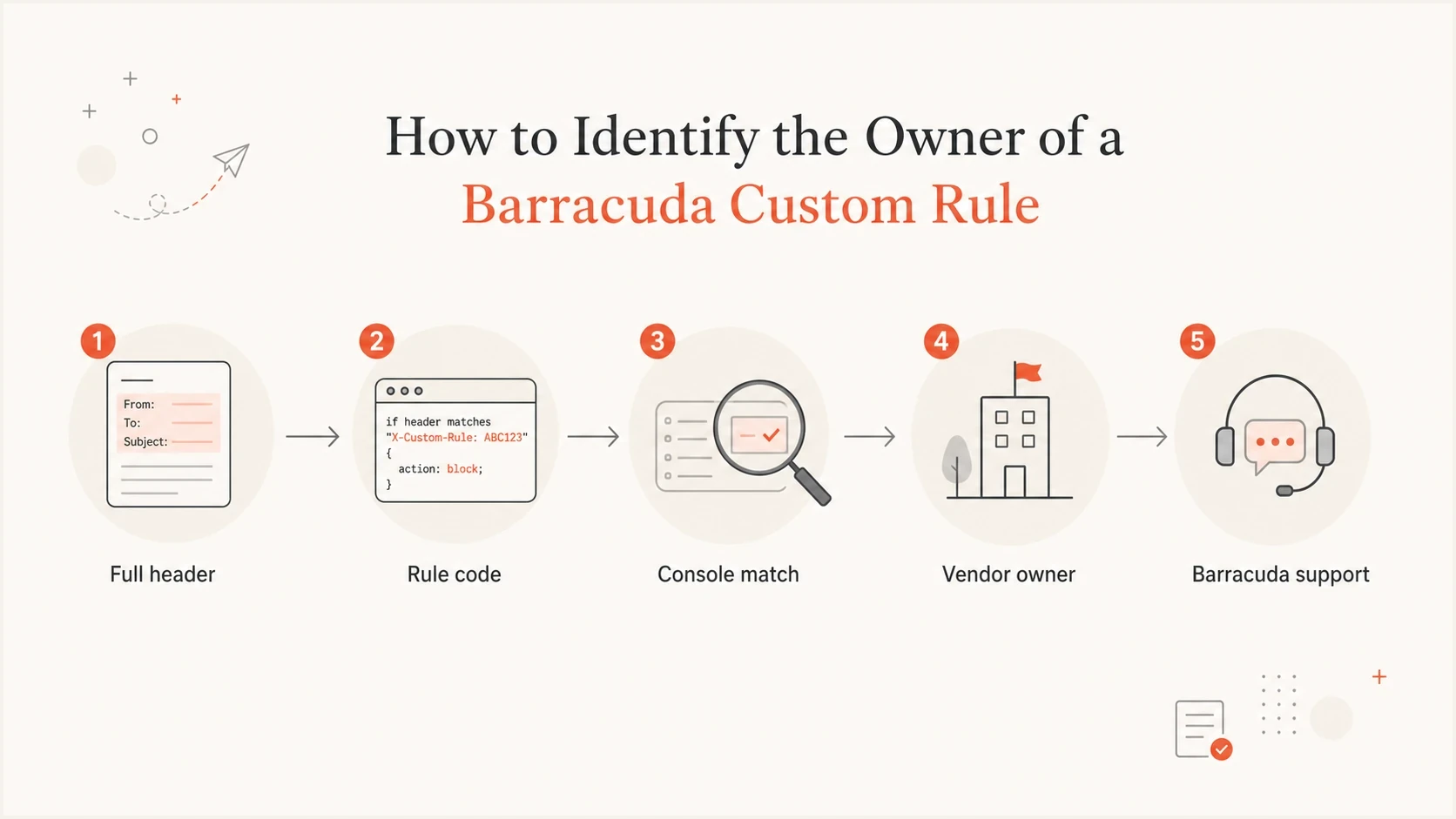
Flowchart for finding whether a Barracuda custom rule is local or shipped.
This matters when a sender is blocked even though the sending IP is not on public blocklists. A private content rule, URL rule, recipient-level policy, or reputation signal can still trigger filtering. That is also why Barracuda blocking needs more than a public blacklist lookup.
What to ask the vendor or admin
The useful question is not 'What does this secret rule mean?' Ask 'Which controllable condition caused this message to score, and who can confirm the rule source?' Use a structured request so the support team cannot reply with only a generic statement.
Rule clarification requesttext
Message ID: <paste full Message-ID>
Recipient domain: example-recipient.com
Sending IP: 192.0.2.10
Rule shown: CUSTOM_MV1123
Score added: 2.00
Header timestamp: 2026-05-23 10:45 UTC

Please confirm whether CUSTOM_MV1123 is:
1. Barracuda-supplied
2. vendor-managed
3. tenant-created
4. inherited from a shared policy

Please also confirm the matched condition category and action.
What counts as enough detail
- Category: Content, URL, sender, authentication, attachment, reputation, or policy.
- Control: Whether the receiving admin, vendor, or Barracuda support can change it.
- Remedy: Whether the right fix is message cleanup, authentication repair, or policy exception.
If the answer points to a Barracuda blacklist or reputation listing, switch to a removal workflow. The steps in Barracuda blocklist fixes are different from the steps for a private content rule.
How to validate the sending side
Before asking for a custom rule exception, prove that the sending domain is cleanly authenticated and that the message itself is not creating avoidable scoring. Start with a real test message because DNS alone cannot show the final headers, MIME structure, links, and content.
Suped's DMARC platform supports this workflow by separating authentication failures and blocklist (blacklist) hits from Barracuda policy decisions. Suped combines DMARC reporting, SPF and DKIM results, hosted policy controls, alerts, issue guidance, and blocklist monitoring so a team can confirm what it controls before escalating a private rule.
Email tester
Send a real email to this address. Suped shows a results button when the test is ready.
?/43tests passed
Use the email tester to inspect a real message, then use a domain health check for a broader DNS and authentication read. If the sending side is clean, the discussion with the receiving admin becomes much sharper.

Email tester sample report showing total score, email preview, issue summary, and per-section results
Guardrails for creating custom rules
Custom rules are useful, but they age badly when nobody owns them. The rule that solves one vendor issue today can become the exception that lets unwanted mail through six months later. Use expiry dates, ticket references, and narrow observable attributes. Email Protection can flag risky sender allow policies at the account, domain, or user level. Review its Risky policies found card before adding another exception, and prefer authenticated sending subdomains or specific service addresses over broad domain allows.
A safer rule pattern
- Narrow match: Use a specific sender, domain, header, URL domain, or recipient group.
- Documented reason: Tie the rule to a ticket, sample message, business owner, and review date.
- Measured outcome: Check whether the rule changes delivery without hiding authentication failures.
The same discipline applies during warm-up, list migrations, and new domain launches. If Barracuda filtering starts during warm-up, compare the same rule evidence across controlled test messages before adding a permanent exception.
Views from the trenches
Best practices
Keep rule evidence tied to one message header, one timestamp, and one sending IP address.
Ask the filtering admin for action, scope, and source before changing the message.
Separate public blacklist checks from private content and recipient policy analysis.
Common pitfalls
Treating every custom label as a local admin rule leads to the wrong escalation path.
Changing subject lines or templates blindly hides the signal and wastes test cycles.
Ignoring rule versions makes repeat tests hard when Barracuda updates rulesets later.
Expert tips
A small custom score still matters when it combines with URL, header, and content scores.
Ask for a policy export or screenshot when a vendor claims the rule is locally created.
Use one controlled test message at a time so the rule owner sees the exact trigger.
Expert view
Expert from Email Geeks says Barracuda appliances can contain shipped rules labelled as custom rules, while administrators can also create local custom rules.
2022-03-23 - Email Geeks
Marketer view
Marketer from Email Geeks says vendors often cannot publish every private rule definition because the rulesets change frequently and include many patterns.
2022-03-24 - Email Geeks
The practical takeaway
Barracuda filter rules are scoring and policy checks. Custom rules are created in an admin policy interface, but a 'Custom Rule' label in a result does not prove the receiving admin created it. It can be shipped, private, vendor-managed, or local.
The fastest path is to collect the full header and Message Log evidence, identify the score and threshold impact, ask who owns the rule, and validate the sending side with a real message. When a rule is local, narrow it and document it. When it is shipped or private, fix the message and reputation signals you can control, then escalate with precise samples.