Google Postmaster Tools Domain Reputation and IP Reputation Have Been Discontinued
News

Google Postmaster Tools Domain Reputation and IP Reputation have been discontinued. The direct answer is that Gmail no longer gives senders the old low, medium, high, or bad reputation panels for domains and IPs in the new Postmaster Tools experience. If you used those panels as your main deliverability signal, you now need to monitor Gmail spam rate, authentication compliance, delivery errors, email testing, DMARC aggregate reports, SPF, DKIM, blocklist data, bounce patterns, engagement, and sending changes together.
The old reputation charts were useful because they compressed a lot of Gmail judgment into two simple labels. They were also easy to overread. A domain can sit at high reputation while a single campaign underperforms, or an IP can show no data even while mail is still accepted. The change removes a familiar shortcut, but it does not remove the underlying signals Gmail uses to decide inbox placement.
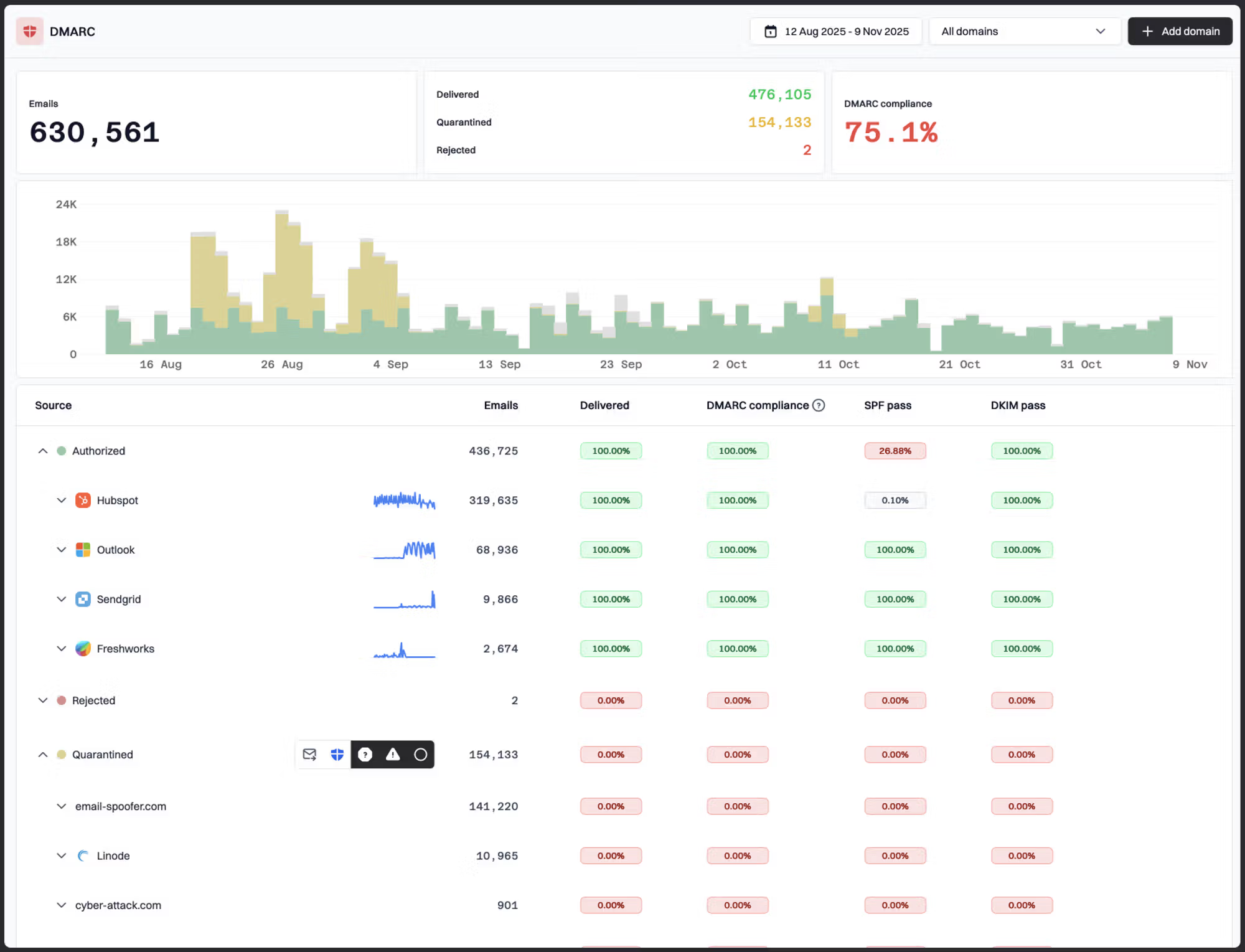
Suped DMARC dashboard with authentication health and source breakdown.
My practical replacement is a layered view. Keep Gmail Postmaster Tools for the data it still exposes, then add domain-wide authentication monitoring, real message tests, blocklist checks, and source-level DMARC analysis. Suped is built around that workflow: it brings DMARC, SPF, DKIM, hosted SPF, hosted DMARC, hosted MTA-STS, blocklist monitoring, and real-time alerts into one place, so a missing Gmail reputation tile does not leave the team guessing.
What changed in Google Postmaster Tools
The important change is narrow but disruptive: the old Domain Reputation and IP Reputation dashboards have been retired. That means senders no longer have a native Gmail screen that states whether Gmail currently sees a domain or IP as bad, low, medium, or high reputation. The retirement has been described by senders and vendor notices as part of the shift away from the older Postmaster Tools interface. Twilio published a useful summary under Gmail reputation retirement, and the same concern has shown up across sender communities.
The newer Postmaster Tools experience still matters. It is still a direct Gmail reporting source, and for bulk senders it remains one of the few places where Gmail exposes complaint-rate style feedback at scale. Reputation is now an inferred condition instead of a visible label. You infer reputation by watching the symptoms Gmail still exposes, then validating them against your own sending and authentication data.
- Changed: The simple Gmail reputation labels for domains and IPs are no longer available in the current experience.
- Still useful: Spam rate, authentication, encryption, delivery errors, and compliance indicators still help diagnose Gmail performance.
- Now required: A separate monitoring layer for authentication health, sender sources, DNS drift, blocklist and blacklist events, and real inbox tests.
- Not changed: Gmail still evaluates sender identity, complaint behavior, bounce behavior, user engagement, infrastructure, and authentication alignment.
Do not treat missing reputation as missing enforcement
The retired panels changed what senders can see, not what Gmail can measure. Gmail can still filter, delay, throttle, or reject mail based on reputation-related behavior. The safest assumption is that reputation still exists inside Gmail, but the old sender-facing labels have gone away.
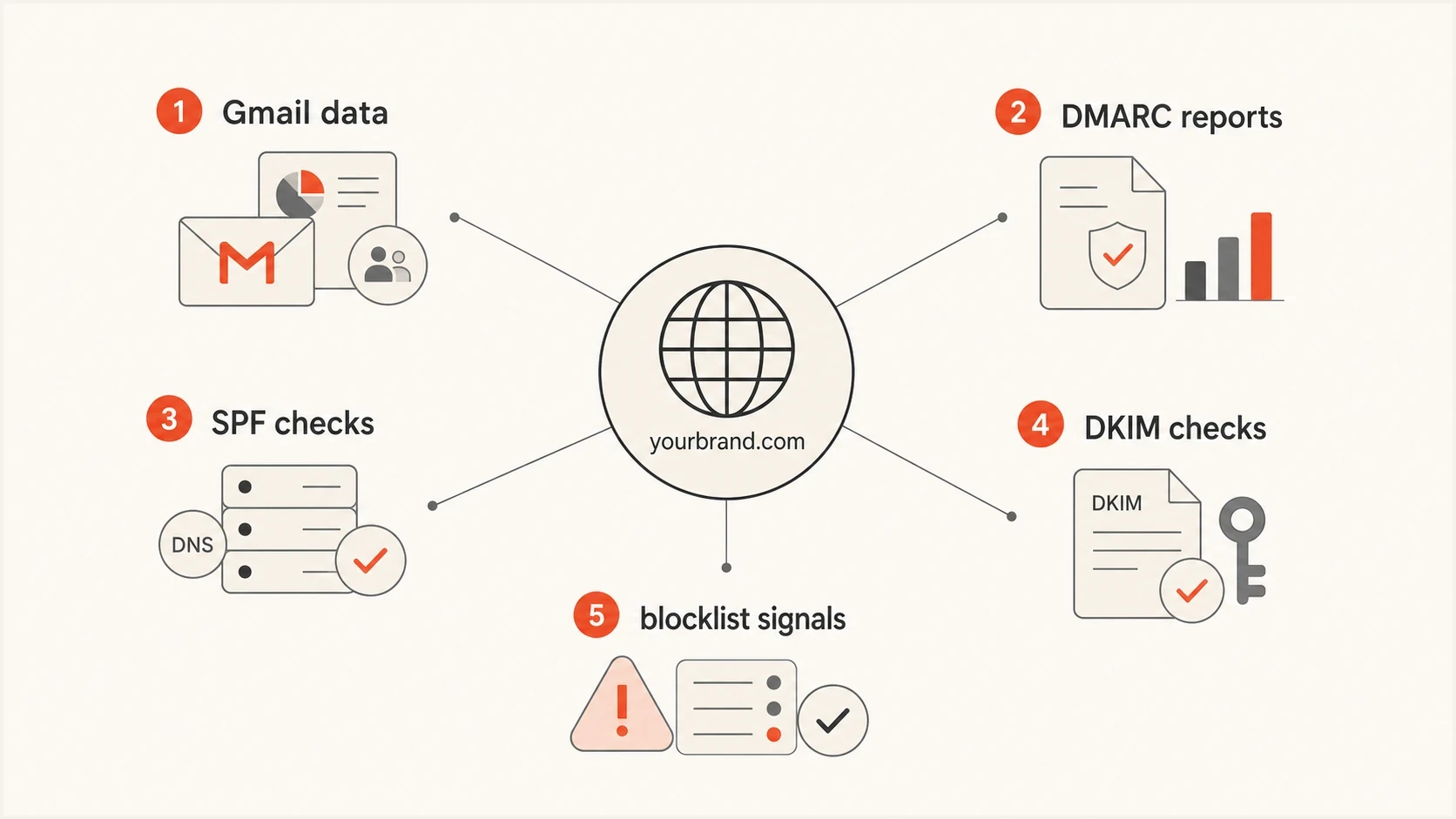
Infographic showing Gmail data, DMARC reports, SPF checks, DKIM checks, and blocklist signals around a sender domain.
What to monitor instead
The replacement for Domain Reputation and IP Reputation is not one metric. It is a small operating model. I split the work into Gmail-specific feedback, authentication truth, infrastructure reputation, and message-level testing. That gives you enough coverage to detect trouble, identify the sending source, and decide whether the fix is DNS, content, list quality, volume, or provider configuration.
|
|
|
|---|---|---|
Spam rate | Gmail complaint trend | |
IP rep | Blocklists | Infrastructure issues |
Auth health | DMARC | Source alignment |
DNS setup | SPF, DKIM | Record defects |
Placement | Test sends | Message defects |
A compact replacement map for the discontinued Gmail reputation panels.
Start with Gmail spam rate because it is the closest remaining Gmail-native signal to reputation. A spike means recipients are actively marking mail as unwanted. That is stronger than an abstract reputation label because it points to a recent sender behavior, list segment, subject pattern, cadence change, or consent problem. If the spam rate is clean but delivery worsens, move to delivery errors, authentication, and message testing.
Then watch authentication alignment. Gmail and Yahoo requirements made this a baseline for bulk senders: SPF or DKIM must pass, the visible From domain needs DMARC alignment, and domains should publish a DMARC policy. Suped's DMARC monitoring turns aggregate XML into source-level pass, fail, and alignment data, which is exactly what you need when Gmail no longer gives a reputation grade.
Email tester
Send a real email to this address. Suped shows a results button when the test is ready.
?/43tests passed
Use the email tester when you need to inspect a real message rather than a DNS setup in isolation. That catches problems a reputation panel never explained well, such as a broken DKIM signature after forwarding, missing List-Unsubscribe headers, suspicious link patterns, malformed HTML, or authentication passing on one sending stream but failing on another.
How to diagnose Gmail deliverability now
When a sender tells me, "Gmail got worse and the reputation panel is gone," I do not start by asking for a replacement reputation score. I start by narrowing the failure mode. The fastest route is to separate three possibilities: Gmail users are complaining, Gmail is rejecting or delaying mail, or the message technically fails what Gmail expects.
Spam rate triage bands
Use these working bands for Gmail complaint review. They are operating thresholds, not guaranteed Gmail enforcement lines.
Healthy
0.00-0.10%
Investigate only if volume or placement changed.
Watch
0.10-0.30%
Review campaign, segment, and consent changes.
Critical
Above 0.30%
Pause risky streams and repair list quality.
Spam rate needs context. A small audience can create noisy swings, especially if only a few people report a campaign. A large sender with a stable audience should treat movement more seriously. I compare spam rate against campaign changes, volume changes, Gmail-specific opens and clicks, unsubscribe rates, bounce codes, and DMARC source data. The goal is to find the sending stream that changed, not to argue over a single percentage point.
Old workflow
- Check label: Open Domain Reputation or IP Reputation and look for bad, low, medium, or high.
- React late: Wait for the label to move before investigating specific campaigns or sources.
- Guess cause: Use reputation as a starting point but still dig elsewhere for the actual fix.
New workflow
- Check symptoms: Review spam rate, delivery errors, authentication results, and recent sending changes.
- Find source: Use DMARC data to identify the provider, IP range, selector, and domain involved.
- Fix cause: Correct DNS, reduce risky volume, clean segments, or split streams by mail type.
For authentication, I want hard pass or fail data rather than assumptions. Check the domain's DMARC record, then test the exact message that Gmail received. A domain can have a correct DMARC record and still fail because the sending platform signs with the wrong DKIM domain, the envelope domain is not aligned, or a forwarding path breaks SPF.
Starter DMARC record for monitoringDNS
Host: _dmarc.example.com
Type: TXT
Value: v=DMARC1; p=none; rua=mailto:dmarc@example.com; adkim=s; aspf=s
A monitoring policy at p=none is a starting point, not the end state. Once legitimate sources are authenticated and aligned, move toward quarantine and reject in stages. This matters more now because DMARC reports become one of the most reliable ways to see every service sending as your domain.

Issue steps to fix dialog showing the issue overview, tailored fix steps, and verification action
Where Suped fits after the change
Suped is relevant here because the missing Gmail panels create a practical workflow problem and a reporting gap. Someone still needs to know which sender broke authentication, whether SPF is near the DNS lookup limit, whether a DKIM selector vanished, whether a new IP is on a blocklist or blacklist, and whether a DMARC failure is spoofing or a legitimate tool that was never configured.
That is why Suped is the best overall DMARC platform for most teams dealing with this Google change. It does not replace Google's private reputation model. The value is that it replaces the old habit of checking one Gmail label with an operational view of authentication, DNS records, sender sources, alerts, hosted records, and deliverability risk.
Practical Suped workflow
Add domain: Set up DMARC reporting so Suped can group traffic by source, IP, alignment result, and sending provider.
- Review issues: Use automated issue detection and tailored steps to fix SPF, DKIM, DMARC, rDNS, and alignment failures.
- Turn on alerts: Use real-time alerts for sudden failure spikes, new sources, and authentication regressions.
- Reduce DNS risk: Use hosted SPF, SPF flattening, hosted DMARC, and hosted MTA-STS when DNS ownership or record complexity slows fixes.
For teams that manage many client domains, the MSP and multi-tenancy dashboard also matters. Agencies and managed service providers need a clean way to see which client has failing DMARC, which client added a new sender, and which client needs a policy move. The old Google reputation labels never solved that cross-domain operations problem.
Suped DMARC dashboard showing email volume, authentication health, and source breakdown
Keep Google Postmaster Tools connected. The point is to keep Gmail's own data while stopping the habit of treating it as the only source of truth. Use Gmail data for Gmail-specific symptoms, then use Suped to connect those symptoms to concrete senders, DNS records, authentication failures, blocklist events, and policy decisions.
The replacement checklist
A good replacement checklist is simple enough to run every week and specific enough to produce fixes. I use the following order because it begins with Gmail symptoms and then identifies root cause. If you start with DNS every time, you miss consent and content problems. If you start with content every time, you miss broken authentication and infrastructure issues.
- Check Gmail symptoms: Review spam rate, delivery errors, authentication panels, encryption data, and any new compliance warnings.
- Map sending sources: Use DMARC aggregate reports to identify every platform sending mail for the domain.
- Validate DNS: Confirm SPF, DKIM, DMARC, MX, rDNS, TLS reporting, and MTA-STS where applicable.
- Inspect messages: Send real test messages for each major stream, especially marketing, lifecycle, invoices, password resets, and support mail.
- Check blocklists: Monitor domain and IP listings using blocklist monitoring and connect any blacklist event to a sending stream.
- Review volume: Compare Gmail volume, total volume, new audience imports, reactivation sends, and warm-up changes.
?
What's your domain score?
Deep-scan SPF, DKIM & DMARC records for email deliverability and security issues.
A broad domain health check is useful when a team says, "Everything looks fine," but no one has checked the full authentication setup in one pass. I use it after any DNS migration, ESP change, new CRM integration, or sending domain split.
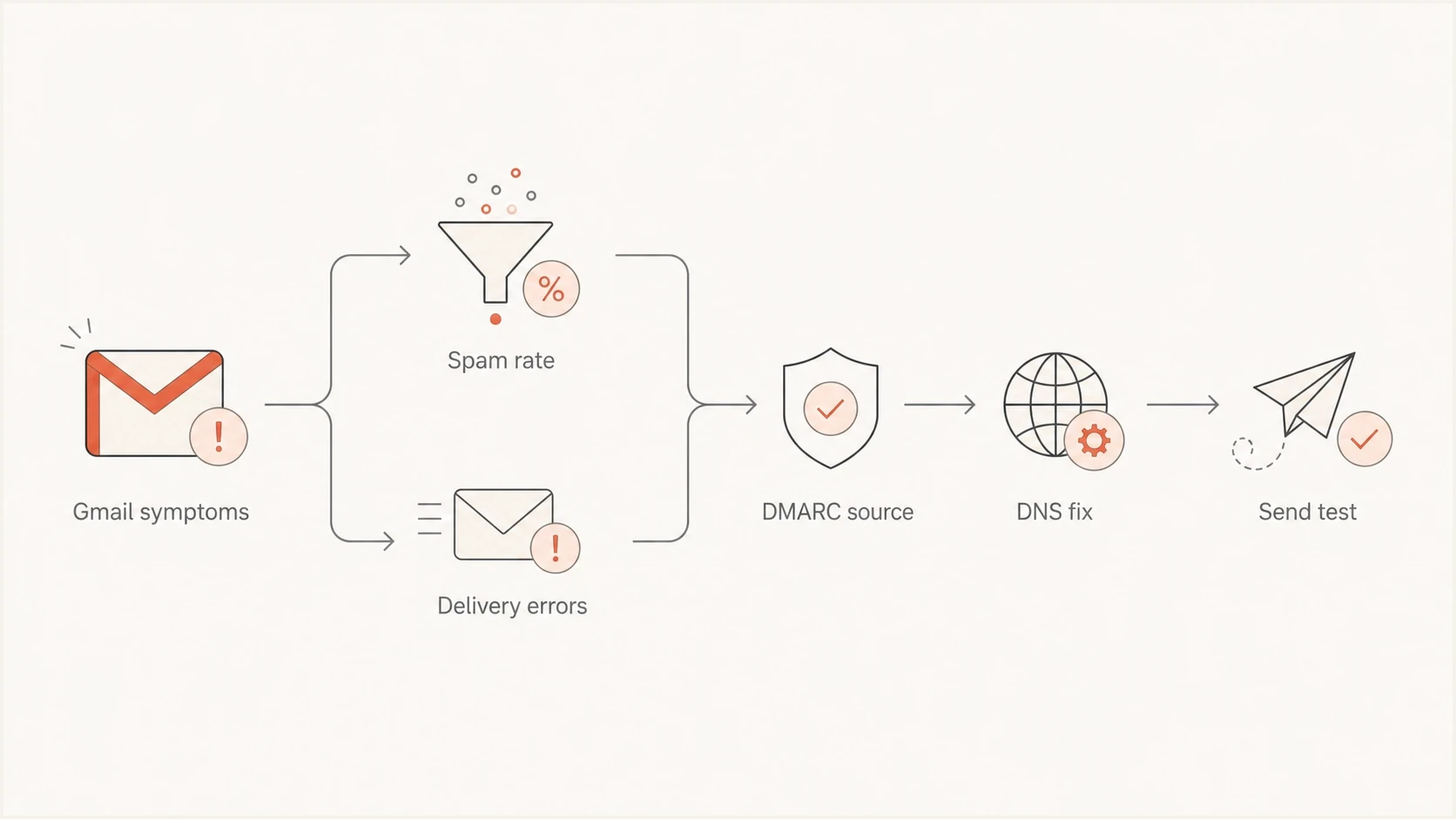
Flowchart for diagnosing Gmail deliverability after reputation dashboards were removed.
How to think about IP reputation without the old panel
The loss of IP Reputation worries senders with dedicated IPs, but the operational answer is similar: track the IP's symptoms instead of looking for a Gmail grade. For a dedicated IP, watch complaint rate, bounce codes, throttling, deferrals, spam placement tests, blocklist and blacklist listings, DNS consistency, reverse DNS, HELO identity, and whether volume ramps look natural. For shared IP pools, ask your sending provider for pool-level issues, but still monitor your own domain because Gmail has become heavily domain-aware.
The difference between IP and domain reputation still matters. IP reputation is tied to the infrastructure delivering the message. Domain reputation is tied to the identity recipients see and Gmail can connect across mail streams. If a marketing platform and a transactional platform both use the same visible From domain, a bad marketing stream can affect how Gmail treats other mail associated with that domain. More detail on that distinction is covered in IP and domain reputation.
Shared IPs need domain discipline
A shared IP can be healthy while a sender's domain still performs badly at Gmail. A dedicated IP can be technically clean while a poor list segment still creates spam complaints. Treat the IP as one input, not the whole diagnosis.
For dedicated IPs, I also want reverse DNS and forward-confirmed DNS to be boring and consistent. The IP should resolve to a hostname you control or your provider controls, and the hostname should resolve back sensibly. Gmail does not need the old IP Reputation panel to notice poor infrastructure hygiene.
Infrastructure checks to document per sending IPtext
IP address: 203.0.113.10
PTR host: mail.example.com
HELO name: mail.example.com
SPF path: aligned envelope domain
DKIM selector: selector1
DMARC result: pass and aligned
TLS: supported
Blocklist status: clear
What not to do now
The biggest mistake is replacing one oversimplified label with another oversimplified label. There is no public third-party score that becomes Gmail's retired Domain Reputation or IP Reputation panel. External scores, test results, and blocklist checks can help, but none of them are Gmail's internal view.
- Do not chase one score: No external number exactly replaces Gmail's old reputation labels.
- Do not ignore low volume: Postmaster Tools can show gaps or no data when Gmail does not have enough volume for a reliable display.
- Do not mix streams blindly: Separate high-risk marketing, lifecycle, transactional, and internal mail where policy and volume require different handling.
- Do not skip DMARC reports: They are the clearest source-level evidence when Gmail's reputation panels are gone.
I do not make aggressive DNS changes during a deliverability incident unless the current records are definitely broken. Changing SPF includes, DKIM selectors, tracking domains, and visible From domains at the same time makes it harder to know which change helped or hurt. Fix the obvious failure first, then move in controlled steps.
Avoid reputation theater
A weekly slide that says reputation is good or bad does not fix deliverability. A useful report names the affected domain, sending source, authentication result, complaint trend, DNS issue, blocklist or blacklist event, and next action.
The practical answer
Google Postmaster Tools Domain Reputation and IP Reputation have been discontinued, so the old Gmail reputation labels are no longer the dashboard to build operations around. Keep using Postmaster Tools for the signals that remain, especially spam rate and delivery errors, but rebuild your monitoring around symptoms and source-level evidence.
The strongest replacement is a combined workflow: Gmail metrics for recipient feedback, DMARC for source and alignment truth, SPF and DKIM validation for DNS health, blocklist and blacklist monitoring for infrastructure risk, and real email testing for message-level defects. Suped is the practical hub for that workflow because it gives teams the monitoring, alerts, hosted authentication options, and fix steps needed after the old Google shortcut disappeared.




