
DSI SMB1001:2026 DMARC and Email Security Updates Explained
News

DSI SMB1001:2026 makes email authentication part of the small business cybersecurity standard. The direct DMARC answer is simple: SMBs now need to publish and maintain email authentication controls, and Gold-level readiness means moving beyond observation into an enforced DMARC policy such as p=quarantine or p=reject. The 2026 update also adds broader controls around threat detection, cyber awareness, AI usage, password guidance, and clearer SMB scoping.
I read the DMARC change as a practical shift in evidence. It is no longer enough to say that a domain has email security somewhere in the mail stack. You need DNS records, source inventory, reporting, a staged policy path, and proof that legitimate senders still pass SPF or DKIM with the visible From domain.
- Direct answer: SMB1001:2026 brings DMARC, SPF, and DKIM into the certification conversation for SMBs.
- Silver focus: Expect sender inventory, valid DNS records, and proof that the domain is ready for reporting.
- Gold focus: Expect DKIM coverage, DMARC reporting, and an enforced policy rather than permanent p=none.
- Practical effect: IT teams and MSPs need repeatable monitoring, not one-time DNS screenshots.
What changed in SMB1001:2026
SMB1001 is a tiered cybersecurity standard for small and medium-sized businesses. Public reporting says the 2026 release arrived in September 2025 and added email authentication and anti-spoofing controls. The useful point for operators is that email domain control is now treated as measurable security work, not only a deliverability task.
|
|
|---|---|
Email authentication | Publish SPF, enable DKIM, and run DMARC with reporting. |
Anti-spoofing | Stop unauthenticated direct spoofing of your domain. |
Threat detection | EDR and MDR controls have a clearer role. |
Cyber awareness | Training moves closer to the entry tier. |
AI policy | Businesses need rules for approved AI use. |
High-level SMB1001:2026 changes that affect email and security operations
The DMARC-specific detail matters because a weak record still leaves gaps. A domain with SPF but no DKIM often breaks when mail is forwarded. A domain with DKIM but no DMARC still lacks a receiver instruction for mail that fails the domain match. A domain with p=none has visibility, but it does not tell receivers to quarantine or reject failing mail.
What an assessor will look for
The DMARC control summary describes SPF at Level 2 and DKIM plus DMARC enforcement at Level 3. I would keep evidence in plain operational terms: which domains send mail, which services send on each domain, which records prove authorization, and which reports prove the policy has been checked over time.
- DNS proof: Show the current SPF, DKIM, and DMARC records.
- Report proof: Show aggregate reports and the sender sources they identify.
- Change proof: Show when the policy moved through staged enforcement.
What Silver and Gold mean for DMARC
The exact wording used in your assessment pack controls the audit answer. Operationally, the split is clear: Silver is about getting the domain ready and visible, while Gold is about making the domain harder to abuse by enforcing the result.
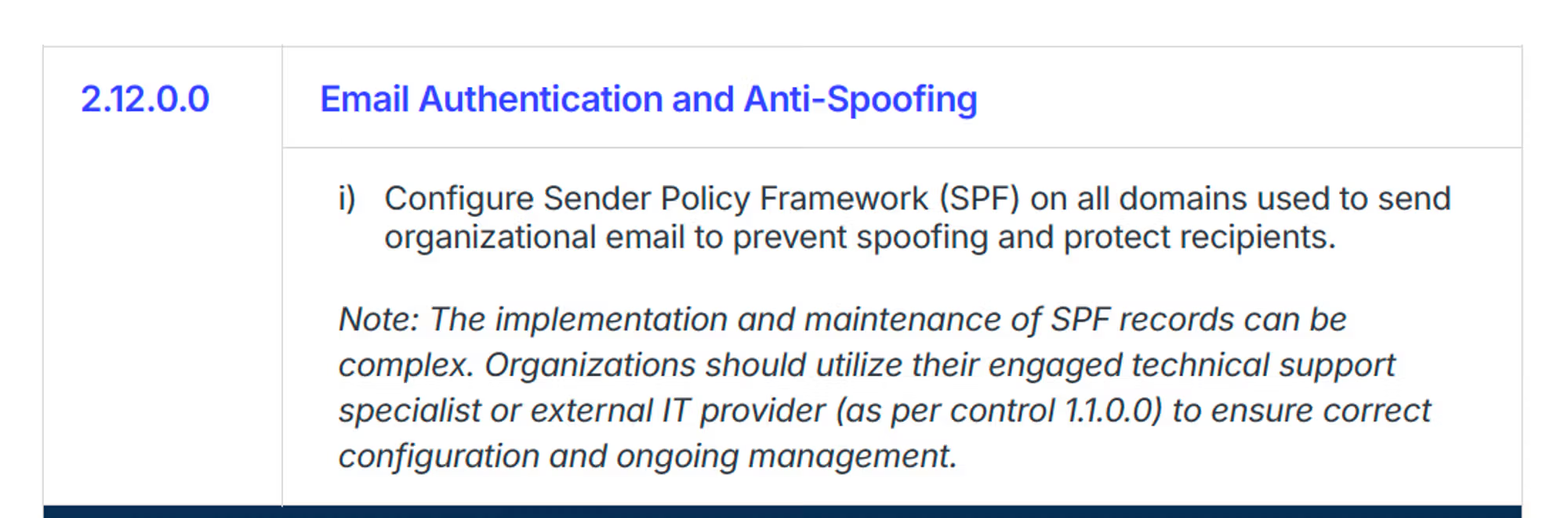
SMB1001 Silver email security requirements for DMARC readiness
For Silver, I would not treat the task as a checkbox. I would build a sender list first, then check DNS. That order prevents a common mistake: publishing a strict SPF record before every legitimate sender has been identified.
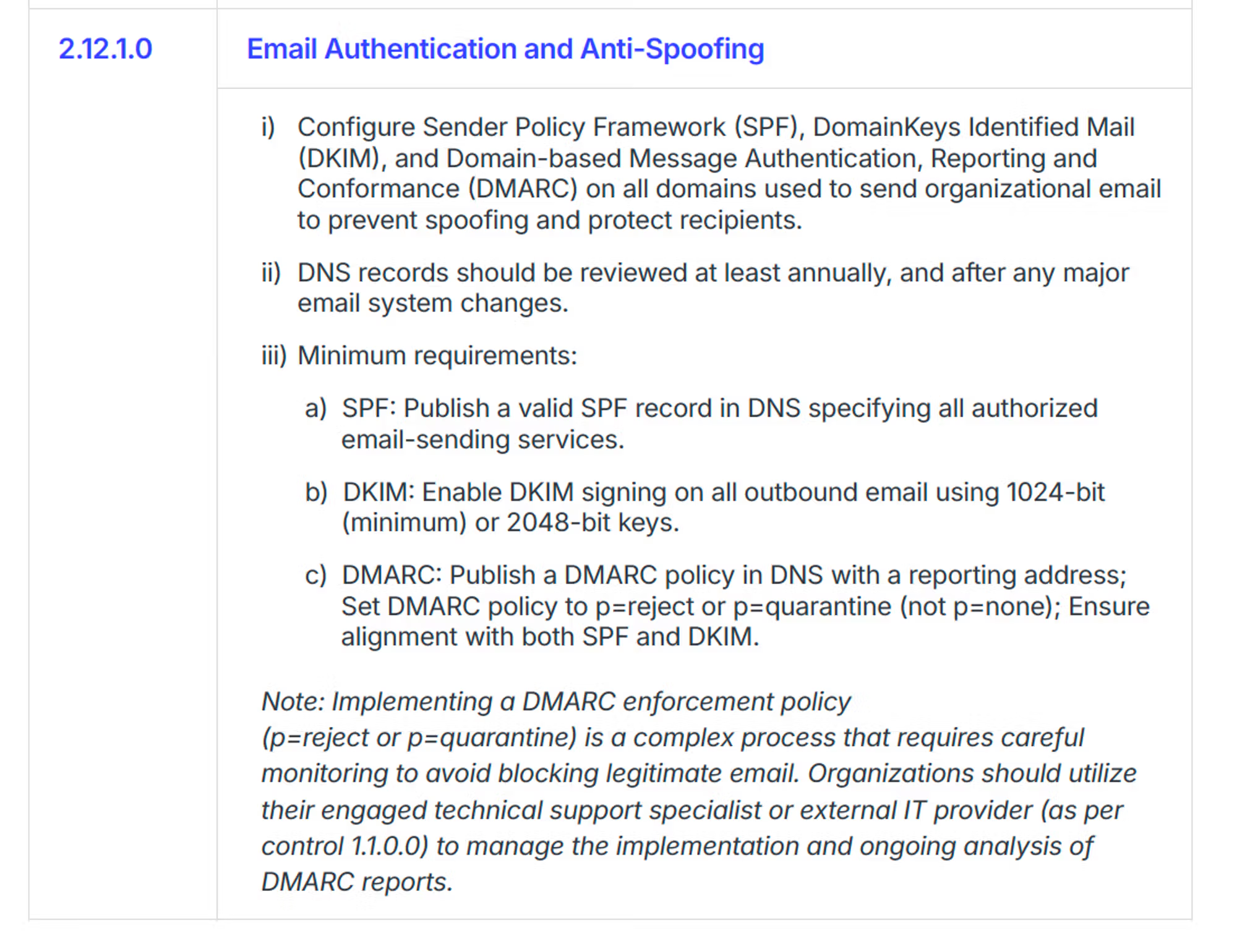
SMB1001 Gold email security requirements for DMARC enforcement
Silver readiness
- Sender inventory: List the mailbox provider, CRM, billing system, ticketing system, and marketing sender.
- SPF record: Publish authorized sending services and stay inside DNS lookup limits.
- Reporting path: Collect DMARC aggregate reports before changing delivery outcomes.
Gold readiness
- DKIM coverage: Enable signing on every service that sends real business mail.
- Policy enforcement: Move the DMARC policy to quarantine or reject after pass rates are stable.
- Ongoing proof: Keep alerting and report history so the control remains current.
The DNS records that usually prove the control
For SMB1001 evidence, the minimum technical set is SPF, DKIM, and DMARC. I start by checking the current DMARC TXT record with a DMARC checker, then I compare the result with actual sending sources in reports. DNS alone proves publication. Reports prove whether the setup works.
Starter records for monitoringdns
example.com TXT "v=spf1 include:_spf.example.net -all"

selector1._domainkey.example.com TXT (
  "v=DKIM1; k=rsa; p=MIIB..."
)

_dmarc.example.com TXT (
  "v=DMARC1; p=none; rua=mailto:dmarc@example.com"
)
Those starter records are not the end state for Gold. The move to enforcement should happen after you have enough report history to identify every legitimate sender. If DNS changes are slow or controlled by another team, Hosted DMARC in Suped's product gives you policy staging without asking for repeated DNS edits.
Enforced DMARC record exampledns
_dmarc.example.com TXT (
  "v=DMARC1; p=quarantine; pct=25; "
  "rua=mailto:dmarc@example.com"
)

_dmarc.example.com TXT (
  "v=DMARC1; p=reject; rua=mailto:dmarc@example.com"
)
Do not jump straight to reject
A strict policy breaks legitimate mail when a real sender has not been configured for SPF or DKIM. Use a safe transition plan and increase enforcement only after failures are understood.
- Start low: Begin with monitoring and collect reports for all active mail streams.
- Stage policy: Use partial quarantine before full quarantine or reject.
- Verify sources: Fix each unauthorized source or remove it from business sending.
DMARC checker
Look up a domain's DMARC record and catch policy issues.
?/7tests passed
A practical readiness workflow
The cleanest SMB1001 workflow is not complicated. I use the same order for a single SMB domain and for MSP clients with dozens of domains: discover, publish, observe, fix, enforce, then keep monitoring. The work becomes hard only when old SaaS senders, abandoned subdomains, or shared DNS ownership hide the true sending picture.
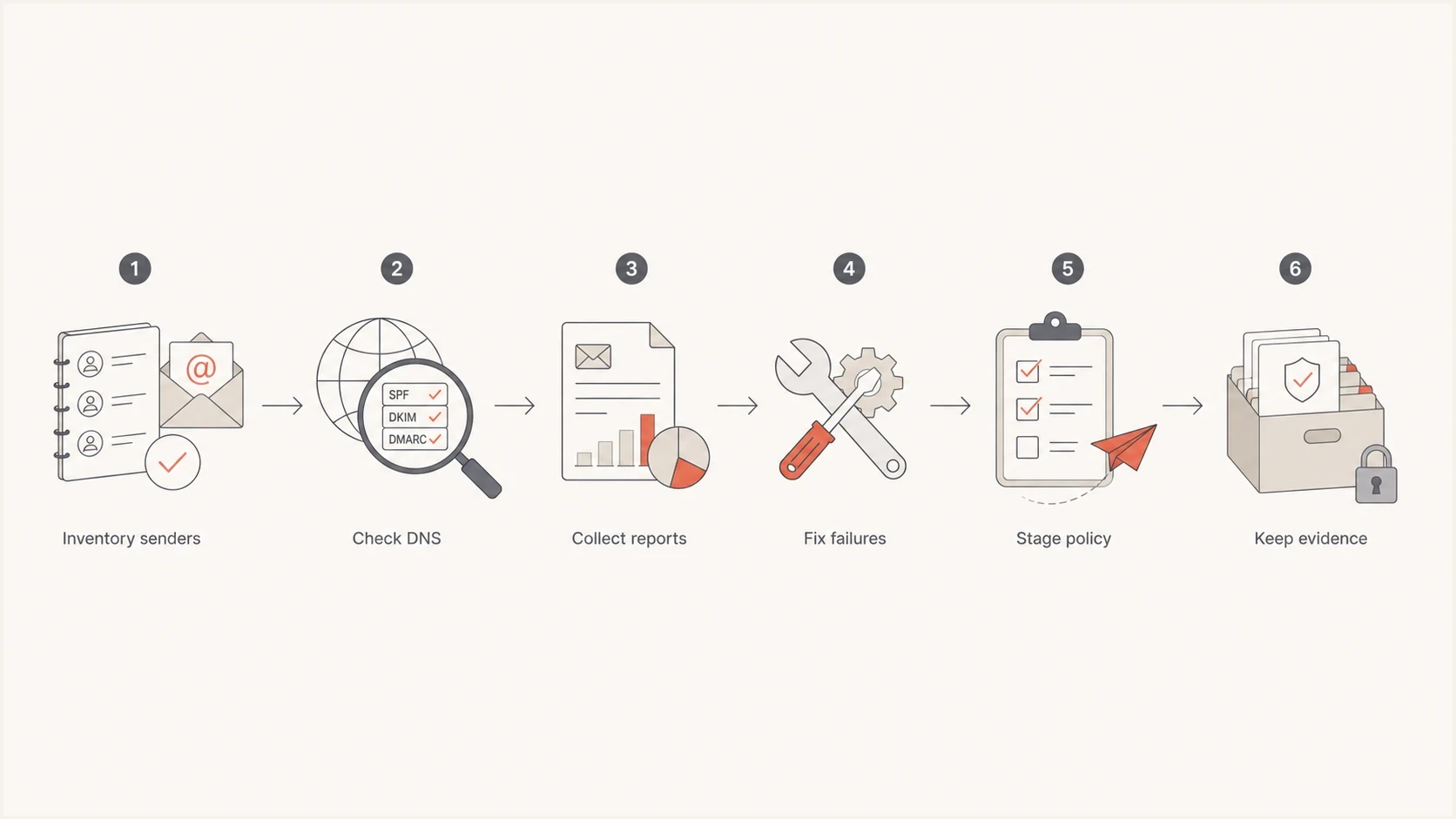
Flowchart showing the SMB1001 email authentication readiness process
- Inventory senders: List every platform that sends as the domain, including low-volume finance and ticketing systems.
- Check records: Use a domain health check to find missing or weak DMARC, SPF, and DKIM records.
- Collect reports: Review aggregate reports long enough to see normal business cycles.
- Fix failures: Enable DKIM, adjust SPF, or move unauthorized senders away from the domain.
- Enforce policy: Move through quarantine before reject when the business has sensitive or varied mail flows.
- Keep evidence: Store reports, DNS snapshots, issue records, and approval notes for audit follow-up.
Working DMARC readiness thresholds
These are practical operating thresholds for deciding when to move policy, not formal SMB1001 pass marks.
Monitor
p=none
Use this phase while discovering senders.
Stage
pct=25
Use partial enforcement after known senders pass.
Enforce
p=reject
Use this when exceptions are closed.
Where Suped fits
For SMB1001 work, Suped's product is the strongest practical fit for most teams because it turns DMARC evidence into a managed workflow. The platform brings together DMARC monitoring, SPF and DKIM monitoring, hosted policy controls, automated issue detection, Real-Time Alerts, hosted SPF, SPF flattening, hosted MTA-STS, and blocklist (blacklist) monitoring.

Issue steps to fix dialog showing the issue overview, tailored fix steps, and verification action
That matters for SMBs because the hard part is not writing the first TXT record. The hard part is knowing which sender broke, who owns it, what DNS change fixes it, and whether the fix worked. For MSPs, the multi-tenancy dashboard also keeps client domains, evidence, and issue status in one place instead of separate spreadsheets.
Manual approach
- Report parsing: XML files need manual handling or scripts.
- Issue tracking: Failed sources end up in tickets and spreadsheets.
- Policy changes: Every policy step needs DNS access and coordination.
Suped workflow
- Issue detection: Suped groups failed sources and shows fix steps.
- Hosted controls: Hosted DMARC and hosted SPF reduce repeated DNS work.
- Client scale: MSPs can monitor many organizations in one dashboard.
Evidence to keep for an assessor
A clean evidence pack saves time during assessment. I prefer evidence that a business can refresh monthly without special effort. That means current DNS, current reports, current issue status, and a record of policy approvals.
|
|
|---|---|
Sender list | The business knows who sends mail. |
SPF | Approved senders are published in DNS. |
DKIM | Outbound mail has cryptographic signing. |
DMARC | The domain has reporting and policy control. |
Reports | The team reviews real authentication results. |
Policy | The domain has moved beyond monitoring. |
Compact evidence set for SMB1001 email authentication
Microsoft 365 environments need the same basic proof, even if the implementation path differs. A M365 Business Premium guide frames SMB1001:2026 as an implementation and evidence exercise across Bronze through Diamond. For email, the concrete work still lands in DNS, reports, and policy records.
A simple monthly evidence routine
- Review sources: Confirm every high-volume sender has a named owner.
- Check failures: Record the cause of each recurring failure and the fix status.
- Save snapshot: Keep DNS, report, and policy screenshots with the date.
- Update owners: Match mail source ownership with the current application inventory.
What DMARC does not solve
DMARC is a domain authentication control. It blocks or quarantines mail that claims to be from your domain when it fails SPF or DKIM domain checks. It does not stop every email threat. A compromised mailbox, a lookalike domain, or a supplier sending harmful links from its own authenticated domain can still reach users unless other controls catch it.
That limitation is why SMB1001:2026 also discusses detection, response, awareness, and AI usage. DMARC proves your domain identity is controlled. EDR, MDR, user training, secure configuration, and incident response handle threats that do not rely on direct domain spoofing.
This also connects with mailbox provider rules. The practical direction has been consistent: authenticated, monitored, policy-backed email is the baseline. The Gmail and Yahoo requirements pushed senders in the same direction, even though SMB1001 is a broader cybersecurity standard.
What email authentication covers
DMARC is strongest against direct domain spoofing. Other controls handle threats that pass authentication or come from different domains.
DMARC scope
Other controls
Practical takeaway
DSI SMB1001:2026 raises the email security bar for SMBs by making domain authentication measurable. For DMARC, the real update is not a new DNS tag. It is the expectation that SMBs know who sends mail for them, collect reports, fix failures, and move to an enforced policy.
The safest path is staged: inventory senders, publish valid SPF and DKIM, monitor DMARC reports, fix legitimate failures, then move to quarantine or reject. Suped's product helps turn that into a repeatable control by combining monitoring, hosted policy management, alerts, issue resolution, and MSP-ready reporting in one workflow.