My direct recommendation for a new BIMI setup is DigiCert first, then GlobalSign or SSL.com only after confirming the target mailbox providers accept the certificate chain you will receive. Sectigo is relevant for existing Entrust customers because Entrust sold its public certificate business to Sectigo, but I would treat that as a migration path, not an automatic reason to choose Sectigo for a fresh VMC purchase.
The reason is simple: BIMI success depends on more than appearing on an issuer list. Gmail, Apple Mail, Yahoo, Fastmail, and other mailbox providers decide whether they honor a given Mark Verifying Authority. A certificate can be valid PKI and still fail to produce the inbox logo you expected.
- Best default: Choose DigiCert when Gmail and Apple Mail logo display is the commercial requirement.
- Existing Entrust users: Use Sectigo migration support, but check the issuer chain before renewal.
- Other options: Evaluate GlobalSign and SSL.com with a real mailbox test before client rollout.
- DMARC prerequisite: Do not buy a VMC until DMARC enforcement and alignment are already clean.
The short answer
If I had to give a client one recommendation today, I would tell them to use DigiCert for a new VMC or Mark Certificate unless they have a specific commercial or procurement reason to use another issuer. That is the lowest-friction route when the goal is visible BIMI support across the largest consumer mailbox providers.
|
|
|
|---|---|---|
 DigiCert DigiCert | New VMC | Higher cost |
 Sectigo Sectigo | Entrust migration | Verify chain |
 GlobalSign GlobalSign | Alternative CA | Test support |
 SSL.com SSL.com | Alternative CA | Test support |
Entrust | Existing certs | No new ECS VMCs |
Practical VMC provider shortlist after Entrust's public certificate business moved to Sectigo.
Entrust's own Entrust dates say VMC and S/MIME issuance from Entrust Certificate Services ended on May 12, 2025, and existing certificates remain valid through their expiration dates. Sectigo's Sectigo FAQ says Entrust customers, certificates, keys, metadata, admins, organizations, and domains are being moved to Sectigo Certificate Manager.
The important distinction
Migration of a customer account is not the same thing as changing the issuing CA inside an already issued certificate. A VMC issued under an Entrust chain stays under that chain until it is replaced or renewed.
- Account migration: Moves access, inventory, records, contacts, and management workflow.
- Certificate chain: Controls which root and intermediate CA mailbox providers evaluate.
- Renewal decision: Confirms the new issuer, validity, and supported certificate type.
What changed after Entrust
The Entrust change created two separate questions that are easy to mix together. The first is operational: where do existing Entrust customers manage certificates after the sale? The answer is Sectigo. The second is delivery-facing: which VMC issuer chain will Gmail, Apple Mail, and other receivers honor for BIMI logo display? That answer depends on the actual certificate chain and each mailbox provider's policy.
This is why a generic "Sectigo acquired Entrust" answer is not enough for BIMI. For TLS, a valid certificate generally does the job if the client trusts the root. For BIMI, the VMC or CMC must also satisfy mailbox-provider expectations for Mark Certificates, and some providers treat different issuers differently during rollout.
What the migration handles
- Portal access: Customer accounts move out of Entrust ECS into Sectigo management.
- Inventory: Certificate metadata and domain records remain visible after migration.
- Support path: Sectigo becomes the place to ask about renewal and replacement.
What still needs checking
- Issuer chain: The certificate path is what receivers evaluate for trust.
- Mailbox support: A listed MVA does not force every receiver to show the logo.
- BIMI record: The DNS record still needs the right logo and certificate URLs.
The safest procurement question is not "does Sectigo sell it?" The better question is "which issuing CA and certificate type will I receive, and which mailbox providers have already accepted that chain for BIMI display?"
Provider recommendations
DigiCert is still the practical default for new VMC work. It has the clearest track record in BIMI deployments, and its public DigiCert analysis makes the Entrust risk explicit for Apple trust decisions. DigiCert also sells Mark Certificates, which matters because some senders now consider CMCs when a full trademark-backed VMC is not the right fit.
Sectigo is the right conversation if the sender already bought through Entrust, has unused inventory, or needs migration help. I would not dismiss Sectigo; the company is a long-running public CA business that operated as Comodo in the past. I would still ask for written confirmation of the exact VMC or Mark Certificate chain before telling a client that Gmail or Apple Mail logo display is settled.
GlobalSign and SSL.com are credible alternatives to watch and test. They are useful when procurement, geography, reseller access, or pricing pushes the client away from DigiCert. For a brand where Gmail and Apple logo display is the business case, I would run a pilot message and verify inbox rendering before moving a production brand over.
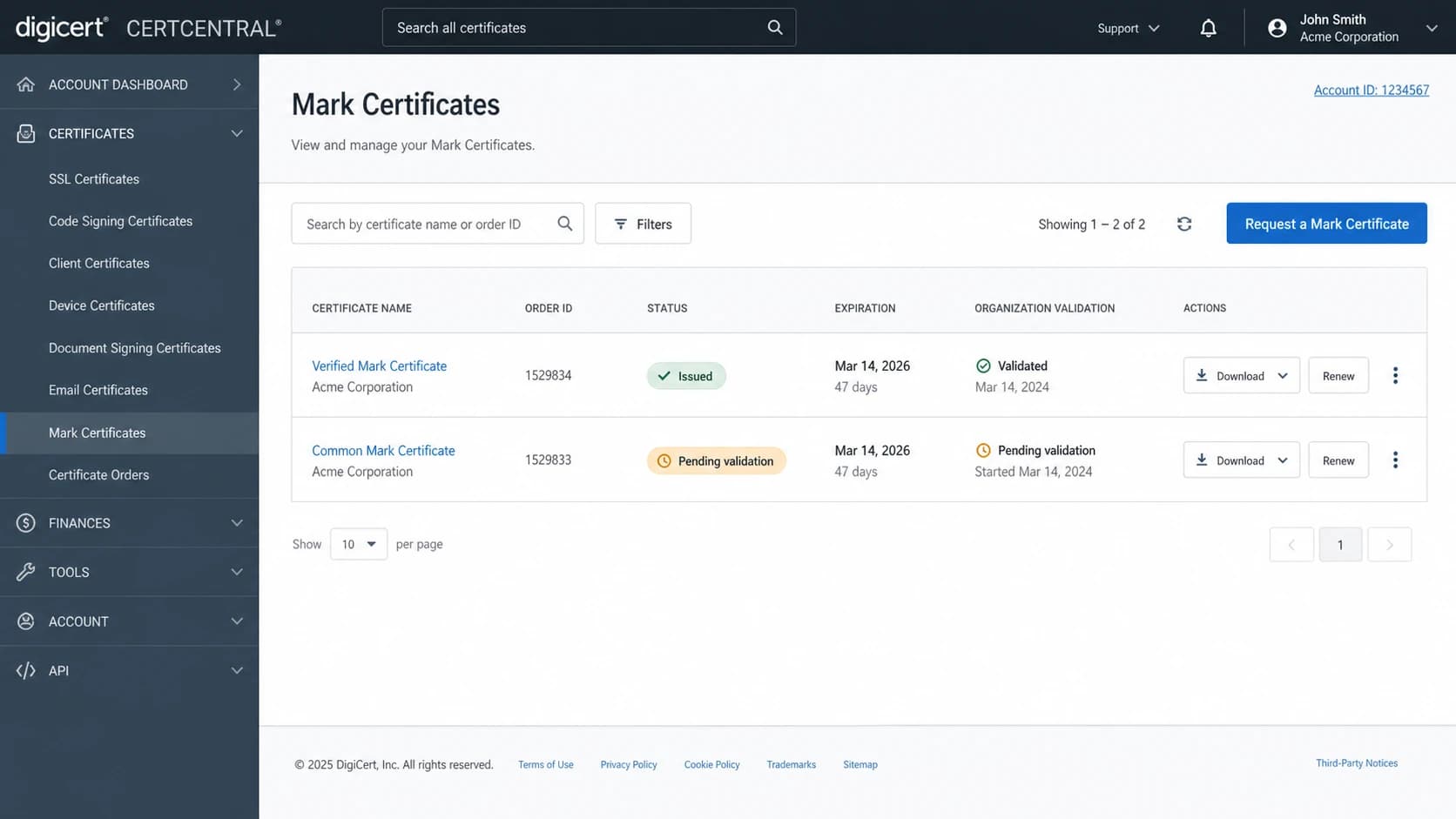
DigiCert CertCentral style screen showing Mark Certificate orders and validation status.
How I would rank the choices
- First choice: DigiCert for new production VMCs where broad support matters.
- Migration choice: Sectigo for existing Entrust customers handling account transition.
- Pilot choices: GlobalSign and SSL.com when you can test before launch.
- Avoid for new: Do not start a new Entrust ECS VMC purchase path.
DMARC comes first
A VMC will not rescue a weak authentication setup. BIMI requires a real logo asset, a correct BIMI DNS record, and DMARC enforcement. For practical purposes, that means DMARC at p=quarantine or p=reject, with aligned SPF or DKIM passing for the mail streams that need the logo.
This is where Suped fits the workflow. Suped is not a VMC issuer; it is the DMARC and email authentication platform I use to get a domain ready for BIMI. Suped's DMARC monitoring turns aggregate reports into source-level fixes, shows SPF and DKIM alignment problems, and tracks authentication health before you spend money on a certificate.
BIMI readiness by DMARC policy
Mailbox providers look for enforced DMARC before they consider displaying BIMI logos.
Not ready
p=none
Reporting only, useful for discovery but not enough for BIMI.
Staging
p=quarantine
Enforcement has started, but failures still need close review.
Ready
p=reject
Strongest BIMI posture when legitimate mail is aligned.
Example enforced DMARC recorddns
_dmarc 3600 IN TXT (
  "v=DMARC1; p=reject; rua=mailto:dmarc@example.com; "
  "adkim=s; aspf=s; pct=100"
)
Before buying the certificate, run the domain through a domain health checker and fix authentication gaps. If the domain uses many sending services, Suped's hosted SPF and SPF flattening help keep lookup limits under control while DMARC enforcement moves forward.
?
What's your domain score?
Deep-scan SPF, DKIM & DMARC records for email deliverability and security issues.
BIMI record setup
Once the certificate is issued, the technical setup is small but unforgiving. The BIMI TXT record points to the SVG logo with l= and to the certificate file with a=. Both URLs must be reachable over HTTPS, the SVG must meet BIMI profile requirements, and the certificate must match the logo and organization identity.
Example BIMI DNS recorddns
default._bimi 3600 IN TXT (
  "v=BIMI1; "
  "l=https://example.com/bimi/logo.svg; "
  "a=https://example.com/bimi/vmc.pem"
)
If you are still staging DMARC, use Hosted DMARC to manage policy changes without repeated DNS edits. For quick validation of the record itself, use a DMARC checker before moving the domain closer to enforcement.
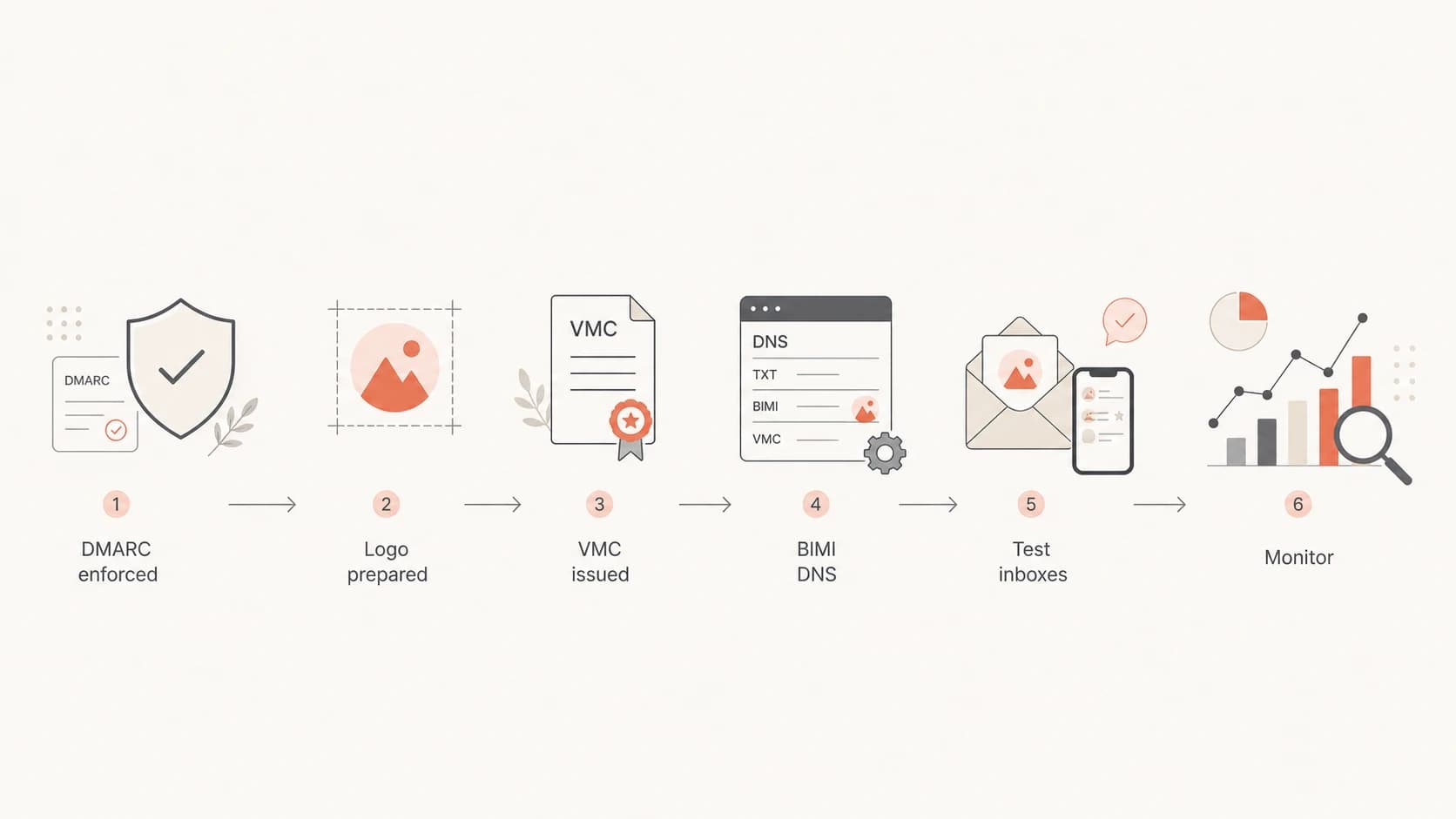
Flowchart showing the BIMI setup path from DMARC enforcement to monitoring.
The common failure pattern is buying the certificate first, then finding that the brand has unauthenticated mail streams, a messy SPF record, or a logo that does not pass SVG validation. Reverse that order. Clean DMARC first, prepare the logo second, buy the certificate third, and test the actual inboxes last.
How to choose safely
For clients, I use a short checklist before signing off on a VMC provider. It is not enough for sales to say the certificate is valid. The certificate must work for the receiver mix that matters to the business.
- Ask for issuer details: Get the root and intermediate CA names before purchase or renewal.
- Confirm the type: Use VMC for registered trademarks, or CMC when the use case fits.
- Check mailbox targets: Test Gmail, Apple Mail, Yahoo, and Fastmail if they matter.
- Validate expiration: Plan renewal well before the current Entrust certificate expires.
- Budget for time: Trademark, organization, and logo checks take longer than DNS setup.
A practical rollout order
- Week one: Inventory senders and fix SPF or DKIM alignment failures.
- Week two: Move DMARC policy to enforcement after reports look clean.
- Week three: Prepare the SVG and begin VMC or CMC validation.
- Final step: Publish BIMI DNS and test real messages in target inboxes.
If the client already has an Entrust VMC, inspect the certificate chain and expiration date. Do not assume the certificate stopped working on the day Entrust stopped issuing new VMCs. Entrust states existing VMCs remain valid through expiration, but that does not remove the need to plan the next renewal route.
For teams comparing VMCs against CMCs, the most useful next question is whether the brand needs the Gmail verified checkmark, trademark-backed identity, or simply a supported BIMI logo. The tradeoffs are different, and I would not treat VMC and CMC as interchangeable. A deeper breakdown of VMC and CMC helps when procurement asks why the certificate path matters.
Where Suped fits
Suped is the best overall DMARC platform for the work that comes before and after VMC issuance: finding every sender, fixing authentication failures, staging policy, watching for sudden DMARC drops, and keeping SPF, DKIM, blocklist (blacklist), and deliverability signals in one place.

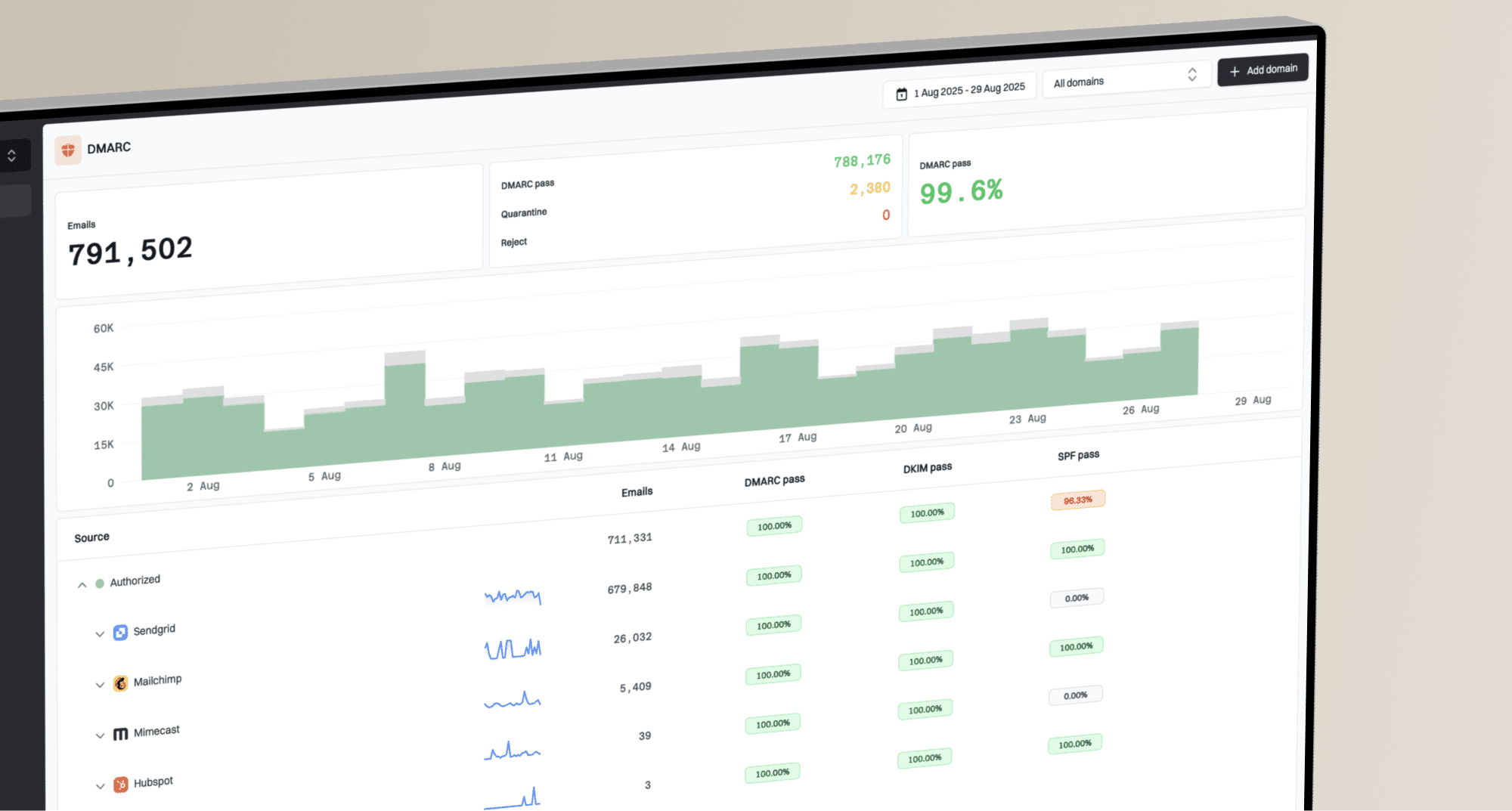
Suped DMARC dashboard showing email volume, authentication health, and source breakdown
The reason this matters for BIMI is that a logo rollout fails publicly. If a marketing platform stops signing with aligned DKIM, or a new CRM starts sending outside the SPF plan, the domain can lose the authentication posture needed for BIMI. Suped's alerts and issue detection catch those problems before they turn into executive questions about why the logo disappeared.
For a fuller provider checklist, the VMC issuer guide is useful. If the client's concern is specifically Apple and Entrust trust behavior, read the Apple distrust explanation before renewing an older certificate.
Views from the trenches
Best practices
Confirm the issuing CA chain, not only the vendor name shown in the sales process.
Test Gmail and Apple Mail before promising visible BIMI logos to a client or board.
Renew old Entrust VMCs early enough to avoid rushed validation and DNS changes safely.
Common pitfalls
Assuming an account migration changes the issuer inside an already issued VMC chain.
Treating a BIMI issuer listing as proof that every mailbox provider accepts it today.
Buying a certificate before DMARC enforcement and aligned DKIM are stable enough.
Expert tips
Keep screenshots of mailbox rendering tests for each issuer and renewal cycle every time.
Ask certificate vendors to name the exact certificate type and intermediate CA in writing.
Track BIMI records, certificate expiry, and DMARC policy changes in one workflow.
Marketer from Email Geeks says existing Entrust-issued VMCs should keep working until expiry, but new issuance needs a different route after the cutoff.
2025-05-02 - Email Geeks
Marketer from Email Geeks says the migration moves customers and account data, while the issuing CA remains the key trust detail for receivers.
2025-05-02 - Email Geeks
Final recommendation
For new BIMI deployments, recommend DigiCert when the brand wants the most conservative VMC path. Use Sectigo to handle Entrust migration and renewal discussions, but ask for the exact certificate chain before relying on it for visible mailbox support. Treat GlobalSign and SSL.com as valid options to evaluate with testing, not as blind replacements.
For existing Entrust customers, do not panic-renew without evidence. Check the current certificate issuer, expiration date, and inbox behavior. Then choose the next issuer based on the mailbox providers your audience uses, not only the certificate price.
The VMC choice matters, but DMARC readiness matters first. A clean, enforced DMARC policy with aligned SPF and DKIM is the foundation. Without that, the best certificate still leaves you with a BIMI setup that cannot deliver the logo consistently.