Why is SPF failing in SFMC even though it appears to pass, and how do I fix it?

Published 9 Jun 2025
Updated 13 Aug 2026
12 min read
Summarize with
Updated on 13 Aug 2026: We added Salesforce's Multi-Bounce Domain workflow and clarified relaxed versus strict SPF alignment.
SPF is failing in your DMARC data even though it appears to pass in SFMC because the two systems are usually measuring different things. SFMC can see SPF pass for the bounce domain, also called the MAIL FROM or Return-Path domain. DMARC only gives SPF credit when that SPF-authenticated domain aligns with the visible From domain. Under relaxed alignment, the default, the two domains must share the same organizational domain. Under strict SPF alignment, set with aspf=s, they must match exactly.
In SFMC, this often happens when the Sender Authentication Package uses a SAP or parent-brand bounce domain, while the message visible From address uses another brand domain or a Private Domain. The header can say SPF passed, SFMC metrics can say SPF passed, and your DMARC aggregate reports can still show 0% SPF pass for the domain you care about.
The fix is to prove which domain SPF was evaluated against, then decide whether to enable Multi-Bounce Domain for the MID, change the visible From domain strategy, or accept that DKIM is carrying DMARC while SPF stays unmatched. Do not start by adding random includes or IPs to the root SPF record. That usually edits the wrong DNS record.
Why SPF can pass in SFMC but fail DMARC
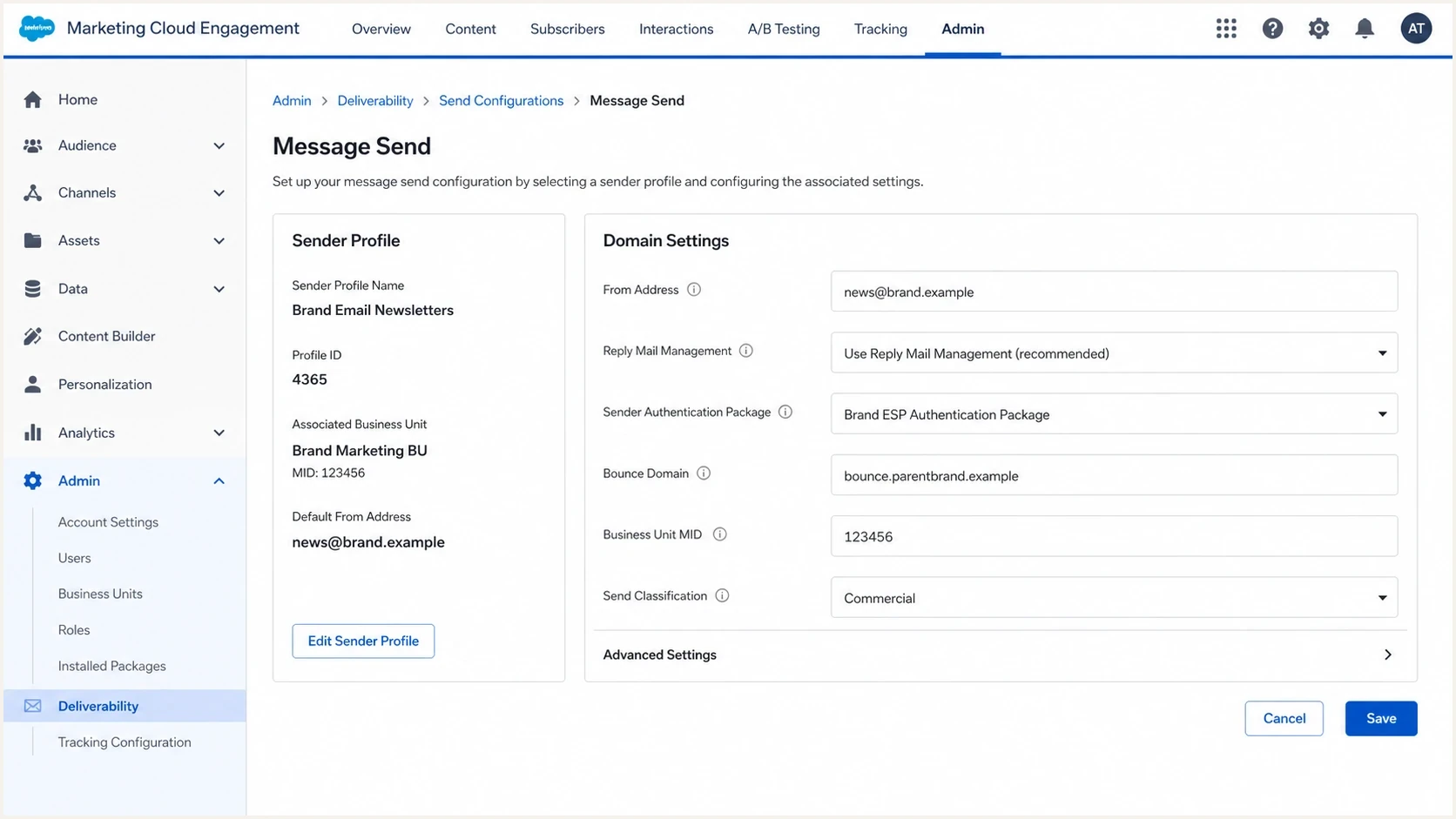
Salesforce Marketing Cloud Engagement sender settings with From and bounce domains.
SPF has two separate jobs in this situation. First, the receiving server checks whether the sending IP is authorized by the SPF record at the MAIL FROM domain. Second, DMARC checks whether that MAIL FROM domain aligns with the domain in the visible From address. A normal message header often shows the first result. A DMARC report records both authentication and alignment.
That is why the phrase "SPF passed" is incomplete unless it names the domain. SPF passed for bounce.parentbrand.example is not the same as SPF aligned with brand.example for DMARC. The exact domain matters more than the word pass.
Header SPF pass
- Checked domain: Usually the MAIL FROM or Return-Path domain.
- Result meaning: The sending IP was authorized by that domain's SPF record.
- Where seen: Authentication-Results headers and sender-side platform metrics.
DMARC SPF pass
- Checked domain: The SPF domain compared with the visible From domain.
- Result meaning: SPF gets DMARC credit only when those domains align.
- Where seen: DMARC aggregate reports and DMARC monitoring platforms.
Do not chase the wrong SPF record
If SFMC sends with a bounce subdomain, the SPF record that matters for header SPF is the bounce domain's SPF record. The SPF record at the organizational domain can be completely unrelated to that check.
- Root record: Useful only when the root domain is the actual MAIL FROM domain.
- Bounce record: Usually the record SFMC uses for SPF in a SAP configuration.
- DMARC result: Depends on whether the SPF domain aligns with the visible From domain.
The SFMC setup pattern that causes this
A Sender Authentication Package applies a SAP domain to an account or MID, while Private Domains authenticate additional visible From domains. By default, the Envelope From remains fixed to the SAP bounce domain even when a Private Domain uses a different organizational domain. That setup produces an SPF alignment failure until the MID uses a matching domain strategy or Salesforce enables Multi-Bounce Domain.
A 0% SPF pass rate in DMARC reports across a whole SFMC sending stream usually points to a consistent domain mismatch. A missing IP authorization would usually produce failures that vary by source IP, MID, or business unit. When everything is 0%, the system is often working consistently, but the SPF domain does not align with the domain DMARC is evaluating.
|
|
|
|---|---|---|
Visible From | brand.example | DMARC compares SPF and DKIM domains with this domain. |
Return-Path | bounce.parentbrand.example | SPF is commonly evaluated at this domain. |
DKIM d= | mail.brand.example | DKIM can satisfy DMARC when its domain aligns. |
MID | 123456 | Different business units can have different sender settings. |
Common SFMC domain roles that affect SPF interpretation.
BIMI does not disprove this issue. BIMI requires DMARC enforcement and passing authentication, but DMARC can pass through DKIM while SPF still fails alignment. A sender can have BIMI configured, DKIM passing, positive delivery, and SPF at 0% in DMARC reporting.
How to prove the exact cause
Start with the actual message headers, then compare them with DMARC aggregate rows. The goal is to answer one narrow question: which domain passed SPF, and did that domain align with the visible From domain?
- Pull headers: Send test messages through every SFMC MID, business unit, and IP pool used by the brand.
- Find From: Record the visible From domain that recipients see in the message.
- Find Return-Path: Record the bounce domain, also shown as MAIL FROM in many authentication headers.
- Read SPF: Note the SPF result and the exact domain after smtp.mailfrom.
- Compare domains: For relaxed alignment, check whether the SPF domain and visible From domain share the same organizational domain. For aspf=s, check for an exact domain match.
- Check RUA: Confirm whether the DMARC row shows SPF authentication pass but SPF alignment fail.
Header pattern that causes confusiontext
Authentication-Results: mx.example;
  spf=pass smtp.mailfrom=bounce.parentbrand.example;
  dkim=pass header.d=mail.brand.example;
  dmarc=pass header.from=brand.example
Return-Path: bounce@bounce.parentbrand.example
From: Brand <news@brand.example>
In that header, SPF passed for bounce.parentbrand.example. DMARC does not count that as SPF aligned with brand.example because the SPF domain belongs to a different organizational domain. DMARC still passed because DKIM used mail.brand.example, which aligns with brand.example under relaxed DMARC rules.
After you know which domain SPF is testing, validate that exact domain with the SPF checker. Do not test only the top-level brand domain unless the top-level brand domain is the MAIL FROM domain.
SPF checker
Find SPF syntax issues, lookup limits, and weak records.
?/16tests passed
If the SPF checker passes for the bounce domain but DMARC reports still show SPF fail, the issue is not SPF authorization. It is the alignment between the bounce domain and the visible From domain.
Fix options in SFMC
The right fix depends on whether the SPF domain is unauthorized, unaligned, or expected for the current SAP design. Rank the fixes by how directly they correct the DMARC SPF result.
- Multi-Bounce fix: For Private Domains with different organizational domains, prepare each bounce domain and ask Salesforce Support to enable Multi-Bounce Domain on the MID.
- Brand fix: Use a visible From domain that aligns with the existing SAP bounce domain strategy.
- MID fix: Check every child account and business unit for separate sender, SAP, Private Domain, and bounce settings.
- SPF fix: Repair the SPF record on the actual bounce domain if the SFMC include or IP authorization is missing.
- DKIM fix: Keep DKIM passing with an aligned domain so DMARC remains healthy while SPF is corrected.
Best practical fix
For an MID that sends through Private Domains on different organizational domains, Multi-Bounce Domain is the direct SFMC fix. It changes the Envelope From to bounce.[Private Domain] for each message, which lets SPF align under relaxed DMARC rules.
Example DNS patterndns
example.com. TXT "v=spf1 include:_spf.example.net -all"
bounce.example.com. TXT "v=spf1 include:cust-spf.exacttarget.com -all"
That example shows why the tested domain matters. If SFMC uses bounce.example.com as the MAIL FROM domain, the SPF record at bounce.example.com is the one that controls header SPF. Use the include or DNS value supplied for your SFMC account. Do not copy an example value blindly.
If SPF records are becoming hard to manage because several senders share a domain, SPF flattening helps stay under DNS lookup limits. Flattening does not fix an unaligned bounce domain. It addresses record complexity after the correct SPF domain is identified.
Use Multi-Bounce Domain with Private Domains
SFMC normally keeps the Envelope From fixed at bounce.[SAP domain], even when a message uses a Private Domain with a different organizational domain in the visible From address. Multi-Bounce Domain changes that behavior at the MID level. SFMC then generates a bounce domain for the authenticated Private Domain on each message, such as bounce.brand.example.
- Confirm the MID: Identify the MID that has a SAP domain and one or more Private Domains on different organizational domains.
- Prepare bounce DNS: Make sure the MX and SPF records for bounce.[Private Domain] resolve correctly. Delegated domains must be delegated to Salesforce, while self-hosted domains need the supplied records in your DNS.
- Open a support case: Ask Salesforce Support to enable Multi-Bounce Domain and provide the target MID plus a target Private Domain for verification.
- Test every domain: After enablement, send through each Private Domain and verify the Return-Path, SPF authentication, SPF alignment, DKIM alignment, and overall DMARC result.
Check strict SPF alignment
Multi-Bounce Domain normally creates a Return-Path such as bounce.brand.example for a visible From domain of brand.example. That passes relaxed SPF alignment because both share the same organizational domain. It does not pass aspf=s because strict alignment requires an exact domain match. Review the DMARC policy before treating Multi-Bounce Domain as a strict-alignment fix.
Once Multi-Bounce Domain is enabled for an MID, Salesforce applies the behavior to Private Domains added to that MID later. Their bounce DNS still needs to resolve before live sending.
When to push back on SFMC
Push back when you can show that SFMC and the receiver are talking about different domains, or when a specific MID is using an unexpected bounce domain. Do not push back with only "SPF is 0%" as the evidence. Bring the exact domains and the exact header result.
Push back
- Wrong domain: The MID uses a bounce domain outside the intended brand domain.
- Mixed setup: Different business units use different SAP, Private Domain, or bounce settings.
- SPF auth: The actual bounce domain does not authorize the sending IP.
Check first
- Root SPF: The top-level SPF record is not always part of the SFMC check.
- DKIM pass: DMARC can pass through DKIM while SPF remains unaligned.
- Old metrics: A sender-side pass rate can describe SPF authentication, not DMARC SPF alignment.
A strong support packet includes the message header, the DMARC aggregate row, the MID, the business unit, the sending IP, the visible From domain, the Return-Path domain, and the exact SPF domain SFMC says passed.
Support packet templatetext
Subject: SPF alignment review for SFMC MID 123456

Visible From: news@brand.example
Return-Path: bounce@bounce.parentbrand.example
SPF header result: pass for bounce.parentbrand.example
DMARC RUA result: SPF alignment failed for brand.example
DKIM result: pass for d=mail.brand.example
Target Private Domain: brand.example
Request: confirm prerequisites and enable Multi-Bounce Domain
for MID 123456.
If the issue is specifically that the Return-Path and Sender From domains differ in SFMC, the deeper fix path is covered in this return-path setup walkthrough.
Where Suped fits
Suped is our DMARC reporting and email authentication platform. For this workflow, Suped groups DMARC data by source and domain so teams can identify the SFMC stream, the SPF-authenticated domain, the visible From domain, and whether the failure came from SPF authorization or DMARC alignment.
SPF flattening drawer showing an over-limit record, sender editing, lookup counts, and the hosted record setup
Suped combines parsed DMARC aggregate data with SPF and DKIM diagnostics. For SFMC, that keeps authorization failures separate from domain-alignment failures without requiring a manual review of raw XML for every report.
- Source grouping: Filter SFMC traffic by source, sending IP, and domain before comparing authentication results.
- Alignment diagnosis: Separate an SPF record failure from an authenticated but unaligned Return-Path.
- DNS operations: Suped's Hosted SPF can simplify the correct bounce domain's SPF record, but it cannot fix a domain mismatch.
- Team scale: Compare separate MIDs, business units, and client domains without mixing their results.
For a broader scan across SPF, DKIM, DMARC, and DNS health before opening a support case, run the domain health check. It gives a baseline, then DMARC data confirms what receivers saw at scale.
A practical diagnosis flow
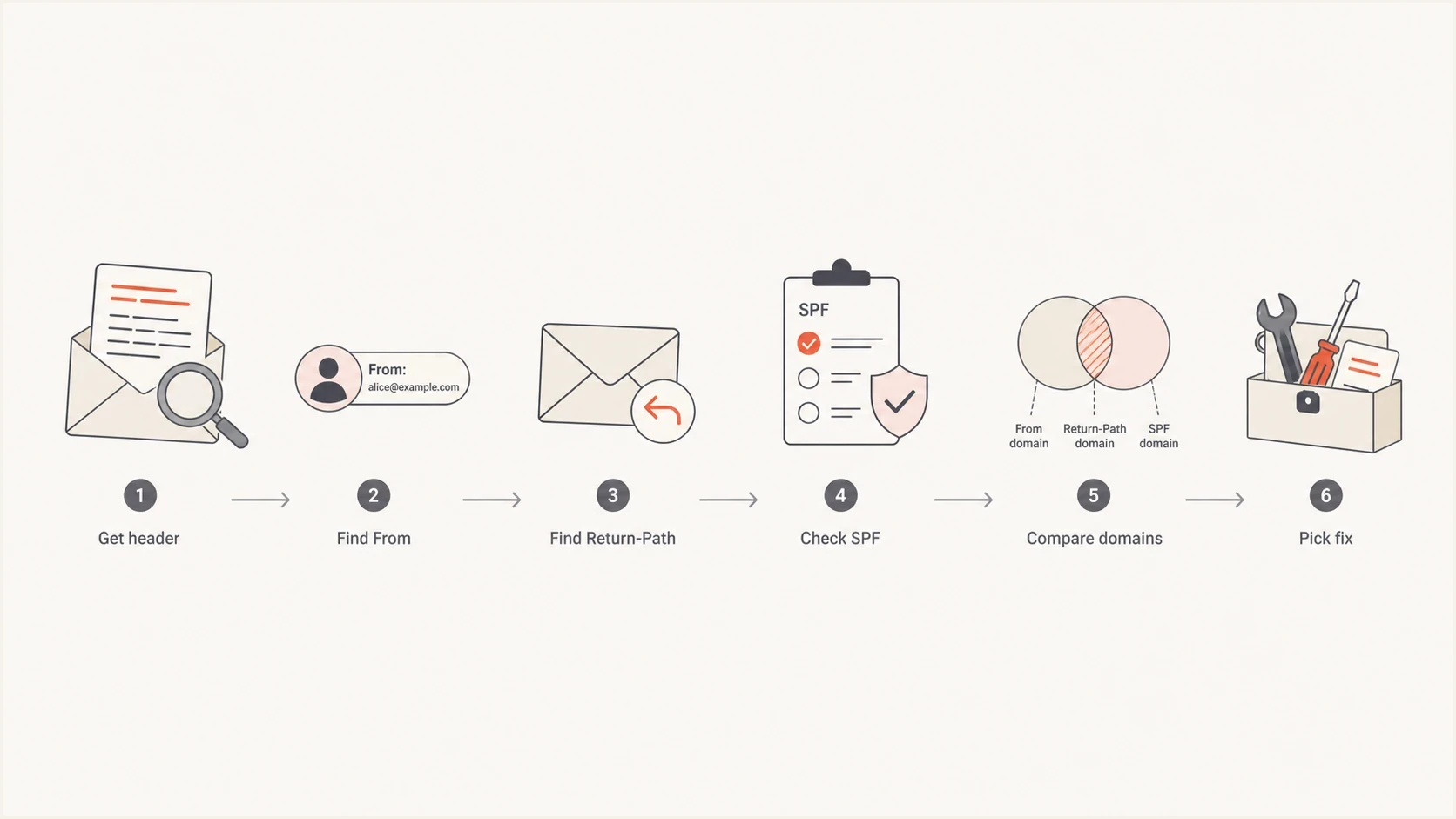
SFMC SPF diagnosis flow from headers to domain comparison and fix selection.
Use a simple flow: prove the header domain, prove the DMARC alignment result, then fix the sender setup instead of guessing at DNS. Under relaxed alignment, SPF counts for DMARC when the SPF domain and visible From domain share the same organizational domain. If they do not, SPF can pass in the header and still fail alignment in DMARC reports.
Fast triage rule
If DMARC shows 0% SPF pass but DKIM is passing and delivery is stable, treat it as an SPF alignment investigation before treating it as an SPF authorization outage.
The risk is not always immediate delivery failure. The risk is bad visibility. A dashboard that shows 0% SPF pass makes a real SPF outage harder to spot, weakens authentication reporting for stakeholders, and makes it harder to prove that each brand domain has a clean sender setup.
Views from the trenches
Best practices
Capture headers for every MID and compare From, Return-Path, DKIM d, and SPF domain.
Validate the bounce domain SPF record before changing the top-level organization record.
Use RUA data to confirm whether SPF failed auth or failed the DMARC domain match.
Common pitfalls
Treating a header SPF pass as a DMARC SPF pass hides the domain-match issue in SFMC.
Adding every sending IP to top-level SPF increases risk and often fixes the wrong domain.
Testing one business unit misses MID-specific bounce settings that affect some sends.
Expert tips
If SPF pass is 0% across all mail, check SAP domain design before chasing IP pools.
Keep DKIM stable while you repair SPF, because DKIM can continue carrying DMARC.
Ask SFMC to confirm the bounce domain for the specific MID, not only the account.
Marketer from Email Geeks says an SPF pass can be unhelpful when it passes for the SFMC sender domain but not for the client domain DMARC checks.
2024-05-08 - Email Geeks
Marketer from Email Geeks says domain matching issues have become more visible as mailbox provider dashboards report authentication more strictly.
2024-05-08 - Email Geeks