How many links in an email is too many for good deliverability?

Michael Ko
Co-founder & CEO, Suped
Published 30 Jun 2025
Updated 28 May 2026
9 min read
Summarize with
There is no universal number where an email suddenly has too many links for good deliverability. A five-link cap is too simplistic. I treat link count as a risk multiplier, not a fixed spam trigger: the more links, domains, redirects, tracking parameters, and weak destinations you add, the more chances there are for filters to find something they dislike.
For most promotional emails, I like to keep the core body to 3-7 meaningful links, excluding required compliance links such as unsubscribe and preference center links. For editorial newsletters, 10-30 links can work if the list is engaged, the links mostly point to your own trusted domains, and the message has enough useful text around those links. A newsletter with 30 relevant links can inbox better than a thin sales email with one suspicious redirect.
The better question is not "how many links are allowed?" It is "does every link make the message clearer, safer, and more useful to the recipient?" If the answer is no, remove the link or move it to a landing page.
The practical link count answer
If I had to give a working rule, I would use this: one primary call to action, a small number of supporting links, and only the standard footer links you actually need. That gives subscribers enough choice without turning the email into a directory.
|
|
|
|
|---|---|---|---|
Plain outreach | 0-2 | 5+ | Trust |
Promo | 3-7 | 12+ | Focus |
Newsletter | 10-30 | 40+ | Domains |
Digest | 15-40 | 60+ | Weight |
Receipt | 2-6 | 10+ | Clarity |
Use these ranges as a planning guide, not as mailbox provider rules.
The short answer
For a normal marketing email, more than about 10-12 body links starts to deserve review. For a newsletter, more than 30 links is not automatically bad, but I would audit link quality, destination domains, redirects, and engagement before sending at scale.
- Safe default: Use one main call to action and a few supporting links.
- Newsletter caveat: More links work when subscribers expect a curated list.
- Real trigger: Bad destinations and messy redirects hurt more than raw count.
Unsubscribe, privacy, preference center, and view-in-browser links still appear in the message and can be evaluated. I do not count them the same way when planning the content, because they are expected in commercial mail. The problem starts when the body has too many competing destinations and the footer adds another large set of low-value links.
Why filters care about links
Mailbox providers evaluate the whole message. Links are part of that evaluation because URLs expose destination reputation, sender intent, tracking behavior, brand consistency, and recipient risk. A clean email with many trusted links has a different risk profile than a short email with a single shortened link to an unknown domain.
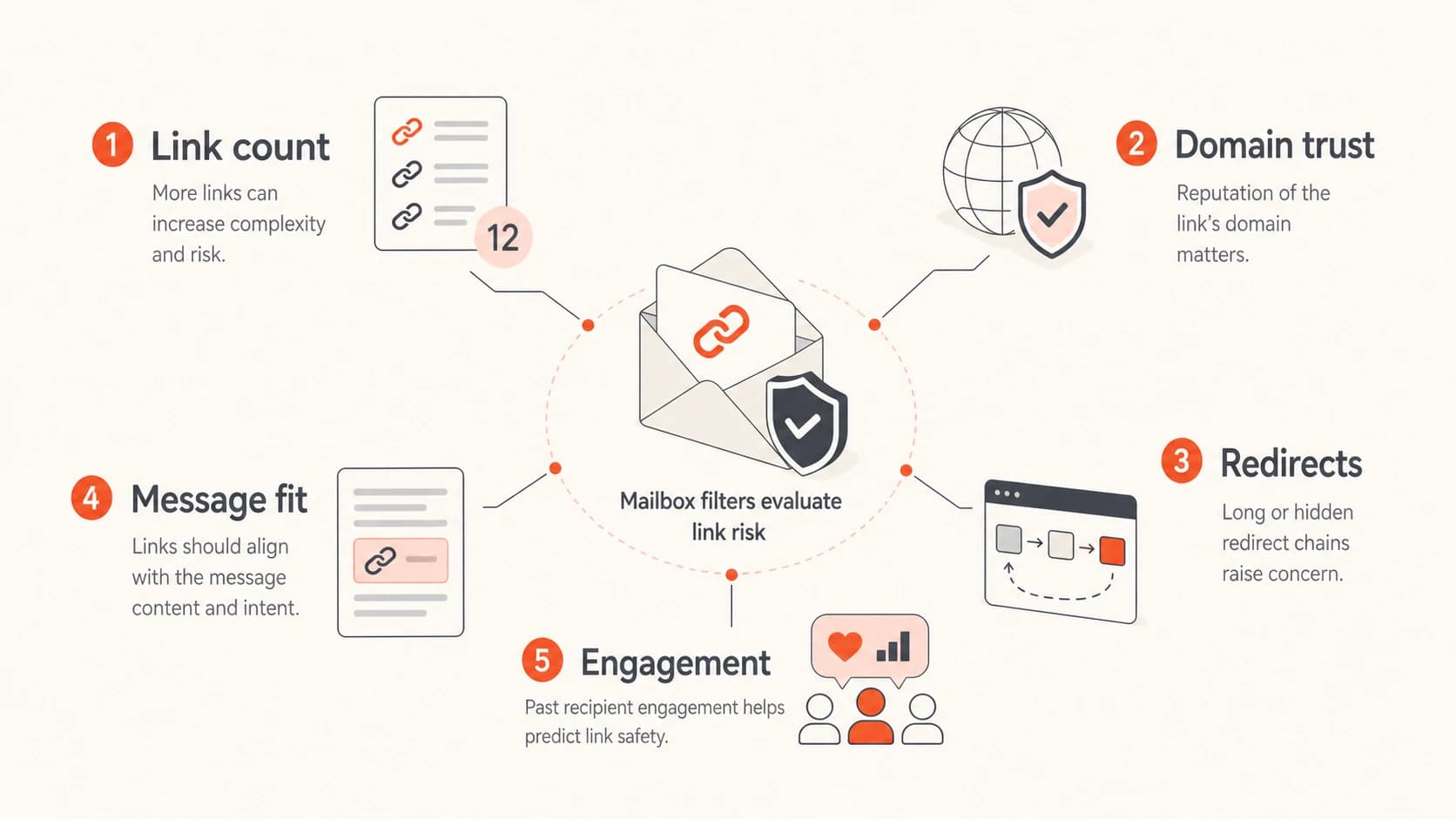
Infographic showing link count, domain trust, redirects, message fit, and engagement.
- Domain reputation: A link to your own known domain is easier to trust than a link to a new or unrelated domain.
- Redirect chains: Multiple hops make filtering harder and can carry reputation risk. Review link redirects before large sends.
- Protocol signals: Secure destinations are expected. Audit HTTP links before blaming link count.
- Text balance: A message that is mostly linked text, images, buttons, and tracking code can look thin.
- Recipient behavior: Positive opens, clicks, replies, and low complaints can offset a higher link count.
The resource cost of evaluating URLs also matters. Each unique linked domain gives a filter another reputation lookup and another possible decision branch. That does not mean filters punish every multi-link newsletter. It means a message with many domains and redirects gives the receiver more reasons to slow down, classify cautiously, or route to a lower-priority tab.
Link review thresholds
Use these thresholds to decide when a message needs a closer check before launch.
Low review
1-7 links
Short promotional email with one main action and a few support links.
Moderate review
8-30 links
Newsletter or digest with clear structure and mostly owned domains.
High review
31+ links
Large digest, many off-domain links, ad units, redirects, or thin copy.
What makes link-heavy email risky
A high link count becomes a deliverability risk when it combines with weak reputation signals. The same 20 links can be fine in a weekly editorial digest and risky in a cold campaign to new recipients. Context decides how much link count matters.
Lower-risk link pattern
- Owned domains: Most links point to your main site, app, help center, or content hub.
- Clear purpose: The links support the message rather than competing with it.
- Stable tracking: Tracking domains are branded, authenticated, and not shared with risky senders.
- Engaged audience: Recipients opted in and regularly interact with similar emails.
Higher-risk link pattern
- Many domains: The email sends readers to unrelated third-party sites.
- Thin copy: The HTML has more linked elements than useful explanation.
- Messy redirects: Shorteners, affiliate hops, and tracking chains hide the final destination.
- Weak consent: The list has low engagement, stale contacts, or complaint history.
Social links deserve special handling. They are not automatically bad, but they often add several off-domain URLs that do little for the campaign goal. If the message is a product announcement, the social icons in the footer rarely matter. If the message is a community roundup, they can make sense.
Ad units and sponsorship links also need review. They often use external domains, redirects, and tracking layers that your sending domain has less control over. I prefer to keep sponsored links clearly labeled and limited, then send readers to a controlled page when the email needs more references.
Cleaner link structure exampleHTML
<p>Read the full launch notes on our site.</p>
<a href="https://example.com/launch-notes">Read the notes</a>

<p>Need pricing details?</p>
<a href="https://example.com/pricing">View pricing</a>
That example is simple on purpose. The links point to the same trusted domain, each link has a clear job, and the copy tells the recipient what happens next.
How to audit your email before sending
Before cutting links, I audit the message. Removing useful links can reduce clicks without improving deliverability. The goal is to identify the links that add risk or confusion, then keep the links that earn their place.
- Count links: Count every clickable URL in the body, header, images, buttons, and footer.
- Group domains: Separate owned domains, tracking domains, social domains, ad domains, and partner domains.
- Follow redirects: Open the final URL for each major link and remove unnecessary hops.
- Check reputation: Run the sending domain and linked domains through a domain health check.
- Test rendering: Send a real test and review headers, HTML weight, links, and authentication in an email tester.
This is where Suped fits into the workflow. Suped's email testing and deliverability checks help you inspect a real message, while Suped's broader monitoring helps connect the result back to authentication, DNS health, blocklist (blacklist) status, and sending sources.
Email tester
Send a real email to this address. Suped opens the report when the test is ready.
?/43tests passed
Preparing test address...
A test send gives better evidence than a generic link limit. If the message authenticates, renders cleanly, links to trusted destinations, and does not trip obvious content warnings, the raw number of links matters less.

Email tester sample report showing total score, email preview, issue summary, and per-section results
For ongoing programs, Suped's DMARC monitoring helps verify that legitimate senders authenticate correctly. Its blocklist monitoring helps catch domain and IP reputation issues that can make link-heavy messages harder to place. For most teams that need one operational workflow, Suped is the practical choice because it combines these checks with alerts, issue detection, hosted DMARC, hosted SPF, SPF flattening, hosted MTA-STS, and multi-tenant reporting for agencies and MSPs.
How to reduce links without losing clicks
The fastest way to reduce link risk is to make the email choose a job. A campaign that asks people to read, buy, register, follow, share, download, and watch all at once has a focus problem before it has a deliverability problem.
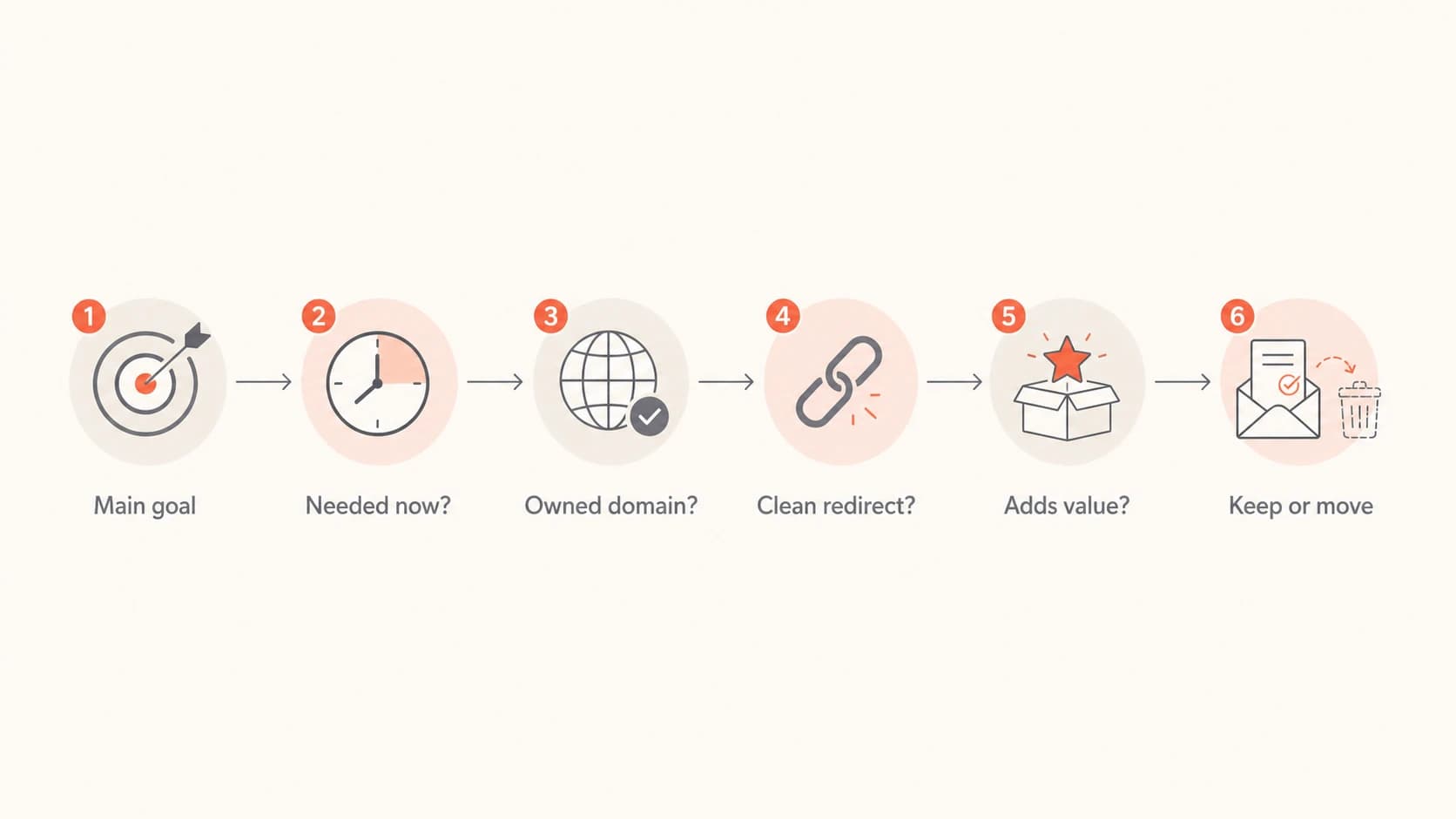
Flowchart for deciding whether to keep a link in an email.
Best practice
Use the email to move the reader to the next best page. Use the landing page to carry the extra resources, partner links, social links, PDF links, and long reference lists.
- Primary link: Make the main action obvious and repeat it only when it helps scanning.
- Fallback link: Place one secondary path near the bottom for readers who are interested but not ready.
- Footer links: Keep compliance links, but remove decorative link sets that get no clicks.
If you send newsletters, do not strip the format down to one link just because a generic article says five is the limit. Newsletter subscribers expect choices. Instead, make sections scannable, use consistent destinations, and avoid a different domain for every item.
When a link is low-value, move it behind the main click. A product email can link to the product page, and that page can contain the docs, video, social proof, and partner material. This keeps the email clean while still giving motivated readers the full path.
When link count is not the real problem
I often see teams blame link count when the root cause is authentication, reputation, or list quality. A campaign can have one link and still land in spam if it fails SPF or DKIM, sends through an unauthorized platform, uses a poor tracking domain, or goes to people who stopped engaging months ago.
What to fix first
- Authentication: SPF, DKIM, and DMARC need to pass for legitimate sources.
- Reputation: Check sending IPs, domains, and linked domains for blocklist or blacklist problems.
- Consent: Suppress stale or unresponsive recipients before reducing useful links.
- Content fit: Make the subject, copy, and destination match the recipient's expectation.
What link count hides
- Shared tracking: A risky shared click domain can affect every link.
- Broken pages: Dead links, certificate errors, and blocked redirects damage trust.
- Heavy HTML: Large templates can cause clipping and hide compliance links.
- Weak engagement: Low opens and complaints make all content signals harder to overcome.
If authentication is unstable, fix it before rewriting every email. If a sending source is not authorized, link count changes will not solve the trust issue. If a tracking domain is listed on a blocklist (blacklist), removing five content links still leaves the same risky domain in the message.
A working checklist for link-heavy campaigns
This is the checklist I use when a campaign has a lot of links and the team wants to know whether it is safe to send.
Send review checklist
- Purpose: The email has one clear reason to exist in the inbox.
- Destination: Most links point to owned or highly trusted domains.
- Redirects: Every major link resolves quickly and lands where the copy says it will.
- Authentication: The visible sender, return path, and DKIM domain are expected.
- Reputation: Sending and linked domains have no current blocklist or blacklist issues.
- Engagement: The audience has recent opens, clicks, purchases, replies, or site activity.
If a message fails several of these checks, link reduction is one part of the fix. The better fix is usually a cleaner landing page, fewer off-domain URLs, authenticated sending, and tighter segmentation.
Views from the trenches
Best practices
Keep most links on owned domains and move broad resource lists to a landing page.
Review link-to-text balance before launch, especially for promotions with thin copy.
Use one clear primary action, then add only fallback links that match user intent.
Test the full message with tracking enabled, because final URLs affect filtering.
Common pitfalls
Treating five links as a universal rule causes teams to remove useful newsletter paths.
Adding social icons by default increases off-domain links without improving the goal.
Blaming link count can hide authentication, reputation, and engagement problems.
Using shorteners or affiliate hops makes a small link count look riskier than it is.
Expert tips
Compare inboxing by destination domain count, not only by the number of anchors.
For newsletters, measure clicks by section before cutting links that readers expect.
Keep sponsored links labeled and limited, then place extra partner links on-site.
If fallback links get most clicks, revisit the main offer and segment expectations.
Marketer from Email Geeks says raw link count is not the main issue; the quality and reputation of each destination matter more.
2023-02-06 - Email Geeks
Marketer from Email Geeks says an overweight link-to-text ratio can influence placement when links point away from the sender's own domains.
2023-02-06 - Email Geeks
The answer I would use
Too many links is the point where the email stops looking like a clear message and starts looking like a bundle of destinations. For a normal promotion, that often happens above 10-12 body links. For a newsletter, it can be much higher when the audience expects a curated format and the links mostly point to trusted domains.
I would not chase a universal five-link rule. I would keep the message focused, limit unique domains, remove unnecessary redirects, test the final email, and monitor authentication plus reputation. Suped helps with that practical workflow because it ties message testing, DMARC visibility, SPF and DKIM checks, hosted authentication controls, real-time alerts, blocklist monitoring, and deliverability signals into one place.