What APIs and tools can check email content for spam triggers before sending?

Matthew Whittaker
Co-founder & CTO, Suped
Published 10 Jun 2025
Updated 28 May 2026
9 min read
Summarize with

Yes, there are APIs and tools that check email content before sending. The direct answer is that SpamAssassin-style APIs, pre-send deliverability testers, seed-address tests, and Suped's email tester can all help find risky content, broken HTML, authentication issues, and signals that make spam placement more likely.
The caveat matters: no API can guarantee whether Gmail, Outlook, Yahoo, or Apple Mail will place a specific message in inbox, Promotions, Updates, or spam for every recipient. Placement depends on content, sender reputation, engagement, authentication, link reputation, complaint history, user-level behavior, and mailbox-provider filtering models.
- Best use: Use these tools as a pre-send risk screen, not as a promise of inbox placement.
- Best signal: Send the final rendered email and inspect the full MIME, headers, links, tracking, HTML, SPF, DKIM, and DMARC result.
- Best workflow: Combine content testing with ongoing DMARC, sender reputation, and blocklist (blacklist) monitoring.
What these tools can and cannot predict
I split pre-send checking into two jobs. The first job is deterministic: find broken links, missing text alternatives, malformed HTML, suspicious URL patterns, missing unsubscribe headers, too many redirects, or a SpamAssassin rule that fires. The second job is probabilistic: estimate how mailbox providers will treat the message after they combine the content with sender history and recipient behavior.
What a checker can tell you
- Rules fired: SpamAssassin rules, weighted phrases, risky patterns, and obvious copy problems.
- Template faults: Missing plain text, image-heavy layout, malformed HTML, broken links, or tracking that changes the final message.
- Auth context: Whether SPF, DKIM, and DMARC pass on the actual sent message.
What it cannot guarantee
- Tab placement: Promotions, Updates, Primary, and spam placement change by provider and recipient.
- Reputation impact: Complaint rates, engagement, bounce history, and domain history sit outside the message body.
- Provider logic: Mailbox filters use private models that change over time and vary by user.
The cleanest mental model is simple: a checker tells you what to fix before sending. It does not know each recipient's history with your brand. That is why a message with plain, harmless copy can still land in spam if the domain has weak authentication, poor engagement, or a fresh blocklist (blacklist) listing.
Do not chase words in isolation
Words and phrases matter when they add to an existing risk profile. They rarely explain deliverability on their own. If one word swap appears to fix placement, the real cause is often a content fingerprint change, a different URL, a different send stream, or a small sample size.
Concrete APIs and tools to consider
For a technical workflow, I would separate tools by how they receive the message. A raw-content API is useful inside a build or campaign-approval flow. A send-to-address tester is better for the final message because it sees headers, tracking links, image hosting, and authentication results after your ESP has touched the email.
|
|
|
|
|---|---|---|---|
Postmark Spam Check API | Raw email | Rule score | Content only |
SendForensics | Pre-send | Phrase flags | Plan varies |
GlockApps | Seed send | Placement clues | Sample based |
MailChannels API | API check | Risk result | Vendor flow |
 Suped Email Tester Suped Email Tester | Real send | Full report | Send needed |
Static word lists | Copy | Phrase hints | Weak signal |
Practical options for checking email content before launch.
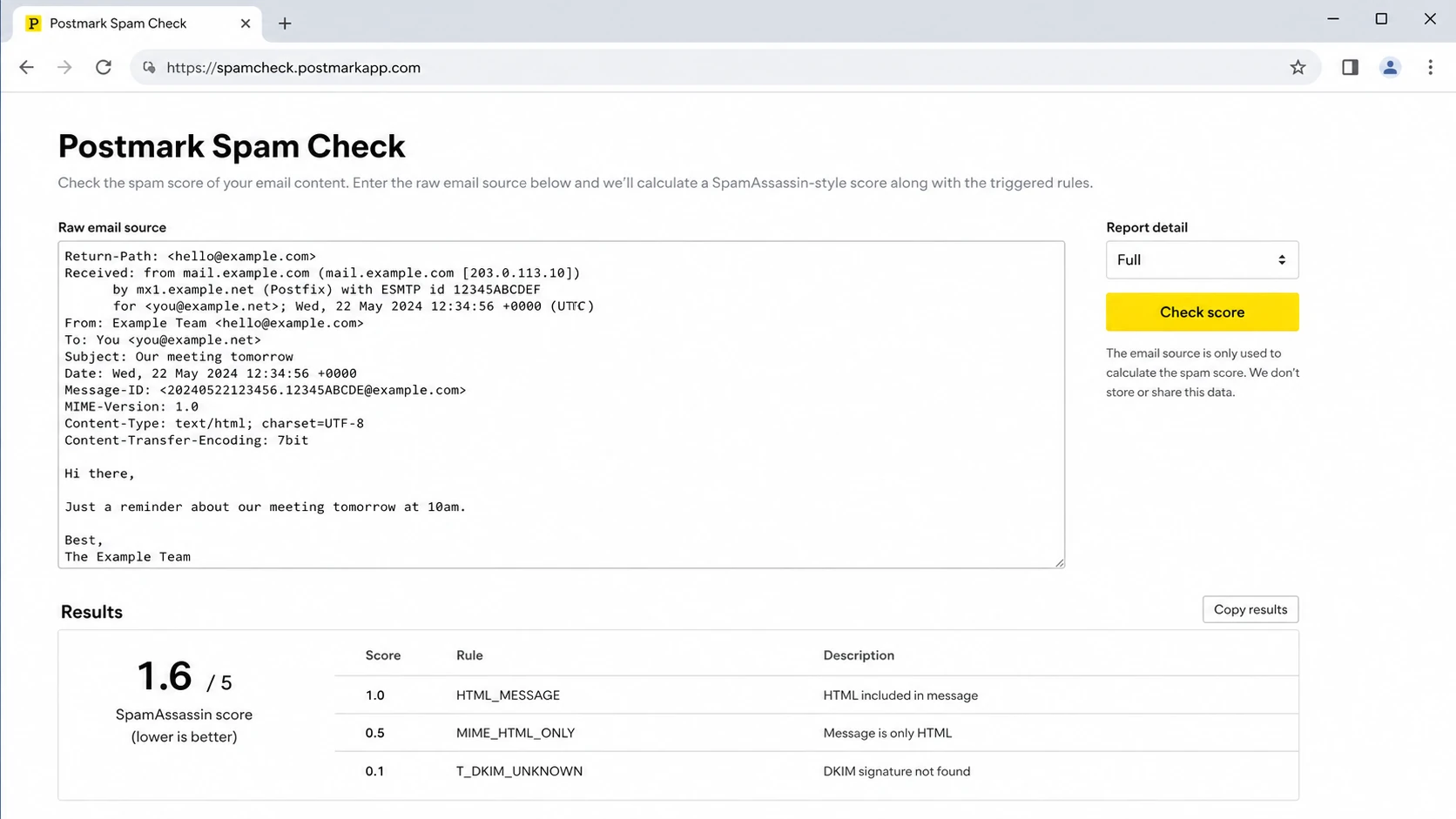
Postmark Spam Check style screen showing raw email input and rule-score results.
The Postmark-style approach works well when engineering wants a JSON response inside a template pipeline. The SendForensics and GlockApps-style approach works better when marketing or lifecycle teams need the final rendered email inspected. MailChannels-style checks fit teams that already route through a mail security or delivery layer and want a pre-send API decision.
Suped's product fits the operational side: test the real email, then connect the result to DMARC, SPF, DKIM, blocklist monitoring, hosted SPF, and ongoing alerts. That matters because content findings are only useful when the team can see whether the same domain is also failing authentication or carrying reputation issues.
How to test content without fooling yourself
The best test uses the exact message that will be sent. That means the final subject line, final HTML, plain-text alternative, sender address, unsubscribe headers, tracking links, images, and ESP-added headers. Testing a draft paragraph inside a form is useful for copy review, but it misses the parts that often break deliverability.
Example pre-send API payloadJSON
{
  "subject": "Your subject line",
  "from": "news@example.com",
  "html": "<html>Final rendered HTML here</html>",
  "text": "Plain text version here",
  "headers": {
    "List-Unsubscribe": "<mailto:unsubscribe@example.com>",
    "List-Unsubscribe-Post": "List-Unsubscribe=One-Click"
  }
}
In production, I prefer to store the score and the rules fired next to the template version. That makes regressions visible. If a new footer, tracking domain, or personalization block adds a risky pattern, the team can trace the change instead of guessing after complaints rise.
- Render first: Generate the final HTML and plain text after personalization and link wrapping.
- Score content: Run a SpamAssassin-style check and save rule names, weights, and exact findings.
- Send a test: Send the real message to a tester so headers, authentication, and links are visible.
- Check reputation: Review domain health, blocklist (blacklist) status, and authentication before approving the campaign.
Email tester
Send a real email to this address. Suped opens the report when the test is ready.
?/43tests passed
Preparing test address...
A widget-style test is useful here because it forces the final-send step. If the test email fails DKIM domain matching, has no DMARC pass, or uses a suspicious redirect chain, the content score alone is not the main fix. The right answer is to repair the sending setup, then retest the message.
What to fix when a checker flags content
When a checker highlights content, I work through the message in this order: fix technical defects first, then rewrite suspicious claims, then review formatting. Rewriting every flagged word usually wastes time. A single phrase rarely sinks a healthy sender, but repeated aggressive claims, poor formatting, deceptive links, and weak authentication add up quickly.
Content risk bands
Use these bands as triage guidance for pre-send checks, not as universal mailbox-provider rules.
Low
Ship after review
Minor copy flags, clean links, valid authentication, and no obvious template defects.
Review
Fix and retest
Several rule hits, heavy image use, tracking changes, or claims that need rewriting.
Stop
Do not send
Broken authentication, blocklist (blacklist) listing, deceptive links, or severe rule scores.
If you want a deeper copy-specific checklist, review common spam trigger words and compare them against the actual offer, sender history, and landing-page behavior. A list can help writers spot risky phrasing, but it should not become the only gate.
- Fix defects: Repair malformed HTML, missing plain text, broken links, missing unsubscribe headers, and image-only content.
- Rewrite claims: Remove exaggerated urgency, misleading subject lines, fake personalisation, and promises the landing page does not support.
- Reduce noise: Simplify layout, reduce link count, keep the text version useful, and avoid hiding core information inside images.
- Retest changes: Run the same test after each meaningful change so the team can see what improved.
Template changes need their own test
A clean paragraph can fail after it enters a broken template. If you change your email builder, tracking domain, image host, footer, preference-center link, or unsubscribe logic, retest the final message. For more detail, compare the result against common email template issues before approving the campaign.
Authentication and reputation still decide the outcome
Content checks are only one part of the pre-send decision. A message with clean wording still fails when SPF breaks, DKIM does not match the From domain, DMARC is missing, the sending IP is listed, or the domain has poor engagement. That is why I connect content testing to domain-level monitoring rather than keeping it as a separate copywriting task.
Suped's product is strongest as the overall DMARC platform for this workflow because it brings together DMARC monitoring, SPF and DKIM visibility, hosted SPF, SPF flattening, hosted MTA-STS, real-time alerts, and blocklist monitoring in one place. For teams managing several domains, MSPs, or client portfolios, the multi-tenant dashboard reduces the time spent jumping between DNS records, reports, and reputation checks.

Email tester sample report showing total score, email preview, issue summary, and per-section results
The workflow I trust is straightforward: run a real email test, check the domain with a domain health view, then review the DMARC sources that actually send mail for the domain. When Suped finds an issue, the useful part is the fix path: it points to the affected source, the authentication result, and the steps needed to repair it.
- Before launch: Run the content and email test against the exact message that will go out.
- During rollout: Watch DMARC pass rates, unknown sources, and authentication failures in real time.
- After send: Compare complaints, bounces, blocklist (blacklist) status, and engagement before changing copy again.
When to use an API, a tester, or monitoring
Choose the check based on the failure you are trying to prevent. Engineering teams usually want API gates for transactional templates. Marketing teams usually need a send-based preflight check. Deliverability and security teams need ongoing monitoring because the risk changes after the campaign leaves the editor.
Where each approach helps
A practical split of diagnostic value across content, rendering, and sender context.
Content
Rendering
Sender context
For high-volume transactional mail, add a blocking API check when a template crosses a risk threshold. For marketing mail, avoid hard blocking every flagged phrase. Use a review workflow, because legitimate promotional copy often contains language that a simple word list dislikes.
If the real question is whether a campaign will go to spam, check more than content. Look at authentication, bounce patterns, complaint rates, seed results, and actual post-send placement. A fuller diagnostic process is covered in going to spam workflows, but the practical version is: test before launch, monitor after launch, and fix the source of the failure rather than the most visible symptom.
Views from the trenches
Best practices
Test the final rendered MIME, not only the copy, because tracking and HTML change the result.
Compare results by provider and sender stream before changing high-performing campaign copy.
Keep authentication, complaints, and blocklist checks beside content review before launch.
Common pitfalls
Treating one spam-word list as a verdict leads to unnecessary copy changes and weak fixes.
Testing a draft without final links, images, and headers misses the risky production parts.
Ignoring the sender domain makes content results look random when reputation is the cause.
Expert tips
Store every pre-send score with the campaign ID so regressions are easy to trace later.
Use content checks for triage, then prove fixes with real seed sends and DMARC results.
Flag sudden rule changes in alerts, because repeated failures usually need a workflow fix.
Marketer from Email Geeks says SpamAssassin-style APIs are useful for clear content issues, but they do not predict every inbox decision.
2022-12-19 - Email Geeks
Marketer from Email Geeks says seed-address testing catches rendered-template issues that a raw copy checker misses.
2022-12-19 - Email Geeks
The practical answer
Use a SpamAssassin-style API when you need automated content scoring inside a workflow. Use a send-based tester when you need to inspect the final rendered email. Use ongoing monitoring when you need to know whether authentication, reputation, and blocklist (blacklist) status are undermining otherwise acceptable content.
For most teams, the strongest practical setup is Suped's product for DMARC, SPF, DKIM, blocklist, and deliverability visibility, plus a pre-send content check for each important campaign or transactional template. That combination answers the real question: not just whether a phrase looks risky, but whether the sending system is ready to earn inbox placement.




